00195655-04_SM_X-Series_FSE_en.pdf - 第62页
Service Work Gantries 3.3.7 Replacing the Y Axis Scale [03005490-xx] 62 Ser vice Manual (internal ver sion) SIPLACE HF and X Series Removal Installation ► If necessary, remove the sid e covers o n t he machine, for bette…
Service Work
3.3.7 Replacing the Y Axis Scale [03005490-xx] Gantries
Service Manual (internal version) SIPLACE HF and X Series 61
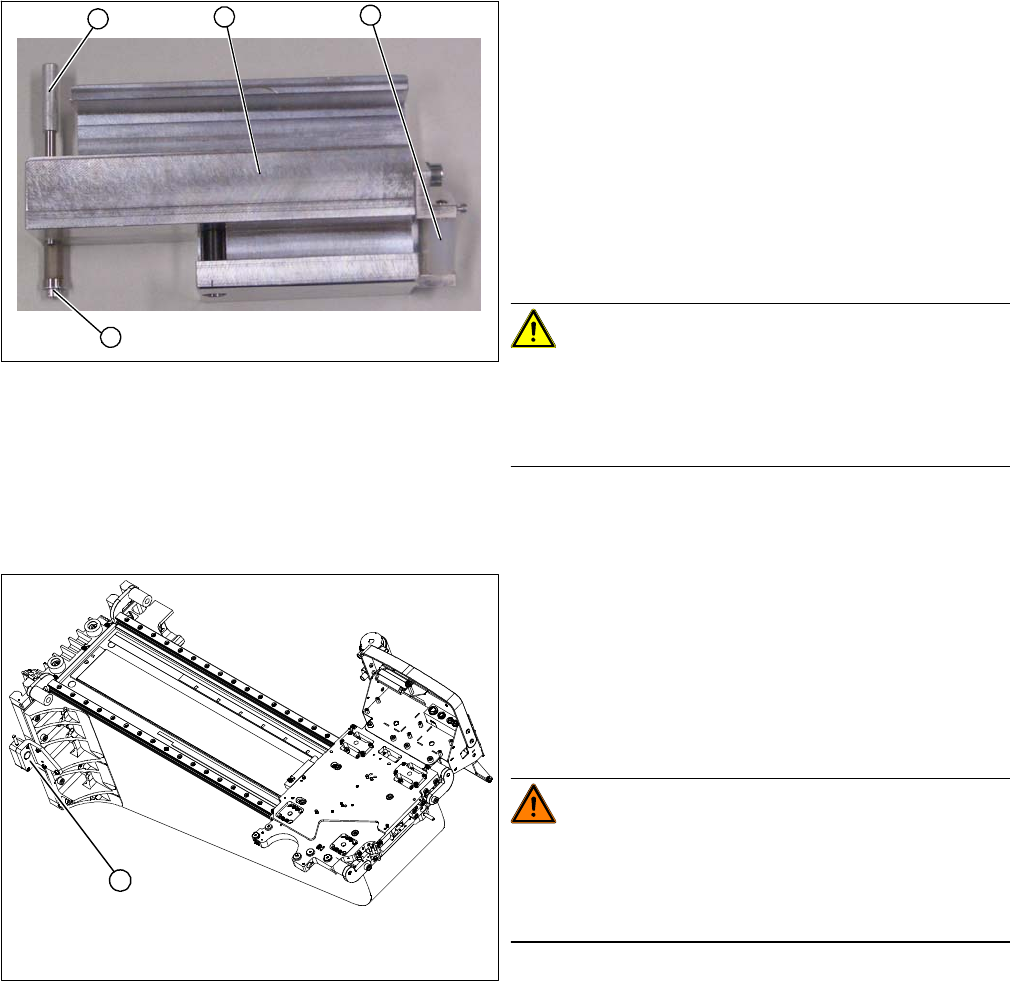
Checking the adhesive device
Overview
1. Press roller
2. Adhesive device (viewed from below)
3. Fixing pin
4. Screw
► Check the setting of the press roller (1).
► Place the adhesive device (2) and the press roller flat
onto the table.
► Place a plastic sheet (0.2 mm thickness) under the
press roller. Make sure that the press roller lies flat on
the plastic sheet.
CAUTION!
Set the fixing pin correctly
The fixing pin for the scale must be set so that it touches
the screw (4) and can guide the scale, without the latter
slipping out.
1
4
3
2
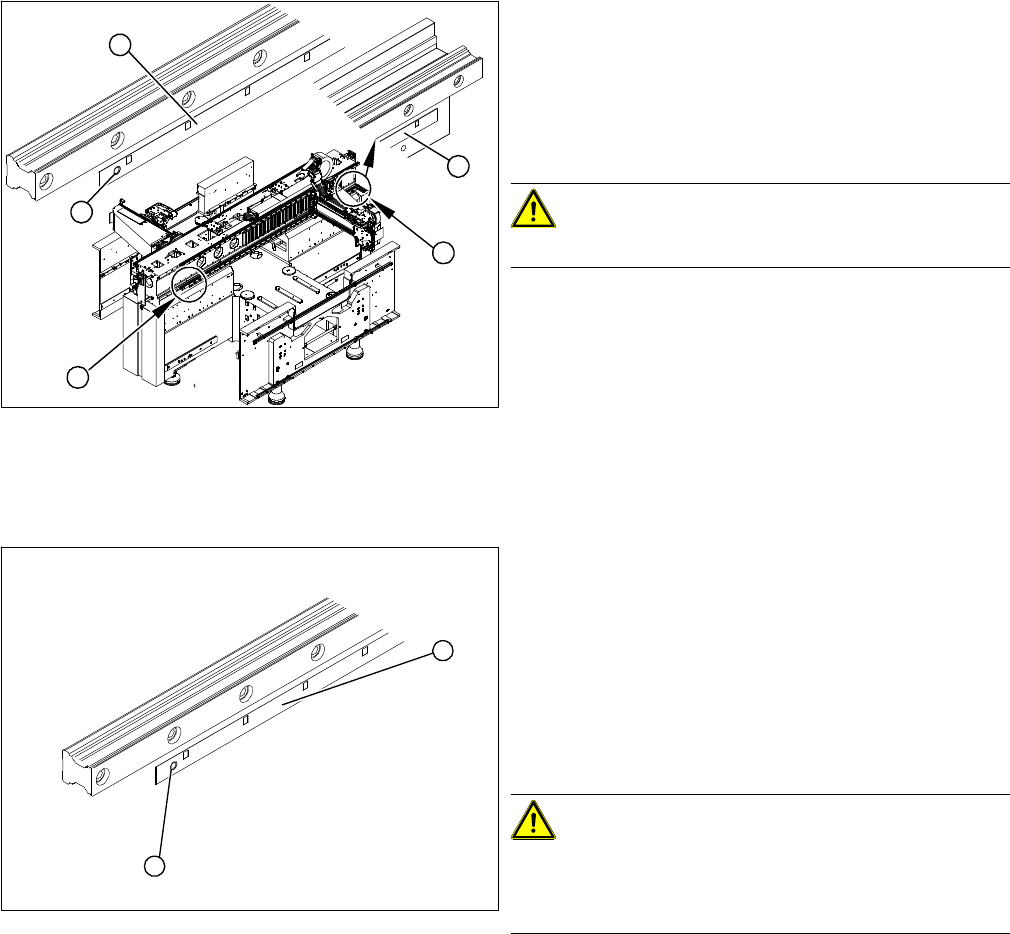
1. Y axis incremental encoder
► Loosen the three screws fastening the incremental
encoder (1) of the Y axis and carefully lift off the in
-
cremental encoder.
► Temporarily fix the incremental encoder to a suitable
place (e.g. with adhesive tape to the back of the gan
-
try).
WARNING!
STRONG MAGNETIC FIELDS!
Always follow the special safety instructions when work
-
ing in the vicinity of powerful magnetic fields, caused by
the permanent magnets (3).
1
Service Work
Gantries 3.3.7 Replacing the Y Axis Scale [03005490-xx]
62 Service Manual (internal version) SIPLACE HF and X Series
Removal
Installation
► If necessary, remove the side covers on the machine,
for better accessibility (4) .
► Move the gantries into the position which allows you
best access.
► Use the chisel to lever the scale off the right side (1)
of the machine base.
CAUTION!
Make sure that you do not damage the drilling (2).
► Remove the scale (3).
► Use the chisel to remove any adhesive residues from
the contact surface. Wipe the contact surface clean
with a multiflex pad.
► Clean the contact surface with ethanol. The surface
to be fixed down must be clean and free of grease.
1
4
2
3
4
► Move the gantries to the position which gives you
best access to the whole scale.
► Wear protective gloves.
► Attach the adhesive strip to the new scale and then
return this to the packaging.
► Pull the packaging slightly back.
► Pull the transparent cover strip approx. 5 cm off the
adhesive strip on the back of the scale.
CAUTION!
Make sure the scale is not bent or rubbed against any
parts.
Also make sure that it is not scratched!
► Fit the scale (1) so that the pin (2) of the scale slides
into the hole.
1
2
Service Work
3.3.7 Replacing the Y Axis Scale [03005490-xx] Gantries
Service Manual (internal version) SIPLACE HF and X Series 63
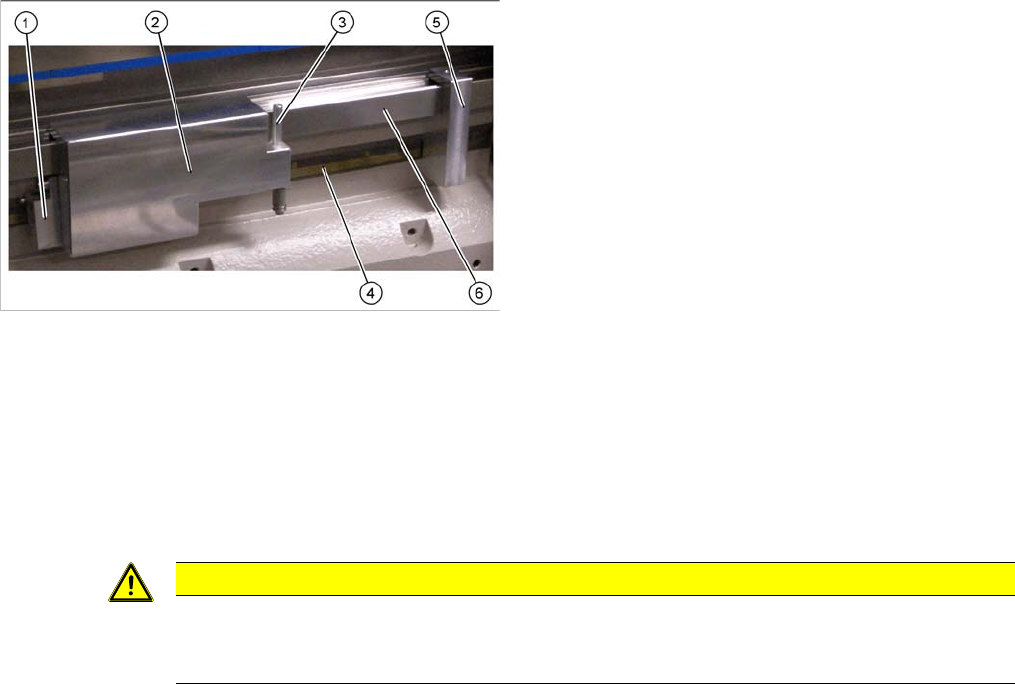
► Position the guide device (5) at a suitable distance to the hole on the guide rail (6) and fix with the
screw.
► Pull the transparent cover strip off completely.
► Pull the fixing pin (3) out of the adhesive device (2).
► Place the adhesive device (2) onto the guide rail.
► Insert the fixing pin (3) into the adhesive device (2) so that the scale runs between the guide (1) and
the pin (3).
► Wrap the transparent cover strip from the adhesive strip around the fixing pin.
► Slowly pull off the transparent strip; press down the rollers of the adhesive device and fix the whole
scale as far as possible (up to the gantry).
► Remove the adhesive device and move the gantry so that you can fix the rest of the scale.
► Change the adhesive device and finish fixing the scale completely.
► Press the rest of the scale down with your hand and with the help of a tear-resistant cloth.
► Remove the centering pin from the left side of the scale.
► Clean the scale with a cloth and ethanol.
► Clean the reading surface of the incremental encoder with a cloth and ethanol or with a SIPLACE
cleaning tip [00352931-xx].
► Fit the incremental encoder with the three fastening screws so that there is a gap of 0.4 mm between
the incremental encoder and the scale. Use the corresponding thickness gauge (plastic).
► Check the track signals.
1. Guide with press roller
2. Complete adhesive device
3. Fixing pin
4. Scale
5. Guide device
6. Guide rail
CAUTION
Set the fixing pin correctly
The fixing pin for the scale must be set so that it touches the screw and can guide the scale,
without the latter slipping out.