00197184-03_IM_Celsius_W520LLC_Windows7_EN.pdf - 第56页
Celsius W 520 w ith W indows 7 03/2014 Editio n 56 5.2 Before proceeding wi th Support Media Before ap plying the Suppor t Media, you must c heck a couple of setti ngs. These f urther prepar ation s teps are des cribed i…
Celsius W520 with Windows 7 03/2014 Edition
55
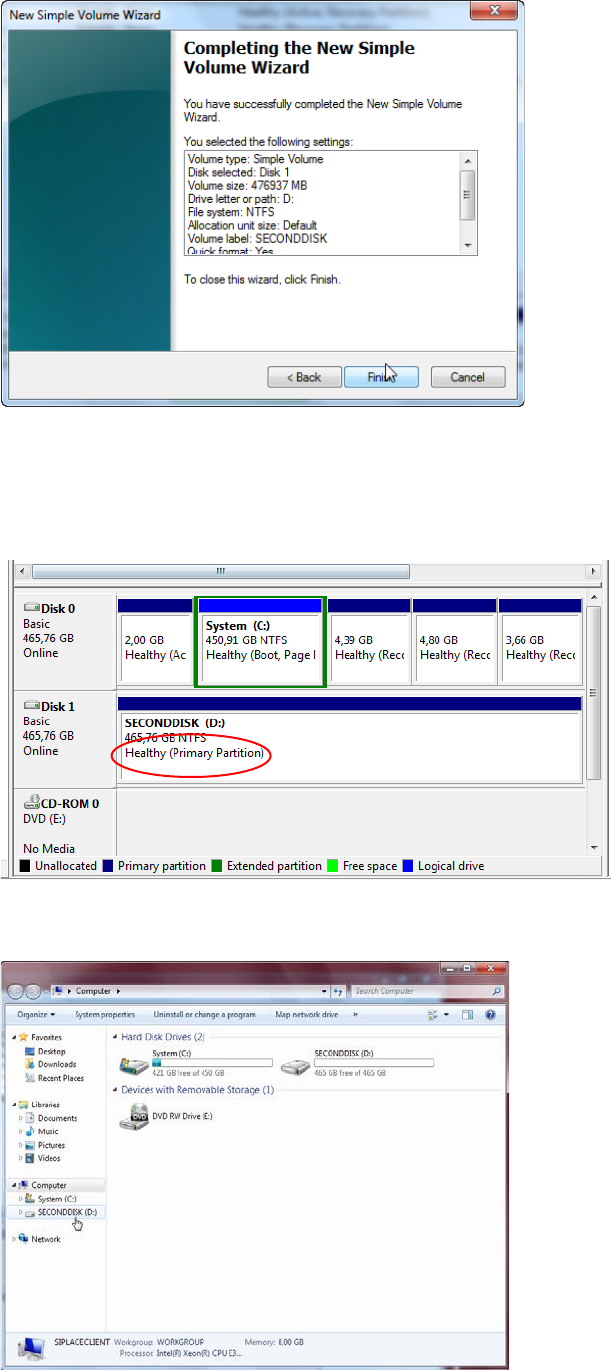
Figure 5-11: New Simple Volume Wizard – Final Page
► Verify the listed settings.
► Click the Finish button to complete the task.
Formatting the drive will take some seconds. After that, the drive should look like this.
Figure 5-12: Formatted drive D: of second hard disk
You now should be able to access the drive in Windows Explorer.
Figure 5-13: Windows Explorer showing the new drive
Celsius W520 with Windows 7 03/2014 Edition
56
5.2 Before proceeding with Support Media
Before applying the Support Media, you must check a couple of settings.
These further preparation steps are described in the document "Required Steps before using
Support Media"”, item no. [00197185-xx].
NOTICE
Wrong Settings cause serious Problems
It is strongly recommended to perform all the steps as described in the "Required Steps
before using Support Media" documentation before you continue setting up the
computer.
Inappropriate settings may cause serious, irreversible problems in network
communication!
WARNING
Check Configuration before installing any Software.
Please ensure that your account and network configuration is appropriate before
installing any software.
Celsius W520 with Windows 7 03/2014 Edition
57