F4000N_revD.pdf - 第18页
F4000N Series Operating Manual Section 3: T eaching Overview Part # 562187N - 1 Rev . D Sep 2012 17 © 20 12 Fisnar Inc. Key Functions → Registers a DISPENSE DOT point. → Registers a LINE ST ART point. → Registers a LINE …
F4000N Series Operating Manual
Section 3: Teaching Overview
Part # 562187N-1
Rev. D Sep 2012
16
© 2012 Fisnar Inc.
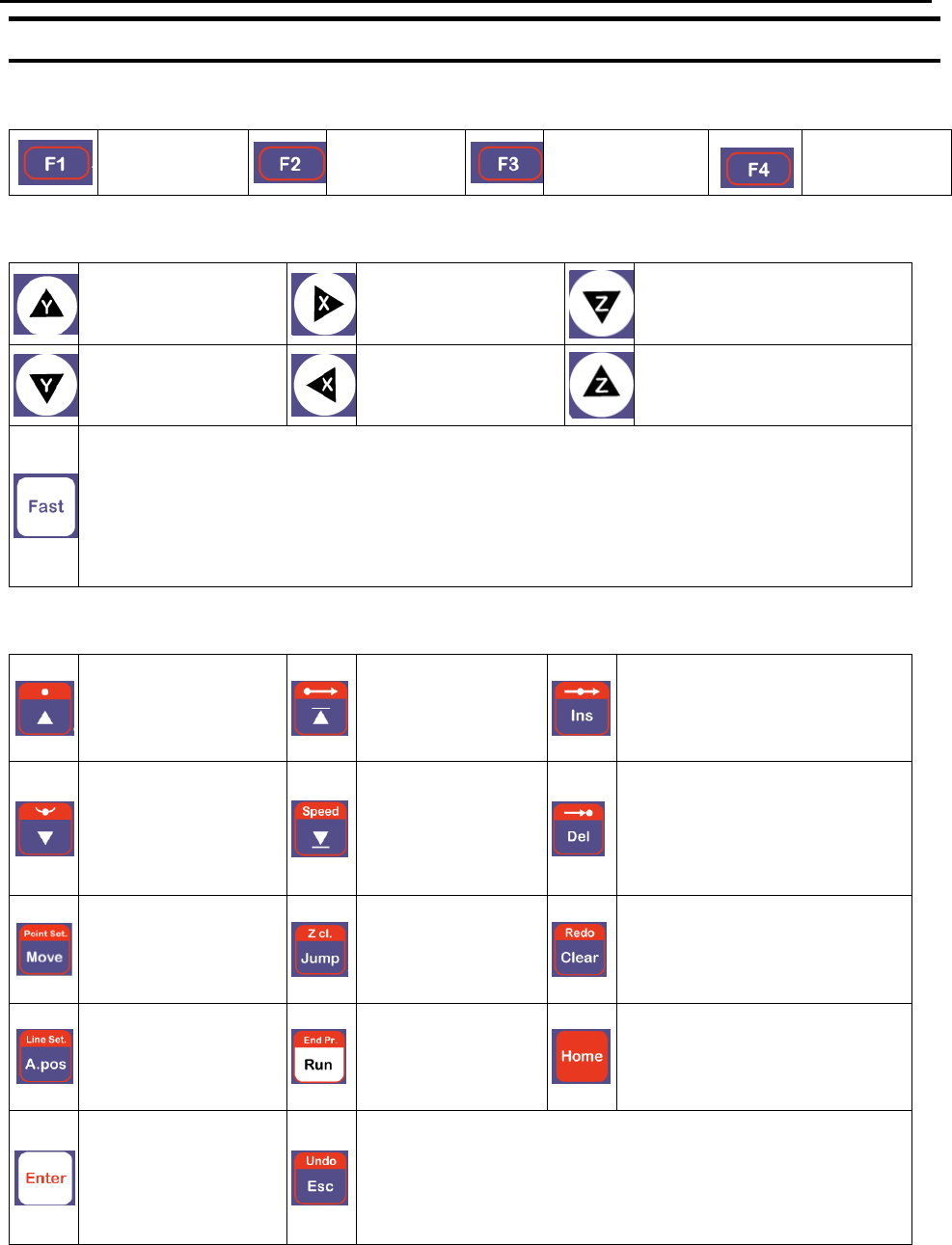
2.2 Key Assignments
Menu Keys
Opens the
Point Menu.
Opens Menu
1.
Opens Menu 2.
Opens the
Setup Menu.
Jog Keys
Jogs the Y-axis in
the forward
direction.
Jogs the X-axis in
the right direction.
Jogs the Z-axis DOWN.
Jogs the Y-axis in
the backward
direction.
Jogs the X-axis in
the left direction.
Jogs the Z-axis UP.
Accelerates jog speed – used with X+, X-. Y+, Y-, Z Up, Z Down
If the FAST button is pressed and held first, then one of the jog buttons is
pressed, the axis will be jogged at the maximum jog speed.
If one of the jog buttons is pressed first, then the FAST button is pressed, the jog
motion will accelerate.
If the FAST button is released, the jog motion will decelerate.
Key Assignments
Moves backward
(-1) memory
address.
Changes the
display to
memory address
number 1.
Inserts a memory address
before the current address.
Moves forward
(+1) memory
address.
Changes the
display to the last
memory address
used in the
program.
Deletes the current memory
address.
Moves the tip to the
point location
currently in the
display.
Jumps to a
specified memory
address
Clears / erases the numeric
value currently shown in the
display.
Adjusts the tips
position after a
barrel change
To run the
program
Homes the robot. Initializes
all axes and moves the
head to the position (0, 0,
0).
(Enter)–used to
confirm data
entries.
Opens the Point
registration menu.
If pressed once, clears the current numeric value.
If pressed twice, cancels the current function.
If a program is running, cancels the running program.
Changes from Point List display mode to Single Point
display when teaching point data.
F4000N Series Operating Manual
Section 3: Teaching Overview
Part # 562187N-1
Rev. D Sep 2012
17
© 2012 Fisnar Inc.
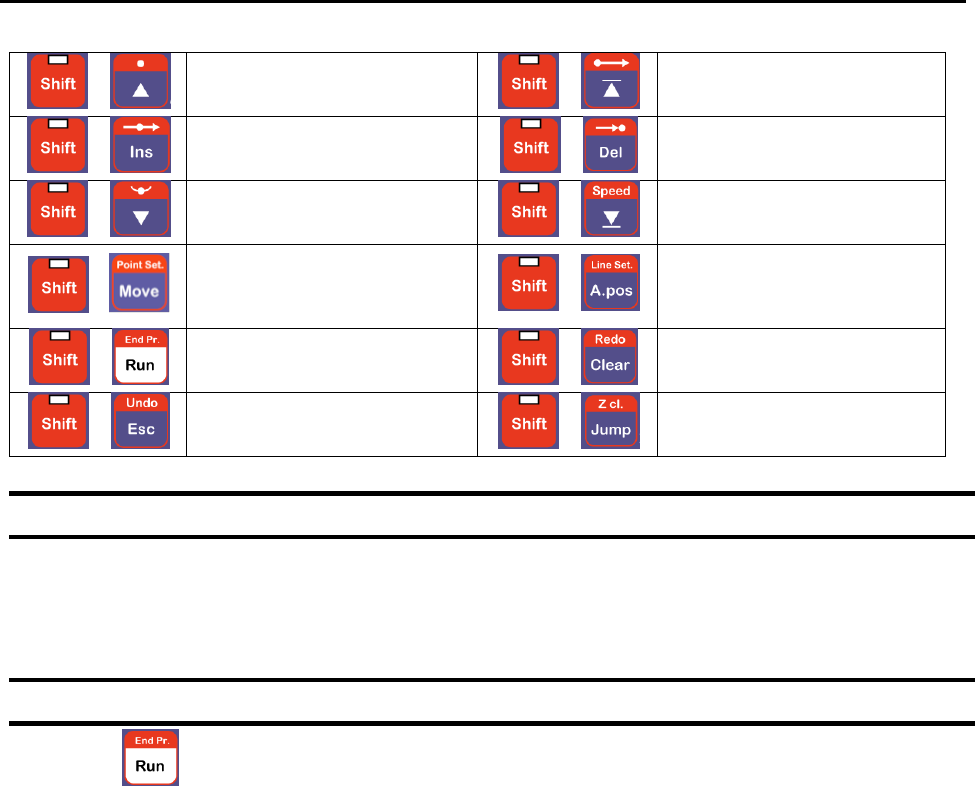
Key Functions
→
Registers a DISPENSE
DOT point.
→
Registers a LINE START
point.
→
Registers a LINE
PASSING point.
→
Registers a LINE END
point.
→
Registers an ARC POINT.
→
Registers a Line Speed
command.
→
Registers a Point
Dispense Setup
command.
→
Registers a Line Dispense
Setup command.
→
Registers the End
Program command.
→
Redo Last Entry
→
Undo Last Entry
→
Registers a Z Clearance
command.
2.3 Data Entry
When a number is required, the teach pendant will automatically switch to numeric entry
mode. The number represented by each key is shown in the lower right corner of the key.
2.4 Running a Program
Press the key to run the program.
F4000N Series Operating Manual
Section 3: Teaching Overview
Part # 562187N-1
Rev. D Sep 2012
18
© 2012 Fisnar Inc.
3. Point Type & Function Summary
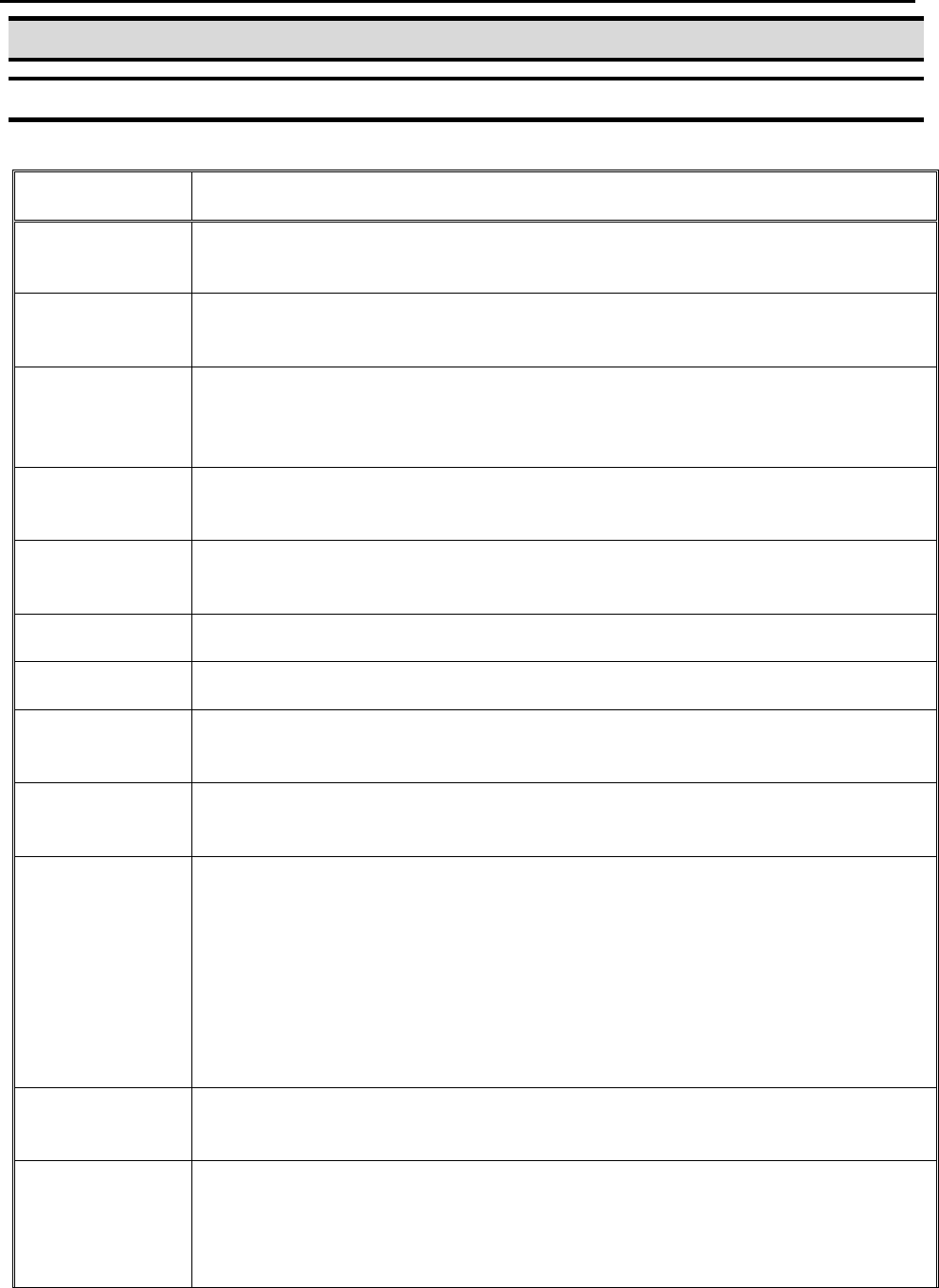
3.1 Point Menu (F1)
Below is a list of Point Types, which are found under the F1 key (Point menu):
Function
Description
Dispense Dot
Registers the current XYZ location as a Dispense point for dot
dispensing.
Line Start
Registers the current XYZ location as a Line Start point for line
dispensing.
Line Passing
Registers the current XYZ location as a Line Passing point. This is a
location on the line where the tip changes direction, such as at the
corner on a rectangle.
Circle
Registers a circle with the circle center at the current XYZ location. The
display will prompt the user for the circle diameter.
Arc Point
Registers the current XYZ location as an Arc point. Arc points are used
to dispense material in an arc or circle.
Line End
Registers the current XYZ location as a Line End point.
End Program
Registers the current memory address as the end of the program.
Dispense On /
Off
Registers an instruction which turns the dispenser on or off at the
current XYZ location.
GOTO
Address
Causes the program to jump to the specified memory address.
Step & Repeat
Registers an instruction that will re-run a selected group of memory
addresses, stepping by a user-defined distance in the X or Y-axis after
each copy. The matrix of parts is defined by specifying the number of
rows, the number of columns, the X offset and the Y offset.
Step & Repeat X indicates that the robot will give priority to the X-axis,
running the parts along the X-axis first.
Step & Repeat Y indicates that the robot will give priority to the Y-axis,
running the parts along the Y-axis first.
Brush Area
Causes the tip to „paint‟ the defined area. The painted area can be in
the form of a rectangle or a circle / spiral.
Call
Subroutine
Causes the machine to jump to a specified memory address and
execute the instructions found there. When the end program instruction
is reached, program execution will continue at address just after the call
Subroutine instruction.