F4000N_revD.pdf - 第77页
F4000N Series Operating Manual Section 5: Point T ype & Function Reference Part # 562187N - 1 Rev . D Sep 201 2 76 © 20 12 Fisnar Inc. The distance and speed that the tip raises after dispensing is controlled by the …
F4000N Series Operating Manual
Section 5: Point Type & Function Reference
Part # 562187N-1
Rev. D Sep 2012
75
© 2012 Fisnar Inc.
The value will be used for all lines from the current memory address forward until another
Tail Length instruction is found.
Values for the Head Time and Tail Time used when performing line dispensing are
registered by pressing the F4 (Setup) key, then selecting Line Dispense Setup. The set
values will be used by all lines from that memory address forward until new set of Line
Dispense Setup values are found.
Please see SECTION 6:Sample Programs for an example of the Line Dispense Setup
instruction.
5.3 Point Dispense Setup
Registers POINT DISPENSE SETUP values which set dispensing time and waiting time at
the end of dispensing („tail‟ time) for dots. The registered values will be used from the
current memory address forward until another POINT DISPENSE SETUP instruction is
found.
5.4 Dispense End Setup
Dispense End Setup allows the L.Length, L. Speed and H. Speed values to be registered
at a memory address. These values will effect how far and how fast the tip rises after
dispensing.
After dispensing a dot or line, it is often required to raise the tip a short distance at a slow
speed. This allows the material to cleanly break free from the tip, without „dragging‟
material where it is not wanted.
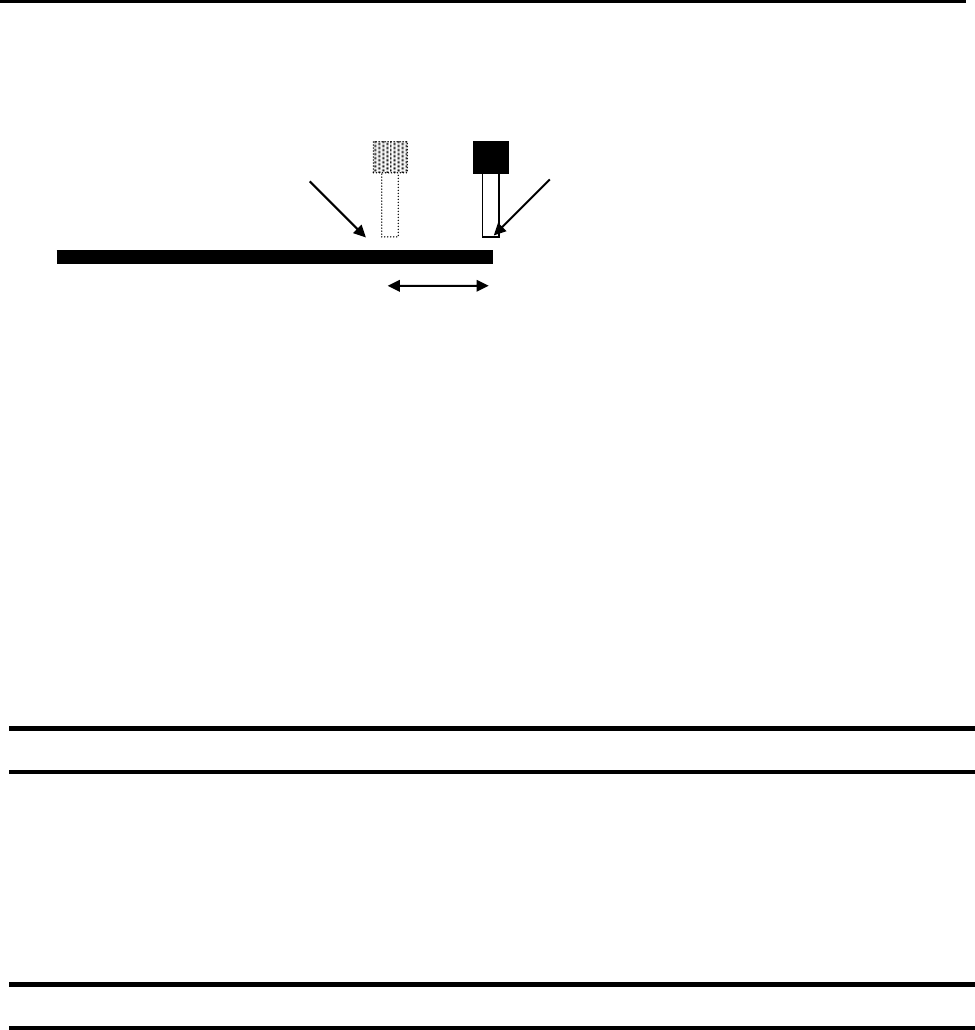
Dispenser Turns Off here
Tip continues moving to end of line
Tail Length
F4000N Series Operating Manual
Section 5: Point Type & Function Reference
Part # 562187N-1
Rev. D Sep 2012
76
© 2012 Fisnar Inc.
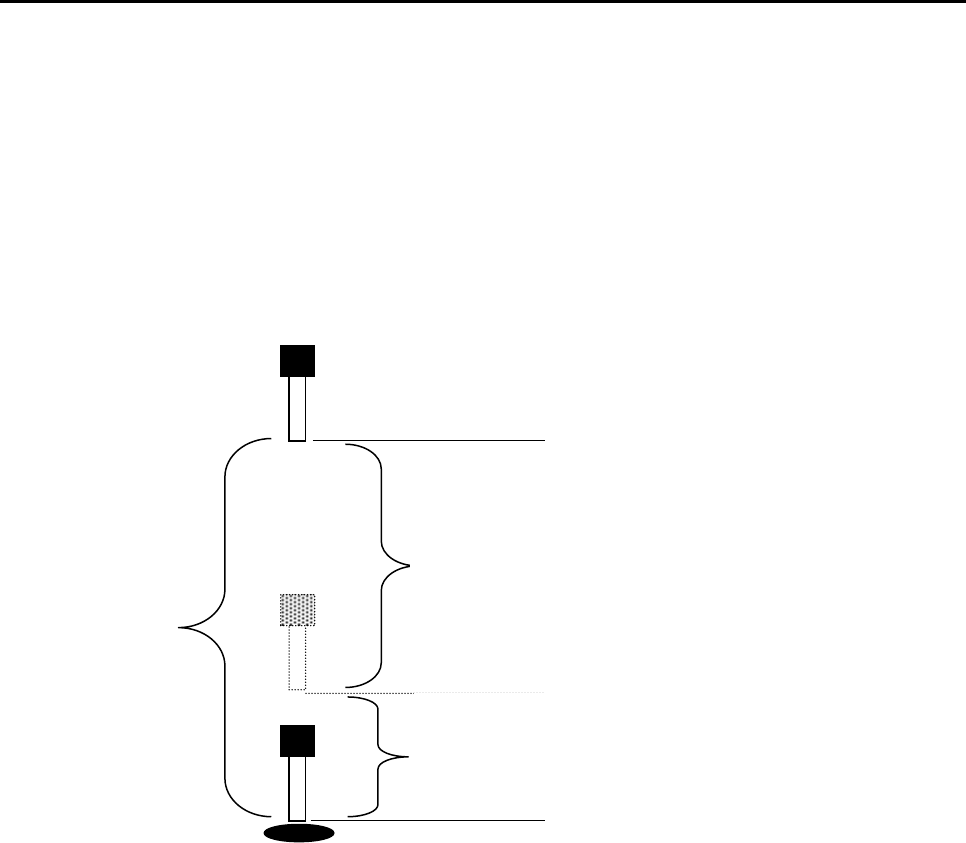
The distance and speed that the tip raises after dispensing is controlled by the L.Length
and L.Speed settings.
After the tip raises the length specified by L.Length at the speed specified by L.Speed,
the tip will continue rising to the Z Clearance height at the speed specified by H.Speed.
The purpose of specifying a Z Clearance height is to allow the tip to raise high enough to
clear any obstacles it may encounter on the way to the next point.
Values for H.Speed, L.Speed and L. Length are registered with the Dispense End Setup
function by pressing the F4 (Setup) key, then choosing Dispense End Setup.
Once Dispense End Setup values have been registered at a memory address, all points
after that memory address will use the values specified. If Dispense End Setup values are
registered again, at a higher memory address, all points from that memory address
forward will use the new values.
Please see SECTION 6: Sample Programs for an example of the Dispense End Setup
instruction.
H. Speed 2: Tip continues rising to
Z Clearance height at H. Speed
L. Length 1: After dispensing, the tip
rises to L .Length at L. Speed
Z Clearance
F4000N Series Operating Manual
Section 5: Point Type & Function Reference
Part # 562187N-1
Rev. D Sep 2012
77
© 2012 Fisnar Inc.
5.5 Z Clearance
The purpose of the Z Clearance function is to cause the tip to raise high enough to clear
all obstacles as it moves from one point to another. If there are no obstacles between any
of the program points, a small Z Clearance value, such as 5 mm, can be used to minimize
the program cycle time.
Values for the Z Clearance are registered by pressing the F4 (Setup) key, then choosing
Z Clearance. The Z Clearance value will be used by all points from that memory address
forward until another Z Clearance value is found. Normally, a Z clearance instruction
should be registered in the beginning of a program, at one of the first memory addresses.
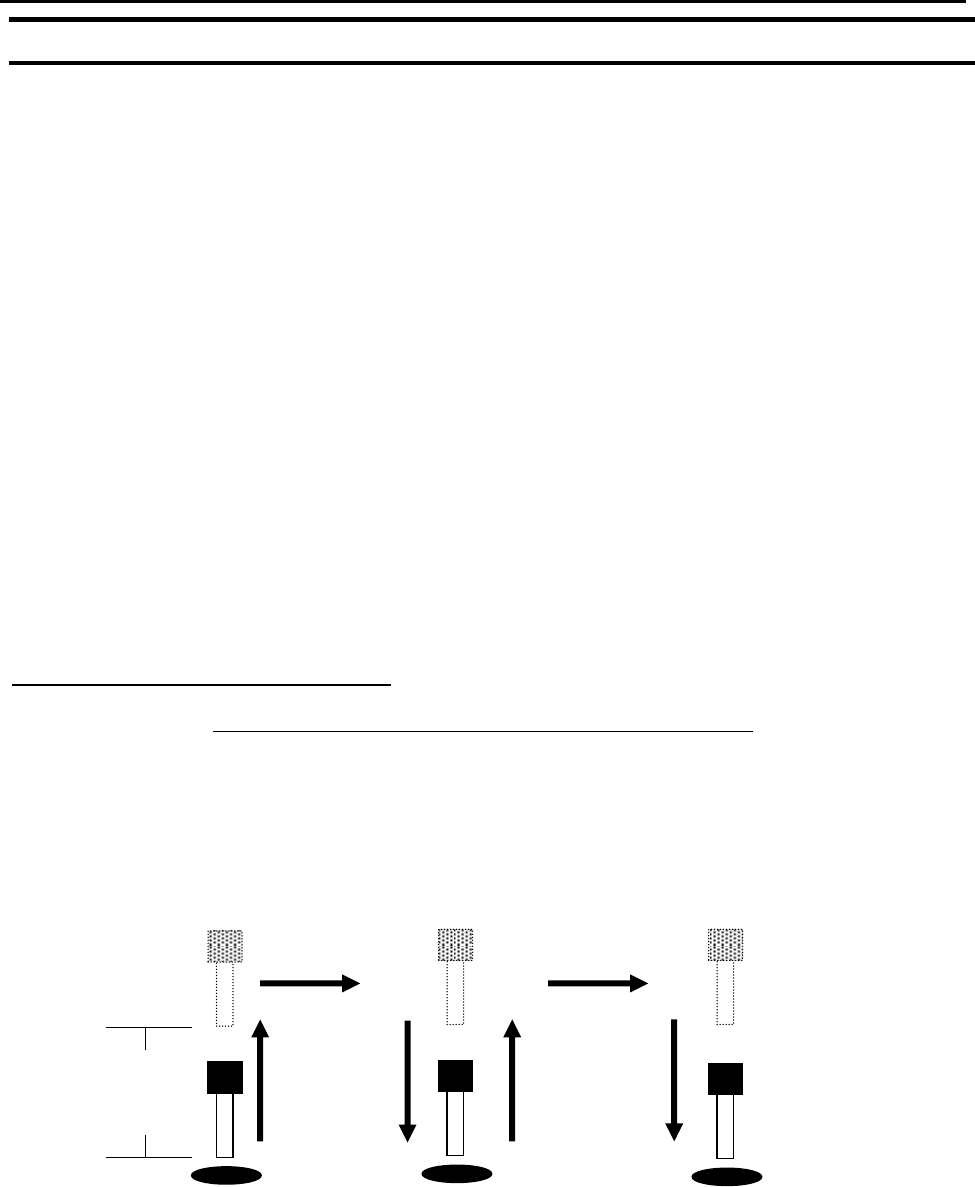
The Z Clearance value may be specified as a relative value or an absolute value. When
specified as a relative value, it is the distance to rise relative to the taught point location.
When it is specified as an absolute value, it is a distance from the Z-axis zero position,
where the tip will rise to, regardless of the Z-axis value of the taught point location. For
example:
Z Clearance = 10 mm RELATIVE:
10 mm
Z = 0 mm