F4000N_revD.pdf - 第26页
F4000N Series Operating Manual Section 4: Programming Example Part # 562187N - 1 Rev . D Sep 2012 25 © 20 12 Fisnar Inc. SECTION 4: Prog ramming Example

F4000N Series Operating Manual
Section 3: Teaching Overview
Part # 562187N-1
Rev. D Sep 2012
24
© 2012 Fisnar Inc.
Function
Description
Adjust Position Setup
Registers the current XYZ location as the Adjust
Position. This reference point can later be used to
correct the program location after the dispensing tip has
been changed.
Retract Setup
Registers Retract values at the current XYZ location.
Retract causes the tip to move up and back over the
dispensed bead after line dispensing.
Quickstep
Causes the robot to move very fast from one point to
another reducing the time of the dispensing cycle.
Auto Purge Setup
Automatically purges the system at the end of the
program.
ESTOP Output Status
After receiving the emergency stop signal, ESTOP
Output Status can modify the status of all the outputs or
leave them as before receiving the emergency signal.
Acceleration
Parameter that controls the robot‟s acceleration.
Pause Status
Sets the position to which the tip moves after pressing
the Start button. The tip can go to the Home position or
will stay at the position where the Start button was
pressed.
Language
Opens MENU for selecting a Language.
Jog Speed
Allows the user to set the tip jog speed for teach mode:
Low, Middle or High jog speed can be selected.
Adjust Position
See SECTION 5:5.9 Adjust Position Setup.
Quick Step Path
Allows the tip to move faster when dispensing.
USB Up/Down Load
Allows the operator to upload or download
program/programs and software updates.
Circle Delay Time
Circle Delay Time allows the robot to stop at the end of
a circle and allow excess material to be removed before
the robot carries to the next point.
Initialize Setup
Initialize Setup returns the tip to the home position,
where X,Y and Z values are equal to 0(zero), as
delivered by the factory. This is useful if the dispensing
tip holder may have been manually pushed out of
position.

F4000N Series Operating Manual
Section 4: Programming Example
Part # 562187N-1
Rev. D Sep 2012
25
© 2012 Fisnar Inc.
SECTION 4: Programming Example
F4000N Series Operating Manual
Section 4: Programming Example
Part # 562187N-1
Rev. D Sep 2012
26
© 2012 Fisnar Inc.
1. Programming Example
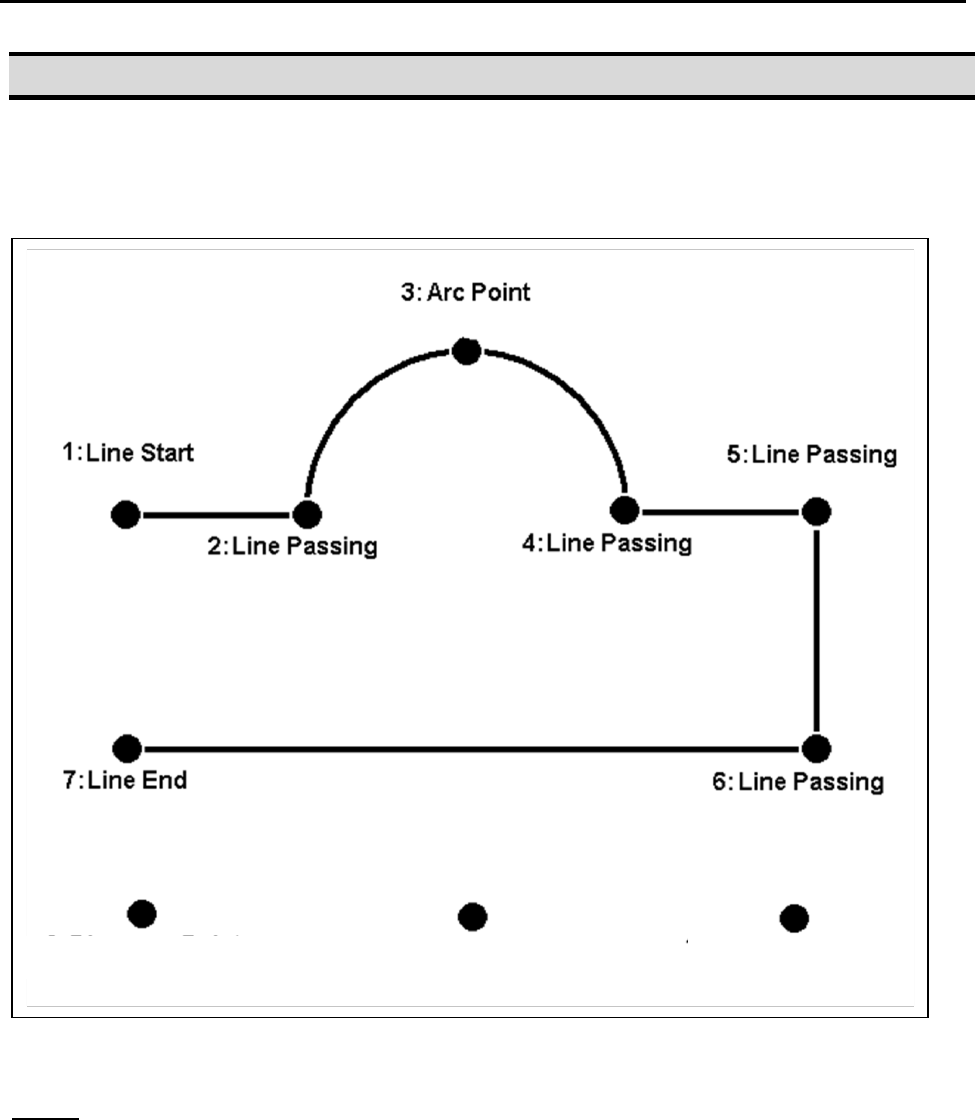
To help you become familiar with programming the robot, please follow the instructions
below to create a program, which dispenses in the following pattern:
Notes:
We will create the above program in program # 10.
We will use a line speed of 40 mm / second for the lines and arcs in the program.
For dots, we will use a dispensing time of 0.50 seconds and a waiting time of 0.1
seconds after dispensing.
9: Dispense Dot
8: Dispense Dot
10: Dispense Dot