3OM-1208-011_w.pdf - 第131页
3-44 AIVEDT -ID (D02_10) C Enter some of the following control commands. Notice If a control command other than the following ones is used, the step becomes invalid. - (hyphen) : This command handles the steps as those f…
3-43
AIVEDT-ID
(D02_07)
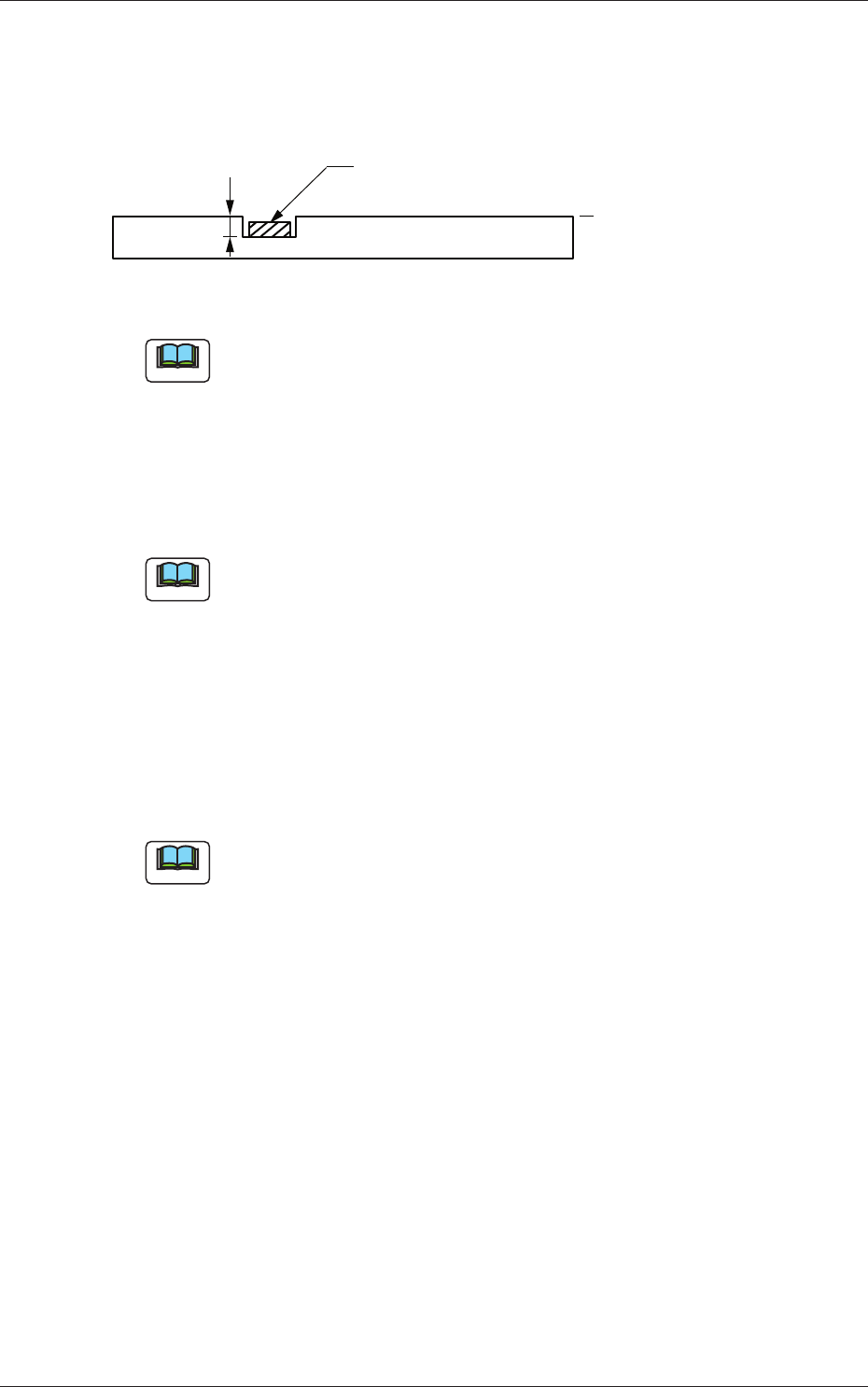
H [mm]
The component placement height can be corrected.
H
Component
PCB
Reference Plane
Fig. 3C32
Note
When a parameter is set as "H" data in the last line (last step No.), it
becomes invalid because "E" is set in the "C (Control Command)" text
box.
(D02_08)
Fdr No.
Set the Nos. of the feeders loaded with components.
Note
The feeder Nos. (Fdr Nos.) to be set here must be specified in the
placement feeder location data.
(D02_09)
V
Select one of the following options for the local recognition mode.
00 :
The local recognition is not performed.
01 :
The local recognition (1-point recognition) is performed.
02
:
The local recognition (2-point recognition) is performed.
Note
(a) The above-described option must be selected after "Enable" is set in
the "local" text box of the label "PEC recognition Mode" in the "PEC
Recognition Data" tab sheet ("A02_03" in Operation Data).
(b) Refer to "(D02_12), (D02_13), and (D02_14)" for how to specify the
coordinates and mark codes for "Local Recognition".
0606-009
1.5 Placement Data

3-44
AIVEDT-ID
(D02_10)
C
Enter some of the following control commands.
Notice
If a control command other than the following ones is used, the step
becomes invalid.
- (hyphen) :
This command handles the steps as those for component
placement.
S :
This command invalidates the steps specified as those for
component placement.
C :
This command invalidates the steps specified as those for
component placement.
Note:
As for dispensers, these steps become valid.
D :
This command handles the steps as those for component
placement.
Note:
As for dispensers, these steps become invalid.
E :
This shows the end of the placement data (O).
When placement data (O) is not created, this shows the
end of the steps in the placement data (P).
P, Q :
This shows the end of the placement data (P) of a
repetitive pattern program.
B :
When the unit PCB BBR function (option) is used, set
this control command for P-No. 1.
See Note (b).
0, 1, 2, 3, 4, 5, 6, 7, 8, 9:
These control commands are used to enable the block
sorting function.
See Note (a).
Note
(a) When the block sorting function is used in the following case, the
productivity will be improved because components are placed on the
specified areas of unit PCBs.
•
It is required to change the nozzles in the nozzle stocker for
component placement on a certain unit PCB according to the
repetitive pattern program.
(b)
Do not set the B command in any lines except "P-No. 1".
(c) Confirm that "0" (zero) is set in the "X [mm]", "Y [mm]", "Z=theta
[deg]", "H", and "Fdr No." text boxes of the last line (last step No.)
and set "E", "P", or "Q".
0606-009
1.5 Placement Data

3-45
AIVEDT-ID
(D02_11)
Comment
Set a comment for each step No.
Alphanumeric characters and symbols can be used.
Up to 32 characters (alphanumerics and marks) can be used.
Note
(a) The automatic operation is not affected by these comments.
(b) The comments can be used to check "Ref. No." printed on the upper
surfaces of PCBs.
(D02_12)
Recog Coord X1 [mm] and Recog Coord Y1 [mm]
Set the coordinates of the first fiducial mark for the local recognition
mode in each text box.
(D02_13)
Recog Coord X2 [mm] and Recog Coord
Y2 [mm]
Set the coordinates of the second fiducial mark for the local recognition
mode in each text box.
(D02_14)
Fiducial Mark FM1 and Fiducial Mark FM2
Set parameters for "Fiducial Mark FM1" (First Fiducial Mark No.) and
"Fiducial Mark FM2" (Second Fiducial Mark No.) related to the local
recognition mode.
Select the mark Nos. (Mark Codes) specifi
ed in the PEC recognition
mark data of the operation data.
0606-009
1.5 Placement Data