3OM-1208-011_w.pdf - 第191页
5-4 AIVEDT -ID 1.2 Outline of Pattern Program Management Data The corresponding tab she et enables the operator to view the summ ed pattern program management data related to each individual pattern programs. When the [P…

5-3
AIVEDT-ID
[5] [Comment] Button
When pressed, this opens the "Comment" window.
A comment can be entered for "Type #2".
[6] "File Information (Type #2)" Pane
This pane displays the clear date & time and the comment of
"Management Data (Type #2)".
[7] [Clear] Button
When this button is pressed, all data of "Management Data (Type #2)"
is cleared and the clear date is updated.
0606-009
1.1 Outline of Management Data
5-4
AIVEDT-ID
1.2 Outline of Pattern Program Management Data
The corresponding tab sheet enables the operator to view the summed pattern
program management data related to each individual pattern programs.
When the [PATT. PRGM. MNG. DT] button is pressed in the
"MANAGEMENT DATA" window, the scope of the pattern program
management data is displayed.
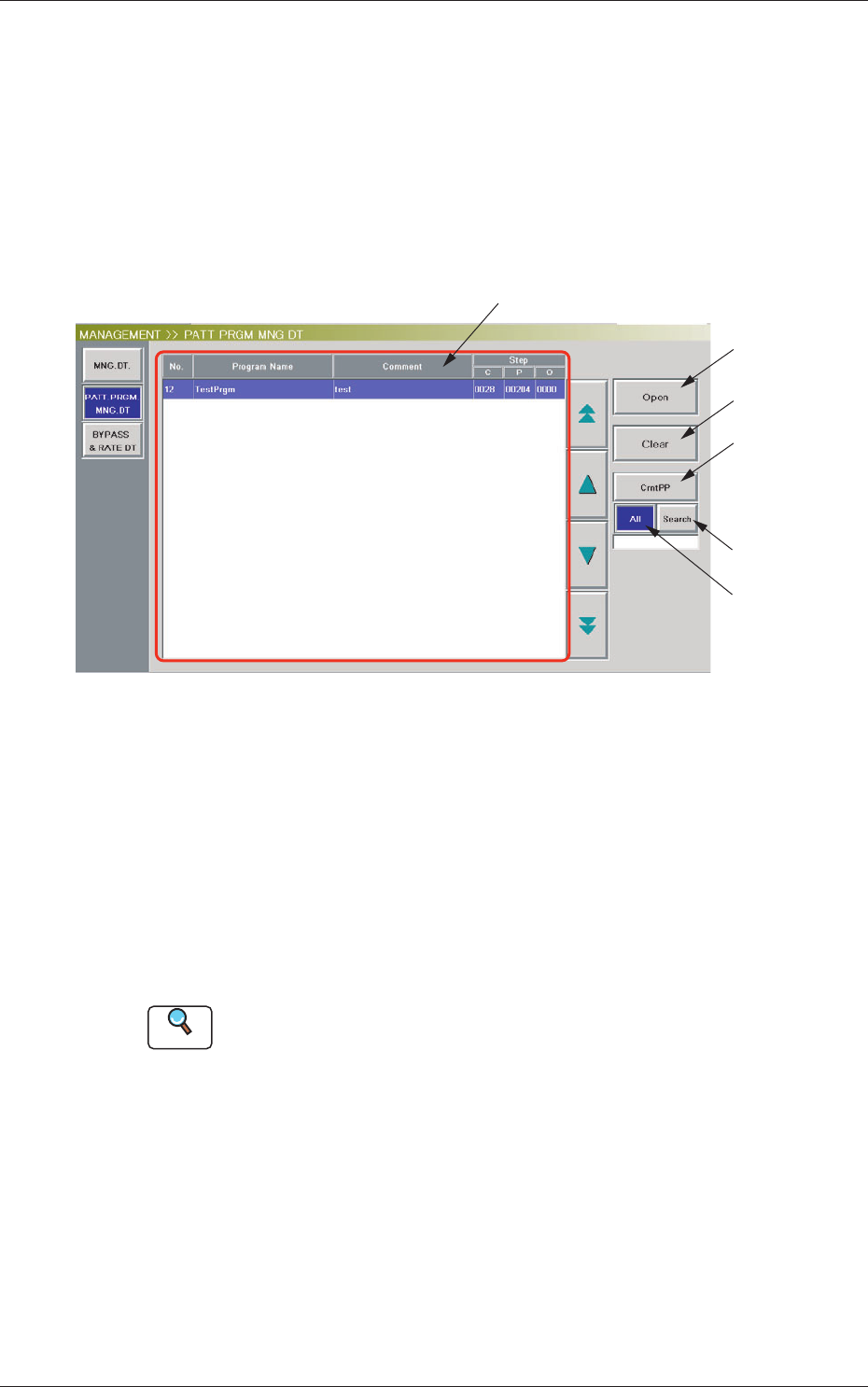
[1]
[2]
[3]
[5]
[4]
[6]
Fig. 3E2 "Patt Prgm Mng Dt" Window
[1] List of Model Names
Listed are the registered model names (pattern program names).
[2] [Open] Button
When this button is pressed after a pattern program (model) is selected
from the list of model names ([1]), the "Pattern Program Management
Data" window opens, enabling the operator to view the pattern program
management data.
Reference
Refer to "3. Pattern Program Management Data" for the details of the
"Pattern Program Management Data" window.
[3] [Clear] Button
When this button is pressed after a pattern program (model) to be
deleted is selected from the list of model names ([1]), the management
data of the selected pattern program is deleted.
0606-009
1.2 Outline of Pattern Program Management Data
5-5
AIVEDT-ID
[4] [CrntPP] Button
When pressed, this button displays the current pattern program
(production model).
[5] [All] Button
When pressed, this button displays the names of all registered programs
in the "List of Model Names" pane.
[6] [Search] Button
When pressed, this button helps you fi
nd a model from the "List of
Model Names" pane.
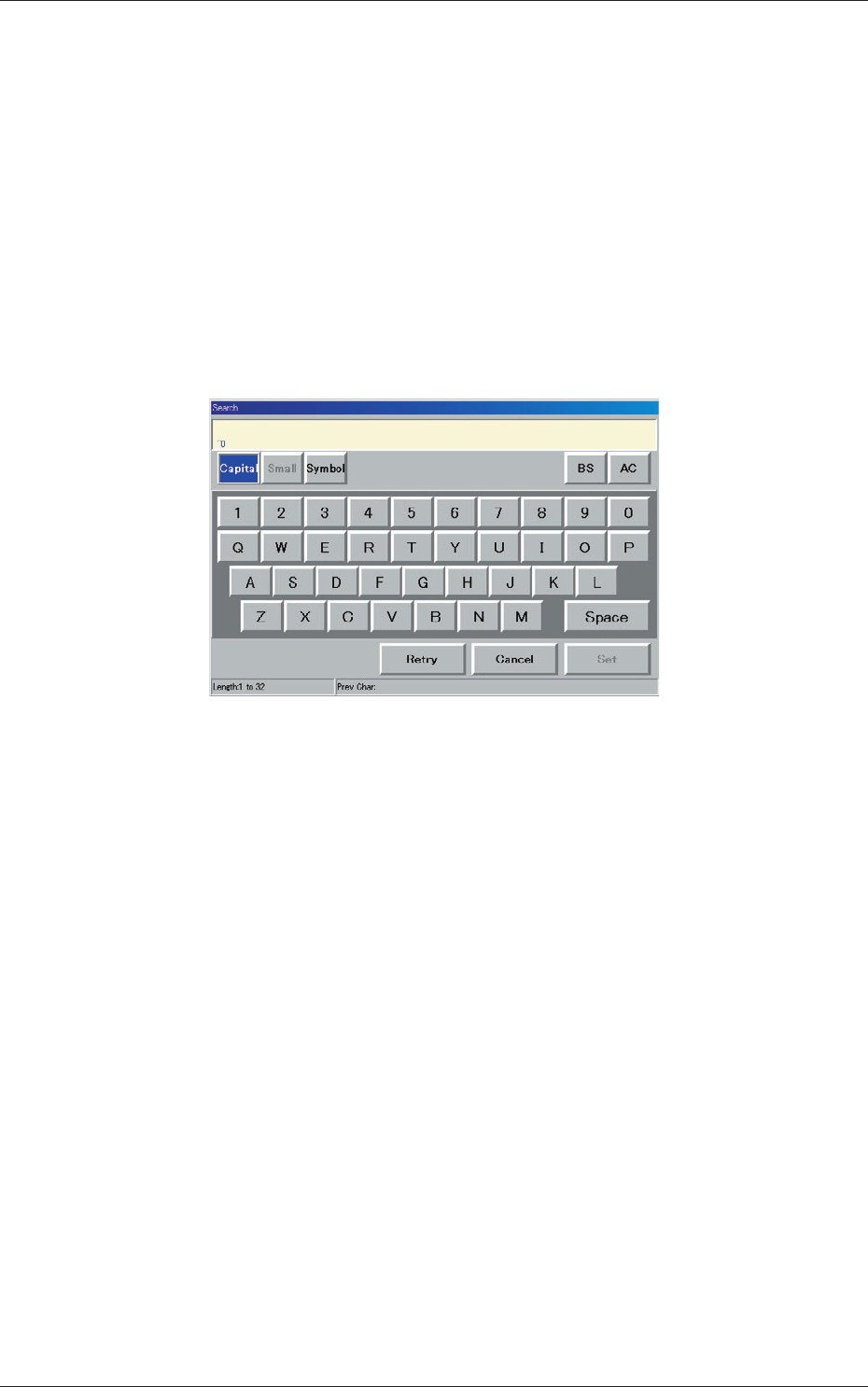
When this button is pressed, the "Search" window opens.
Fig. 3E3 "Search" Window
When the desired model name is entered in the entry box and the [Set]
button is pressed, the search function starts working and the result
appears in the "List of Model Names" pane.
"*" (asterisk) and "?" (question mark) can be used as wild cards.
abc* : The search function retrieves the program names which start
with "abc".
a?c :
The search function retrieves the program names which start
with "a" and contain "c" as the third character.
0606-009
1.2 Outline of Pattern Program Management Data