3OM-1208-011_w.pdf - 第245页
6-12 AIVEDT -ID [3] Mark (Right) X (Horizontal), Y (V ertical) [mm] The set offset parameters are used to adjust the positional deviations based on the design dimensi ons of F eeder B ases #1 , #2, #3 , and # 4 (Rear Sid…
6-11
AIVEDT-ID
2.1.2 Feeder Base Offset
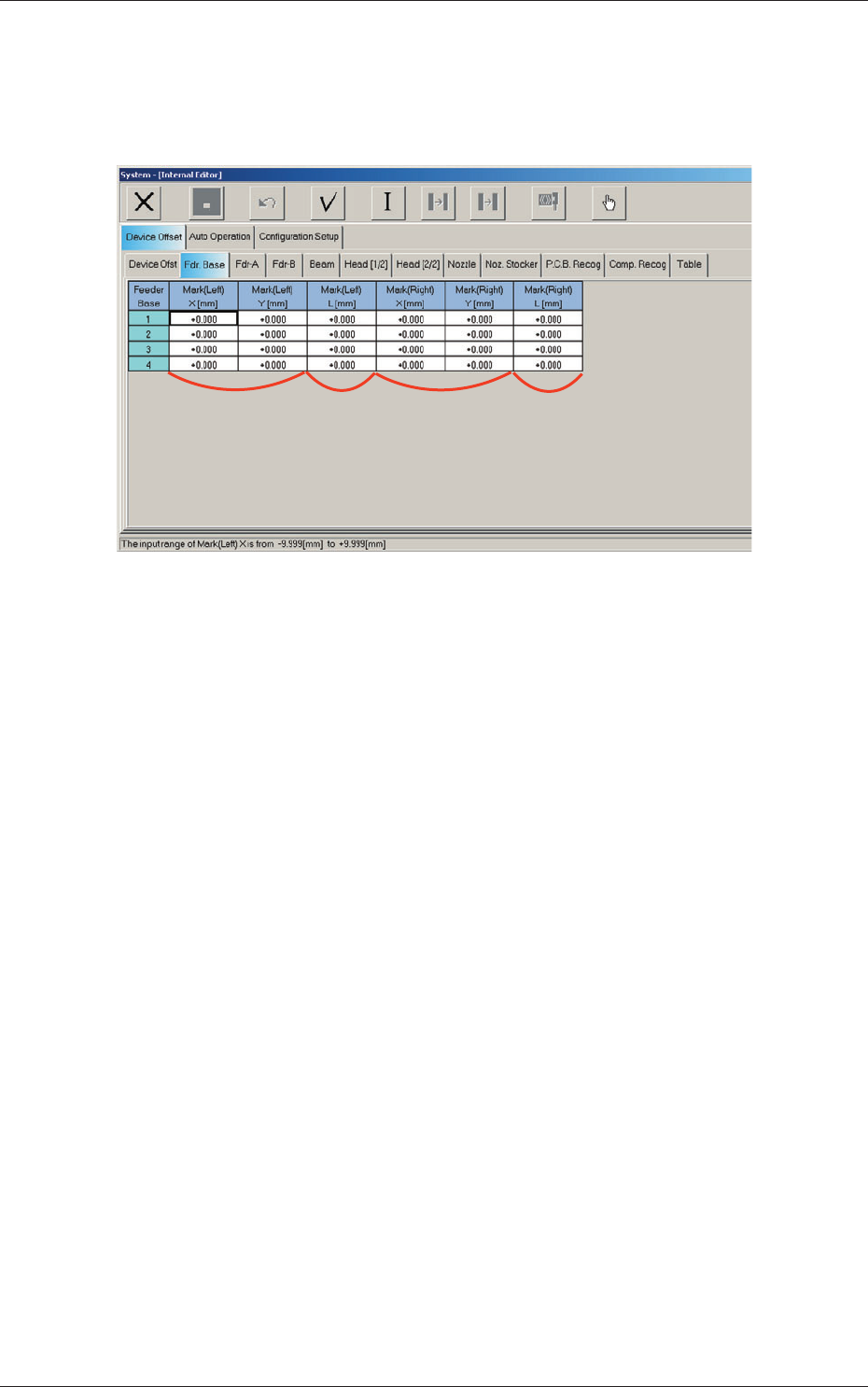
When the "Fdr. Base" tab is pressed in the "Device Offset" tab sheet, the
following tab sheet appears.
[1] [2] [3] [4]
Fig. 3F11 "Feeder Base" Tab Sheet
[1] Mark (Left)
X (Horizontal), Y (Vertical) [mm]
The set offset parameters are used to adjust the positional deviations
based on the design dimensions of Feeder Bases #1, #2, #3, and #4 (Rear
Side: #1 and #3, Front Side: #2 and #4). The values based on the PL-
XY coordinate system must be entered in the text boxes.
As for "Mark (Left) X and Y", the positional deviations are calculated
with the feeder base offset measurement jig being set on the left end of
the feeder base through recognition with the PEC recognition camera.
[2]
Mark (Left)
L (Height) [mm]
The set offset parameters are used to adjust the positional deviations
(height direction) based on the design dimensions of Feeder Bases #1,
#2, #3, and #4 (Rear Side: #1 and #3, Front Side: #2 and #4).
When the feeder bases are installed lower than the design values, a plus
value must be entered in each text box.
0606-009
2.1 Device Offset Data
6-12
AIVEDT-ID
[3] Mark (Right)
X (Horizontal), Y (Vertical) [mm]
The set offset parameters are used to adjust the positional deviations
based on the design dimensions of Feeder Bases #1, #2, #3, and #4 (Rear
Side: #1 and #3, Front Side: #2 and #4). The values based on the PL-
XY coordinate system must be entered in the text boxes.
As for "Mark (Right) X and Y", the positional deviations are calculated
with the feeder base offset measurement jig being set on the right end of
the feeder base through recognition with the PEC recognition camera.
[4] Mark (Right)
L (Height) [mm]
The set offset parameters are used to adjust the positional deviations
(height direction) based on the design dimensions of Feeder Bases #1,
#2, #3, and #4 (Rear Side: #1 and #3, Front Side: #2 and #4).
When the feeder bases are installed lower than the design values, a plus
value must be entered in each text box.
Note
The tilts of the PCB positioning sections on the feeder base sections are
calculated on the X and Y values of "Mark (Left)" and "Mark (Right)"
2.1 Device Offset Data
0606-009
6-13
AIVEDT-ID
2.1.3 Feeder Offset A and Feeder Offset B
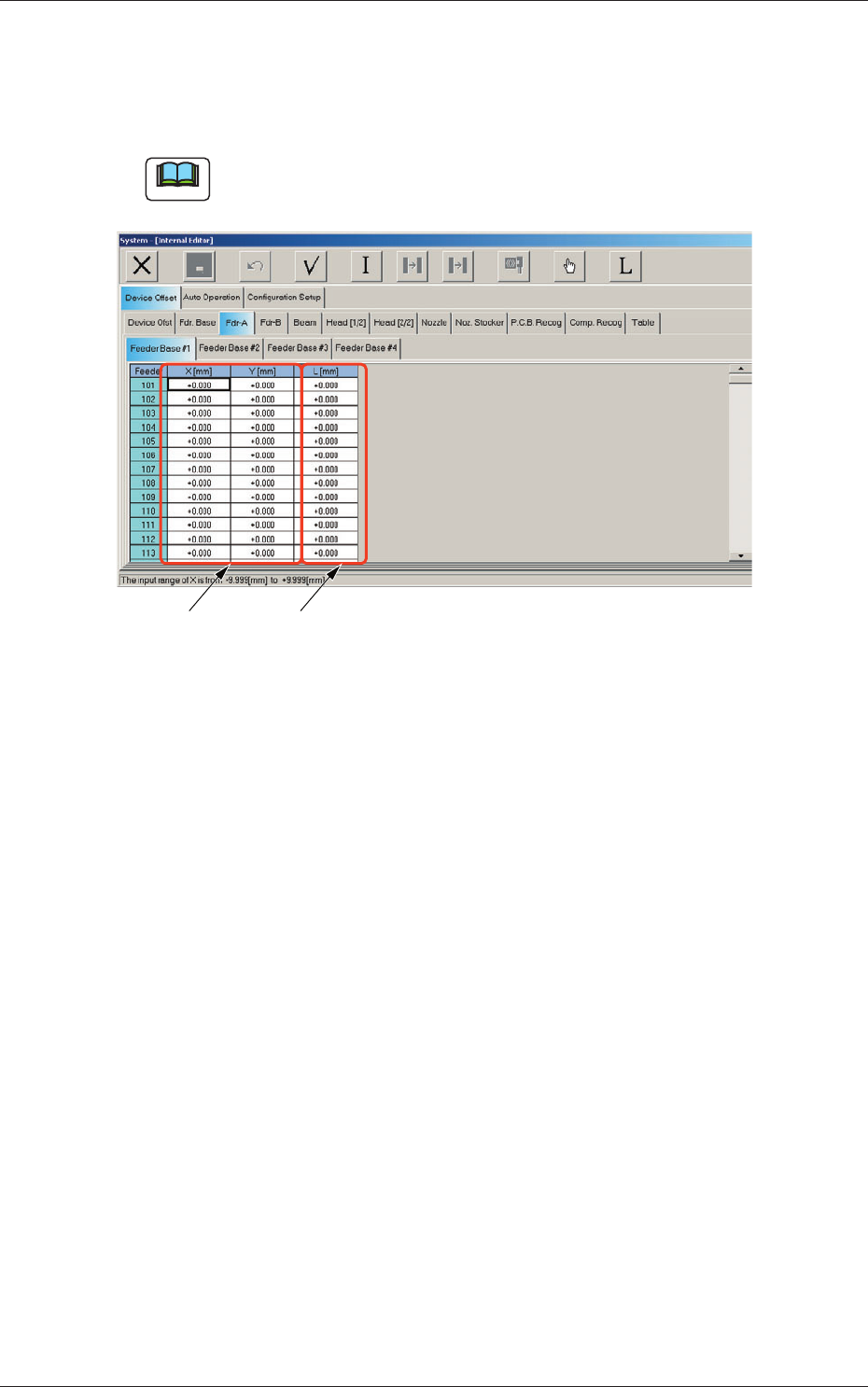
When the "Fdr-A" or the "Fdr-B" tab is pressed in the "Device Offset" tab
sheet, the corresponding tab sheet appears as shown below.
Note
Another tab sheet can be opened by pressing the corresponding "Feeder
Base" tab.
[1] [2]
Fig. 3F9
"
Fdr-A
"
Tab Sheet
Feeder Offset A
This offset data is used to correct variation in each feeder slot (Fdr No.) of
the feeder base.
•
The parameters measured at shipment of the machine are entered.
Do not change the parameters unless necessary.
Feeder Offset B
This of
fset data is used to correct variation in the feeder.
•
The X and Y parameters are recognition-processed during the automatic
op
eration to track the positional relation between the nozzle and component
centers and updated automatically for better pickup posture (pickup on the
component center).
Note:
In normal cases, it is not necessary to enter any parameters.
•
The "L [mm]" parameters are not updated automatically but the entered
ones are reflected.
2.1 Device Offset Data
0606-009