3OM-1208-011_w.pdf - 第278页
6-45 AIVEDT -ID Set the following offset values for each camera. [1] PCB Recog Camera The set parameters are used to adjust the horizontal tilt of the PEC recognition camera. Z (Angle) [deg] Set the parameters representi…
6-44
AIVEDT-ID
2.1.22 PCB Recognition Offset
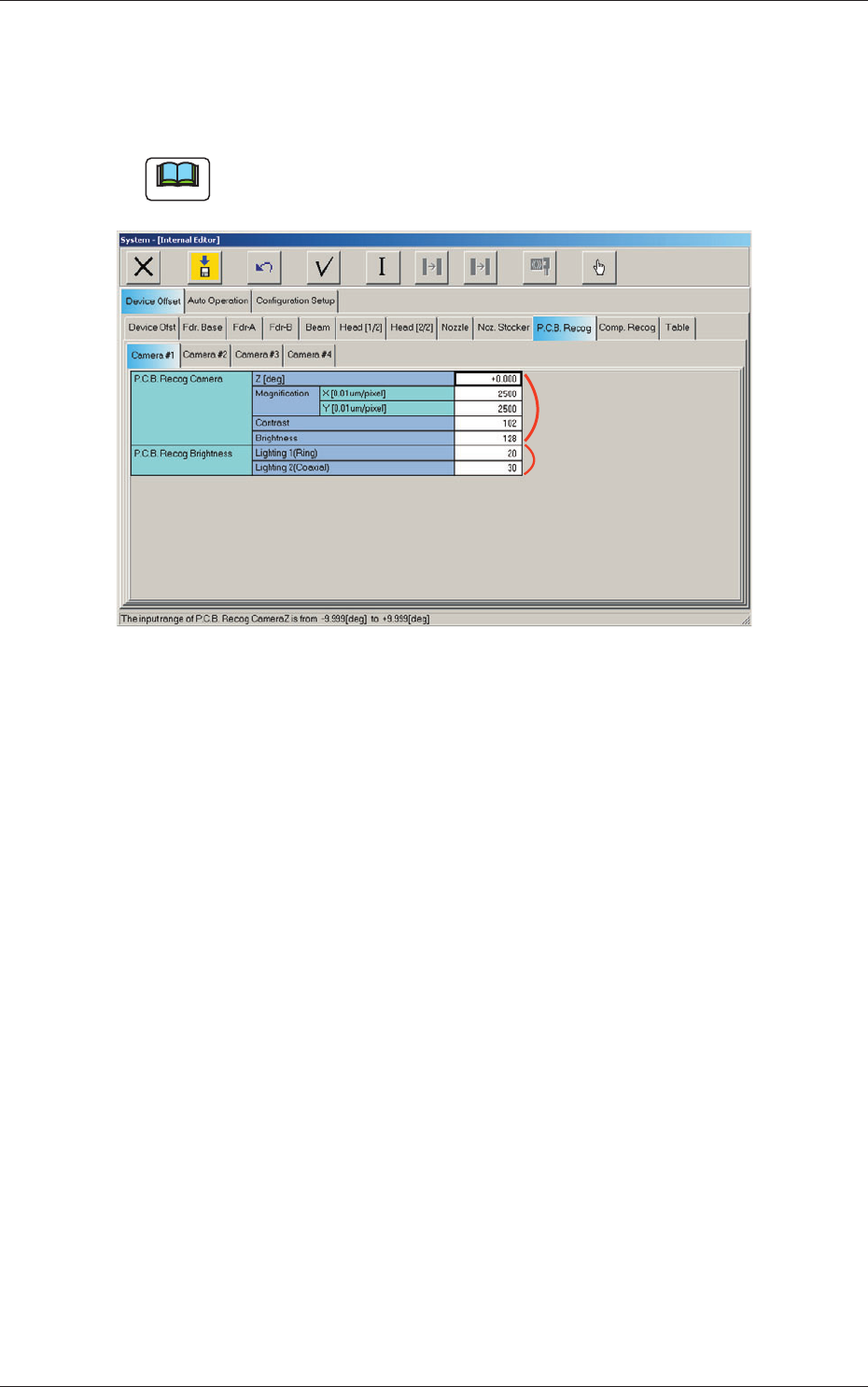
When the "PCB Recog" tab is pressed in the "Device Offset" tab sheet and
the "Camera #1" tab is selected, the following tab sheet appears.
Note
As for the "Camera #2", "Camera #3", and "Camera #4" tab sheets, the
same contents as the "Camera #1" tab sheet are displayed.
[1]
[2]
Fig. 3F44 "PCB Recog Camera #1" Tab Sheet
0606-009
2.1 Device Offset Data
6-45
AIVEDT-ID
Set the following offset values for each camera.
[1] PCB Recog Camera
The set parameters are used to adjust the horizontal tilt of the PEC
recognition camera.
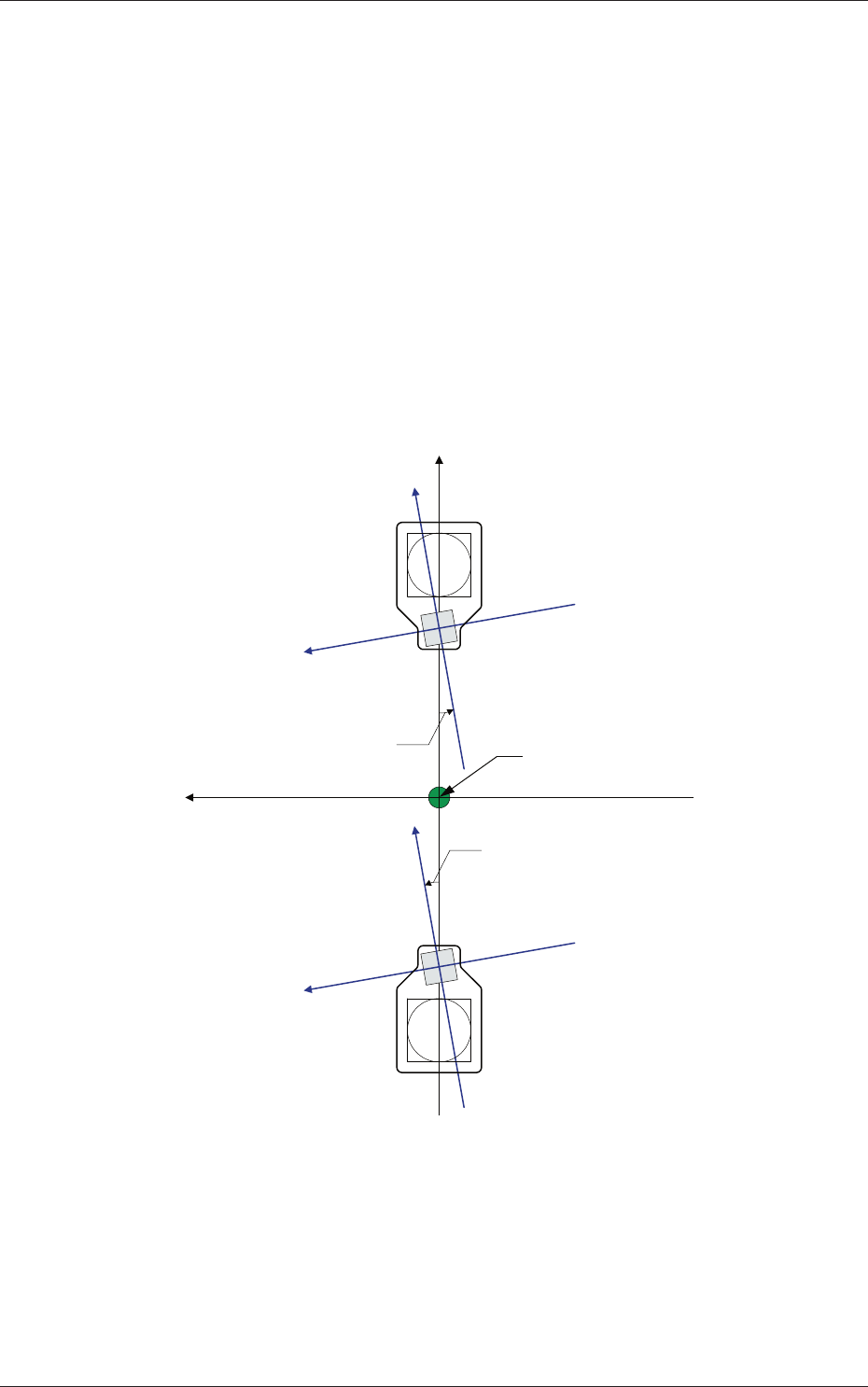
Z (Angle) [deg]
Set the parameters representing the angular deviations in the scanning
coordinates of the PEC recognition cameras based on the machine
reference X/Y coordinates (Xm-Ym).
When the camera scanning coordinates are shifted counterclockwise
to the machine reference X/Y coordinate system, a plus sign must be
affixed to each offset data.
Xm(+)
Ym (+)
Yc (+)
Xc (+)
Yc (+)
Xc (+)
Xc-Yc : PEC Recognition
Coordinate System
Xm-Ym : Machine Reference
Coordinate System
Pm. Machine Reference
Coordinate Origin
Angle of PEC Recognition Camera
Angle of PEC Recognition Camera
Fig. 3F45
0606-009
2.1 Device Offset Data

6-46
AIVEDT-ID
Magnification X (Horizontal) and Y (Vertical) [0.01 mm/pixel]
Set how many micrometers should be equivalent to one pixel to specify
the magnification of the PEC recognition camera.
The parameters are automatically calculated through teaching
operations performed using the magnification measurement jig.
•
Default:
2500
Contrast and Brightness
The brightness of the image captured by the PEC recognition camera
can be adjusted.
•
Defaults
Contrast :
102
Brightness :
128
Note
(a) The larger the value for "Contrast" is, the stronger the chromaticness
becomes.
(b) The larger the value for "Brightness" is, the brighter the whole view
becomes.
[2] PCB Recog Brightness
Coaxial Lighting, Ring Lighting
Set the brightness level for PEC recognition lighting.
•
Defaults
Coaxial Lighting :
30
Ring Lighting :
20
0606-009
2.1 Device Offset Data