YSI_Prog_E.pdf - 第149页
3-26 3 Step screen Changes the display . Display b y Ref. No. Ref. No. unit (part unit) test results are displa yed in the left side list of the inspection list. By selecting parts from the list, the selected row is high…
3-25
3
Step screen
Test range
All : Tests all steps.
Only Piece of Board : Tests steps in individual boards of the selected multi-board panel No.
Only Selected View : Tests steps in the selected view.
Only Selected Parts : Tests steps for the selected part.
Test Board Side (YSi-X)
Performs a test based on the "A/B Side" setting in the basic parameters.
Side A : Tests only those steps for which "A/B Side" is set to "Side A".
Side B : Tests only those steps for which "A/B Side" is set to "Side B".
Both : Tests all steps, regardless of the "A/B Side" setting.
Image List Test
Skip : Tests only standard images, and does not test images in the image list.
All : Tests standard images and images in the image list.
Exec OK Parts : Tests standard images and images in the OK image list.
Exec NG Parts : Tests images in the NG image list.
3
Press the [Execute] button to perform a multi-test.
4
Check the test results.
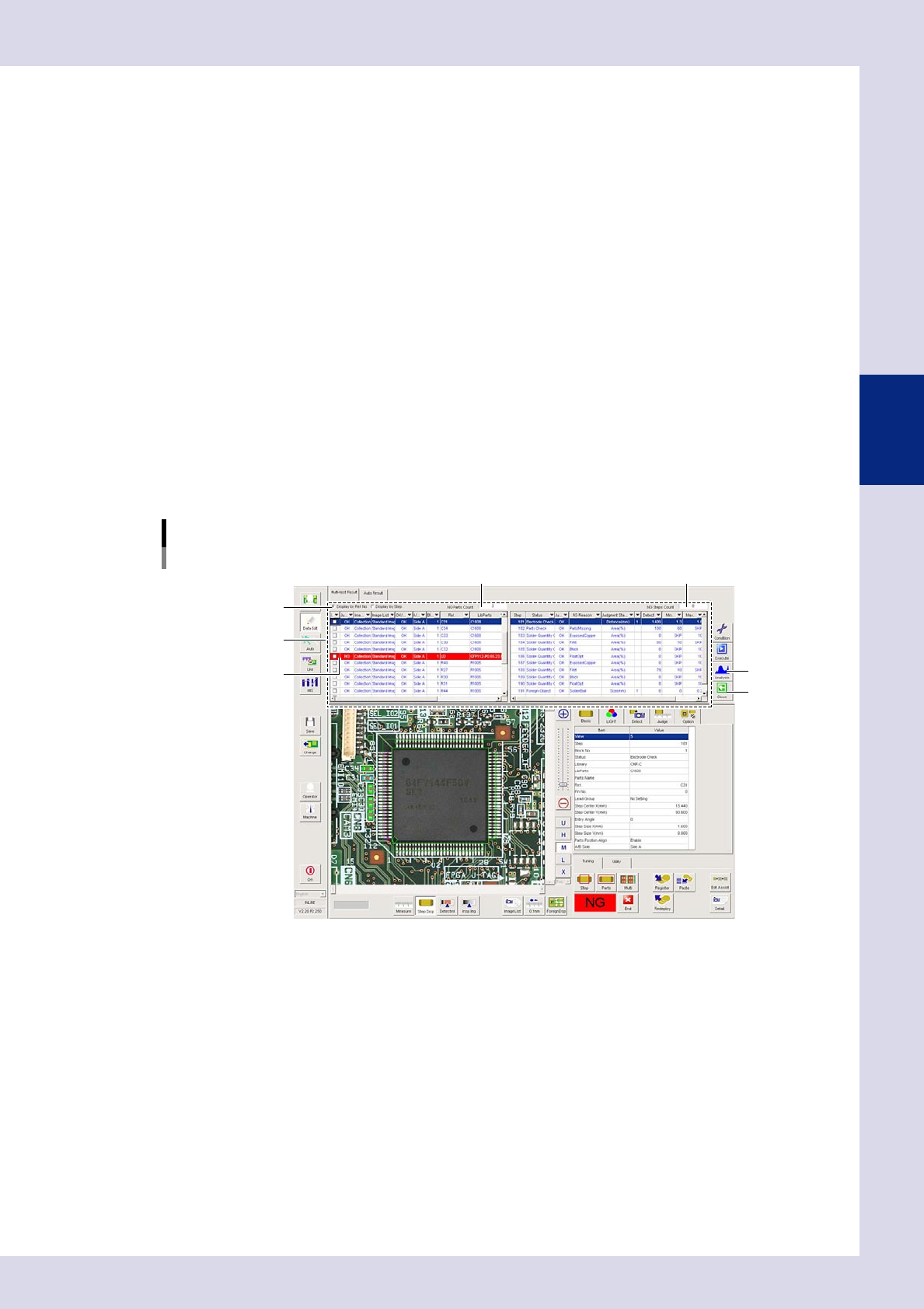
A list of test results appears when the test is complete, allowing the test results and detection values for
each step to be referenced. Steps with NG result appear in red.
Multi-test results example
Ref. No. unit display
[Close] button
Results list
NG step
[Analysis] button
Changes the display.
NG Parts Count
NG Steps Count
24331-P6-00

3-26
3
Step screen
Changes the display.
Display by Ref. No.
Ref. No. unit (part unit) test results are displayed in the left side list of the inspection list. By selecting parts from
the list, the selected row is highlighted in blue, and the step test result for the applicable part is displayed in the
right side list of the inspection list. Select a step and check the step position and parameters.
Display by Step:
Displays the test results for all tested steps. Select a step and check the step position and parameters.
NG Parts Count
Displays the number of parts for which the test result is NG.
NG Steps Count
Displays the number of steps for which the test result is NG.
[Analysis] button
By selecting a display item, the test result for the relevant item is displayed in a graph. Refer to this when setting
parameters for data tuning.
5
Press the [Close] button to exit the multi-test.
3-27
3
Step screen
2.4.2 Measurement results
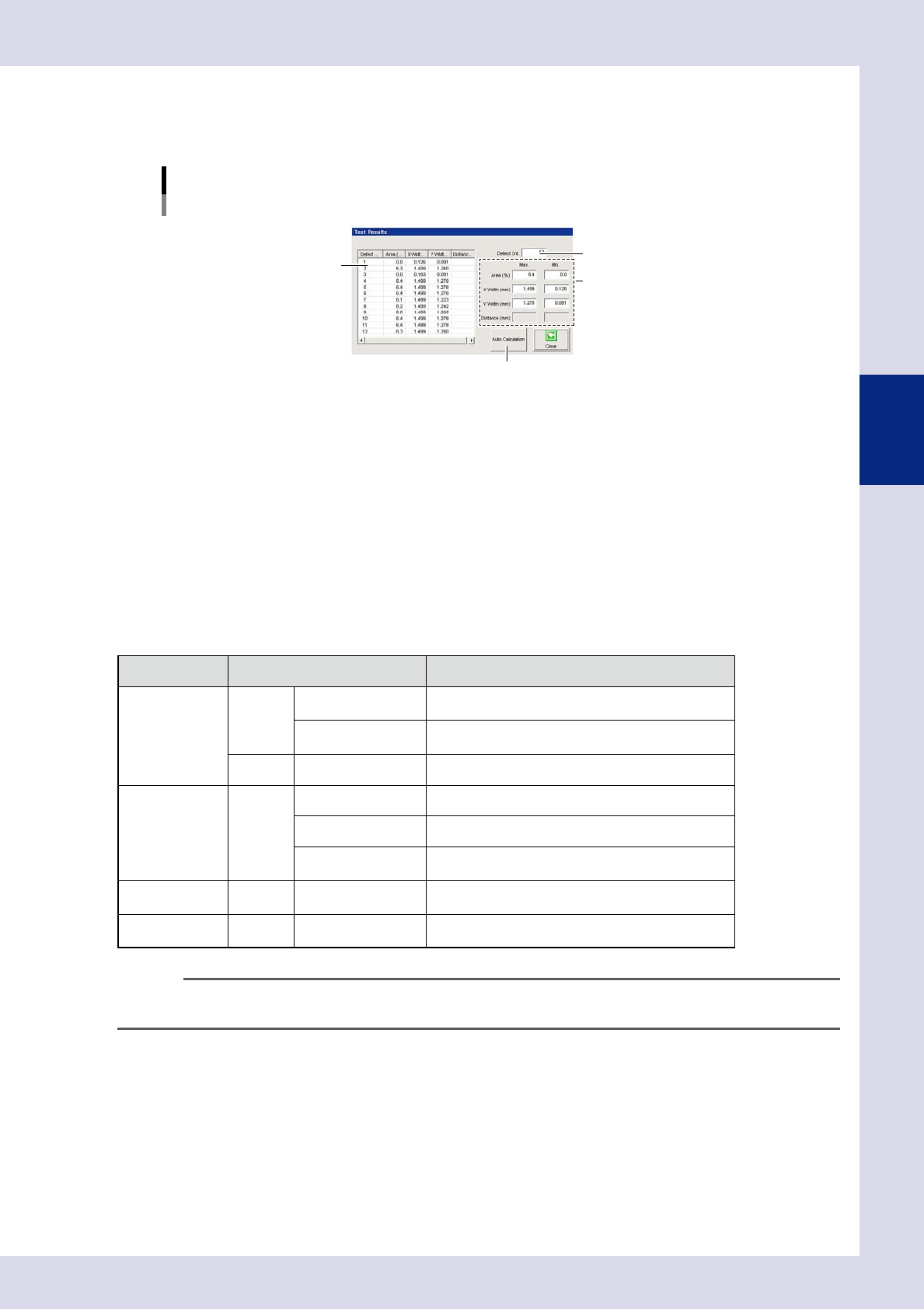
By pressing the [Detail] button following a step test, a "Test Results" screen appears containing data for
detected areas within steps.
"Test Results" screen
Inspection mode: "Lead Check"
3
2
1
4
24332-P6-00
1. Detection area details
Shows the details of all detection areas within the step. Recognized characters and corresponding scores are displayed
following a character recognition test.
2. Detect count
Shows the number of detected steps and number of inspection steps.
3. Max. / Min.
Displays the "Area", "X Width", and "Y Width" maximum and minimum values.
4. [Auto Calculation] button
By pressing this button, detection condition setting values change to appropriate values automatically based on the
detection area. The locations which change and appropriate value calculation method differ for each inspection status.
The items that are automatically set by pressing the [Auto Calculation] button are as follows.
Status Parameters Setting value
Lead Check Judge
Maximum Acceptable
Size X, Y
1.5 times the maximum size XY of each detected lead
Lead Width Check
0.7 times the minimum size of each detected lead when
this parameter is enabled.
Detect Std Area Step area
Electrode Check Detect Std Area Sum of two electrode areas
Minimum Area Fixed to 20%
Minimum Detectable
Size X, Y
0.7 times the step frame size
Character
Recognition
Detect Character Size Maximum detectable size XY by character recognition
Parts Check Detect
Minimum Detectable
Size X, Y
0.7 times the step frame size
n
NOTE
Values entered by pressing the [Auto Calculation] button cannot be applied to all parts. If a step test is performed
and the test result is not incorrect, change the parameter settings as required.