00196626-06_AI_Portalmodularitaet_SX12_de_en.pdf - 第117页
Dismantling a Gantry Firmware Download Performing Calibration Gantry Modularity Portalmodular ität 117 4.2.2 Firmware Do wnload ► Select the Update machine.. button to check th e whole machi ne and to perform an eSW down…
Dismantling a Gantry
Performing Calibration Description and Connections on the GCU
116 Gantry Modularity Portalmodularität
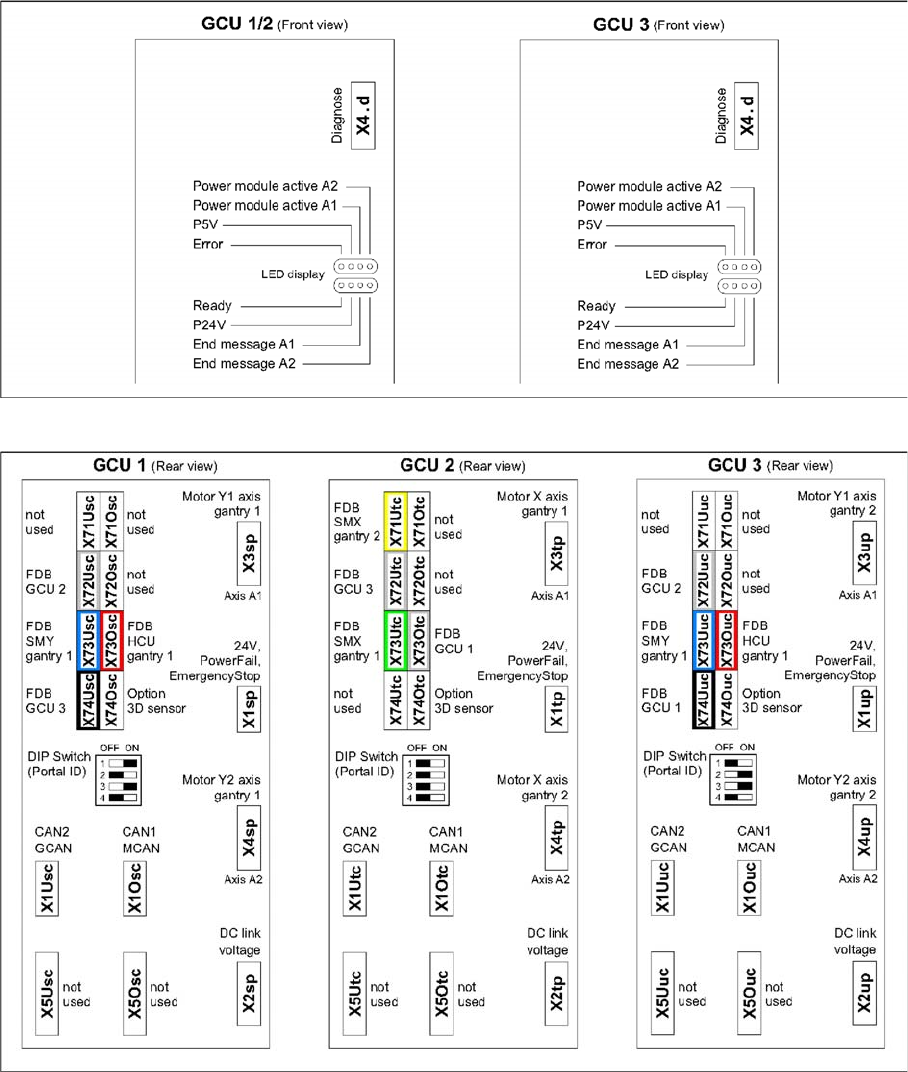
4.2.1 Description and Connections on the GCU
GCU - front side
GCU - rear side
Dismantling a Gantry
Firmware Download Performing Calibration
Gantry Modularity Portalmodularität 117
4.2.2 Firmware Download
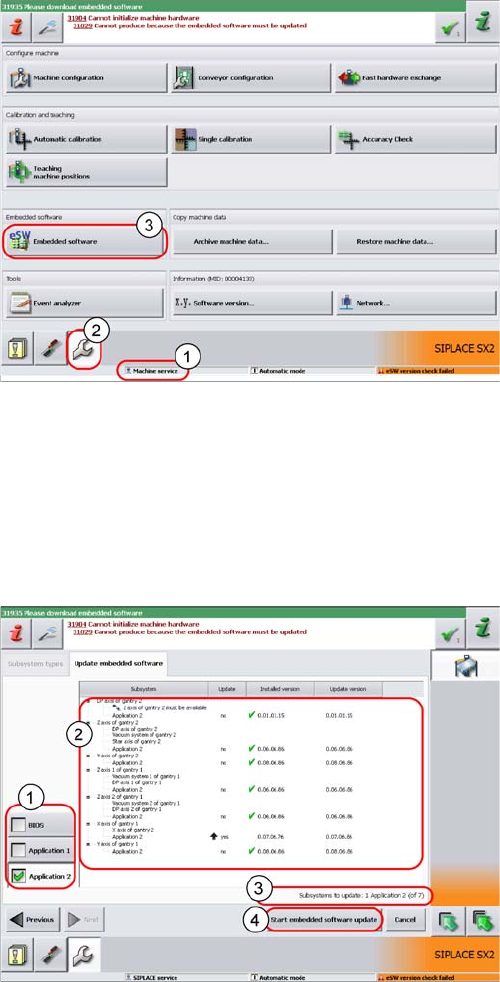
► Select the Update machine.. button to check the whole machine and to perform an eSW download
for multiple subsystems.
► Select the Update subsystem... button to select and check a specific subsystem, in order to perform
an eSW download.
► Select theVersion Information... button in order to display all subsystem versions, Bios application 1/
2.
► The function Firmware Download can be performed
with the operator levels (1) Machine-Service or
SIPLACE-Service.
► Switch over to the service menu (2).
► Select the button Embedded Software (3).
1. Selection button, BIOS application 1/2
2. Shows the status of the individual subsystems.
3. Update information about the number of subsystems
which still have to be downloaded.
4. Starts the download.

Dismantling a Gantry
Checklist Firmware Download
118 Gantry Modularity Portalmodularität
4.3 Checklist
► Put this check list in the machine logbook.
Gantry dismantled (downgrade)
Step Action Who?
1 Gantry removed? Customer in line with assembly
guide
2 Is the gantry secured in the gantry carrier? Customer in line with assembly
guide
3 Head secured in center of gantry? Customer in line with assembly
guide
4 Are the correct end position buffers fitted? Customer in line with assembly
guide
5 Has the trailing cable been packed correctly and fixed
in the machine?
Customer in line with assembly
guide
6 Has the stationary camera (optional) been dismantled,
if necessary?
Customer in line with assembly
guide
7 Have the camera connections been unplugged from the
box PC?
Customer in line with assembly
guide
8 Has the nozzle changer been dismantled, if necessary Customer in line with assembly
guide
9 Is the reject bin fitted? Customer in line with assembly
guide
10 Have all tools been removed from the machine? Customer in line with assembly
guide
11 Are the doors screwed? Customer in line with assembly
guide
12 Is the machine switched on and ready for operation? Customer in line with assembly
guide
13 Have all calibration steps been performed? Customer in line with assembly
guide
Date Signature