00196626-06_AI_Portalmodularitaet_SX12_de_en.pdf - 第94页
Fitting the Gantry Installing the Gantry Transporta tion Locks and Tilt Guar d 94 Gantry Modularity Portalmodularität 3.4 Installing the Gantry Hooking the gantry carrier into place on the machine ► (1) Use the gantry li…
Fitting the Gantry
Transportation Locks and Tilt Guard Gantry Preparations
Gantry Modularity Portalmodularität 93
3.3.4 Transportation Locks and Tilt Guard
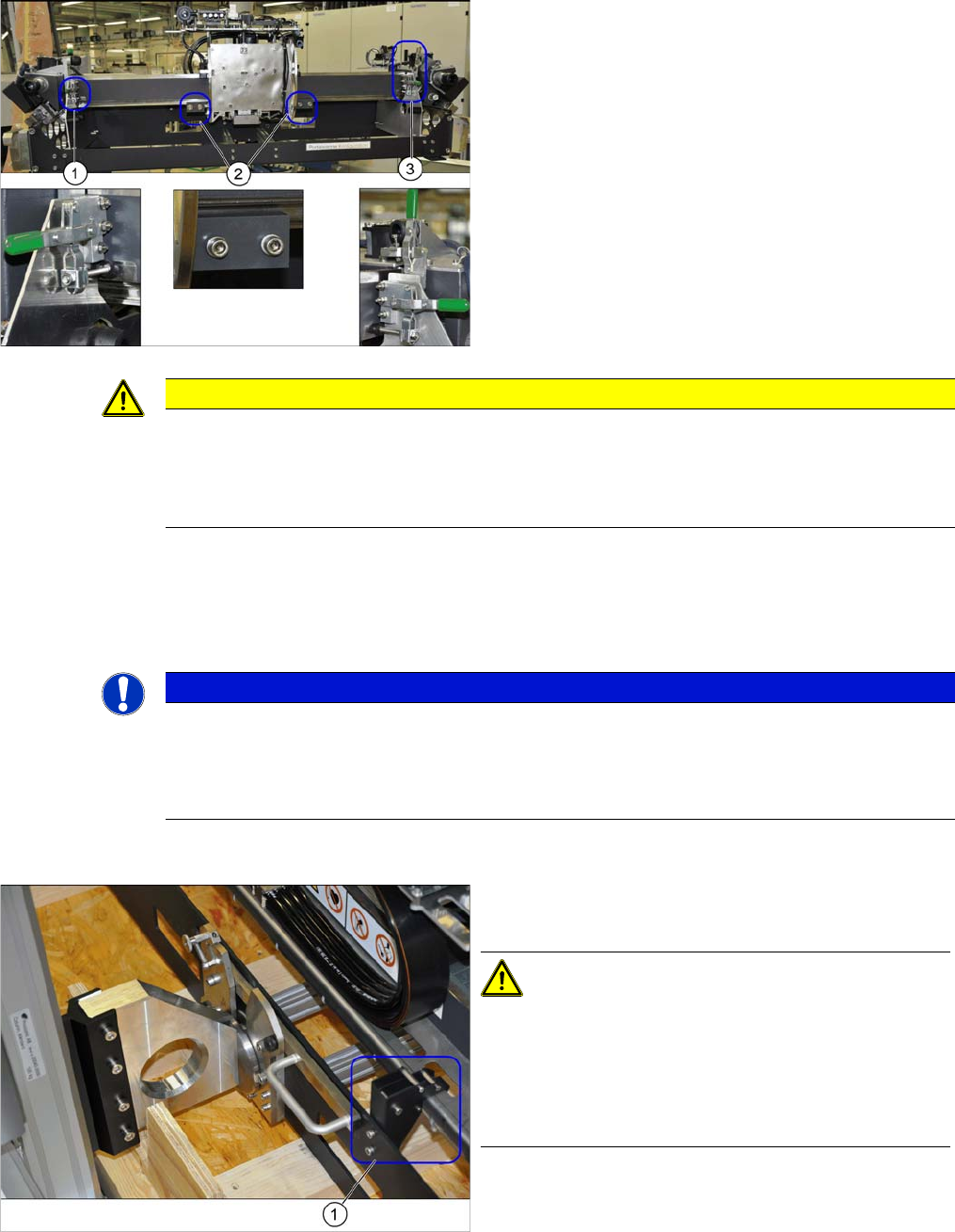
► Swing the green lever upwards and swivel the transportation lock to one side.
► There is another lever at (3). Swing the green lever upwards and remove it.
► Loosen the 2 screws fastening the transportation locks (2) to the head plate in each case and remove
both locks.
Tilt guard on the gantry carrier
The gantry is locked with 3 transportation locks (1) and
(3) at the gantry carrier. In addition, the head plate has
two transportation locks (2) for the placement head.
CAUTION
Docking
► Flap down the transportation lock plates right before the docking.
► Make sure that the gantry does not slide of the gantry carrier during rerailing respectively
derailing and that the tilt guard is suspended in order to hold the gantry in position.
NOTICE
Storing the transportation locks
If the gantry is transported or packed back into the transportation crate, you need to refit the
transportation locks.
► Place the transportation locks in the crate for later usage.
The gantry is also fitted with a tilt guard (1) on the gantry
carrier.
CAUTION!
Tilt guard on the gantry carrier
When the tilt guard is open, the gantry could fall off the
gantry carrier.
Only open the tilt guard once you have hooked the gantry
carrier onto the machine docking unit.
Fitting the Gantry
Installing the Gantry Transportation Locks and Tilt Guard
94 Gantry Modularity Portalmodularität
3.4 Installing the Gantry
Hooking the gantry carrier into place on the machine
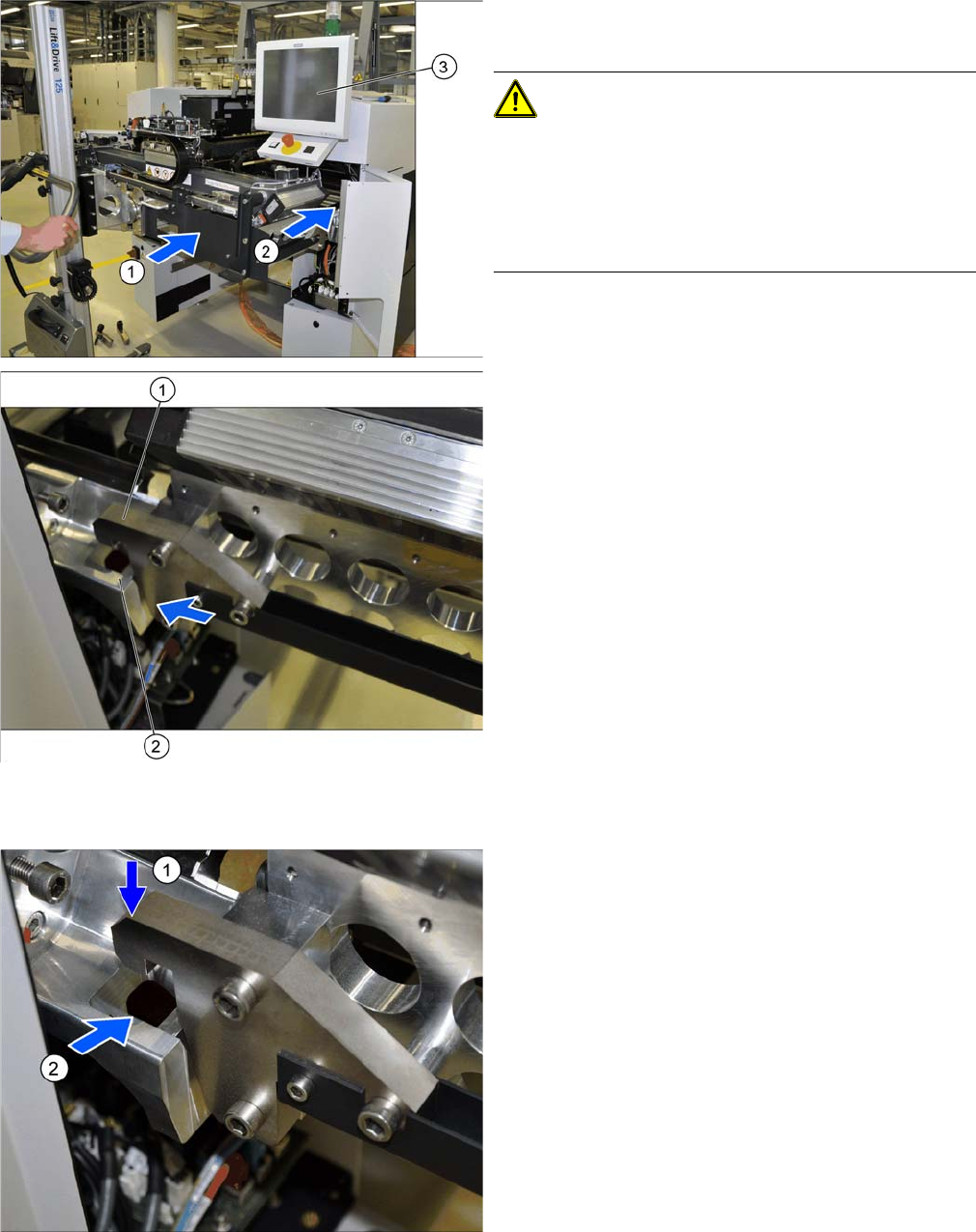
► (1) Use the gantry lift to move the gantry in front of the
machine location.
CAUTION!
Move the gantry carefully
Make sure that you do not damage the monitor (3).
Make sure that you do not hit the gantry anywhere and do
not move it too far into the machine (2). Always check the
right and left sides.
1. Docking hook on the gantry carrier
2. Docking unit on the machine linear guides
► Move the gantry forwards so that the gantry carrier
docking hooks (1) are in front of the machine docking
unit (2).
► Always check the right and left sides.
► Lift the gantry so that the gantry carrier docking hooks
(1) are above the machine docking unit (2).
► Carefully lower the gantry so that the two docking
hooks (1) slide reliably into the openings in the dock-
ing unit (2).
► Always check the right and left sides.
Fitting the Gantry
Transportation Locks and Tilt Guard Installing the Gantry
Gantry Modularity Portalmodularität 95
Remove the tilt guard and move in the gantry
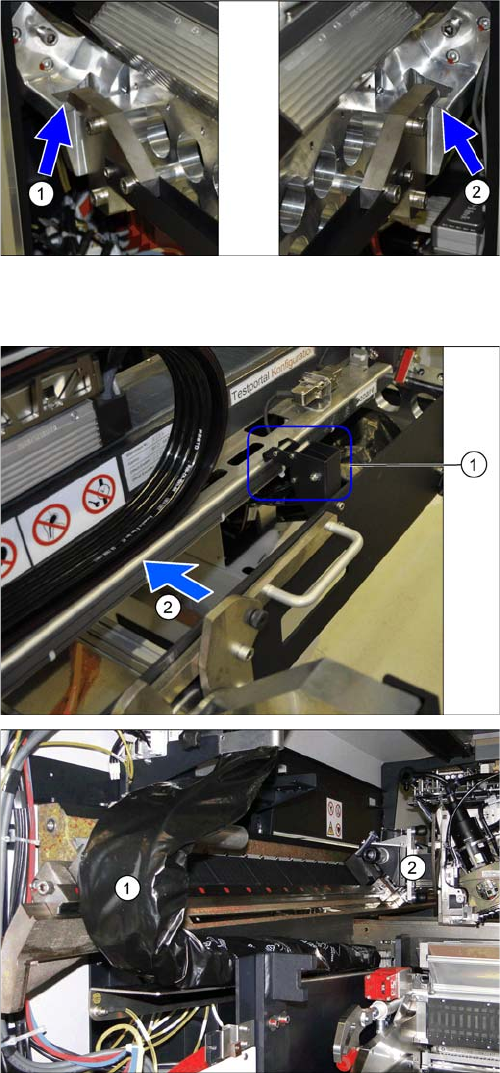
The docking hooks are hooked into place on the left (1)
and right (2) sides.
The gantry carrier with the gantry is now fixed reliably
onto the machine.
► Open the tilt guard (1).
► Push the gantry (2) into the machine so that both
sides of the gantry rest on the two linear guides.
► Move the gantry lift with the gantry carrier out of the
location.
► Move the gantry (2) into the machine so that the trail-
ing cable (1) can be pulled underneath, through the
gantry.