00197043-04_VD_706_1_SP2_705_05_SP2_DE_EN.pdf - 第11页
Station S oftware 70 6. 1 SP 2 /705.05 SP 2 / Vers ion De scription Ausgabe 07/2013 E dition 11 4 Compa tible M ode The 706.1 SP 2 station sof tware version can be use d as Vers ion 705 © in c ompatible m ode on placem e…
Station Software 706.1 SP2/705.05 SP2 / Version Description Ausgabe 07/2013 Edition
10
3.5 User Classification – New Activity Levels
The activity levels have been changed in the 70x station software version. The following 4 activity
levels exist:
– Basic Production
– Advanced Production
– Machine Service
– SIPLACE Service
NOTICE
For a detailed description of the user classification and changing the activity levels, see
the "Getting Started" manual (order number: 00195685-02).
3.6 User Settings, Machine Options and Software Options
There is no menu bar on the GUI of the 70x station software version.
The user settings, the software options and the machine options can be found in the Settings view
(Icon ).
NOTICE
For a detailed description of the settings, see the online help of the station software.

Station Software 706.1 SP2/705.05 SP2 / Version Description Ausgabe 07/2013 Edition
11
4 Compatible Mode
The 706.1 SP2 station software version can be used as Version 705© in compatible mode on
placement machines that do not run with the 706.x station software only. I.e., the compatible mode
may be used on an SX1/SX2 but not on an SX1/SX2 V2 placement machine.
This means that the new functions of the current version can be used in the compatible version as
far as possible.
The visibility and functionality of the new functions in compatible mode are explained in the
following table.
Compatible Mode Meaning
Complete
Complete function support.
Compatible The function is visible and executable at the station. However, new add-
ons in the station software or in the line products are not supported.
Hidden The function is invisible/inactive, e.g. due to licensing or unsupported
SIPLACE Pro download/upload.
Not supported
The function is not supported, e.g. because of failing hardware.
Table 4-1: Visibility and functionality in compatible mode
The respective visibility/functionality in compatible mode is specified for the new features in
chapter 5.
Station Software 706.1 SP2/705.05 SP2 / Version Description Ausgabe 07/2013 Edition
12
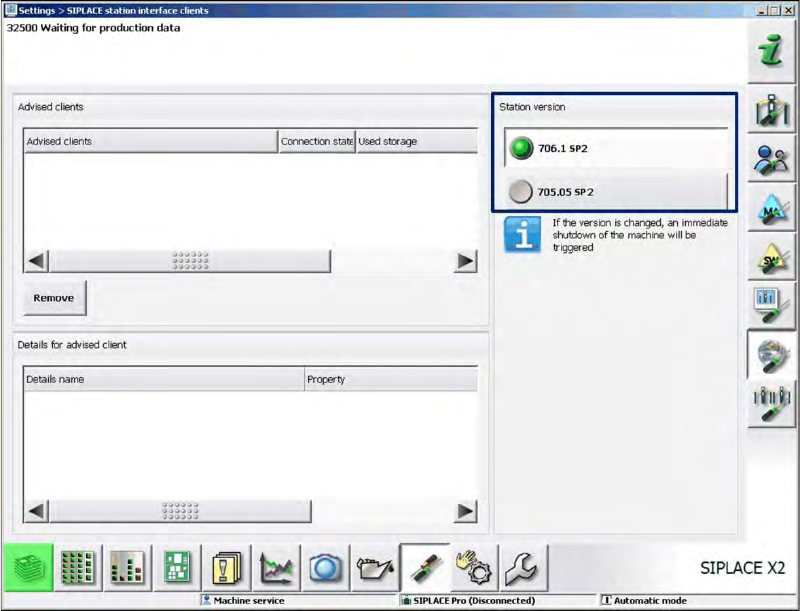
The compatible mode can be activated under Settings – SIPLACE station interface clients on
the GUI.
Figure 4-1: Setting compatible mode