00197043-04_VD_706_1_SP2_705_05_SP2_DE_EN.pdf - 第40页
Station S oftware 70 6. 1 SP 2 /705.05 SP 2 / Vers ion De scription Ausgabe 07/2013 E dition 40 6.19 Requesting Shutdow n Reason on the GUI If the m achine reboots unex pectedly, an error event is gener ated during s hut…
Station Software 706.1 SP2/705.05 SP2 / Version Description Ausgabe 07/2013 Edition
39
6.17 Tape Security Flag in X-Feeder
An X-feeder can be operated in many different ways in an environment without setup verification.
Therefore, a tape might be exchanged in an X-feeder without notifying SIPLACE Setup Center
about it.
A tape security flag is set in the embedded software of the X-feeder to check for changes on a tape
in the feeder. The tape will be accordingly displayed as "secure" or "insecure" on the GUI of the
station software.
The security flag is set to the "secure" value in the following cases:
– A packaging unit is assigned and the foil is not torn.
– A packaging unit is assigned and a foil torn has been repaired.
The security flag is set to the "insecure" value in the following cases:
– Foil torn
– Foil removal error
– Foil jam
If a feeder is positioned at the station, the security flag is read by the station software and
transferred to SIPLACE Setup Center. SIPLACE Setup Center evaluates the security flag state. If
the "unsecure" value applies, the appropriate packaging unit is torn down and the station is notified
that the track is empty. The corresponding tape will then be displayed as "insecure" on the GUI of
the station software.
6.18 Improved Behavior at Conveyor Problems
Until now, the entire station and not only the concerned input belt was locked at some conveyor
problems. The displayed setup and other data of the current job were reset and thus, it was not
possible to perform a setup verification.
Examples
– The external MES system locks the station during a product change or a change over. The first
board of the next job has already passed the printer while the first station still assembles the
last board of the preceding job. By locking the station, the external system ensures that the
new board does not enter the station too soon.
– During production, an external system detects a problem, e.g. too low pick-up reliability. The
input belt and the station get locked. After the station has been locked it cannot be operated,
e.g. to solve the problem with the concerned component shape, without performing a reboot.
As of this station software version, the concerned input belt will be locked only and correspondingly
displayed by an icon on the GUI. All other station functions can be performed.
Station Software 706.1 SP2/705.05 SP2 / Version Description Ausgabe 07/2013 Edition
40
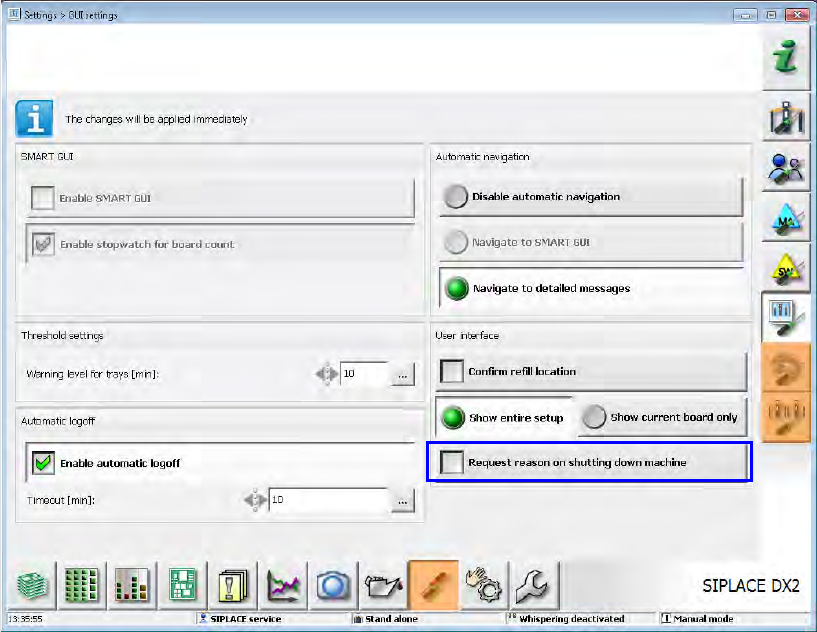
6.19 Requesting Shutdown Reason on the GUI
If the machine reboots unexpectedly, an error event is generated during shutdown. However, with
this event it cannot be detected if the shutdown was scheduled (e.g. for maintenance) or
unscheduled caused by a software or hardware problem.
In order to find out the shutdown reason, a request can be activated under Settings – GUI
settings as of this station software version.
Figure 5-20: Requesting machine shutdown cause
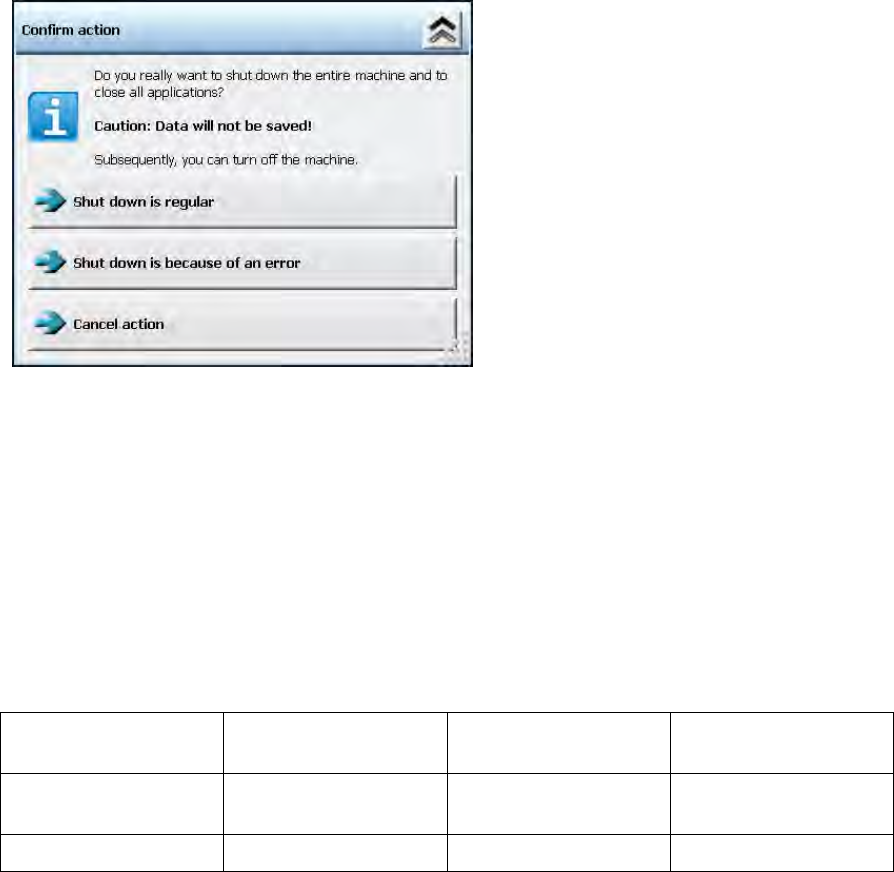
If the Request reason on shutting down machine option is activated, the following dialog is
displayed after the Shut Down button has been clicked.
Station Software 706.1 SP2/705.05 SP2 / Version Description Ausgabe 07/2013 Edition
41
Figure 5-21: Confirming shutdown
The operator has to select either the Shutdown is regular or the Shutdown is because of an
error option. Thereafter, the shutdown will be performed.
If the Shutdown is because of an error option was selected, the station software generates a
new error event that will serve as basis criterion for the decision to perform unscheduled reboots.
This event can be automatically evaluated by tools.
6.20 New Positions for Fixed Rails in SX1/SX2 V2
The following new positions have been implemented for fixed rails in the SX1/SX2 V2 conveyor
system:
Fixed Rail Fixed Rail Position PCB Width Distance of Fixed
Rail
Right/Left
Outer
268 250 286
536
Right/Left
259.7
242
277.2
Table 5-1: Fixed rail positions in SX1/SX2 V2
6.21 Checking Insufficiently Fixed Filter Disks
Some filter disks are not sufficiently fixed on the segments and thus are loosened. Loosened filter
disks may cause placement errors and the suction of small components into the vacuum system of
the placement head.
The fixing of the filter disks can be checked by a blowing off test. A stronger blow pulse that blows
off an insufficiently fixed filter disk is generated in the pressure control valve,. The absence of the
filter disk is detected by the component camera of the placement head and a corresponding error
message is displayed.
In the station software, this test run can be started in the Manual operations for the placement
heads on the SIPLACE service activity level via the Check filter disks button.