00197043-04_VD_706_1_SP2_705_05_SP2_DE_EN.pdf - 第13页
Station S oftware 70 6. 1 SP 2 /705.05 SP 2 / Vers ion De scription Ausgabe 07/2013 E dition 13 5 Featur es of the 706. 1 SP x Station Softw ar e Version 5.1 Features of the 706.1 SP2 Station Soft ware Version This s tat…
Station Software 706.1 SP2/705.05 SP2 / Version Description Ausgabe 07/2013 Edition
12
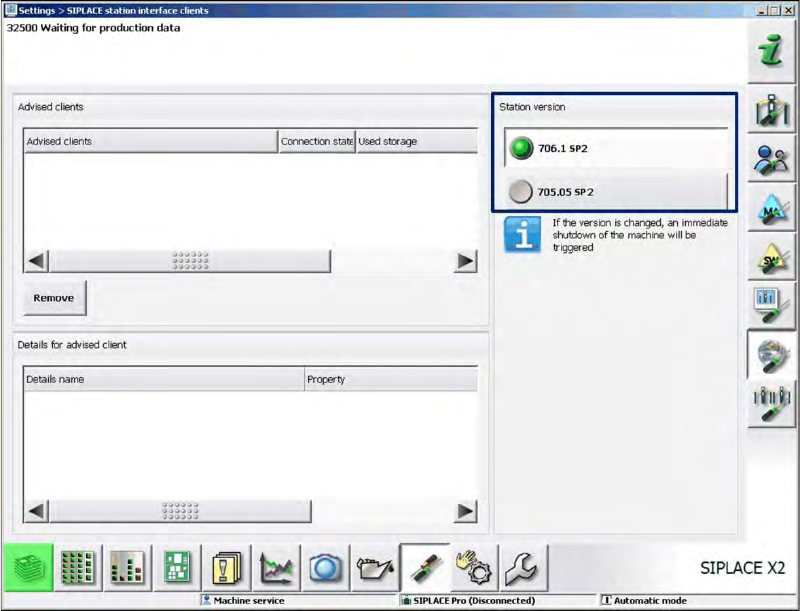
The compatible mode can be activated under Settings – SIPLACE station interface clients on
the GUI.
Figure 4-1: Setting compatible mode

Station Software 706.1 SP2/705.05 SP2 / Version Description Ausgabe 07/2013 Edition
13
5 Features of the 706.1 SPx Station Software Version
5.1 Features of the 706.1 SP2 Station Software Version
This station software version does not contain any new features.
All features of the 701.xx - 706.1 SP1 station software versions are also supported in the 706.1
SP2 station software version.
5.2 Features of the 706.1 SP1 Station Software Version
NOTICE
Detailed information about the single functions can be found in the Online help for the
station software.
All features of the 701.xx - 706.1 station software versions are also supported in the 706.1 SP1
station software version. The main features of the 706.1 SP1 station software version are listed
below.
5.2.1 "Set full" Function Linked to Activity Level
Up til now the operator could set the table full with the button in the main view as of the
Basic Production activity level.
As of this station software version, this function is linked to the activity level.
Default activity level: Advanced Production.
If required, the activity level may be changed.
5.2.2 New Nozzle Types: 1008 and 1009
The new 1008 and 1009 nozzle types are supported by the station software.

Station Software 706.1 SP2/705.05 SP2 / Version Description Ausgabe 07/2013 Edition
14
6 Features of the 706.1 Station Software Version
NOTICE
Detailed information about the single functions can be found in the Online help for the
station software.
All features of the 701.xx - 706.0 station software versions are also supported in the 706.1 station
software version. The main features of the 706.1 station software version are listed below.
6.1 SIPLACE X-Series S – X3 S, X4 S, X4i S Placement Machines
Compatible mode: Not supported
The station software supports the X3 S (with three gantries), X4 S and X4i S (with four gantries)
placement machines of the new SIPLACE X-series S. The X4i S resembles the X4i and the X4 S
resembles the X4 placement machine. The only difference between the X3 S and the X4 S
placement machines is that gantry 2 fails for the X3 S and consequently, it resembles an X3
placement machine.
For the X4i S it is necessary to define the table position (inner and outer) in the Auto Configuration.
For the X3 S and X4 S, only the outer table position is supported.
To minimize the distance between feeder and conveyor, the small calibration tool holder with a
small calibration tool device is used for the CPP placement head. However, if a stationary camera
is used simultaneously, the big calibration tool device with the corresponding calibration tool holder
still has to be used.
Smart Pin Support is supported. Each gantry has to be equipped with a pin picker if Smart Pin
Support is used.
The new conveyor system for the SIPLACE X-series S is supported.
6.2 New Conveyor System for SIPLACE X-Series S
Compatible mode: Not supported
A new conveyor system has been introduced for the SIPLACE X-series S placement machines.
The conveyor system consists of five sections: input section, processing section 1, intermediate
section, processing section 2, output section and supports single and dual conveyor lane mode.