00197043-04_VD_706_1_SP2_705_05_SP2_DE_EN.pdf - 第12页
Station S oftware 70 6. 1 SP 2 /705.05 SP 2 / Vers ion De scription Ausgabe 07/2013 E dition 12 The com patible m ode can be act ivated under Settings – SIP L A CE station inte rface clients on the GUI. Figure 4-1 : Sett…

Station Software 706.1 SP2/705.05 SP2 / Version Description Ausgabe 07/2013 Edition
11
4 Compatible Mode
The 706.1 SP2 station software version can be used as Version 705© in compatible mode on
placement machines that do not run with the 706.x station software only. I.e., the compatible mode
may be used on an SX1/SX2 but not on an SX1/SX2 V2 placement machine.
This means that the new functions of the current version can be used in the compatible version as
far as possible.
The visibility and functionality of the new functions in compatible mode are explained in the
following table.
Compatible Mode Meaning
Complete
Complete function support.
Compatible The function is visible and executable at the station. However, new add-
ons in the station software or in the line products are not supported.
Hidden The function is invisible/inactive, e.g. due to licensing or unsupported
SIPLACE Pro download/upload.
Not supported
The function is not supported, e.g. because of failing hardware.
Table 4-1: Visibility and functionality in compatible mode
The respective visibility/functionality in compatible mode is specified for the new features in
chapter 5.
Station Software 706.1 SP2/705.05 SP2 / Version Description Ausgabe 07/2013 Edition
12
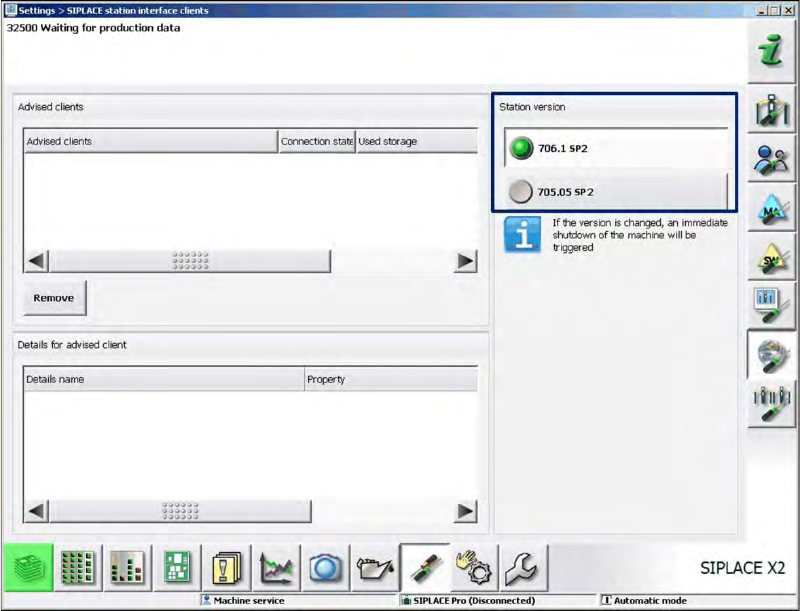
The compatible mode can be activated under Settings – SIPLACE station interface clients on
the GUI.
Figure 4-1: Setting compatible mode
Station Software 706.1 SP2/705.05 SP2 / Version Description Ausgabe 07/2013 Edition
13
5 Features of the 706.1 SPx Station Software Version
5.1 Features of the 706.1 SP2 Station Software Version
This station software version does not contain any new features.
All features of the 701.xx - 706.1 SP1 station software versions are also supported in the 706.1
SP2 station software version.
5.2 Features of the 706.1 SP1 Station Software Version
NOTICE
Detailed information about the single functions can be found in the Online help for the
station software.
All features of the 701.xx - 706.1 station software versions are also supported in the 706.1 SP1
station software version. The main features of the 706.1 SP1 station software version are listed
below.
5.2.1 "Set full" Function Linked to Activity Level
Up til now the operator could set the table full with the button in the main view as of the
Basic Production activity level.
As of this station software version, this function is linked to the activity level.
Default activity level: Advanced Production.
If required, the activity level may be changed.
5.2.2 New Nozzle Types: 1008 and 1009
The new 1008 and 1009 nozzle types are supported by the station software.