00197043-04_VD_706_1_SP2_705_05_SP2_DE_EN.pdf - 第47页
Station S oftware 70 6. 1 SP 2 /705.05 SP 2 / Vers ion De scription Ausgabe 07/2013 E dition 47 Component ra nge for Twin Head W ith type 25 component c am era (Stat. P&P 16 x 16 mm digital) W ith default type 3 3 co…
Station Software 706.1 SP2/705.05 SP2 / Version Description Ausgabe 07/2013 Edition
46
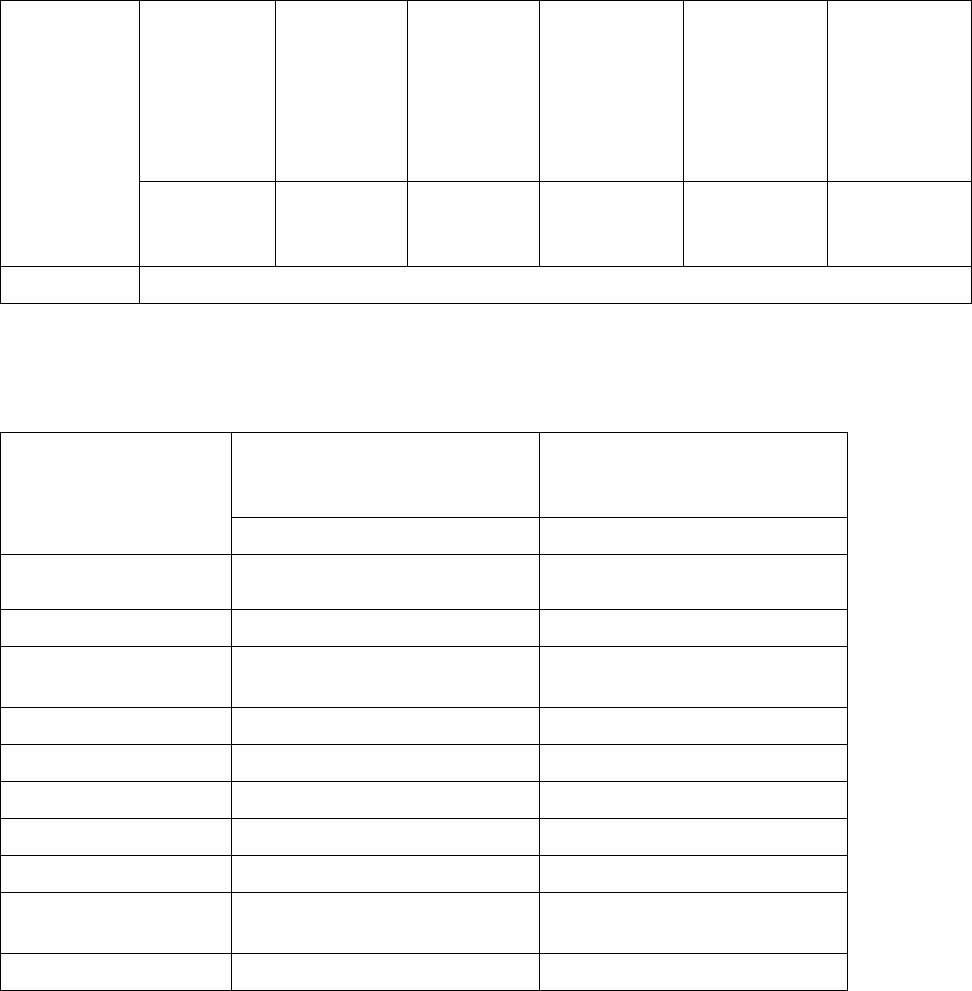
7.3 Component Range
Component
range for
CPP head
With type 28
component
camera
(C&P 18,7 x
18,7 mm
digital)
With type
29
component
camera
(C&P 27 x
27 mm
digital)
With default
type 30
component
camera
(C&P 27 x
27 mm
digital)
With type 38
component
camera (C&P
16 x 16 mm
digital)
With type 33
component
camera (Stat.
P&P 55 x 45
mm digital)
With type 36
component
camera (Stat.
P&P 32 x 32
mm digital)
0402
through 18.7
x 18.7 mm
01005
*)
through 27
x 27 mm
01005
through 27
x 27 mm
01005
through 16 x
16 mm
(0603)
through
55 x 45 mm
0603 through
32 x 32 mm
Nozzle types 20xx, 28xx
Table 7-3: Component range CPP head
*)
If components with an edge length between 0.19 and 0.26 mm are taught, a warning is displayed,
that the placement quality may be less than specified.
Component range for
C&P20A head
With default type 23 component
camera (C&P 6 x 6 mm digital)
With high-resolution type 41
component camera (C&P 6 x 6
digital)
01005 through 2220 01005 through 2220
Component
specification
min dimenstions
0.18 x 0.18 mm 0.12 x 0.12 mm
max. dimensions
6 x 6 mm (incl. component
tolerances)
6 x 6 mm (incl. component
tolerances)
min. lead pitch
0.25 mm 0.08 mm
min. lead width
0.1 mm 0.03 mm
min. ball pitch
0.4 mm 0.1 mm
min. ball diameter
0.2 mm 0.,05 mm
Field of vision
8.4 x 8.4 mm
2
8.9 x 8.9 mm
2
Method of illumination
Front-illumination (5 levels,
programable as required)
Front-illumination (5 levels,
programable as required)
Nozzle types 10 xx, 11 xx, 12 xx 10 xx, 11 xx, 12 xx
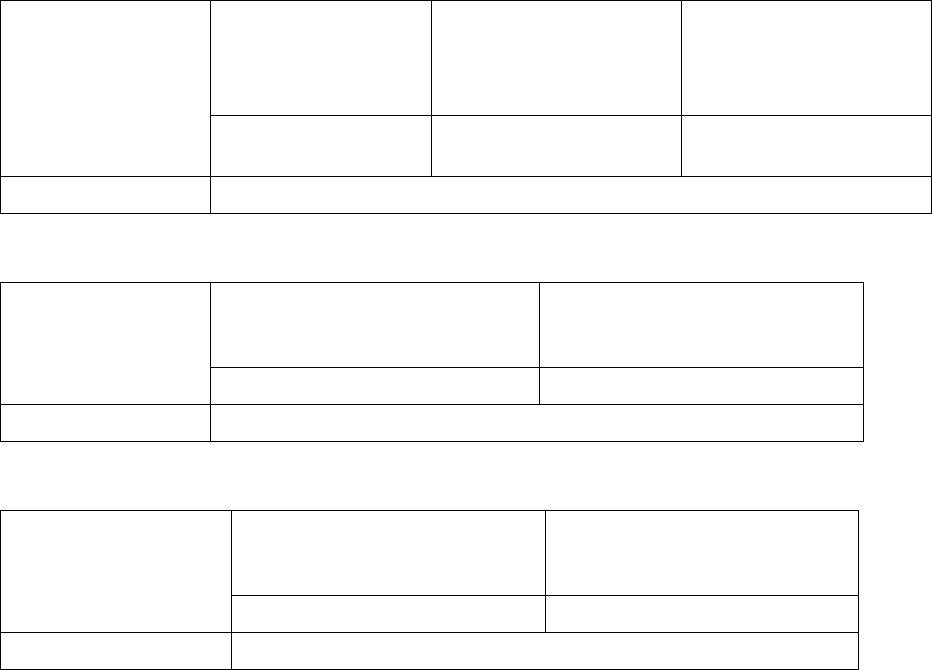
Table 7-4: Component range C&P20A head
Station Software 706.1 SP2/705.05 SP2 / Version Description Ausgabe 07/2013 Edition
47
Component range
for Twin Head
With type 25
component camera
(Stat. P&P 16 x 16
mm digital)
With default type 33
component camera (Stat.
P&P 55 x 45 mm digital)
With type 36 component
camera (Stat. P&P 32 x
32 mm digital)
0201 through 16 x 16
mm
0402 through 55 x 45 mm 0603 through 32 x 32 mm
Nozzle types 5 xx (standard), 4 xx + adapter, 8 xx + adapter, 9xx + adapter
Table 7-5: Component range Twin Head
Component range
for VHF P&P head
With type 25 component camera
(Stat. P&P 16 x 16 mm digital)
With default type 33 component
camera (Stat. P&P 55 x 45 mm
digital)
0201 through 16 x 16 mm 0402 through 55 x 45 mm
Nozzle types 508
Table 7-6: Component range VHF P&P head
Component range for
C&P12 head
With default type 28 component
camera (C&P 18,7 x 18,7 mm
digital)
With type 30 component camera
(C&P 27 x 27 mm digital)
0402 through 18.7 x 18.7 mm 0201
*)
through 27 x 27 mm
Nozzle types 30xx
Table 7-7: Component range C&P12 head
*)
0201 components can only be placed restrictively.
Station Software 706.1 SP2/705.05 SP2 / Version Description Ausgabe 07/2013 Edition
48
8 SIPLACE Software Environment
8.1 SIPLACE Pro Programming System Version 10.1 SP1
The SIPLACE Pro programming system Version 10.1 SP1 supports the SIPLACE X-series, SX-
series and DX-series placement machines with the 706 station software version.
Compatible mode: SIPLACE Pro Version 9.3.
NOTICE
For a detailed description of the programming system, see the SIPLACE Pro version
description and the online help system.
8.2 SIPLACE OIS Version 10.1
Software version 10.1 of the monitoring system SIPLACE OIS supports the SIPLACE X-series, SX-
series and DX-series placement machines.
Compatible mode: OIS Version 9.3.
NOTICE
A detailed description can be found in the software description "Getting started with OIS"
and the online help system for OIS.
8.3 SIPLACE Setup Center Version 5.1 SP1
Software version 5.1 SP1 of the SIPLACE Setup Center supports the SIPLACE X-series, SX-series
and DX-series placement machines.
Compatible mode: SIPLACE Setup Centen Version 4.2.
NOTICE
A detailed description can be found in the software description "Getting started with
Setup Center" and the online help system for Setup Center.