User-Manual-NeoDen9-PNP-machine.pdf - 第29页
29 Zhejiang Neoden T echnol ogy Co., Ltd In XY motion interface, when selec ting nozzles No .1-No.6, u ser s hould lock the position at first, input a ce rtain height value and then click the n ozzle test to g o down to …
28
Zhejiang Neoden Technology Co., Ltd
ctual column and start Y will be its actual location of row.
(
2
)
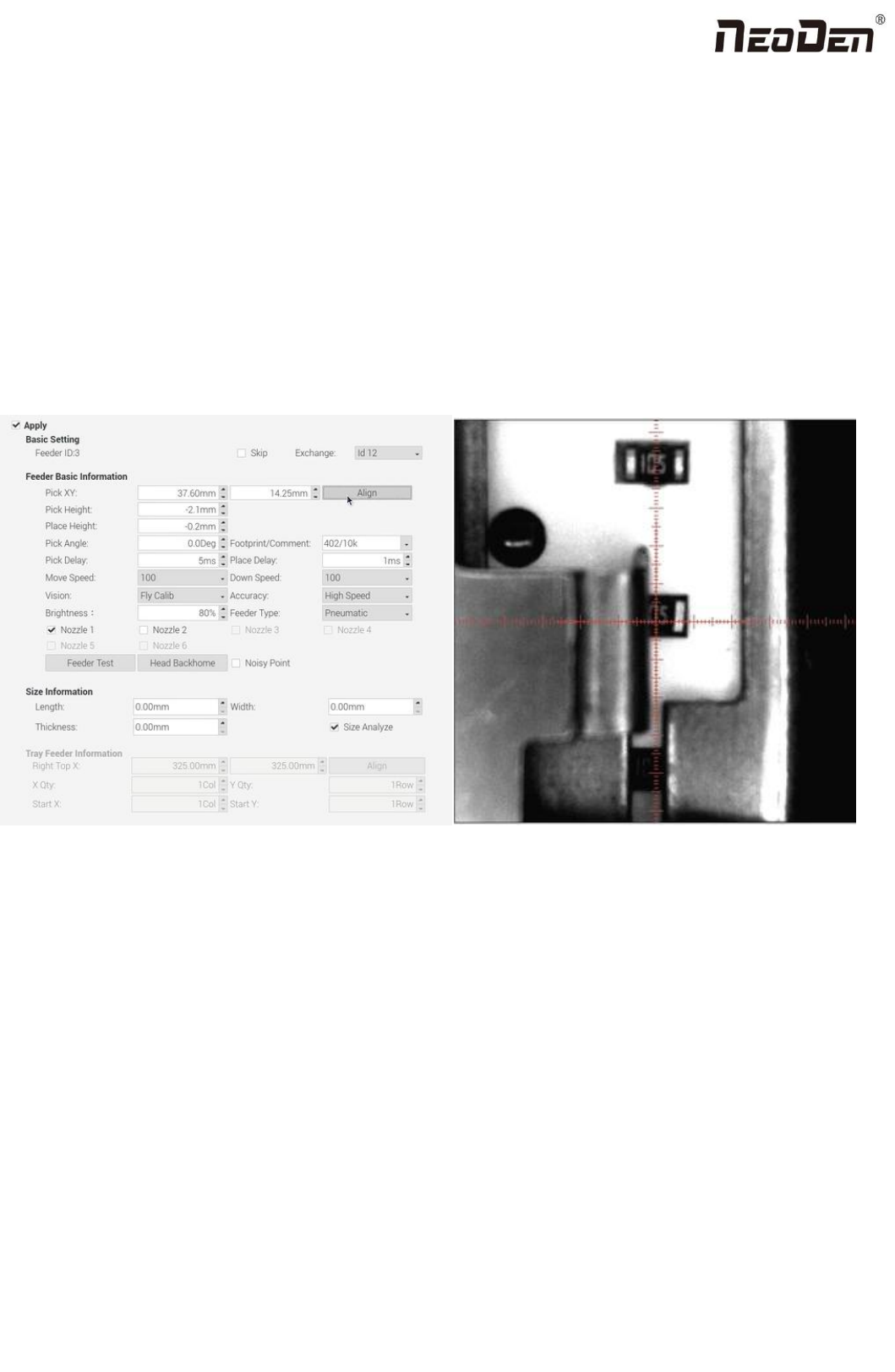
Feeder basic info: fig(4.2.1)
Skip: once selected, all components in this feeder will be skipped
Feeder exchange: this function can be used if any reel tape was installed at wrong or inappropriate position. Select the
feeder/ IC tray feeder you need to exchange, then the related feeder info will be synchronized to the swapped feeder/
IC tray feeder.
Pick XY: Align the first component position in the feeder as fig, which is Mark camera align the component
central position, then click ”save and back”, the well-saved position’s X/Y coordinates will be automatically show up
as fig. (P.S.: pick position can be set one by one or be set by the scale setting, scale setting is more convenient).
Fig(4.2.1) Fig(4.2.2)
Initial angle: default is 0°, in some special cases, you can change the mounting angle of the entire components by
modifying the angle here. Here specially pay attention to some components with direction requirement, such as LED
red/green, diode, IC chip etc.
Footprint/ Value: component footprint/ value. Footprint refers to the footprint name, such as 0603, 0805, 1206 etc.,
Value refers to component data, such as 10K, 75Ω etc.
Pick height:
Measuring method of pick height: you can bulk edit the pick position to measure the pick height. According to different
components, you can input appropriate pick height at first and click the nozzle to go down(if the feeder is cloesed, when
clicking nozzle to go down, the feeder will turn on automatically and then the nozzle goes down)to manually observe
whether the height is reasonable and make fine adjustment.

29
Zhejiang Neoden Technology Co., Ltd
In XY motion interface, when selecting nozzles No.1-No.6, user should lock the position at first, input a certain height value
and then click the nozzle test to go down to measure whether the pick height is reasonable.(Note: when testing the pick
height in locked interface,the feeder won’t turn on automatically. You can select the component above the edge of the
sheeting to measure.
Place height:
Measuring method: first measure the height from the nozzle to the pcb board. Considering the thickness of the component
itself, press down about 0.1mm or o.2mm. For special component, make appropriate adjustment.
Pick delay: for special components,such as large IC, 0402 resistor and capacitor etc, it’s better to set some long time on
the pick delay to make sure nozzle can pick up them stably.
Place delay: for special components,such as large IC and large capacitor etc, it’s better to set some long time on the
place delay to make sure nozzle can still suck the component stably during the movement to the board.
Move speed: it is used to control the head’s movement speed. For general component like 0603, just keep default value
100. For special component like large IC, please adjust this value to slow down the movement speed.
Down speed: it is used to control the nozzle head’s Z-axis downward speed (Special notice: for lead pitch
distance<0.5mm, please set this to a lower speed).
Vision: against component to choose applicable vision method. Such as:
For resistor/ capacitor--- please select Flying calibration.
For component which does not require high precision --- you can also select No action.
For IC --- you can select IC correction or big IC correction according to different IC sizes. The two methods difference
is: IC correction is one shot recognition; big IC correction is separately taking photos for IC’s four corners. So, make sure
the complete image of the component can be taken if you choose IC correction, otherwise you can only select big IC
correction method.IC pre-rotation correction is to rotate the component to the placement angle at first and then perform the
placement.
Accuracy: including high speed and high accuracy. Generally normal resistor/ capacitor is default as high speed mode,
do not need to modify it; For IC, please select high accuracy mode.
Brightness: it refers to the brightness of component recognition (after component being picked up) in assembly
procedure.
Feeder type: two types for selection---Pneumatic and Electric .
Nozzle: you can select single nozzle or several nozzles in different cases, once selected, they’ll be automatically
assigned to each feeder. Notice: for edge position feeders, you can just use limited nozzle head to pick up components.
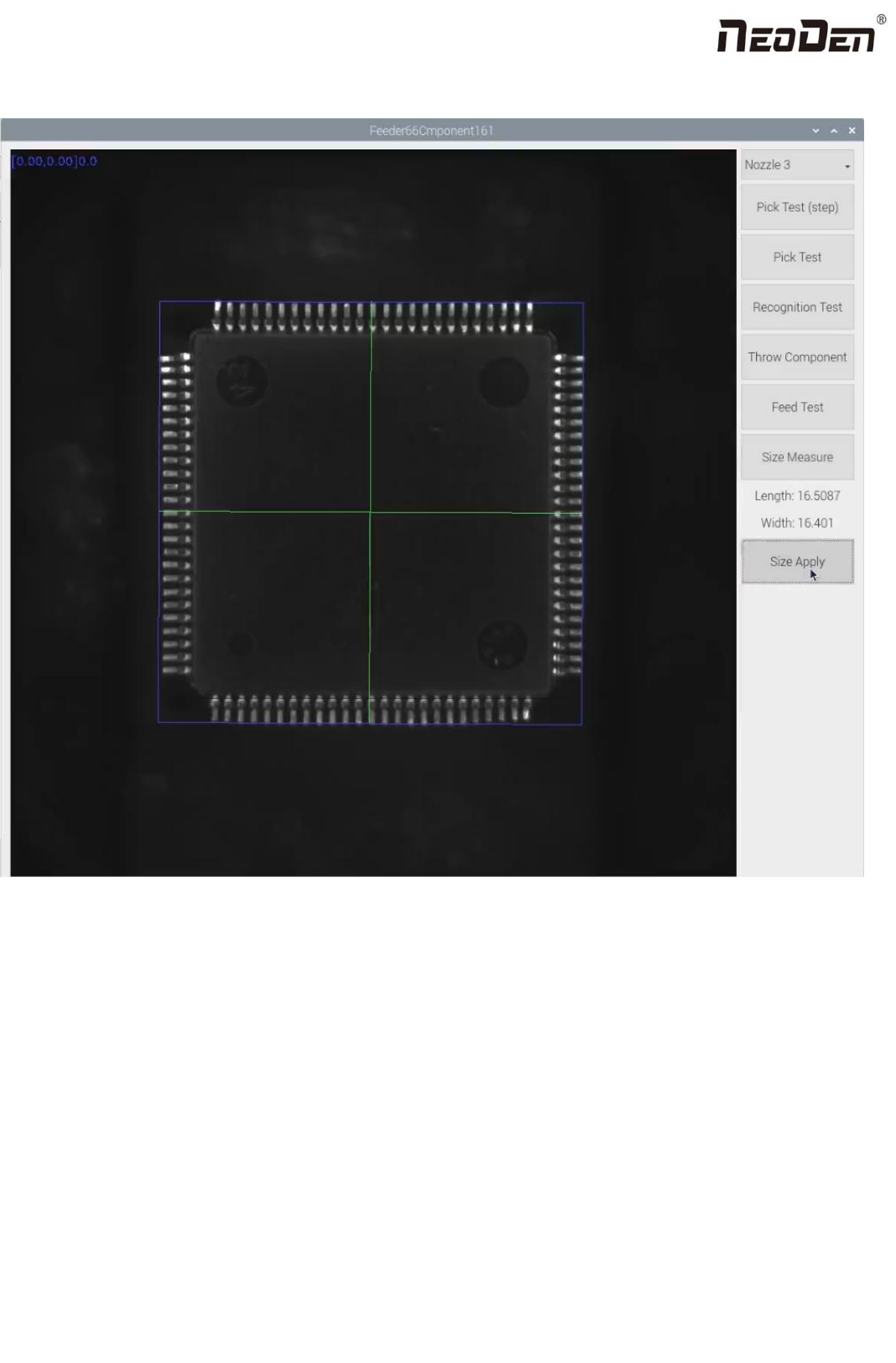
If you’re not sure, just click “Feeder Test” button under the nozzle selection part. It will pop out below, you can test
30
Zhejiang Neoden Technology Co., Ltd
which nozzle is available to pick up component from this selected feeder. Details for each button:
Nozzle: select the nozzle head you need to test
Step pick test: click this button after nozzle is selected, the detailed process: the nozzle head moves to this
feeder→feeder cover opens → the nozzle lowers down to pick up component. This is single step operation, which can
help the operator check whether pick position/ pick height is correct or not. If there is problem, they can be re-set in
feeder basic setting.
Pick test: after nozzle selection, click this button, the head will move to feeder position, the component is feeded,
nozzle lowers down to pick component. This procedure is finished without any pause.
Recognition test: after the “Pick test” with component picked up, then click this “Recognition test” to reognize the
photo taken by flying camera according to selected recognition method. If the photo is with problem, you need to do
some adjustment for the problematic recognition after finding the reason(such as interference reason and recognition