User-Manual-NeoDen9-PNP-machine.pdf - 第4页
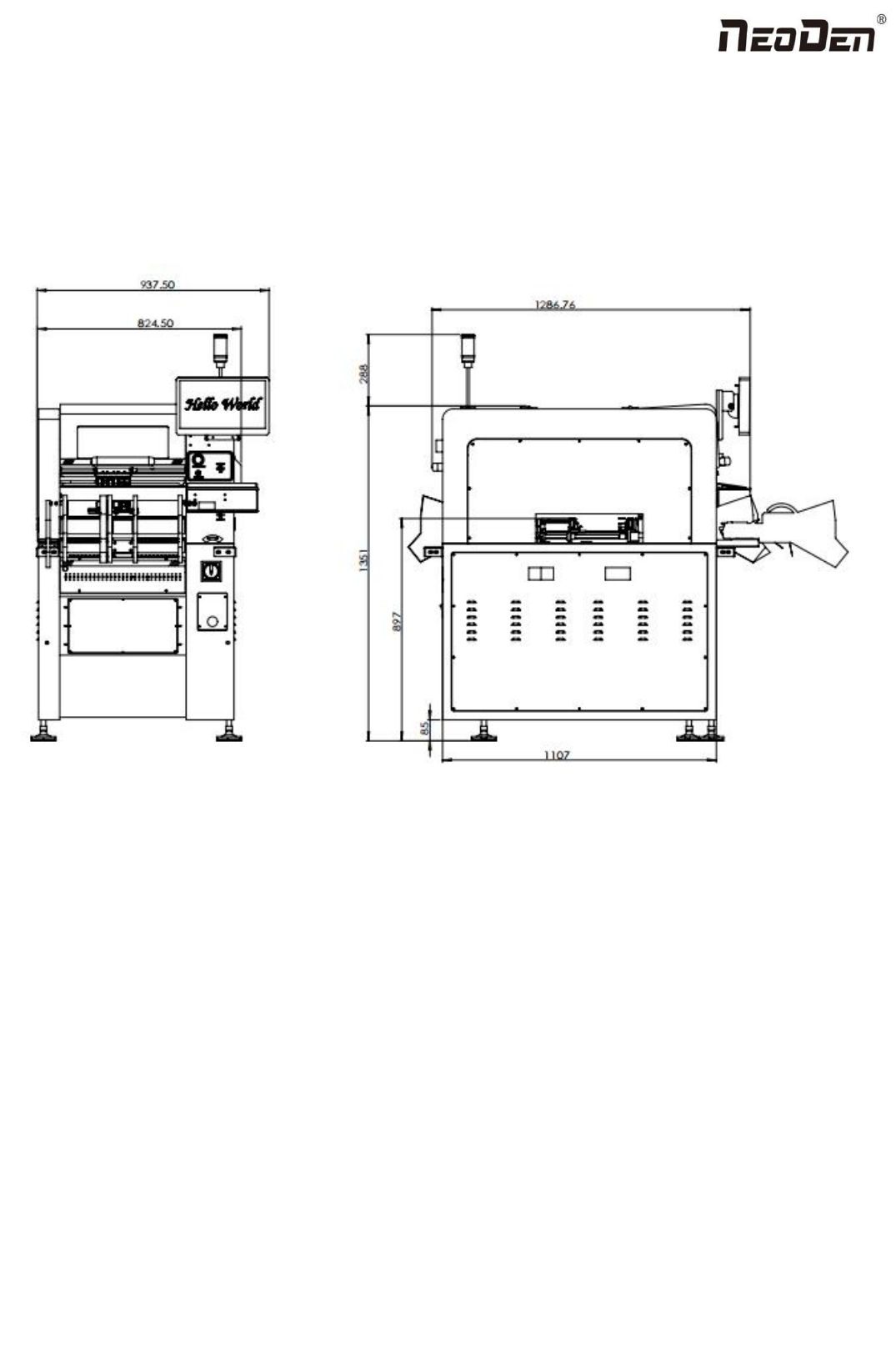
4 Zhejiang Neoden T echnol ogy Co., Ltd 1. Equi pment installa tion and pr ecautions 1.1 Ma chine Dimens ion Figure 1- Machin e dimension

3
Zhejiang Neoden Technology Co., Ltd
1. Equipment installation and precautions....................................................................................................................................4
1.1 Machine Dimension........................................................................................................................................................4
1.2 Structure of Neoden9......................................................................................................................................................5
1.3 Working Area Structure.................................................................................................................................................. 6
1.4 Important Notice.............................................................................................................................................................8
1.5 Operation flow chart.......................................................................................................................................................9
1.6 Flow chart of making a programming file....................................................................................................................10
2.PCB Editing............................................................................................................................................................................. 11
2.1 PCB information...........................................................................................................................................................12
2.1.2 Backward................................................................................................................................................................... 12
3.Panelized Board Information...................................................................................................................................................13
3.1 SMD 1 Position Setting................................................................................................................................................ 13
4. Coordinate information...........................................................................................................................................................17
4.1 PCB Mark setting......................................................................................................................................................... 17
1.PCB Mark Point...............................................................................................................................................................17
2. Mark point alignment..................................................................................................................................................... 18
3.Mark Point information................................................................................................................................................... 18
4.2 Component list setting..................................................................................................................................................19
5.Feeder Information Setup........................................................................................................................................................ 26
5.1 Function of Feeder Information....................................................................................................................................26
5.2 Feeder setting................................................................................................................................................................27
6. Nozzle Information.................................................................................................................................................................31
7. Assembly Interface................................................................................................................................................................. 31
8. Manual Test............................................................................................................................................................................ 34
9. System Setup...........................................................................................................................................................................36
9.1 Feeder Position Config................................................................................................................................................. 37
9.2 Component Positions Setup..........................................................................................................................................38
10. First trial and test.................................................................................................................................................................. 43
10.1 Program first dry run.................................................................................................................................................. 43
10.2 First production test.................................................................................................................................................... 43
10.3 Component Inspection................................................................................................................................................43
10.4 Continuous SMT production...................................................................................................................................... 44
11. Structure and maintenance instruction................................................................................................................................. 44
11.1 Feeder Brief Introduction........................................................................................................................................... 44
11.2 Installing tape and reel components........................................................................................................................... 46
11.3 Incorrect installation Samples:................................................................................................................................ 47
12.Maintenance...........................................................................................................................................................................49
12.1 Take effective measures to reduce /avoid malfunction.............................................................................................. 49
12.2 Maintenance................................................................................................................................................................50
12.3 Related issues during solder paste printing process...................................................................................................51
4
Zhejiang Neoden Technology Co., Ltd
1. Equipment installation and precautions
1.1 Machine Dimension
Figure 1- Machine dimension
5
Zhejiang Neoden Technology Co., Ltd
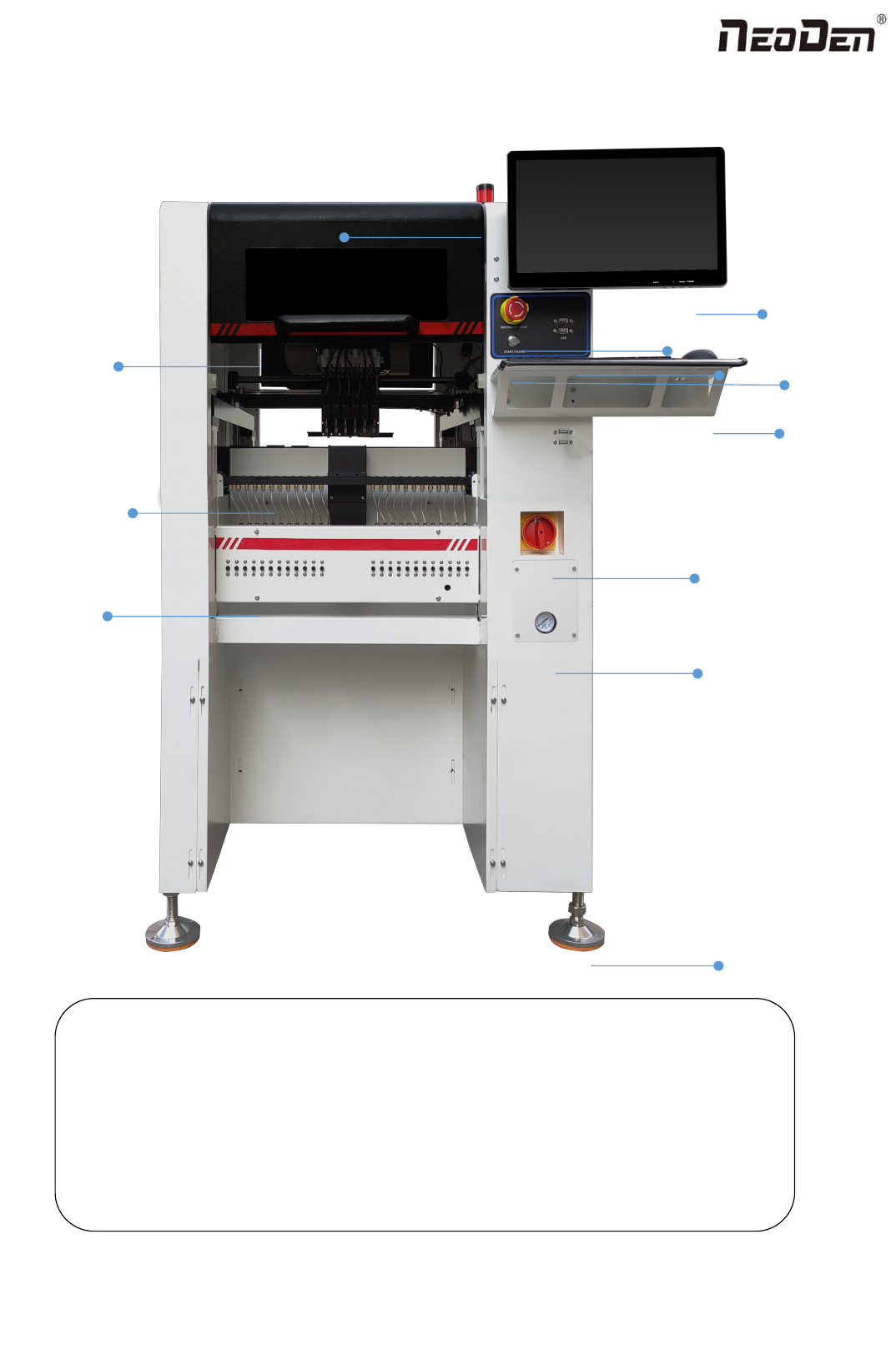
1.2 Structure of Neoden9
Figure 2-Ports and Appearance
(1)Warning Light(Triple Color) (7) USB port
(2)Safety cover (8)Pause button
(3)Front Feeder Slots 1-33(Reference value representation)
(4)Electric Feeder Port (9)Mouse keyboard bracket
(5)Display (10)Power Switch
(6)Emergency Button (11)Air source input
(12)Heavy load pedestal
(8)
(3)
(9)
(1)
(2)
(4)
(5)
(6)
(7)
(10)
(11)
(12)