User-Manual-NeoDen9-PNP-machine.pdf - 第41页
41 Zhejiang Neoden T echnol ogy Co., Ltd Fig.Auto Ca libration Interf ace 8. XY Linear Encoder Initia lize 9. M ounting Head Linear Encoder Initializ e 10. Nozzle Height Set Ze ro Warning: Th is is only need to be done a…

40
Zhejiang Neoden Technology Co., Ltd
according to the actual situation
3. Nozzle and IC camera center position
Nozzle 1 front IC Central Position: click to align,nozzle 1 will move to front IC camera and take photos. Once the photo is
displayed, to align the central position of nozzle with white crosshair and save the data.(P.S. Once the Nozzle 1 front IC
Central Position, nozzle 2-6 central position will be changed based on nozzle 1.) Apply the same operation for Nozzle 2
front IC Central Position and Nozzle 6 front IC Central Position.
4. Trash Box Position: after Administration Login, click to align the position of trash box accordingly.
5. Placement Head Reset Position:after Administration Login, click to align the position of Placement Head Reset
accordingly.
6. Exchange Nozzle Position: after Administration Login, click to align the position of exchanging nozzles accordingly.
7. Automatic calibration
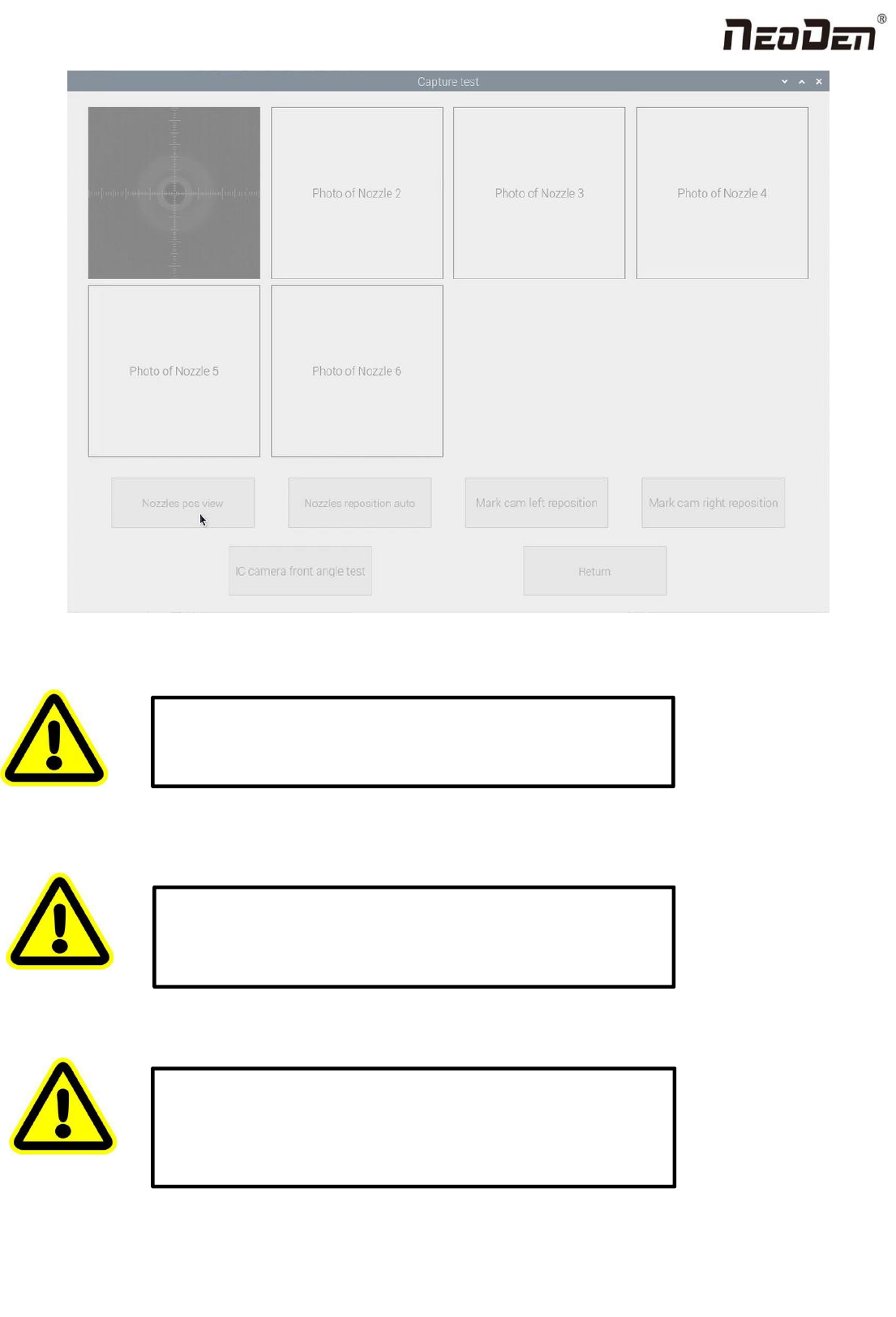
Check Nozzle Position:Check the position of nozzle 1-6 in the center of the front IC camera. Click this button, 1-6 nozzles
will act automatically and display in this interface
Automatic positioning of nozzle: It can realize the automatic positioning of nozzle and front IC camera.
Left and right mark camera positioning: this function is currently under development.
Front and rear IC camera angle: the camera may have an angle when the equipment is installed. This function can
automatically measure the angle of the front IC camera to improve the mounting accuracy. Click this button, the nozzle 1
takes the mark point and acts. After the action is completed, click return, and the automatically measured data will be
synchronized to the initial angle of the front IC camera in the right basic configuration.
41
Zhejiang Neoden Technology Co., Ltd
Fig.Auto Calibration Interface
8. XY Linear Encoder Initialize
9. Mounting Head Linear Encoder Initialize
10. Nozzle Height Set Zero
Warning:This is only need to be done after nozzle height set zero.
Please do not change it without checking with NeoDen Team.
Warning:
This is only need to do after the Linear was reinstalled or
some mechanism changed. Please do not change it without checking
with NeoDen Team.
Warning: This is a must-do step after replaced the motors and belts
or re-tested. Otherwise the nozzles may crash down to break
somewhere. And also please do this step cautiously under the
instruction from NeoDen technical engineer to avoid unnecessary
damage to the machine.
42
Zhejiang Neoden Technology Co., Ltd
9.3 Basic Configuration
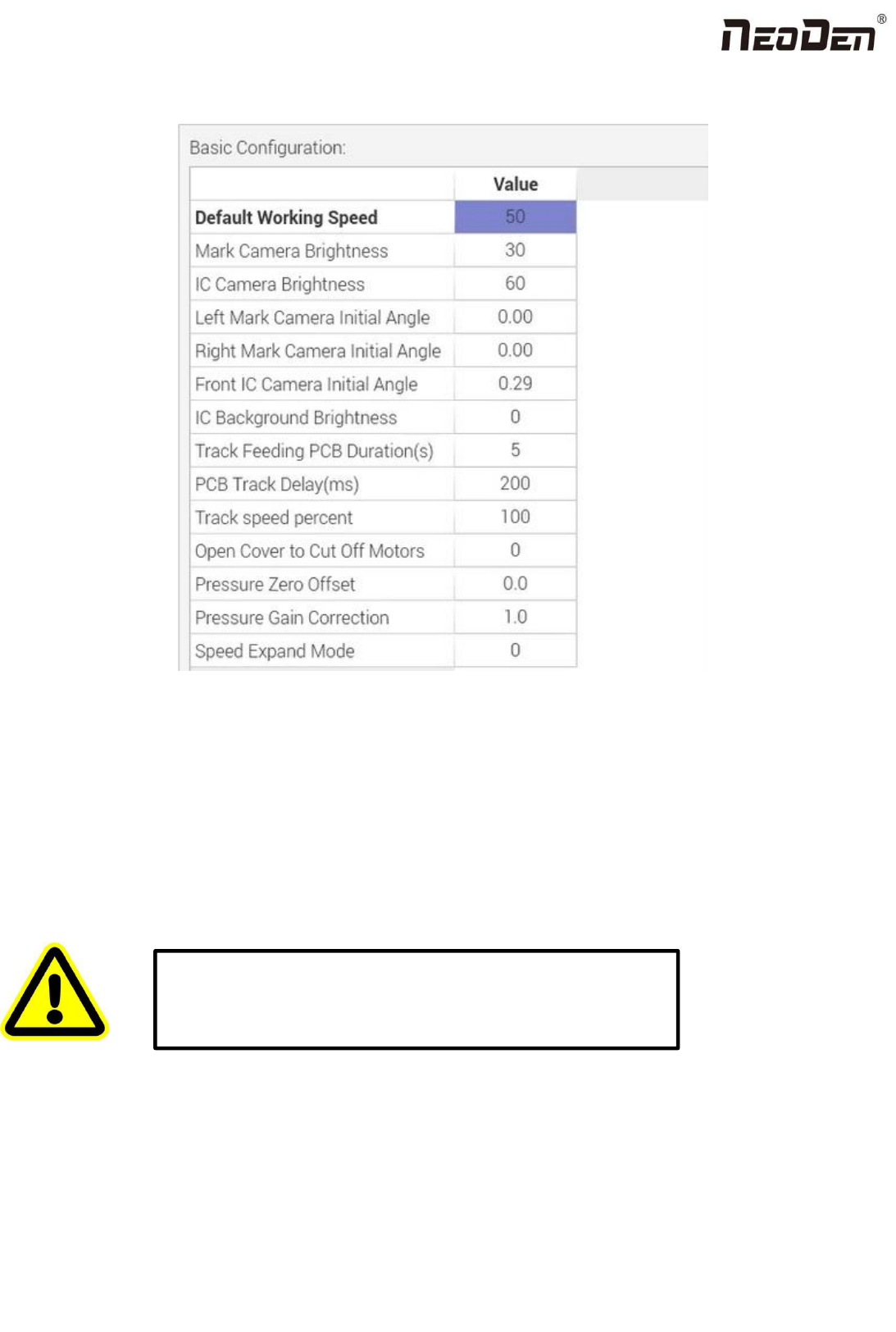
Fig: Basic Configuration
Default Working Speed: this is adopted by the placement speed in the mounting interface
Mark Camera Brightness and IC Camera Brightness: they are the default value when coming out from the factory. The
default value for Mark Camera Brightness is 30,and for IC Camera Brightness is 40. They can be adjusted according to the
real situation.
Left Mark Camera Initial Angle,Right Mark Camera Initial Angle,Front IC Camera Initial Angle and Back IC
Camera Initial Angle:
Track Feeding PCB Duration(S): track forward to the conveyor and sending the signal,the duration of waiting for the
PCB feeding
Open Cover to Cut Off Motors: this is to prevent any body damage during picking and placing. if set value 0, in the
mounting process when open the cover, the machine will turn to Step mode to do the mounting, due to the safety
Warning: the values are already set up before shipping, no extra
adjustment is required. There is a risk to lead to malfunctional
condition, please kindly contact technical engineer before
operation.