User-Manual-NeoDen9-PNP-machine.pdf - 第39页
39 Zhejiang Neoden T echnol ogy Co., Ltd ( P .S. Password is required to activate the items to avoid misoperation, ple ase contact technical engineer before calibrating. ) 1. Ma rk Camera Relative Po sition Stick a pie…
38
Zhejiang Neoden Technology Co., Ltd
9.2 Component Positions Setup
39
Zhejiang Neoden Technology Co., Ltd
(
P.S. Password is required to activate the items to avoid misoperation, please contact technical engineer before
calibrating.
)
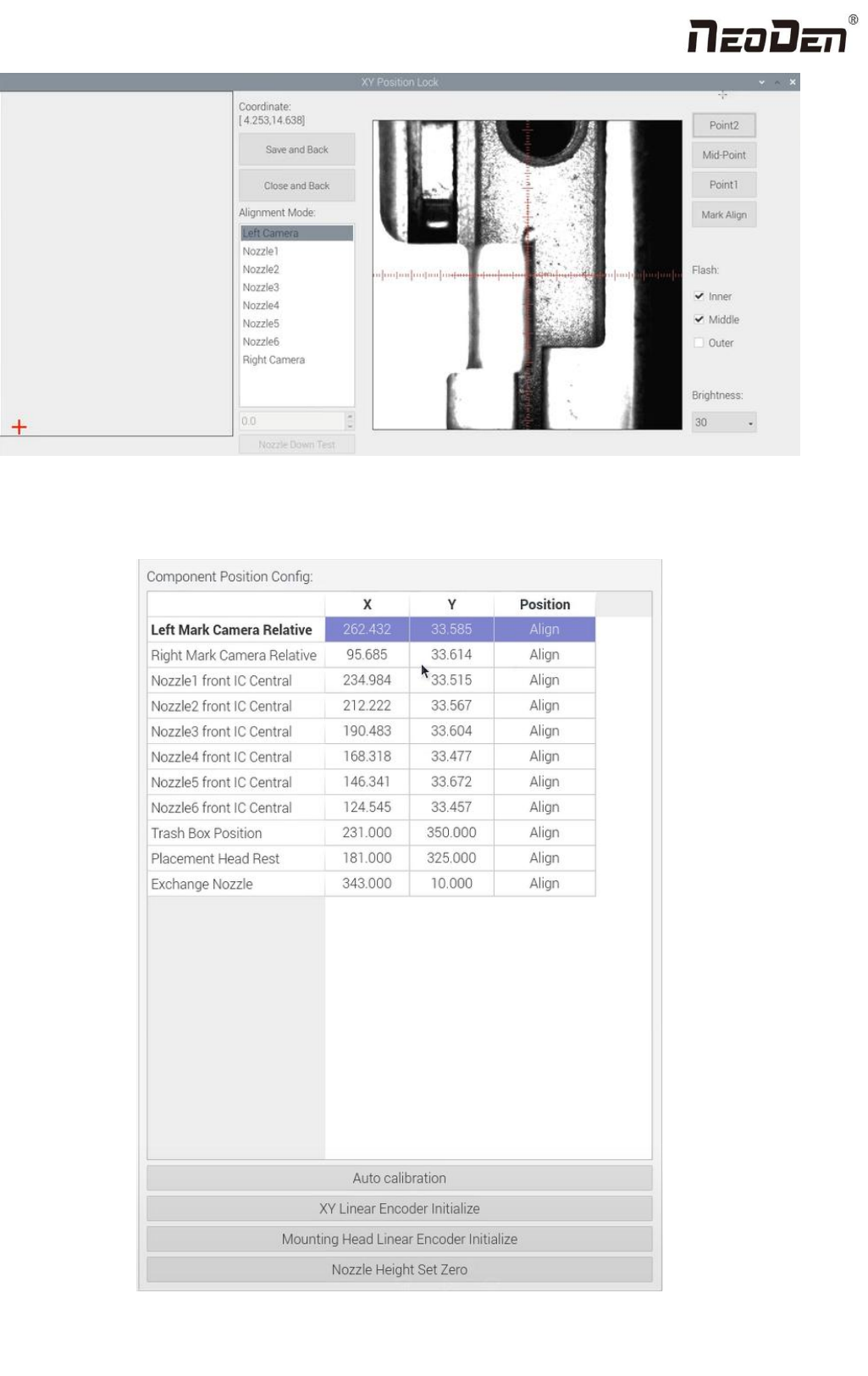
1. Mark Camera Relative Position
Stick a piece of label on the edge of rail and apply ink or ink on the nozzle;
Enter the manual test interface, click XY to move, find the position of the label paper (the position pasted on the rail
surface) through the reference camera, then switch the alignment mode to "nozzle 1", and then click "close and return".
After entering the factory settings, the administrator logs in first, clicks "click lock" at the relative position of the mark
camera, and a prompt window pops up (do you want to leave a mark at the current position). Click Yes, and the
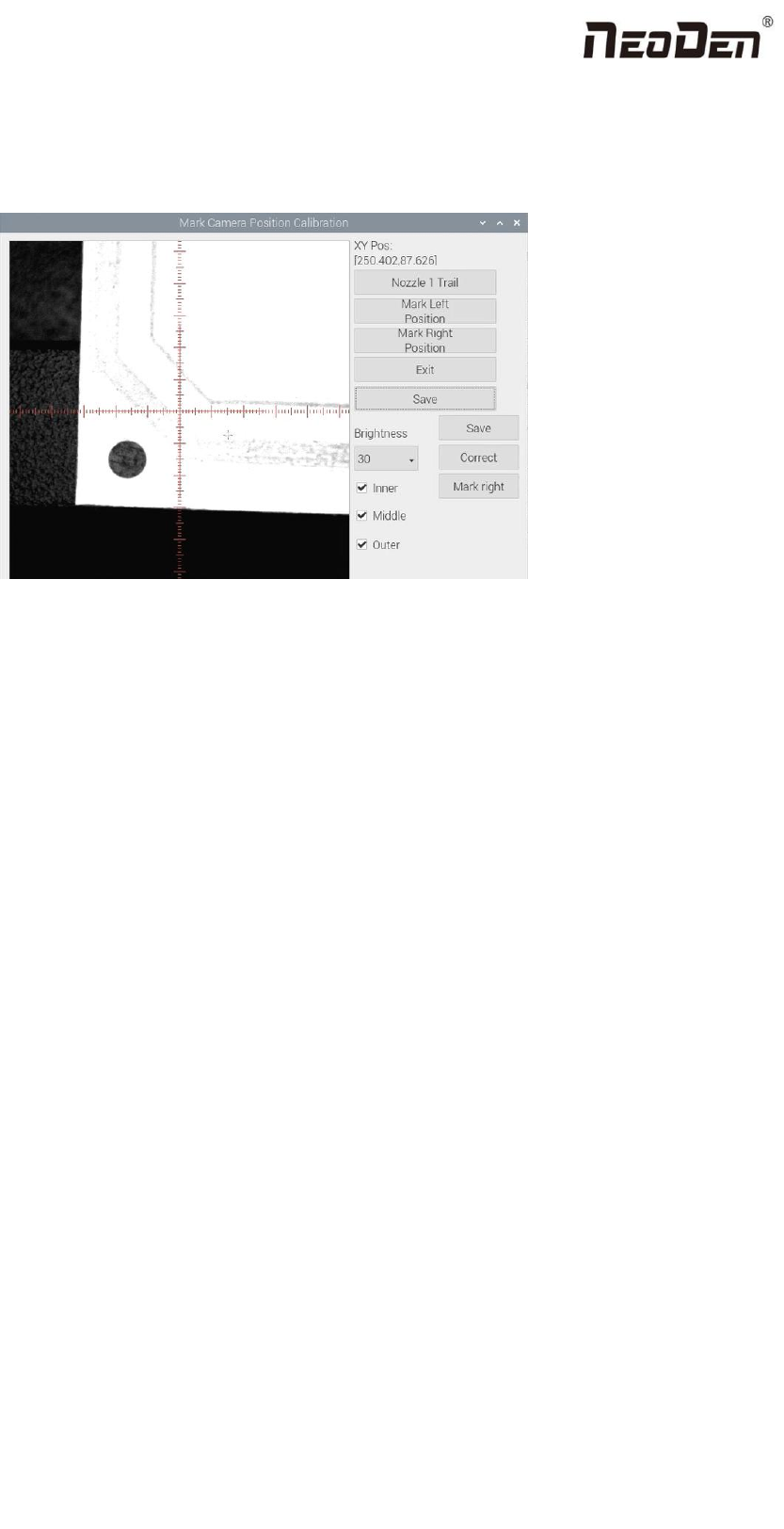
following interface will appear. Click "nozzle 1 leave a mark" and the sticker will drop, leaving a dot. Observe the
position deviation between the mark point and the center point of the red cross cursor, You can use the Red Cross to
select the center position of the mark point. If the deviation position is within 10 wires, it is regarded as the completion
of the mark. After the left camera is aligned, click mark to locate it right. Similarly, you can also use the cross to select
the center position of the line mark point. Note: both left and right cameras shall be positioned and then saved (if the
deviation is too large, the Engineer shall be contacted in time for correction)
2. Introduction of Mark Camera Relative Position function:
Left Mark Camera Positioning:The left camera is used to recognize the image after leaving the mark
Right Mark Camera Positioning:The right camera is used to recognize the image after leaving the mark(In principle, the
images of left and right cameras are the same)
Exit:Exit without leaving marks
Save:After the marking operation is completed and the center position of the marking point is also selected, click save to
save the data.
Brightness:The brightness of the mark camera when recognizing an image, it can be adjusted in the drop-down list

40
Zhejiang Neoden Technology Co., Ltd
according to the actual situation
3. Nozzle and IC camera center position
Nozzle 1 front IC Central Position: click to align,nozzle 1 will move to front IC camera and take photos. Once the photo is
displayed, to align the central position of nozzle with white crosshair and save the data.(P.S. Once the Nozzle 1 front IC
Central Position, nozzle 2-6 central position will be changed based on nozzle 1.) Apply the same operation for Nozzle 2
front IC Central Position and Nozzle 6 front IC Central Position.
4. Trash Box Position: after Administration Login, click to align the position of trash box accordingly.
5. Placement Head Reset Position:after Administration Login, click to align the position of Placement Head Reset
accordingly.
6. Exchange Nozzle Position: after Administration Login, click to align the position of exchanging nozzles accordingly.
7. Automatic calibration
Check Nozzle Position:Check the position of nozzle 1-6 in the center of the front IC camera. Click this button, 1-6 nozzles
will act automatically and display in this interface
Automatic positioning of nozzle: It can realize the automatic positioning of nozzle and front IC camera.
Left and right mark camera positioning: this function is currently under development.
Front and rear IC camera angle: the camera may have an angle when the equipment is installed. This function can
automatically measure the angle of the front IC camera to improve the mounting accuracy. Click this button, the nozzle 1
takes the mark point and acts. After the action is completed, click return, and the automatically measured data will be
synchronized to the initial angle of the front IC camera in the right basic configuration.