User-Manual-NeoDen9-PNP-machine.pdf - 第35页
35 Zhejiang Neoden T echnol ogy Co., Ltd the adjustment is comple te, just save it. ( 10 ) Head H ome bac k: clic k to m ove the h ead back to original left top p osition. ( 11 ) Nozzle Rep lace: click to rep lace nozzle…
34
Zhejiang Neoden Technology Co., Ltd
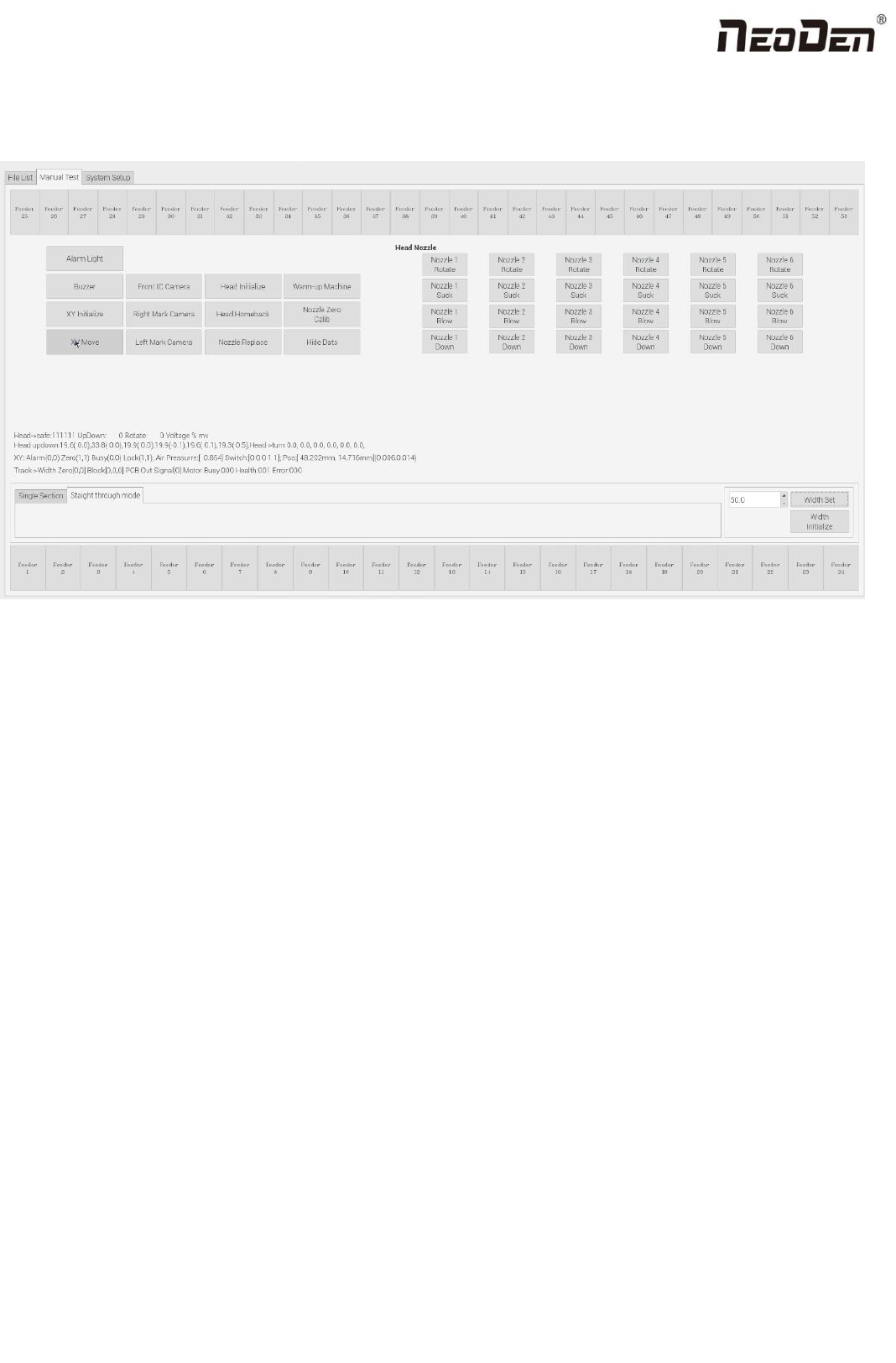
8. Manual Test
Before programming, perform a manual test at first to debug whether the machine can work normally.
(1) Feeder No.1-No.53: after loading tape reel on feeder, click the feeder to test its feeding function.
(2) Alarm light: click this button to test if the light could work correctly, the color should change from red, green to yellow
by sequence.
(3) Buzzer: click this button, the buzzer beeps.
(4) XY initialize: click this button to have XY back to zero.
(5) XY Move: it’s to move to a specified position or get the current coordinate. Click this button to enter a vision interface.
The movement modes are optional. Use the crosshair on the left vision interface to move the placement head.
(6) Front IC Camera: it’s to test the photograph function.Click this button, front IC camera will take a photo and the image
above front IC camera will be displayed.
(7) Right Mark Camera,Left Mark Camera: it’s to test the photograph function. Click this button,the corresponding mark
camera will take a photo and the image below the corresponding mark camera will be displayed.
(8) Head initialize: head initialization can be executed before mounting.
(9) Nozzle Height Calib: it’s to adjust the height of the nozzles to the same height. Adjustment method: 1.Preparation tools:
1pc of A4 paper, 1pc of standard nozzle. Steps: 1.Visually confirm whether there is a nozzle on the placement head, click
“nozzle height calib”; 2.Lock the nozzle position to above the track(after selecting the position and nozzle No.1’s alignment
method, save it). Select the corresponding nozzle and click the up button and down button on the keyboard to to adjust the
height of nozzle to make sure that the nozzle just presses on the upper plane of the track after the nozzle is lowered. After
35
Zhejiang Neoden Technology Co., Ltd
the adjustment is complete, just save it.
(10)Head Home back: click to move the head back to original left top position.
(11)Nozzle Replace: click to replace nozzles, the head will move to its position for easier replacement.
(12)Head Nozzle: click to test rotation, suction, blow and moving down functions of nozzle NO.1-NO.6.
(13)Width Initialize: initialize the width of rails back to zero.
(14)Width Set: after the initialization of rails width, enter the expected width, click Width Set, the rails be widened
accordingly.
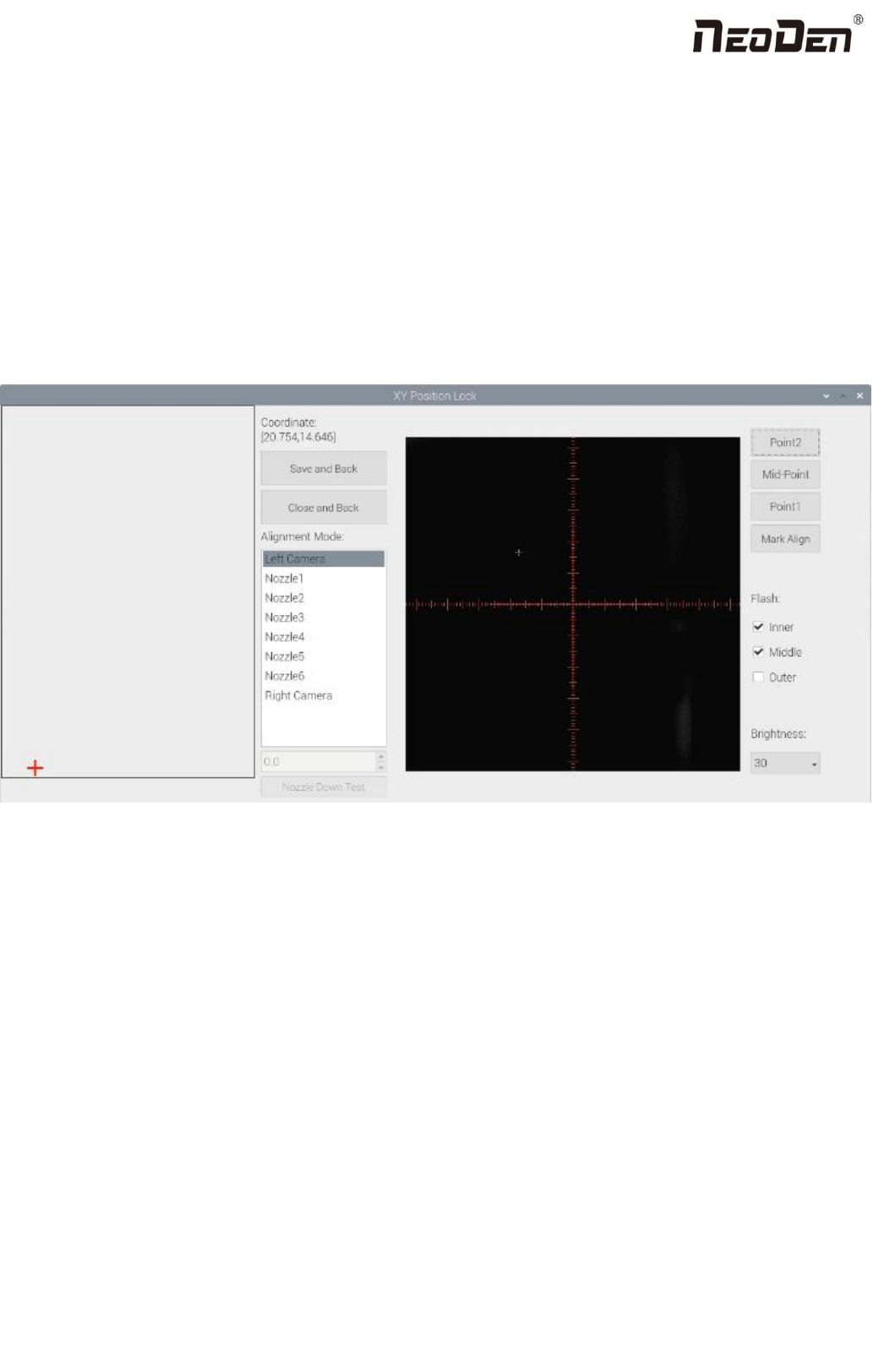
(15)Introduction of Lock interface, as below fig.
Save and back:After align the center of components,click “save and back”to save the date.
Close and Back: Refer to exit the current interface.
Align method:Include left mark camera,nozzle 1-6,right mark camera,choose the alignment method according to the
actual situation,right side will show the real image by mark camera alignment.
Nozzle Down Test:
When mark cameras are selected as the alignment mode, this function is gray and inoperable.
When selecting nozzle 1-6, this interface turns black and can be operated. The user must first lock the position, enter a
reasonable height value, and then click the nozzle down test button to measure whether the reclaiming height is reasonable.
(Note: when locking the interface to test the reclaiming height of Feida, feeder will not open automatically. You can select
the material above the edge of thecomponent to measure.)
Point 1, Point 2, Mid-point:This operation is used to select the center position of some components.
For example, select " left mark camera" as alignment mode. First select the center of the first pin of the lower left foot
36
Zhejiang Neoden Technology Co., Ltd
of the chip, click "point 1", then select the pin center of the upper right foot opposite to left 1, click "point 2", and then click
the middle point. The machine will automatically calculate the center position of the chip.
Light source: outer ring,middle ring,Inner ring,Mark point generally select to use outer or inner ring,select
corresponding light source according to PCB kind.
Brightness: Image recognize brightness can be adjusted on the drop-down list.
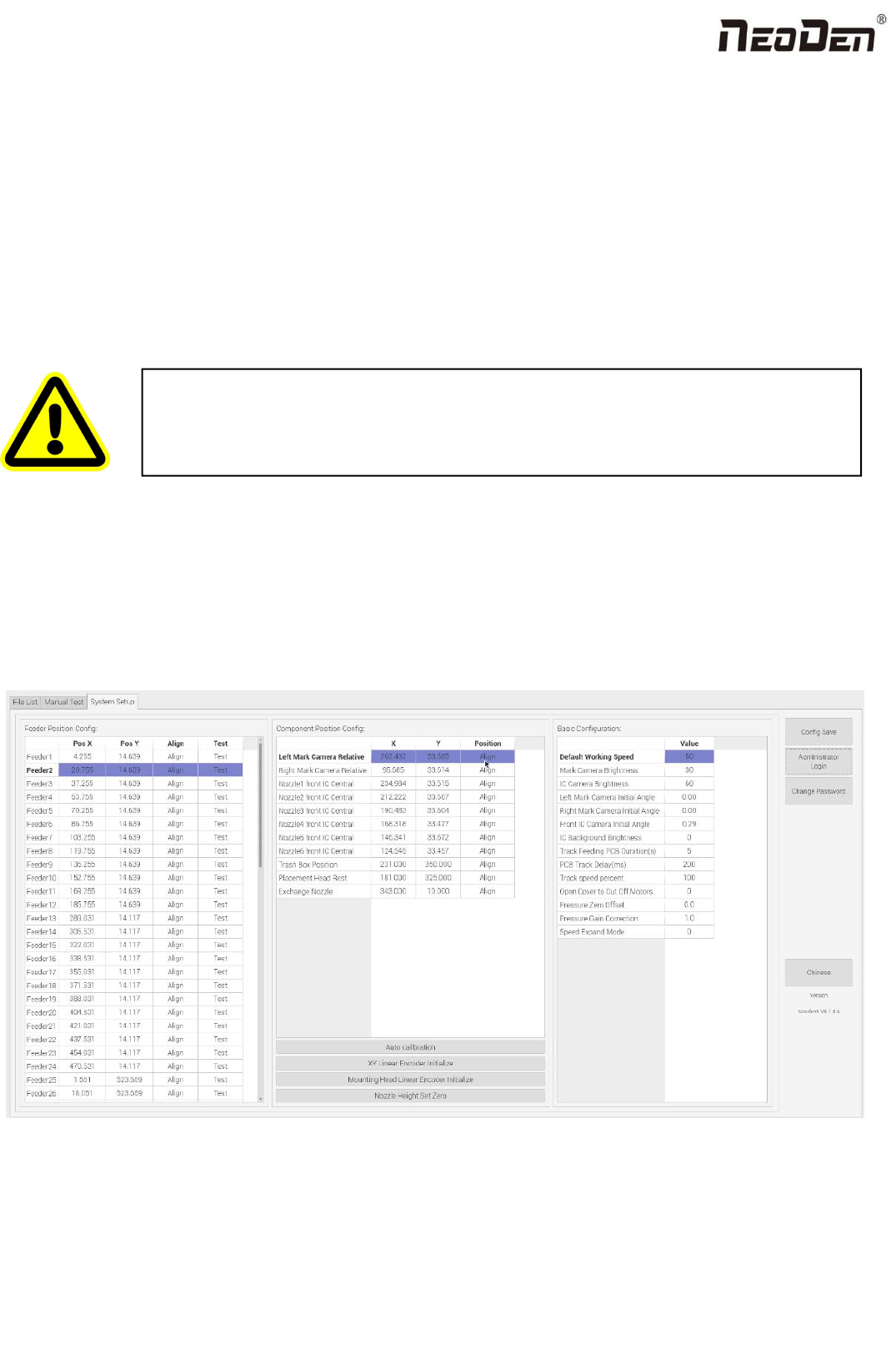
9. System Setup
If any revision is required, we suggest you contact our engineer to get detailed instruction first. (P.S.
All parameters were set up before shipping, usually no adjustment is required.) This section will
provide a brief introduction for all parameters, to get detailed adjustment instruction, please contact
our technical engineer.
Right buttons functions:
Config save: to click Save after changing the parameter.
Administrator login: to prevent any misoperation, this interface will be inactive and greys out. To make it inactive,
Administrator needs to login.
Warning: this part aims at machine’s global parameter settings, any modified
parameter will influence all working files, when modify this part please consider
seriously.