User-Manual-NeoDen9-PNP-machine.pdf - 第43页
43 Zhejiang Neoden T echnol ogy Co., Ltd conside ration; if set value 0, and op en the cover in the moun ting proce ss, the mach ine continu es mountin g but with lowe r speed as 20 . 10. First t rial and test 10.1 Prog …
42
Zhejiang Neoden Technology Co., Ltd
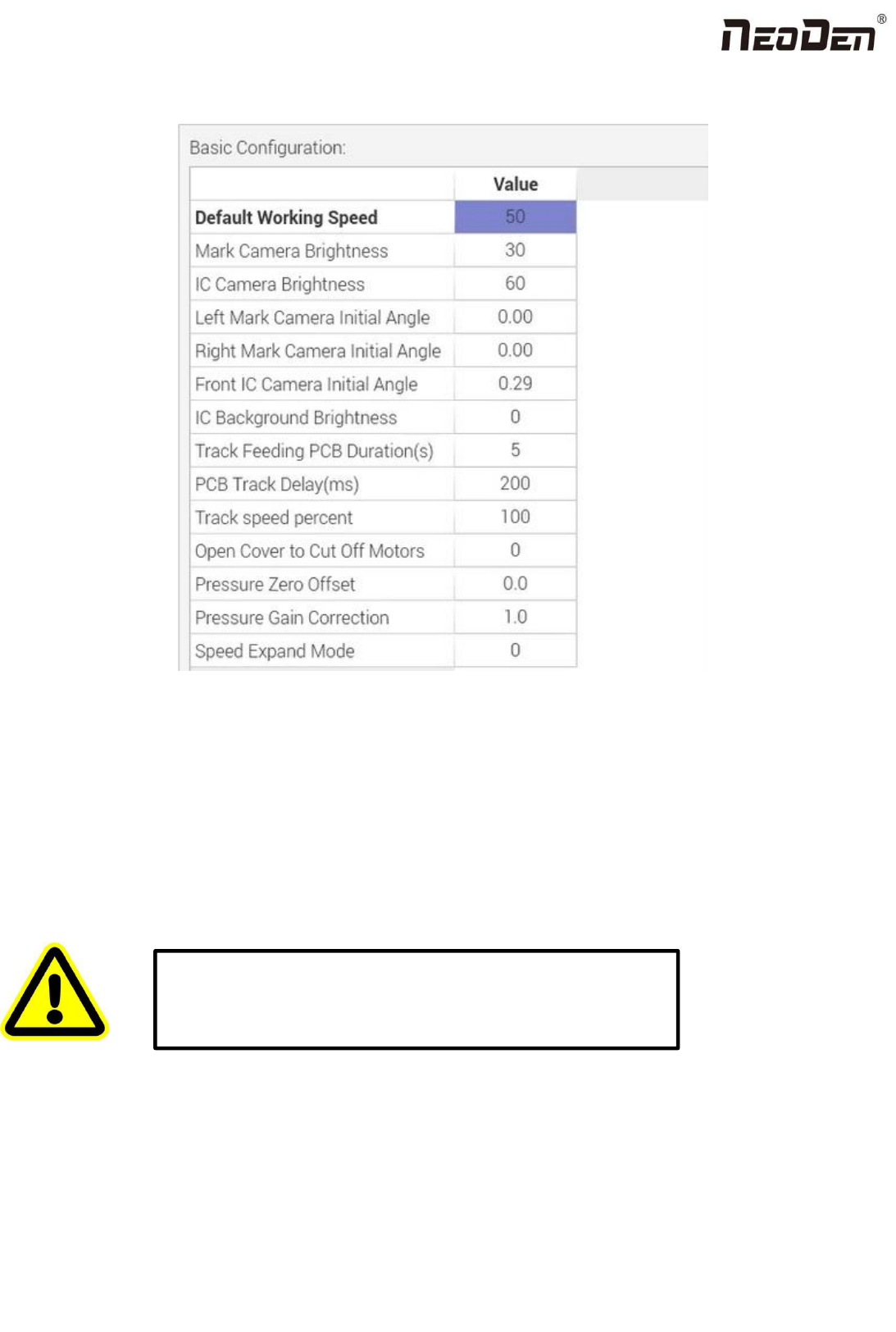
9.3 Basic Configuration
Fig: Basic Configuration
Default Working Speed: this is adopted by the placement speed in the mounting interface
Mark Camera Brightness and IC Camera Brightness: they are the default value when coming out from the factory. The
default value for Mark Camera Brightness is 30,and for IC Camera Brightness is 40. They can be adjusted according to the
real situation.
Left Mark Camera Initial Angle,Right Mark Camera Initial Angle,Front IC Camera Initial Angle and Back IC
Camera Initial Angle:
Track Feeding PCB Duration(S): track forward to the conveyor and sending the signal,the duration of waiting for the
PCB feeding
Open Cover to Cut Off Motors: this is to prevent any body damage during picking and placing. if set value 0, in the
mounting process when open the cover, the machine will turn to Step mode to do the mounting, due to the safety
Warning: the values are already set up before shipping, no extra
adjustment is required. There is a risk to lead to malfunctional
condition, please kindly contact technical engineer before
operation.

43
Zhejiang Neoden Technology Co., Ltd
consideration; if set value 0, and open the cover in the mounting process, the machine continues mounting but with lower
speed as 20.
10. First trial and test
10.1 Program first dry run
Usually we would suggest you to have a dry run (no components are loaded) before production test. After it goes smoothly,
you can start to produce few boards.
10.2 First production test
1 Make a programming file
2 Test the file to pick and place components to finish one board.
10.3 Component Inspection
Inspection items
●Check if the specification, direction, polarity of components is aligned with what they should be.
●Whether the components are damaged or the pins are distorted.
●Whether the component is off beyond allowance.
The inspection methods vary from the equipment that you have.
Except visual inspection, all of amplifier, microscope, online or offline AOI equipment can be applied if the pitch of IC is
quite small to check.
Inspection Standard
Please follow SOP to do inspection or any other general standards (IPC Standard and SJ/T10670-1995 SMT General
Technical Requirements). Adjust the programming file according to the placement effect after the first production test.
1. If there are any specification, direction and polarity issues, please do the adjustment according to the process file.
2. If there is any deviations of the chip placement, please do the adjustment by following two methods:
(1) If the placement effects of all components are off in the same direction, it would be the fiducial issues. Please adjust
the coordinates of fiducials according to its value of deviation.
(2) If there are several components off beyond allowance, you’d better adjust their coordinates on working file with
down-looking camera. If there are couple of issues occur during test, some other points need to be considered.
3. Frequent pickup failure. Some suggestions are listed below
(1) The pick height is inappropriate, please revise the value after an inspection or a pick-test
(2) The pick offset needs an adjustment, it should be aligned with the center of component reel slot rather than that of
component.
(3) Due to peel strength or installation issue of wasted film, the film on tape won’t be peeled completely

44
Zhejiang Neoden Technology Co., Ltd
(4) The nozzle was blocked
(5) The nozzle is damaged or has a crack
(6) The size issue of nozzle would cause air leakage or insufficient suction
(7) The air hose is blocked or has a leakage problem, and even the pump has an issue.
4. Frequently throwing components. Some suggestions are listed below,
(1) Up-looking camera can’t take a clear picture of component due to brightness issue for example
(2) The pins are distorted
(3) The size or shape isn’t aligned with that in “Footprint library’’
(4) The size of nozzle is inappropriate or insufficient suction.
(5) The nozzle has solder paste or rubbish cause air leakage
(6) The nozzle is damaged or cracked cause air leakage
10.4 Continuous SMT production
Follow the SOP to start production
Notes:
(1) Do not touch the surface to board to avoid damaging the printed solder paste.
(2) When the error message occurs, please check out and solve it a.s.a.p.
(3) Once reloading the component during production, pay attention to the model, specification, polarity and direction of
components.
(4) Clear the reject box timely to avoid wasted materials stacked too high to damage the mount head
11. Structure and maintenance instruction
11.1 Feeder Brief Introduction