User-Manual-NeoDen9-PNP-machine.pdf - 第33页
33 Zhejiang Neoden T echnol ogy Co., Ltd Configuratio n in terface introd uction: Tr acks configuratio n: the func tion of PCB Raise and Width Set are tota lly same as tha t in PCB Informat ion interfac e. Debug Set: (1)…
32
Zhejiang Neoden Technology Co., Ltd
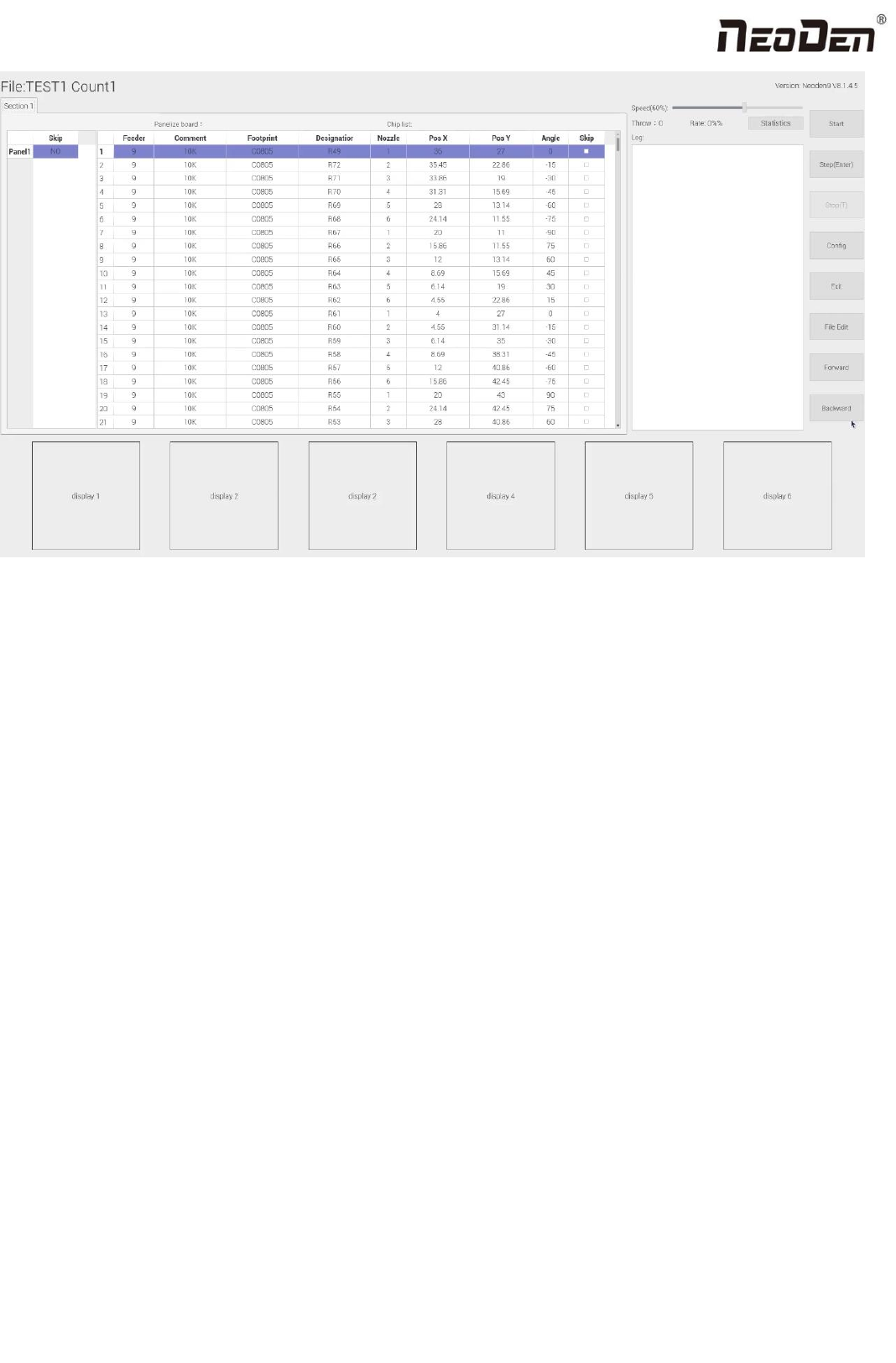
(1) Left part is detailed component list, you can get a real-time assembly situation with the varying of the highlight
blue area;
(2) Right top part shows the current assembly speed, you can drag the scroll bar to adjust it(the max is 100%);
(3) Throw and Rate will make a statistics for thrown components and you can check each feeder’s component pick
failure rate and get the information that which kind of component is easily picked failure, then find solution to
improve it.
(4)Log will show some informations like rate of throw component, current average speed and quantity of components
which have been assembled under the current file.
(5)The bottom side 6 display windows are real-time feedback for component recognition images.
(6)Right side buttons’ introduction:
Start: machine starts the current file’s assembly procedure.
Step: operation for each single assembly procedure.
Stop: stop current assembly work.
Exit: after assembly is finished, please directly click this button and back to home interface.
File edit: if the component picking is failed several times or there is big deviation of placement accuracy, the operation
need to be paused. After analyzing the reason, you do not need to exit the assembly interface and just click “file edit”
to modify it. After the modifying is finished, save it and come back to assembly interface.
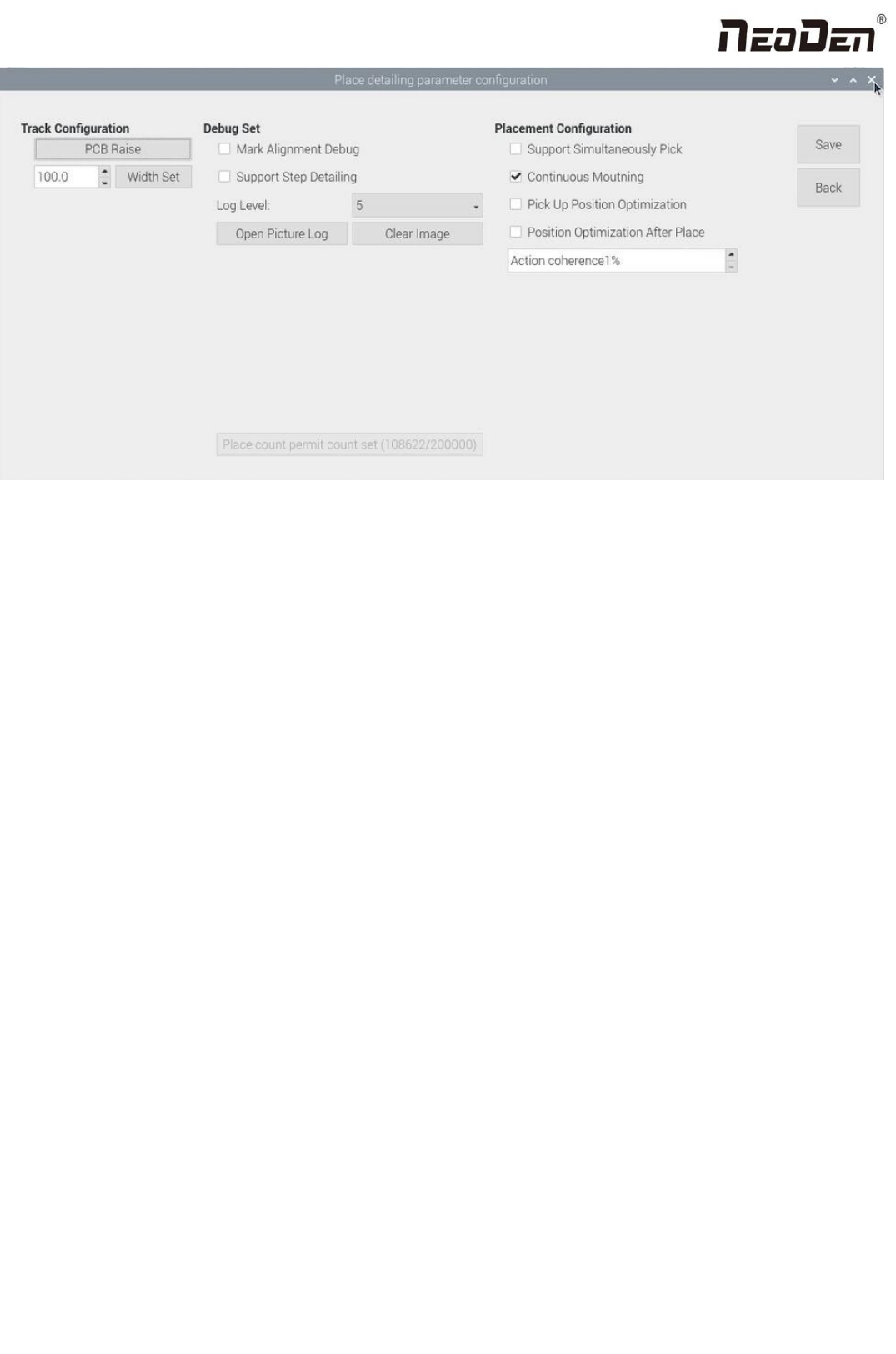
Config: press this button, a detailed configuration setting interface will pop out as below:
33
Zhejiang Neoden Technology Co., Ltd
Configuration interface introduction:
Tracks configuration: the function of PCB Raise and Width Set are totally same as that in PCB Information interface.
Debug Set:
(1)Support step detailing: once this is clicked, every time you click “Step”, the machine will only execute one command.
This is strongly recommended for the first tial assembly procedure after the programming file is finished.
(2)Open picture log: after pressing this button, the file of stocking recognition photos will be opened, from which
recognition details of components can be checked.
Placement configuration:
(1)Support simultaneously pick: once this is clicked, the nozzles with same pick height will lower down to pick components
at the same time, which will greatly improve placement speed (It is recommended for component whose size is bigger than
that of 0603). For NeoDen9, the simultaneous pick nozzles are nozzle 1 and nozzle 4,or nozzle 2 and nozzle 5, or nozzle 3
and nozzle 6.
(2) Rail continuous mounting: this is for PCB continuously feeding to realize continuous automatic assembly operation.
(3)Pick up position optimization: once this is cliked, nozzle head can automatically optimize the pick position when picking
components( It is recommended only for small components ).
(4)Position optimization after placement: if this function is selected in the first time, it will directly come to position
correction interface after placement is finished. User needs to correct the position according to the actual placement
situation.After the correction is completed, machine will place the components according to the corrected position when the
placement is performed again.
34
Zhejiang Neoden Technology Co., Ltd
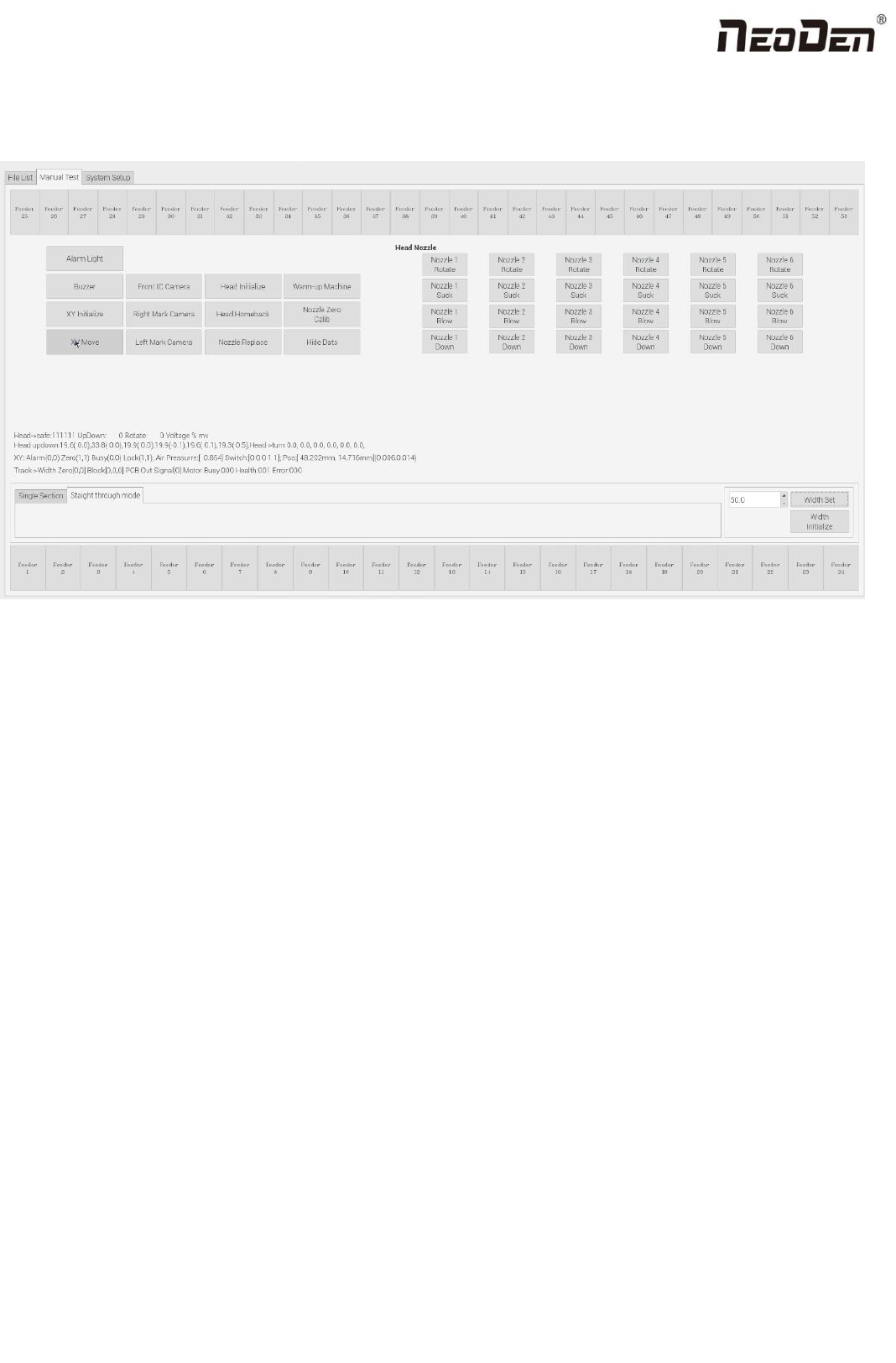
8. Manual Test
Before programming, perform a manual test at first to debug whether the machine can work normally.
(1) Feeder No.1-No.53: after loading tape reel on feeder, click the feeder to test its feeding function.
(2) Alarm light: click this button to test if the light could work correctly, the color should change from red, green to yellow
by sequence.
(3) Buzzer: click this button, the buzzer beeps.
(4) XY initialize: click this button to have XY back to zero.
(5) XY Move: it’s to move to a specified position or get the current coordinate. Click this button to enter a vision interface.
The movement modes are optional. Use the crosshair on the left vision interface to move the placement head.
(6) Front IC Camera: it’s to test the photograph function.Click this button, front IC camera will take a photo and the image
above front IC camera will be displayed.
(7) Right Mark Camera,Left Mark Camera: it’s to test the photograph function. Click this button,the corresponding mark
camera will take a photo and the image below the corresponding mark camera will be displayed.
(8) Head initialize: head initialization can be executed before mounting.
(9) Nozzle Height Calib: it’s to adjust the height of the nozzles to the same height. Adjustment method: 1.Preparation tools:
1pc of A4 paper, 1pc of standard nozzle. Steps: 1.Visually confirm whether there is a nozzle on the placement head, click
“nozzle height calib”; 2.Lock the nozzle position to above the track(after selecting the position and nozzle No.1’s alignment
method, save it). Select the corresponding nozzle and click the up button and down button on the keyboard to to adjust the
height of nozzle to make sure that the nozzle just presses on the upper plane of the track after the nozzle is lowered. After