DR4900 用户手册_Full version.pdf - 第14页
Table 1 Menu icons (continued) Icon Description Icon Description Send Close expanded measurement view More information Open working procedure Instructional assistant Table 2 Sample analysis icons Icon Description Icon De…
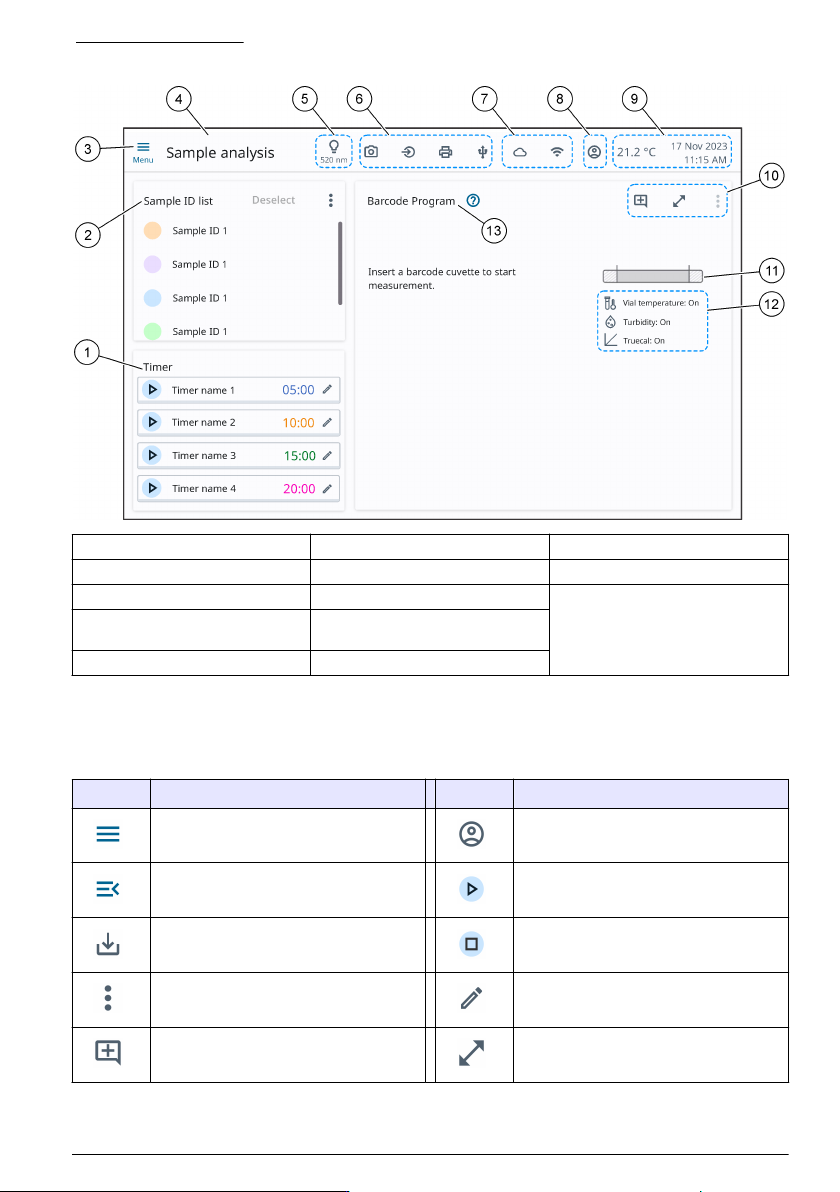
Figure 8 Main screen
1 Timers 6 Connected hardware 11 Concentration range bar
2 Sample ID list 7 Online connectivity 12 Sample analysis icons
3 Main menu 8 Operator 13 Program title
4 Menu title 9 Ambient temperature, date and
time
5 Selected wavelength 10 Display and program icons
6.1 Icon description list
Refer to Table 1, Table 2 and Table 3 for descriptions of icons that show on the display.
Table 1 Menu icons
Icon Description Icon Description
Main menu Operator
Close menu Start timer
Save Stop timer
Options Edit timer
Add comment Expand measurement view
English 13
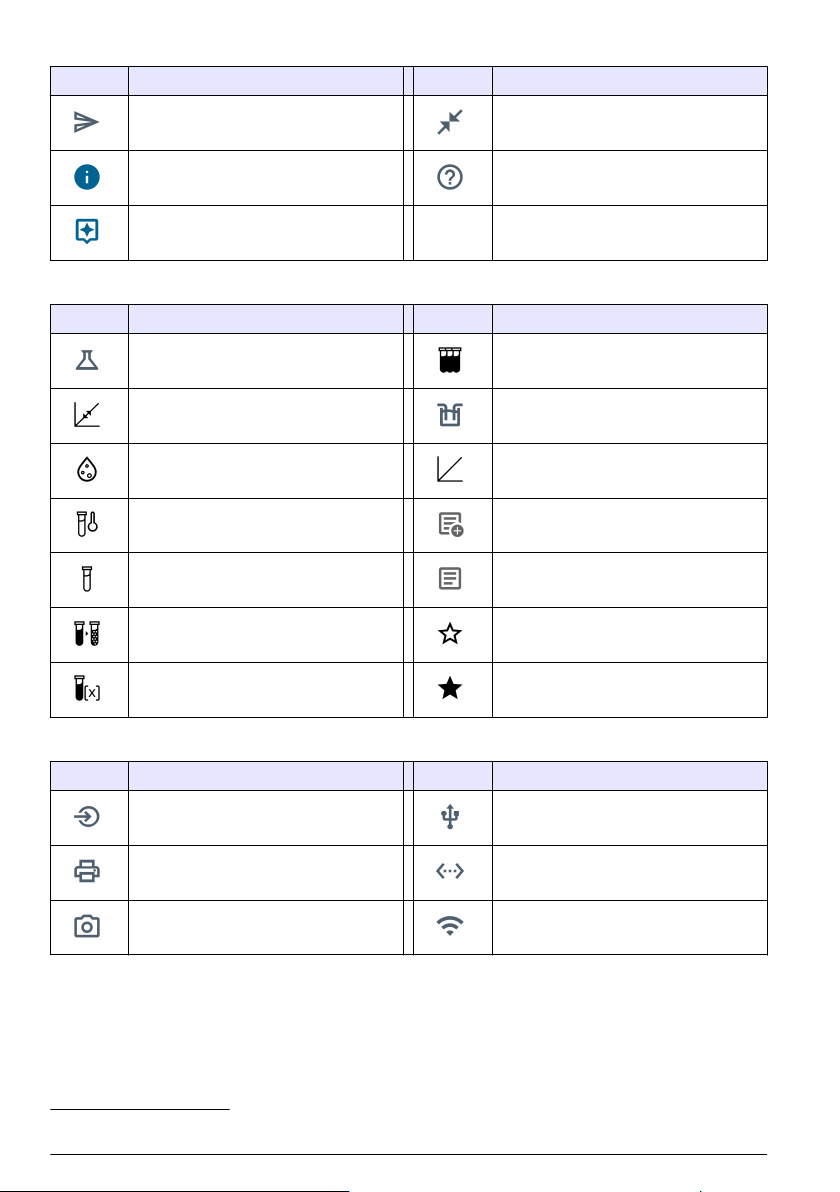
Table 1 Menu icons (continued)
Icon Description Icon Description
Send Close expanded measurement view
More information Open working procedure
Instructional assistant
Table 2 Sample analysis icons
Icon Description Icon Description
Sample analysis Multiple measurement
Standard adjust Sipper is connected
Turbidity TrueCal
Cuvette temperature Add comment
2
Reagent blank Comment available
2
Dilution factor Favorite
Concentration factor Selected favorite
Table 3 Connectivity and hardware icons
Icon Description Icon Description
Input devices USB flash drive
Printer Ethernet
Camera Wi-Fi
2
Sample ID menu only
14 English

Section 7 Operation
7.1 New program functions
Refer to Table 4 for an overview of new program functions.
Table 4 DR4900 functions
New function Description
Temperature
detection
The temperature of the vial is measured with an infrared sensor. The vial temperature
shows on the screen.
Temperature warning The vial temperature is examined based on the chemical and physical properties for the
specified procedure and measurement range. If the vial temperature has a sufficiently
large effect on the measured value, a temperature warning shows.
The temperature warning is only enabled for selected procedures.
Temperature
compensation
The vial temperature is used to correct the measured values when the vial temperature
has a sufficiently large effect on the measured values. The correction is dependant on the
procedure, measured value and temperature. The temperature compensation is
applicable to a procedure-specified temperature range.
The temperature compensation is only enabled for selected procedures.
Turbidity warning The turbidity in the vial is examined by nephelometric measurement based on the
procedure and measurement range. If the turbidity has a sufficiently large effect on the
measured values, a turbidity warning shows.
The turbidity warning is only enabled for selected procedures.
7.2 Configure the instrument
1. Push , then select Settings.
2. Select an option.
Option Description
Measurement
settings
Selects the settings for data export, temperature detection, turbidity detection,
TrueCal, temperature unit, interference check, certificate of analysis and sipper. Refer
to Configure the measurement settings on page 16.
Operator ID Adds an operator ID to the system. Refer to Add an operator ID on page 16.
Security Sets a password for administrator access. Security management can be divided into
three different user groups: basic, intermediate and advanced.
Note: A basic user must not have more permissions than an intermediate user. An
intermediate user must not have more permissions than an advanced user.
Refer to Configure security management on page 17.
General Sets the language, date and time, display and power, and sound settings. Refer to
Configure the general settings on page 17.
Connectivity Connects the instrument to external devices. Refer to Configure external devices
on page 18.
Service Gives information about updates, service logs, backups, the next service and Hach
service menu. Refer to Service menu on page 18.
English 15