DR4900 用户手册_Full version.pdf - 第31页
Figure 10 Replace the cell compartment Section 9 Troubleshooting Message Possible cause Solution Critical hardware error A hardware error has occurred. Set the instrument to off, then to on again. If the problem continue…
C A U T I O N
Chemical exposure hazard. Obey laboratory safety procedures and wear all of the personal protective
equipment appropriate to the chemicals that are handled. Refer to the current safety data sheets
(MSDS/SDS) for safety protocols.
C A U T I O N
Chemical exposure hazard. Dispose of chemicals and wastes in accordance with local, regional and
national regulations.
8.1 Clean the instrument
N O T I C E
Do not use cleaning agents such as turpentine, acetone or similar products to clean the instrument including the
display and accessories.
Clean the enclosure, the cell compartment and all of the accessories with a moist cloth and a mild
soap solution.
8.2 Clean spills
C A U T I O N
Chemical exposure hazard. Dispose of chemicals and wastes in accordance with local, regional and
national regulations.
1. Obey all facility safety protocols for spill control.
2. Discard the waste according to applicable regulations.
8.3 Replace the cell compartment
Replace the cell compartment if the cell compartment is very dirty and cannot be cleaned with a mild
soap solution.
1. Set the power switch to off. Refer to Startup on page 9.
2. Replace the cell compartment. Make sure that the surface of the cell compartment is aligned flush
with the surface of the enclosure. Refer to Figure 10.
30
English
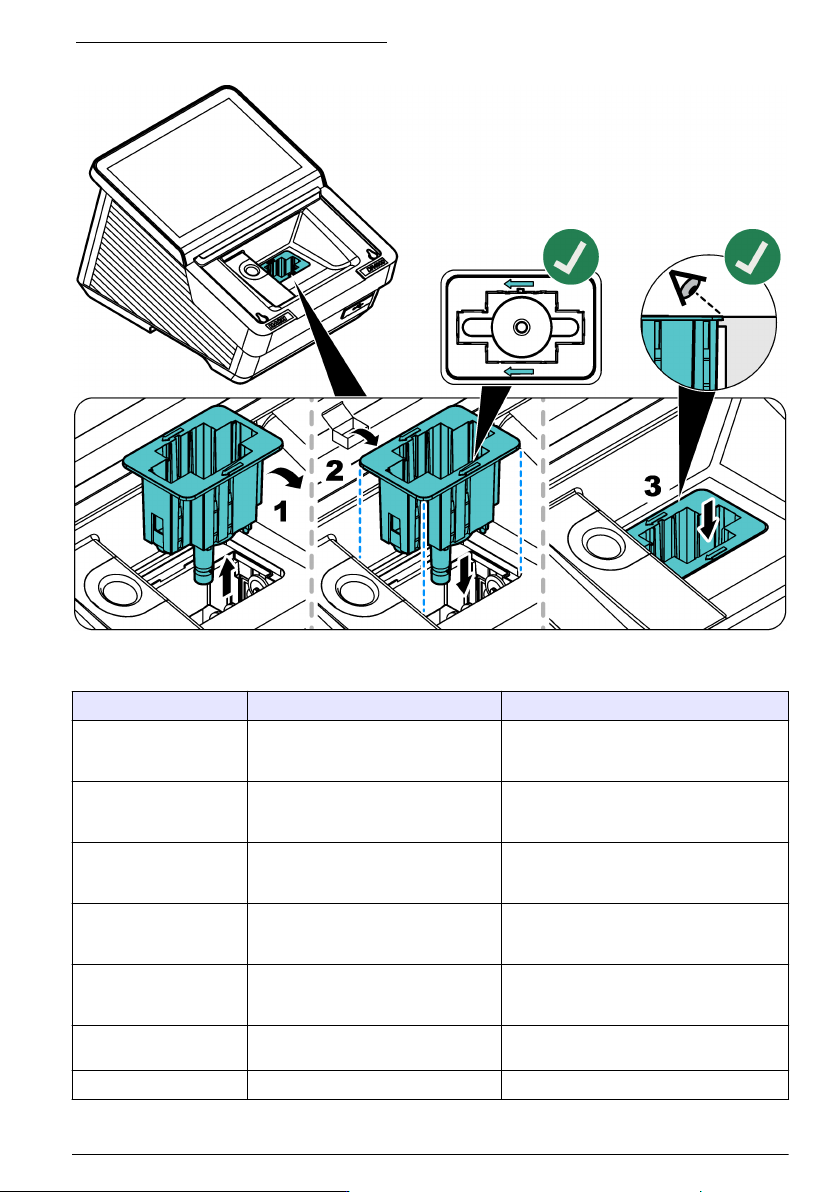
Figure 10 Replace the cell compartment
Section 9 Troubleshooting
Message Possible cause Solution
Critical hardware error A hardware error has occurred. Set the instrument to off, then to on again. If
the problem continues, contact technical
support.
There is too much
ambient light.
There is too much ambient light. The
instrument is in full sunlight or below a
different light source.
Decrease the ambient light. Remove the
instrument from full sunlight. Close the lid.
Lighting conditions are
unstable.
There is too much ambient light. The
instrument is in full sunlight or below a
different light source.
Make sure that the ambient light is constant
during the measurement and is not too
bright.
A test result is not
possible.
The settings are not correctly set for
the procedure. The instrument
software is outdated.
Examine the settings for the user program
or update the instrument.
The concentration is too
high.
The concentration is above the
maximum limit of the measurement
range.
Dilute the sample and measure again.
The absorbance is more
than 3.5.
The measured absorbance is more
than 3.5.
Dilute the sample and measure again.
The result is negative. The calculated result is negative. Examine the concentration of the sample.
English 31
Message Possible cause Solution
The chemistry has
expired.
The chemical has expired and could
cause incorrect measurements.
Use new chemicals and measure again.
The zero solution is not
correct!
The zero cuvette and the sample
cuvette are not compatible.
Make sure that the zero and sample
cuvettes are from the same batch.
The measured value is
over the measurement
range.
The measured value is above the set
limit.
Dilute the sample and do the test again.
Select a test with the applicable
measurement range.
The measured value is
under the measurement
range.
The measured value is below the set
limit.
Select a test with the applicable
measurement range.
The measured value is
outside of the control
limits.
The value is higher or lower than the
control limits set in Trends.
Change the control limits in Trends.
The cuvette is dirty. The cuvette is dirty or there is too
much turbidity in the sample.
Clean the cuvette. Wait until the particles
settle. Then measure again.
The barcode was not
read.
The label of the barcode cuvette was
not read.
Use a different cuvette. Make sure that the
cuvette has a HACH barcode.
Select the correct and applicable procedure
from the list.
Turbidity too high The turbidity of the liquid in the cuvette
is too high.
Clean the cuvette. If necessary, filter the
sample. Then measure again.
For COD: After the particles fall to the
bottom of the cuvette, measure again.
Cuvette temperature too
high
The cuvette temperature is too high. Do the measurement again with a
temperature-controlled cuvette, reagent and
sample.
For COD: Decrease the temperature of the
cuvette to room temperature. Then measure
again.
Cuvette temperature too
low
The cuvette temperature is too low. Do the measurement again with a
temperature-controlled cuvette, reagent and
sample.
For COD: Increase the temperature of the
cuvette to room temperature. Then measure
again.
Temperature
compensation not
possible
The temperature is not within the
correction range. For Ammonia: 25 to
38 °C (77.0 to 100.4 °F). The
measurement correction cannot be
completed.
Do the measurement again at a
temperature within the range where
compensation is possible or at room
temperature.
Section 10 Replacement parts and accessories
W A R N I N G
Personal injury hazard. Use of non-approved parts may cause personal injury, damage to the
instrument or equipment malfunction. The replacement parts in this section are approved by the
manufacturer.
Note: Product and Article numbers may vary for some selling regions. Contact the appropriate distributor or refer to
the company website for contact information.
32
English