DR4900 用户手册_Full version.pdf - 第28页
3. Select an option. Option Description Name Enters a name for the new program. Version Enters an abbreviation or a number for the version. Measurement process Sets the measurement formula. Formulas Sets the formula with…

3. Select an option.
Option Description
Name Enters a name for the new single wavelength program.
Units Selects the unit for concentration or adds a new unit: mg/L (default), g/L, ng/L,
ppm, ppb
Wavelength Enters the wavelength: 320 to 1100 nm (default: 560 nm)
Resolution Selects the number of decimal digits for the concentration: 1 (default), 0.1,
0.01 or 0.0001
Chemical form 1 Enters the chemical formula that will show the analysis parameter.
Calibration curve values Shows a calibration curve. Enter values, measuring standards or formulas.
Push Start assistant to get instructions for the setup.
Upper limit Enters the maximum measured value if enabled.
Lower limit Enters the minimum measured value if enabled.
Timers Adds a maximum of four timers to the program.
Chemical forms Enters a maximum of four chemical forms and four factors for the calculation.
4. Push Save.
7.4.7.2 Configure a program with multi wavelengths
1. Push , then select Sample analysis > User programs > Add > Multi wavelength.
2. Push OK.
3. Select an option.
Option Description
Name Enters a name for the new multi wavelength program.
Units Selects the unit for concentration or adds a new unit: mg/L (default), g/L, ng/L,
ppm, ppb
Absorbance formula Selects the absorbance formula to calculate the number of wavelengths and
coefficient keys that will show below. Default: 400 nm, 500 nm, 600 nm, 800 nm
and K₁A₁+K₂A₂
Wavelength Enters the wavelength: 320 to 1100 nm (default: 560 nm)
Resolution Selects the number of decimal digits for the concentration: 1 (default), 0.1,
0.01 or 0.0001
Chemical form 1 Enters the chemical formula that will show the analysis parameter.
Calibration curve values Makes a calibration curve. Enter values, measuring standards or formulas.
Push Start assistant to get instructions for the setup.
Upper limit Enters the maximum measured value if enabled.
Lower limit Enters the minimum measured value if enabled.
Timers Adds a maximum of four timers to the program.
Chemical forms Enters a maximum of four chemical forms and four factors for the calculation.
4. Push Save.
7.4.7.3 Configure a freely programmed test
1. Push , then select Sample analysis > User programs > Add > Free programming.
2. Push OK.
English
27

3. Select an option.
Option Description
Name Enters a name for the new program.
Version Enters an abbreviation or a number for the version.
Measurement process Sets the measurement formula.
Formulas Sets the formula with which the test result is calculated.
Formula variables Enters the wavelengths, factors, constants and more.
Timers Adds a maximum of four timers to the program.
Control number Calculates based on the selected measurement procedure.
4. Push OK.
7.5 Use the camera (optional)
Use the external camera to:
• Show, keep and send the certificate of analysis for each chemical consumable package.
4
Refer to
step a.
• Use the QR code to update the chemistry database with the latest calibration information. Refer to
step b.
• Read the sample information. Special labels are used to record the information about where, by
whom and when the sample was collected. The handwritten text (in uppercase letters) is imported
by the external camera. Refer to step c.
1. Make sure that the camera is correctly installed and shows on the display. Refer to Install the
camera (optional) on page 11.
2. Push . The camera is set on and a window with a live video stream shows.
a. Hold the package for chemical consumables 5 to 10 cm (2 to 4 inches) above the camera.
A video stream is shown on the screen to help the user navigate through the package so that
the data matrix code can be read by the camera.
b. Put the barcode cuvette in cell compartment 1.
The system examines if necessary updates are available. If yes, the camera is set to on and a
window with a live video stream shows.
c. Hold the bottle with the sample ID label in front of the camera. Refer to Figure 9.
Note: Use only capital letters written with a black pen with a line width of 0.6 to 0.7 mm (0.023 to
0.028 inches)
The information is read, decoded and shown on the screen. Correct the data if necessary.
3. Select an option.
4. Push OK to go back to the main menu.
4
Each package for chemical consumables has a data matrix code on the bottom with the most
important information.
28 English
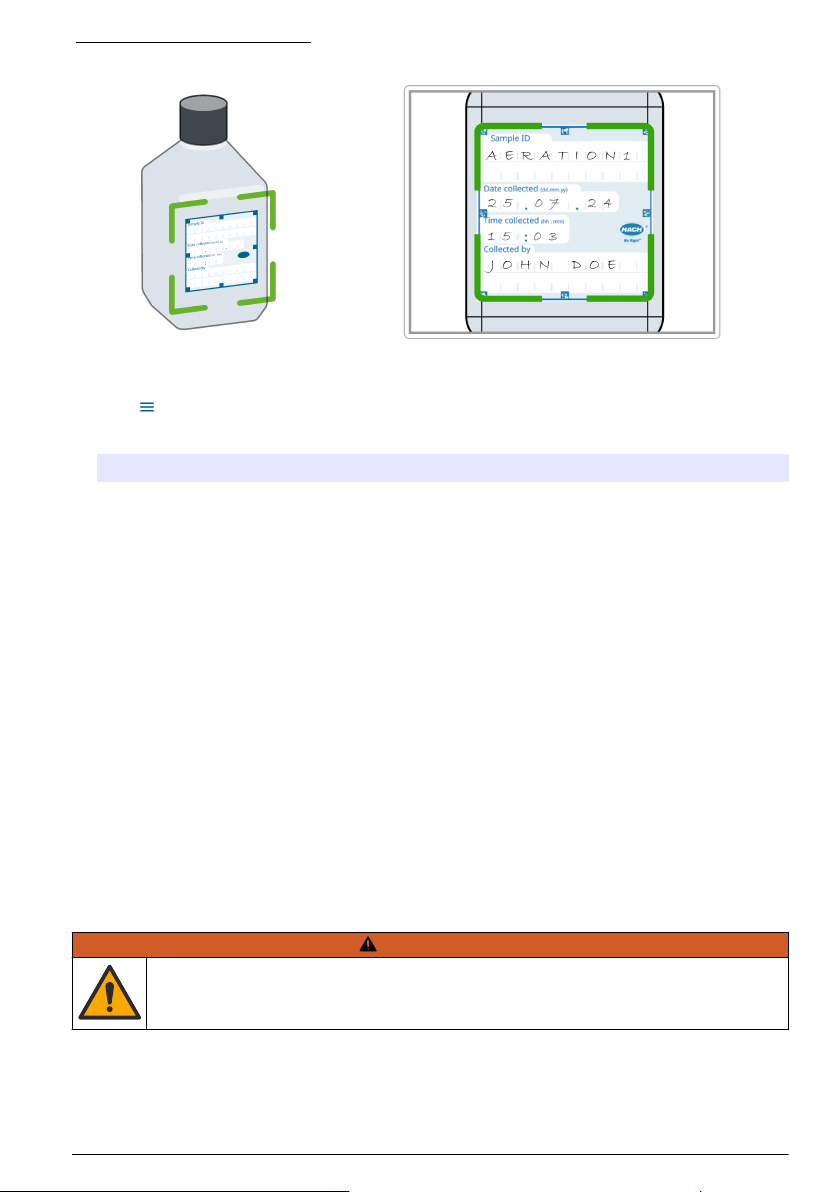
Figure 9 Read sample ID label
7.6 Show reports and data
1. Push , then select Reports & data.
2. Select an option.
Option Description
Data log Keeps a data log with a maximum of 10,000 measurements. A complete report of the analysis is
kept, which includes the date, time, parameter, value, sample ID and operator.
Trends Use the trend option to show a time curve or history curve for the saved measurements for each
parameter and location. The concentration of the applicable parameter shows over time.
Ratios Monitors the parameter relationships at a special location and shows the parameter in a chart with
the ratio function.
Scan log Records 200 time-course measurements and multi wavelength scans.
AQA log Examines the analytical quality. Configures the control of individual procedures with standard
solutions or the testing of cross-sensitivity of analyses with standard addition solutions, multiple
determinations and dilutions. A maximum of 1000 records are recorded.
7.7 Do a system check
The System checks menu contains some optical checks for the system.
7.7.1 Do an optical check
At regular intervals, do an optical verification to look at stray light, photometric and wavelength
precision.
An optional test filter set (verification kit) with six precision glass filters, target values and instructions
is available as an aid to do a comprehensive instrument verification. Refer to Table 7 on page 33.
Section 8 Maintenance
W A R N I N G
Multiple hazards. Only qualified personnel must conduct the tasks described in this section of the
document.
English 29