00193411-02.pdf - 第120页
5 Operator, Line engineer, Service engineer User M anual SIPLACE HS -60 5.9 Component trolley Software version SR. 503.xx07/2003 US Edition 120 5.9 Com ponent tro lley 5.9.1 Safety instru ctions on docking and undocki ng…

User Manual SIPLACE HS-60 5 Operator, Line engineer, Service engineer
Software version SR.503.xx 07/2003 US Edition 5.8 Refilling components
119
5.8 Refilling components
The online help contains information on refilling components with and without barcodes.
Æ With tape feeders, make sure that you always splice on a new tape early enough so that the
feeders do not run out of components.
Æ However, do not splice the tapes too early because if you wind the tape onto the new reel after
splicing the end of the old tape, the reel with the new tape may be overfilled. The tape could
then slip off the reel and become tangled. Under certain circumstances, this could cause pick-
up errors and prolonged down times.
Æ Always insert spindles when using tape reels of 5" and larger (see Fig. 5.4 - 3) and make sure
that the dividing plates are inserted correctly (see Fig. 5.4 - 3
).
5 Operator, Line engineer, Service engineer User Manual SIPLACE HS-60
5.9 Component trolley Software version SR.503.xx07/2003 US Edition
120
5.9 Component trolley
5.9.1 Safety instructions on docking and undocking the component trolley
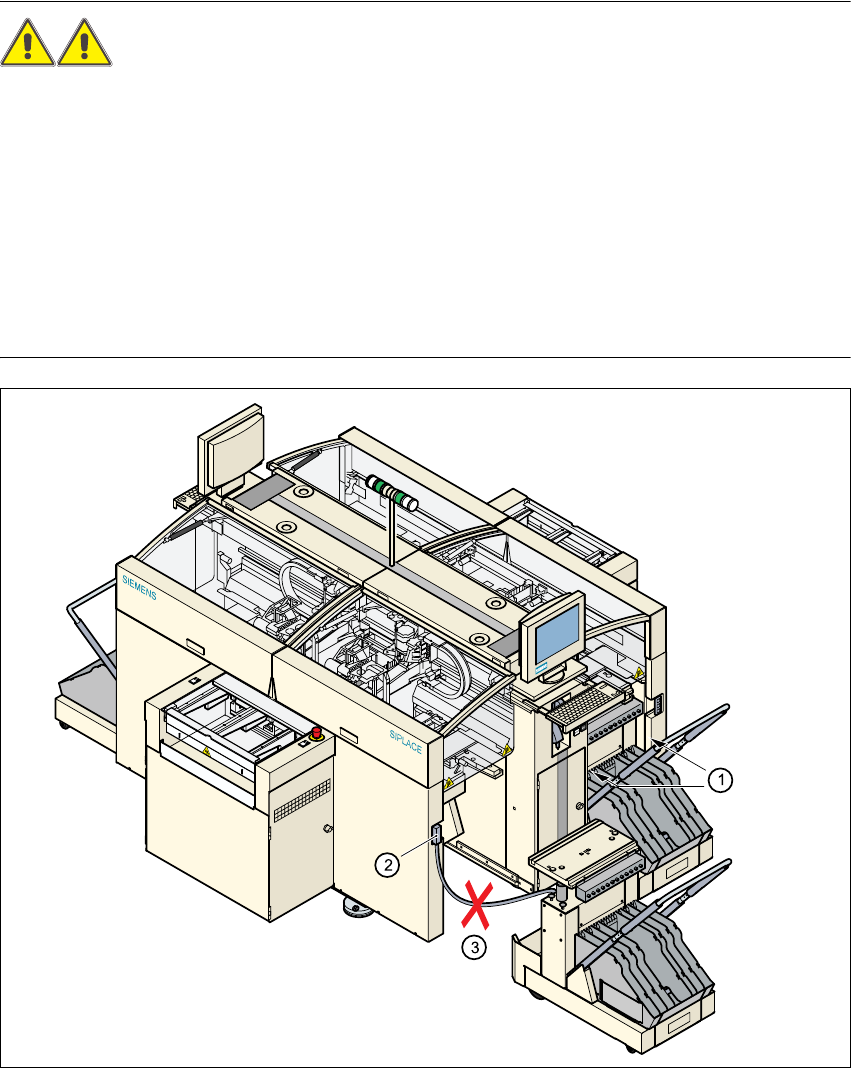
WARNING 5
Æ Never reach into the gaps between the component trolley and the placement system while the
machine is running (see item 1).
Æ Always check that the component trolley is docked on the placement system before connecting
or disconnecting the connecting cable for the component trolley at the socket on the placement
system (item 2).
– Never connect the connecting cable for the component trolley to the socket on the placement
system and then operate the component trolley outside the machine via the compressed air
control unit (item 3).
5
Fig. 5.9 - 1 Safety instructions on the component trolley
User Manual SIPLACE HS-60 5 Operator, Line engineer, Service engineer
Software version SR.503.xx 07/2003 US Edition 5.9 Component trolley
121
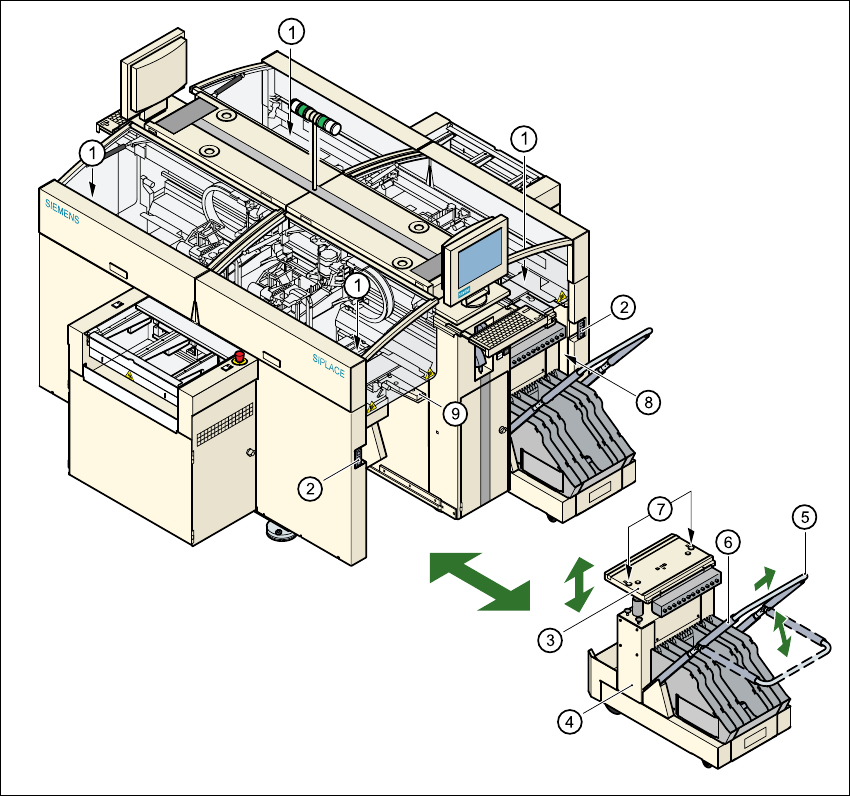
Fig. 5.9 - 2 Docking or undocking the component trolley
5
(1) Button for raising and lowering the component table bed
(2) Plug for connecting the component trolley cable
(3) Component table bed, can be raised or lowered
(4) Component trolley
(5) Bracket
(6) Actuator tube
(7) Centering holes for the centering pins
(8) Gap between the component trolley and the machine frame
(9) Supporting surface for the component table bed