00193411-02.pdf - 第161页
User Manual SIPLAC E HS-60 7 Station extensions Software version SR.503.xx 07/2003 US Edition 7.3 Dual conveyor 161 7.3.8.1 T echnical dat a – dual conveyor 7 7 7 7.3.9 Preventi ve maint enance The indivi dual conv eyor …

7 Station extensions User Manual SIPLACE HS-60
7.3 Dual conveyor Software version SR.503.xx 07/2003 US Edition
160
7.3.6 Synchronous transport mode
7.3.6.1 Description
In synchronous mode, two PCBs of the same size are moved into the placement position
together. They must be processed as a common panel.
In this way, the top and bottom of a PCB can be processed on a single line, and the time required
to transport the PCB is shorter since two PCBs are always transported at the same time.
7.3.6.2 Function
PCBs on conveyor tracks 1 and 2 are moved synchronously onto the conveyor sections (i.e. the
conveyors are controlled synchronously, but independently of one another). The components to
be placed on conveyor tracks 1 and 2 must be organized into a panel via two subpanels. (See
the user manual for the line computer).
If only one conveyor track (or center conveyor) is full when the placement sequence starts, the
subpanel on this section will be identified as “not for placement”.
7.3.6.3 Restrictions
If the dual conveyor is operated in synchronous mode, the ‘PCB whispering down the line’ option
is deactivated. PCB barcode operation is not supported in this mode. The ‘Global ink spot’ option
cannot be used.
7.3.7 Controlling the dual conveyor using the Single Functions menu
The online help contains information on controlling the dual conveyor and on the Single Functions
menu.
7.3.8 Automatic width adjustment on the dual conveyor
The desired conveyor width relates to both conveyors. When the command is received, the con-
veyors are set to the desired width one after another.
PLEASE NOTE 7
Automatic width adjustment is deactivated if “synchronous transport” is selected.

User Manual SIPLACE HS-60 7 Station extensions
Software version SR.503.xx 07/2003 US Edition 7.3 Dual conveyor
161
7.3.8.1 Technical data – dual conveyor
7
7
7
7.3.9 Preventive maintenance
The individual conveyor belts and the additional lifting table require the same maintenance as the
standard conveyor. Each conveyor belt must be maintained as described in the maintenance in-
structions.
Fixed conveyor side Right (standard), left (optional)
Max. component height 6 mm
PCB format 50 mm x 50 mm up to 368 mm x 216 mm (standard)
50 mm x 50 mm up to 368 mm x 242 mm (available upon
request)
Long board: PCB longer than 368 mm (option)
50 mm x 110 mm up to 610 mm x 216 mm
50 mm x 110 mm up to 610 mm x 242 mm (available upon
request)
PCB thickness 0.5 mm to 4.5 mm
Max. PCB warpage Up: 4,5 mm - PCB thickness
On bottom: 0.3 mm + PCB thickness
Clearance on PCB underside Standard: 25 mm
Option: max. 40 mm
PCB transport height 830 mm ± 15 mm (standard)
900 mm ± 15 mm (option)
930 mm± 15 mm (option)
950 mm ± 15 mm (SMEMA: optional)
Type of interface Siemens (standard)
SMEMA (optional)
Component-free PCB handling edge 3 mm
PCB changeover time 2.5 s
Conveyor mode Synchronous or asynchronous
Components on each conveyor Synchronous: different, asynchronous: same
PCB width on each conveyor Synchronous: different, asynchronous: same
Ink spot recognition Synchronous: not possible, asynchronous: possible
Automatic width adjustment Synchronous: not possible, asynchronous: possible
7 Station extensions User Manual SIPLACE HS-60
7.4 PCB barcode Software version SR.503.xx 07/2003 US Edition
162
7.4 PCB barcode
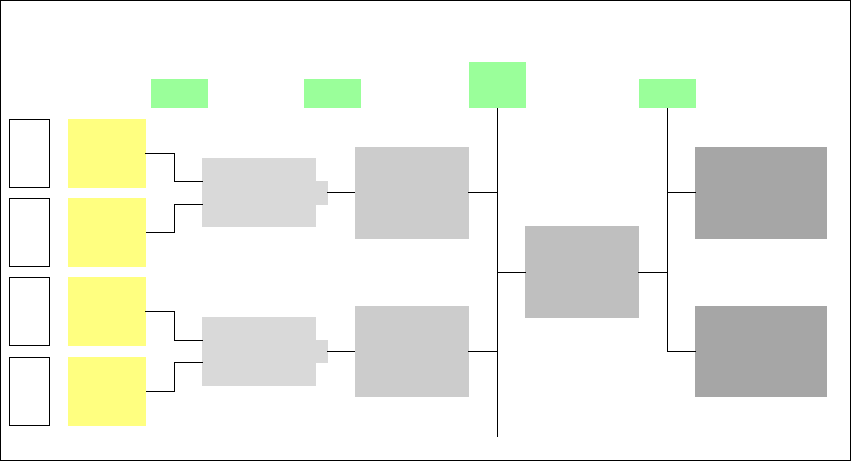
7.4.1 Overview
The PCB barcode reader is used to automatically record and decode barcodes on PCBs. The
PCB barcode reader sends the read data via its serial interface to the transport controller and then
for further processing to the machine controller via the CAN bus.
7
Fig. 7.4 - 1 PCB barcode block diagram
The PCB barcode readers are installed on the input side of the placement machine, above and
below the PCB conveyor, so that barcode labels on the topside and underside of the PCBs can
be read.
A maximum of four PCB barcode readers may be retrofitted in order to read the topside and un-
derside of the PCB on the transport track.
Device number
1
Barcode
reader
top
Distribution
board
Transport
controller,
right
Barcode
reader
bottom
2
3
Barcode
reader
top
Distribution
board
Transport
controller,
left
Barcode
reader
bottom
4
Machine
controller
Station
computer
SIPLACE Pro/
line computer
LAN
CAN
bus
V-24V-24