X-Series-Maintenance-Manual(1).pdf - 第81页
Major Maintenance Preparatory Steps Maintenance Tasks for C&P20A Head Maintenance Manual SIPLACE X Series 81 Color-coding of dosage devices and lubrican ts See also 1.2 Preparatory Work... [ ➙ 11] Overview of M ult…
Major Maintenance
Maintenance Tasks for C&P20A Head Preparatory Steps
80 Maintenance Manual SIPLACE X Series
Preparatory Steps
5.5.3 Preparatory Steps
Assembling the head mount
► Assemble the head mount. Read the head mount manual (German and English: [00196371-xx]).
► Connect the assembly mount ESD connection to an ESD connection at the workplace.
Vacuum test
► Set the nozzles for the current nozzle configuration down in the nozzle changer.
► Before you begin maintenance work, perform a vacuum test. Use the calibration nozzles 2057 for
this. If vacuum value irregularities occur at certain segments, take a closer look at these during
maintenance work. Note down the numbers of the problematic segments for later reference.
Removing the placement head
► Dismantle the placement head and remove it from the placement machine. Read the service manual
for the respective machine first.
► Fit the placement head onto the head mount.
Multipette
► Prepare the multipette. (See below)
CAUTION
ESD regulations!
► Always observe the ESD regulations described in the user manual.
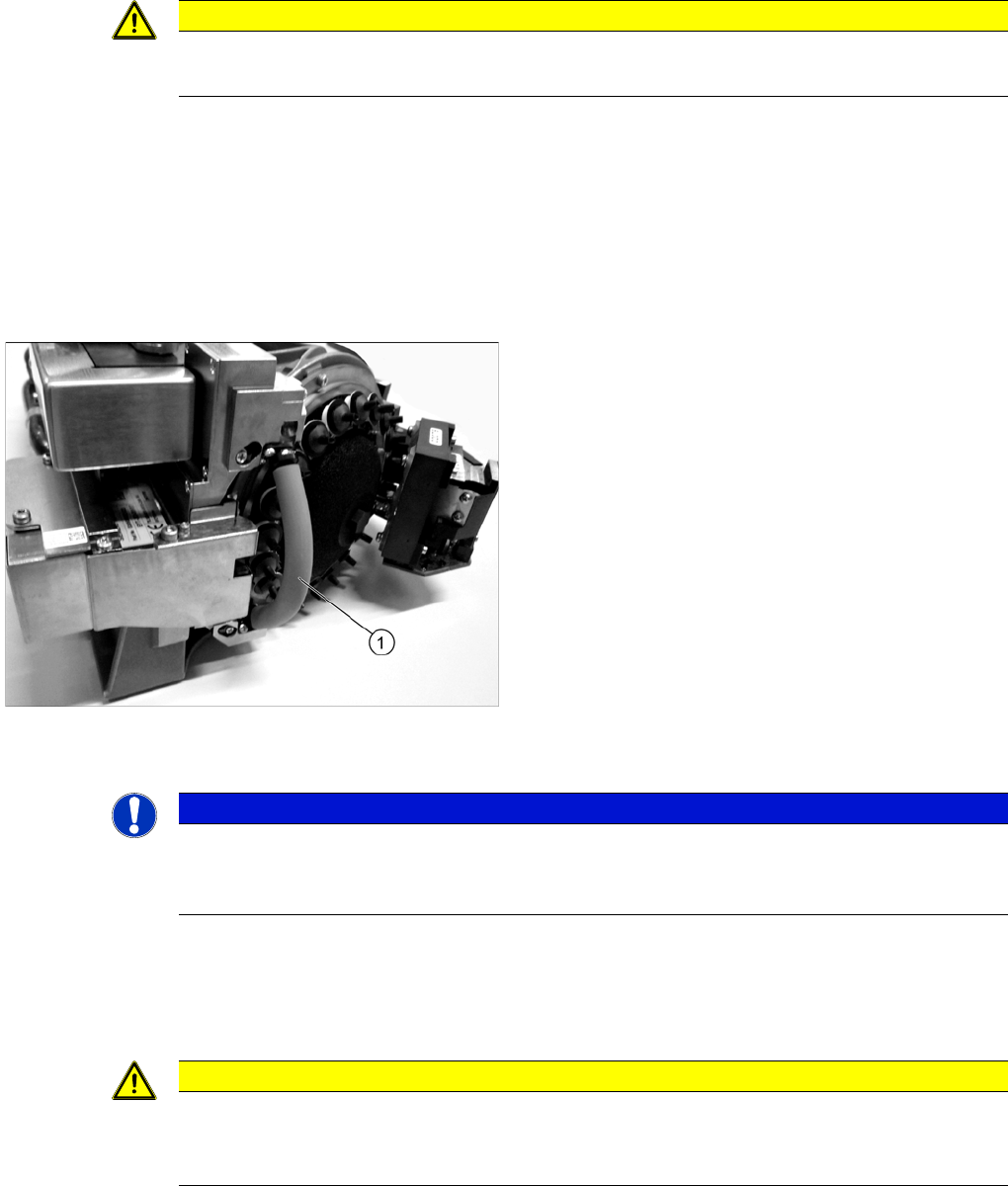
► Fit the protective hose (1) onto the component
sensor.
NOTICE
Fast Head Exchange
► If possible, use the FHE function. This enables you to perform a brief calibration during the
subsequent installation.
CAUTION
Do not combine!
Only use the combitip specifically marked for each lubricant, to avoid combining the lubricants.
Contamination (combination) of lubricants can affect the service life of the bearings!
Major Maintenance
Preparatory Steps Maintenance Tasks for C&P20A Head
Maintenance Manual SIPLACE X Series 81
Color-coding of dosage devices and lubricants
See also
1.2 Preparatory Work... [ ➙ 11]
Overview of M ultipette
5.5.3.1 Overview of Multipette
Assembling the Multipette
5.5.3.2 Assembling the Multipette
Color Lubricant Application
White White combitip
Nye Synthetic Oil 200A 30 ml
Driver bearing (C&P20 only)
Black Black combitip
Klüberalfa DH 3-100
Driver bearing (C&P20A only)
Blue Blue combitip
Lubcon Thermoplex ALN 1001/00 50 ml
Segment guide/Z axis guide (C&P20A)
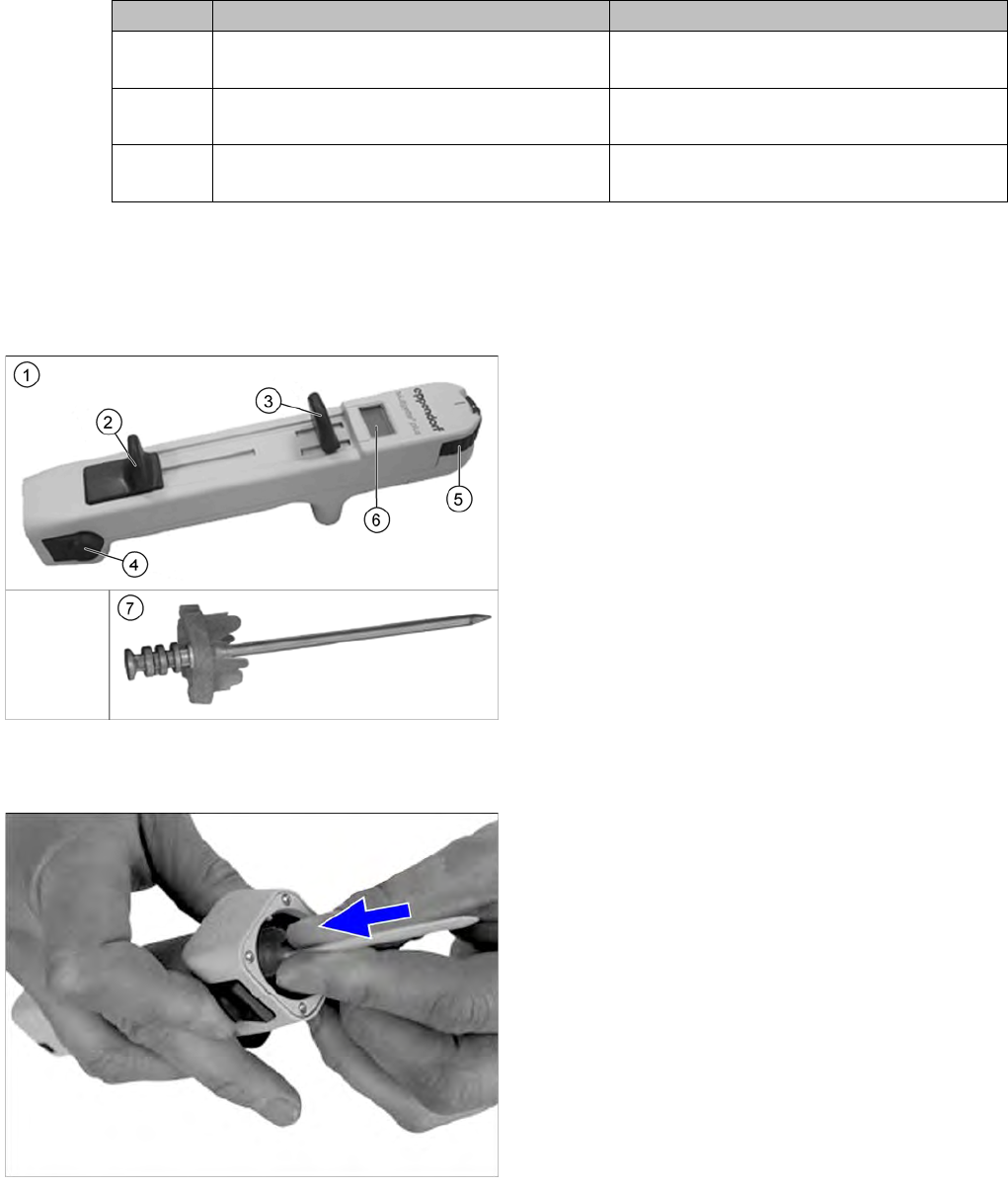
1. Multipette
2. Filling lever
3. Dosage lever
4. Reject button
5. Volume setting
6. Digital display
This shows the application amount. The amount
applied depends on the combitip used and the
current position of the volume setting.
7. Combitip
► Press the filling lever on the multipette right down and
hold in position.
► Press the relevant combitip onto the multipette until it
engages.
► Check whether the combitip is fitted firmly on the
Multipette.
► Set the required dosage on the volume setting.
Major Maintenance
Maintenance Tasks for C&P20A Head Preparatory Steps
82 Maintenance Manual SIPLACE X Series
Filling and Settin g the Multipette
5.5.3.3 Filling and Setting the Multipette
► Place a cloth or similar material on your working surface so that this is not soiled with lubricant when
you set the multipette.
► Take the tip of the combitip out of the lubricant and wipe any excess lubricant off the combitip.
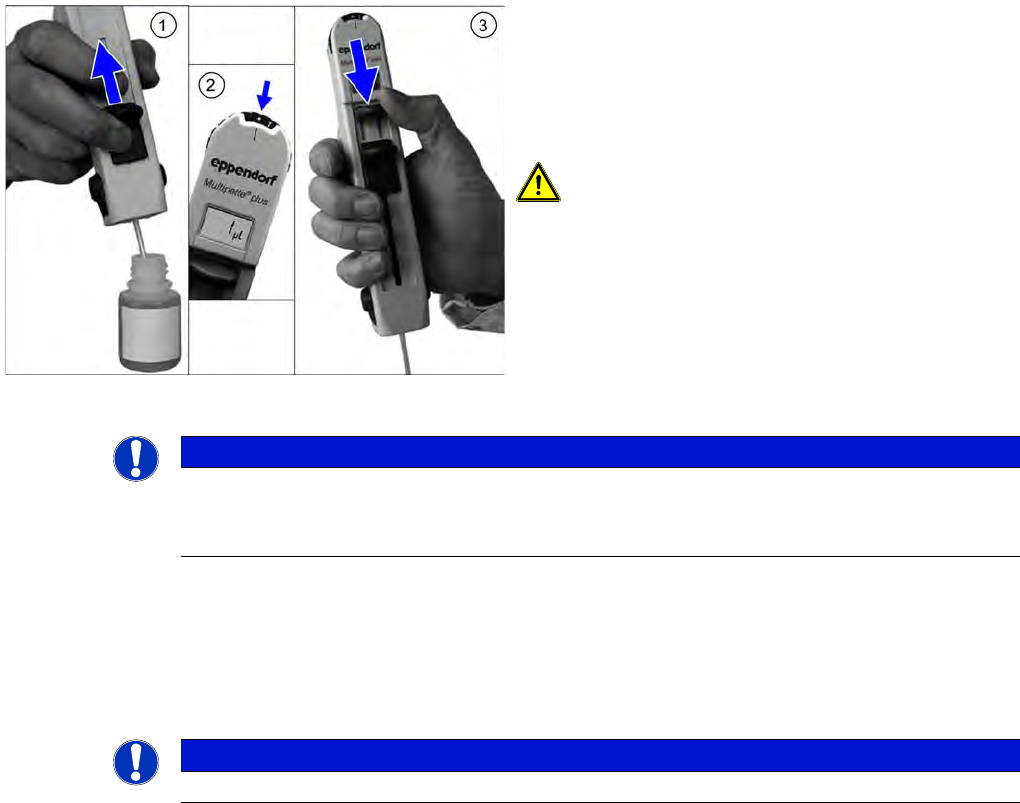
► (2) Set the multipette gauge to the dot on the left, next to the "1". The display should now show "1 µl".
► (3) Push the application lever as far as the end stop, in the direction of the combitip.
This removes any air trapped in the combitip. The volume shown is then accurate.
► Test the application volume on the cloth.
The multipette is now ready for use.
Releasing the Combitip from the Mu ltipette
5.5.3.4 Releasing the Combitip from the Multipette
► Hold the combitip over a container with the relevant lubricant or a waste bin and push the filling lever
right down. The remaining lubricant will be pressed out.
► Pull the filling lever back up again.
► Press the two reject buttons simultaneously. The combitip will be released from the multipette.
► Push the filling lever as far as the end stop, in the
direction of the combitip.
► Dip the tip of the combitip into the relevant lubricant.
► (1) Slowly push the filling lever in the direction of the
display, to pull the lubricant into the multipette.
CAUTION! Do not apply the filling lever too
quickly, otherwise a strong vacuum will be created. The
fluid will then be enriched with air bubbles, which can
lead to inaccurate application volumes.
However, the small air bubble in the upper section of the
cylinder does not affect the application volume.
NOTICE
Fill the combitip completely
If you do not completely fill the combitip, the display will not flash. In this case, you need to
return the initial volume to the bottle and then refill the combitip.
NOTICE
You can change the volume between applications by simply turning the volume setting wheel.