TRS Advanced WB Intel Issue 02.pdf - 第5页
Issue 2, Nov 14 TRS Advanced Maintenance 5 Objective 1: Locate the haza rdous areas of the machine. W arning * Moving machine parts can cause injury . * During this course the machine may be operated with covers removed.…

TRS Advanced Maintenance
4
Issue 2, Nov 14
Pneumatic
21 Identify and locate all pneumatic components of TRS DKO
22
Understand the operation and limitations of a Venturi
Vacuum System
DKO/
DKW
23 Test Performance of Venturi Vaccum DPI
24 Test Vacuum performance through Tooling Towers DPI
Software
25 Use of Diagnostics to test operation DPI
26 Enable / Disable the TRS system/Soft Lift&Land Para. DPI
27 Locate and understand “timing.ini” file DKW
Calibration and Co-Planarity
28 Co-Plane the Machine DPI
29
Check / Calibrate TRP Home and TRP Over Rails
Sensors
DPI
30 Check / Set Rising Table Home Position DPI
31 Calibrate Camera Reference Position DPI
32 Calibrate Vision Height DPI
33 Calibrate Print Height DPI
34 Calibrate Rail Width DPI
35 Calibrate Squeegee Pressure DPI
36 Calibrate Vision and Offset DPI
37 TRS dual belt speed motor setting (belt speed setting) DPI
38 Run SPC and troubleshoot if necessary DPI
Pre-Production Setup
39 TRA Pitch adjustment, Plate Offset Jig (POJ) DPI
40 Check TRA Gap and adjust (Level Adjustment) DPI
41 Set-up board stop DPI
42 Baseline Data Information DKO
43 Process Fault Finding DKO
44 Locate and identify drip trays in the printer DKO
45 Remove and refit left side safety cover DPI
46 Transportation of the TRS Unit DPI
47 Converting machine to Strip Handling Option DPI
Issue 2, Nov 14
TRS Advanced Maintenance
5
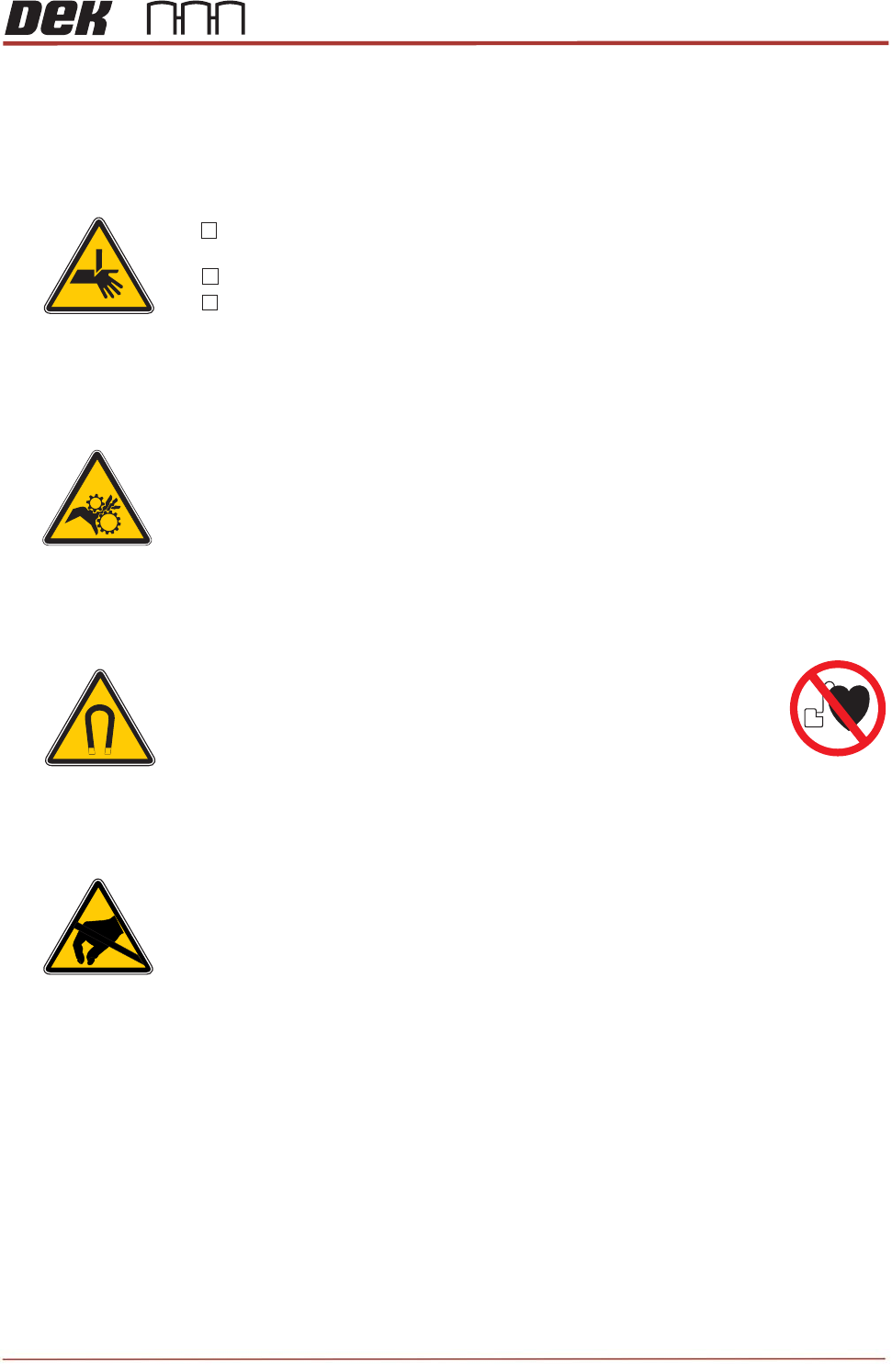
Objective 1: Locate the hazardous areas of the machine.
Warning
* Moving machine parts can cause injury.
* During this course the machine may be operated with covers
removed.
* Always remove system power prior to undertaking any work on
machine.
* Ensure you DO NOT push or press any buttons or operate the
machine until all personnel are clear of danger.
Personal Safety
Tick each safety item as it is demonstrated to you by your instructor:
Strong Magnet Warning (Machines with Linear Motors only)
The linear motors inside the machine contain*
strong permanent magnets.
These may interfere with pacemakers and metallic implants.*
These magnets could potentially erase data on credit cards,*
ID cards etc.
))
((
Wear eye protection and gloves when working with solder paste
and solvents.
If in doubt press the E-stop, EMO
Do not bypass camsafe switches
ESD Hazard
* The printer contains Electro-Static Sensitive Devices (ESD).
* Do not touch any electronic component of PCB unless wearing
a correctly grounded wrist strap.
Safety Objective
I have been briefed on the above safety aspects and I am fully satised with my
responsibilities..
Sign
Date

TRS Advanced Maintenance
6
Issue 2, Nov 14
Objective 2: Identify the key benefits and features of the TRS option.
• Ball placement application on singulated substrates (BGA devices) improved by Z
locking towers
• Better print quality with improve co-planarity (TRP improvements)
• Better alignment capabilities through less tolerance stack up (active surround system)
• JEDEC tray, J boat, Flat boat
• Passive solder paste printing down to 01005
• Processing singulated substrates typically PGA, LGA flip chip devices for GPU or
CPU’s
• Processing multiple substrates from carriers in a single process stroke
• TRP (Top referencing plate) a structure that compresses the substrates removing
warpage
• Active surround for substrate alignment and snugging
• Z locking towers for substrate thickness variation
• Self-centring towers, with no alignment capabilities for improved throughput a low
carrier interference