YAMAHA-YG系列 换螺杆指导书.pdf - 第23页
Service Engineer Service I nformati on SI080 2008 E-000 = YG series: Replacement proc edure for ball screws of each axis 23/65 2.4. Centering of the Y -axis 2.4.1. How to perform centering of the Y-axis ball screw [ Comm…
Service Engineer
Service Information
SI0802008E-000= YG series: Replacement procedure for ball screws of each axis
22/65
When mounting the ball screw of YG88R, YG100R, YG200, YG200L and YG300 models.
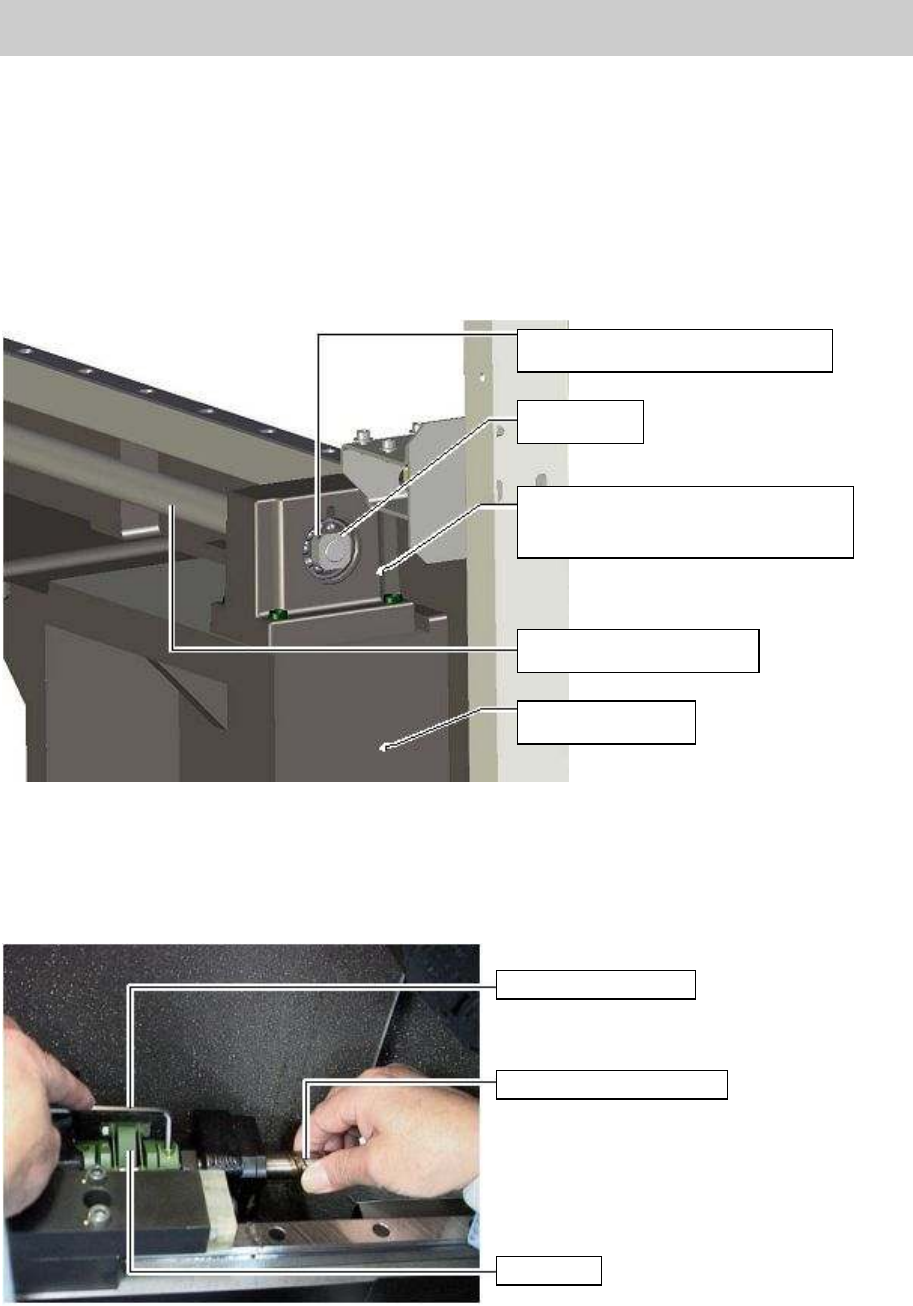
5. Assemble the bearing on the dead-end side of the SCREW BALL Y AXIS.
1) Insert the dead-end side of the SCREW BALL Y AXIS into the bearing.
2) Tighten the LOCK NUT with a spanner while inserting a hex wrench into a hole (for
anti-rotation) on the SCREW BALL Y AXIS.
3) Tighten the set screw for anti-backlash on a corner of the LOCK NUT with a hex wrench.
Figure 28
* The following procedure is common to all the models.
6. Temporarily tighten one of the two bolts at the slotted part of the coupling on the ball screw side.
Figure 29
Setscrew for fixing the LOCK NUT
LOCK NUT
HOLDER, BRG. Y
*Please do not remove this part.
SCREW BALL Y AXIS
FRAME R, Y AXIS
Hex wrench (Size 3)
SCREW BALL Y AXIS
Coupling
Service Engineer
Service Information
SI0802008E-000= YG series: Replacement procedure for ball screws of each axis
23/65
2.4. Centering of the Y-axis
2.4.1. How to perform centering of the Y-axis ball screw [Common to both Y1 and Y2-axis]
* The following procedures are common to all the models.
Note:
Please perform centering with reference to the height of the center of the ball screw on the motor side.
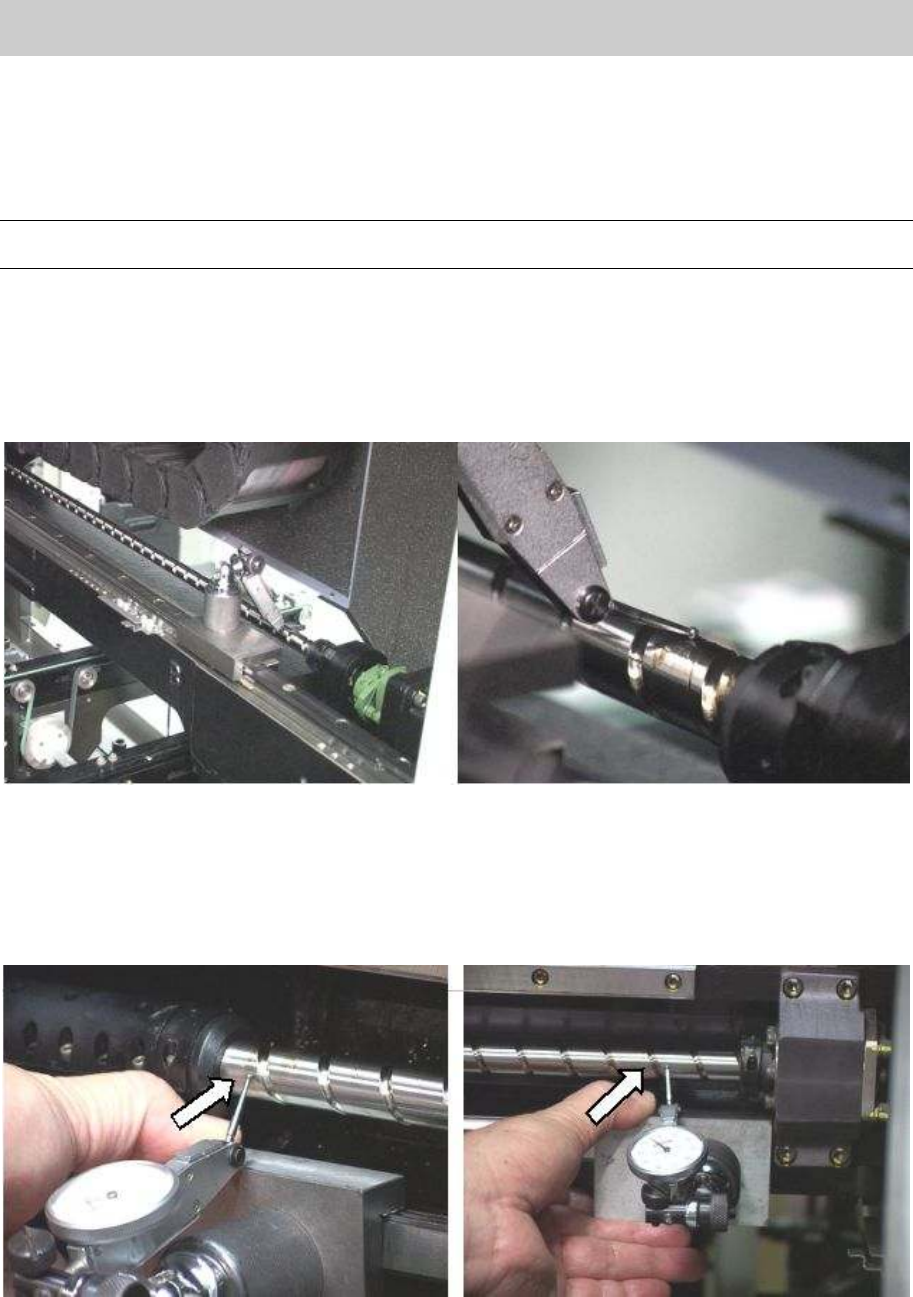
1. Set the tool (plate) for centering to the GUIDE SET and attach a dial gauge on the tool.
2. Put the dial gauge at the point near the SUPPORT UNIT on the ball screw, then perform zero
setting.
3. Put the dial gauge at the point near the HOLDER BRG. Y. Then adjust the height of the HOLDER
BRG. Y by putting shims so that the dial gauge indicates 0 and temporarily tighten the fixing bolts.
Figure 30
4. Put the dial gauge at the point near the SUPPORT UNIT on the ball screw, and perform zero
setting.
5. Put the dial gauge on the point near the HOLDER BRG. Y on the ball screw, and adjust the
position of the HOLDER BRG. Y by moving it from side to side until the dial gauge indicates 0, then
temporarily tighten the fixing bolts.
Figure 31
6. Repeat the procedure from 2 through 5 to adjust the deviation of the center of the ball screw so
that it falls within +-0.01mm. Then fully tighten the bolts.
Service Engineer
Service Information
SI0802008E-000= YG series: Replacement procedure for ball screws of each axis
24/65
2.4.2. Adjustment after replacing the ball screw
The coordinates of the machine deviate due to the replacement of the parts. Therefore, some works
need to be done in order to restore the coordinates in the simple method.
Caution:
Please make sure to do the necessary work before replacement. Otherwise, you will need to perform
all the adjustment, which requires a great deal of time later on.
<Works to be done>
• Adjust the machien reference.
• Adjust the Y2 dual offset
• Adjsut the reference coordinate after the replacement of the ball screw.
• Check the peak current (With the Servo utility).
* Please refer to the relevant section in “5. Adjustment”.
Check if the bolts are tightened properly
1. Press the [Emergency stop] button and check the surrounding area for safety.
2. Check the bolts removed for replacement or loosened are tightened properly.
Check if the bolts are tightened with the appropriate hex wrench and make a mark on the
bolts with the marker pen.
Other items to be checked and done
1. Check if there are any tools used for replacement left in the machine.
2. Check if there are any pieces of cut off cable tie left in the machine.
3. Make sure that all the harnesses are secured properly, and no axes interfere with anything
when they move.
Caution:
Please do not use an air gun for cleaning inside the machine. The blown away dusts may stick to the
moving parts of the axes, which causes the serious problem to the machine.
4. Get ready for the production activity
Put back all the removed parts such as feeders and other supplying equipments to the
original position.
2.5. Necessary adjustment
Note:
Please refer to the relevant section in “YG300 CalibSm Adjustment Manual” for performing the
following adjustment.
• Check and adjust the soft limit of the Y-axis
• Check and adjust the coordinate of the ANC nozzle station.
• Check if the ANC consecutive nozzle change function works properly after adjusting the
coordinate of the nozzle station.
• Check and adjust the coordinate of the blow station.
* Please use an actual board and perform mounting test.
If the mounting accuracy is not enough, please perform FAMF adjustment.