YAMAHA-YG系列 换螺杆指导书.pdf - 第56页
Service Engineer Service I nformati on SI080 2008 E-000 = YG series: Replacement proc edure for ball screws of each axis 56/65 5.6.1. A djustment of the soft limit Click on the [Axis] button on the main m enu screen to a…
Service Engineer
Service Information
SI0802008E-000= YG series: Replacement procedure for ball screws of each axis
55/65
5.6. Adjustment of the soft limit
The soft limit is the safe distance that is set in order to avoid collision of the parts during operation.
Setting the soft limit is considered to be important, as the axes require the maximum space to travel in
the machine, however on the other hand, they require the safe distance to avoid collision
.
Please do not change the setting value of the each axis.
* The soft limit value may vary depends on the model.
<The offset values of the soft limit>
Axis name X-axis Y-axis YT-axis Z-axis R-axis PU-axis W-axis
88Xg, 100Xg +-2mm +-2mm +-1mm
+-360 degrees
+-1mm +-0.5mm
100XTg +-2mm +-2mm +-2mm +-1mm
+-360 degrees
+-1mm +-0.5mm
HSDXg +-2mm +-2mm +-1mm
+-360 degrees
+-1mm +-0.5mm
Axis Name LX-axis LY-axis LZ-axis LH-axis LT1-axis LT2-axis
LW-axis
YTF80W +-1mm +-1mm +-1mm +-1mm +-1mm +-1mm +-0.5mm
ATS +-1mm +-1mm
Axis Name X-axis Y-axis YT-axis Z-axis R-axis PU-axis W-axis
YG88 (R) +-2mm +-2mm +-1mm
+-360 degrees
+-1mm +-0.5mm
YG100 (R) +-2mm +-2mm
-0.5mm
+0.2mm
-5mm
+5mm
+-1mm +-0.5mm
YG200 (L) +-2mm +-2mm +-2mm
-0.5mm
+1mm
+-360 degrees
+-1mm +-0.5mm
YGD +-2mm +-2mm +-1mm
+-360 degrees
+-1mm +-0.5mm
Axis Name X-axis Y-axis CZ-axis Z-axis R-axis PU-axis W-axis
YHP-ⅡFF,FD
+-2mm +-2mm
-1mm
+0.5mm
+-1mm
+-360 degrees
+-1mm +-0.5mm
YHP-Ⅱ4M
+-2mm +-2mm +-0.3mm +-0.3mm
+-3mm +-1mm +-0.5mm
Axis Name DX12-axis
DY12-axis LZ12-axis LH12-axis
DS12-axis LW-axis
d-YTF +-1mm +-1mm +-1mm +-1mm +-1mm +-1mm +-0.5mm
ATS +-1mm +-1mm
Axis Name LX-axis DY-axis LZ-axis LH-axis LT-axis LP-axis LU-axis
+-1mm +-1mm +-1mm +-1mm +-1mm +7 +0.5mm
LS-axis LR-axis
-1.0 -1mm
WAFER-ATS
+-1mm
+-360 degrees
Axis Name X-axis Y-axis Z-axis R-axis U-axis W-axis T-axis
YG300 +-1mm +-1mm
-0.2.mm
+0.5mm
+-5mm +-1mm +-1mm +-1mm
Table 2
Service Engineer
Service Information
SI0802008E-000= YG series: Replacement procedure for ball screws of each axis
56/65
5.6.1. Adjustment of the soft limit
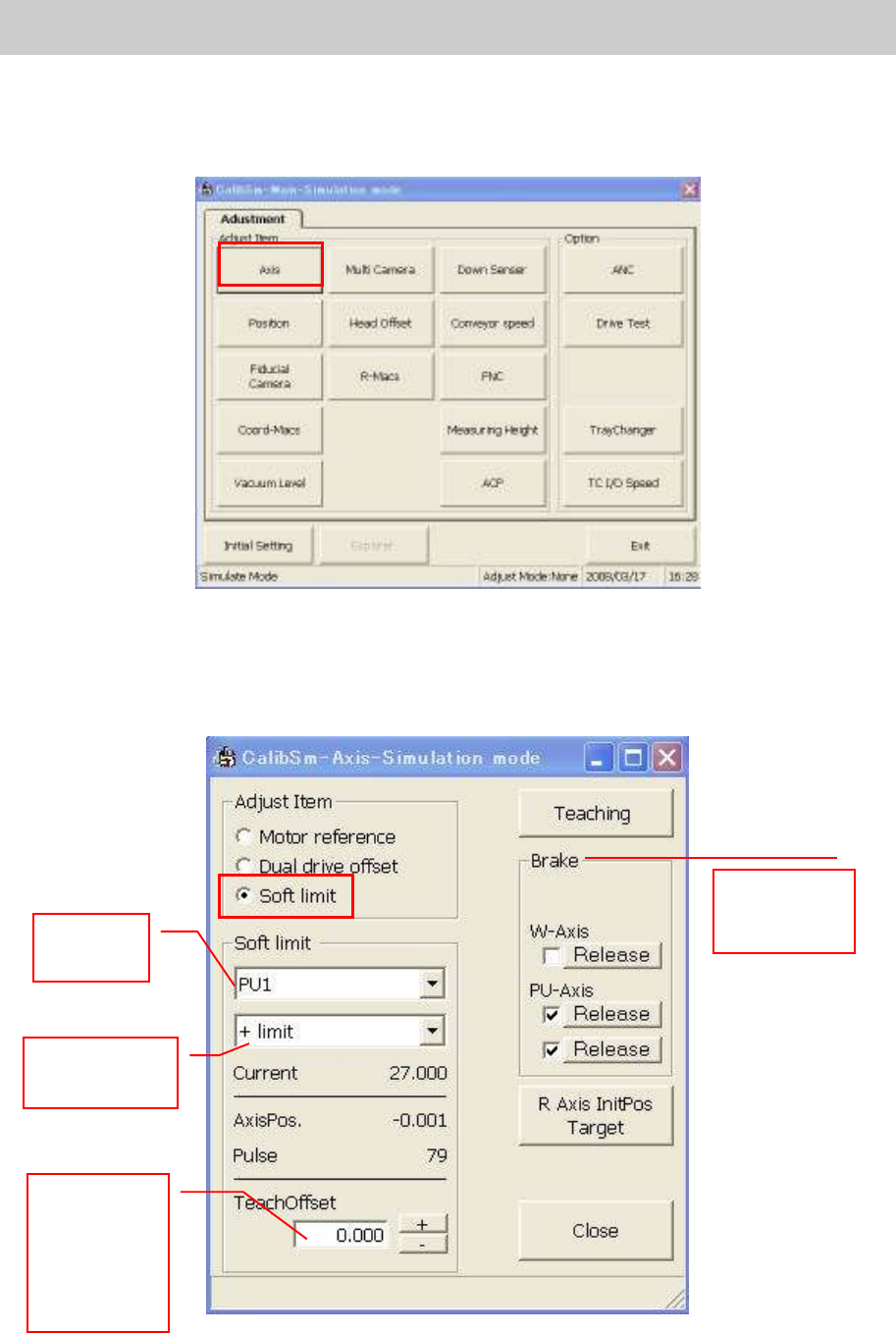
Click on the [Axis] button on the main menu screen to activate the “Soft limit” adjustment function.
Figure 80
< Main axes (X, Y-axis)>
Normally, the soft limit is set to the position that is shifted by the amount of the offset value inward from
the mechanical limit or the secondary limit.
Figure 81
The function
for releasing
the brake
.
Select
the axis
Select the
axis direction
Input the
offset value
referring to
the offset
values in
Table 2.
Service Engineer
Service Information
SI0802008E-000= YG series: Replacement procedure for ball screws of each axis
57/65
1. Press the [Emergency stop] button and turn off the servo.
2. Set the offset value. (Please refer to Table 2.)
3. Press the axis to be adjusted against the mechanical limits on both the + and – direction and click
on the [Teach] button.
Subtract the “Teach Offset” value from the obtained value by pressing the axes to the mechanical
limit in order to obtain the value.
4. The dialog box appears asking you to save the machine data. Click on the [OK] button.
Note:
When adjusting the soft limit of YG300 machine, press the X and Y-axis of the mounting table A
against the mechanical limit in order to generate the error of secondary limit deliberately. In this way,
the occurrence of the error of other axes can be prevented.
When an application error such as secondary limit error occurs in X-axis, Y-axis and U-axis adjustment,
the current position of the axes cannot be obtained correctly. Please make sure to clear the error
before pressing the axes against the mechanical limit.
5.6.2. Check the soft limit
Move the axis slowly by inching in order to check if the soft limit is set properly. Set the axis speed to
lower than 10%, and move the axis from near the soft limit outward and check if the axis stops at the
specified position. If it does not, please perform appropriate adjustment.