YAMAHA-YG系列 换螺杆指导书.pdf - 第53页
Service Engineer Service I nformati on SI080 2008 E-000 = YG series: Replacement proc edure for ball screws of each axis 53/65 Note: If the value is smaller than the specification, rotate the ball screw to the anticlockw…
Service Engineer
Service Information
SI0802008E-000= YG series: Replacement procedure for ball screws of each axis
52/65
5.4.3. Check and adjust the Y2-axis dual offset
Please make sure to check the offset balance between the Y1 motor and the Y2 motor as it may be
disrupted due to the replacement of the Y-axis motor.
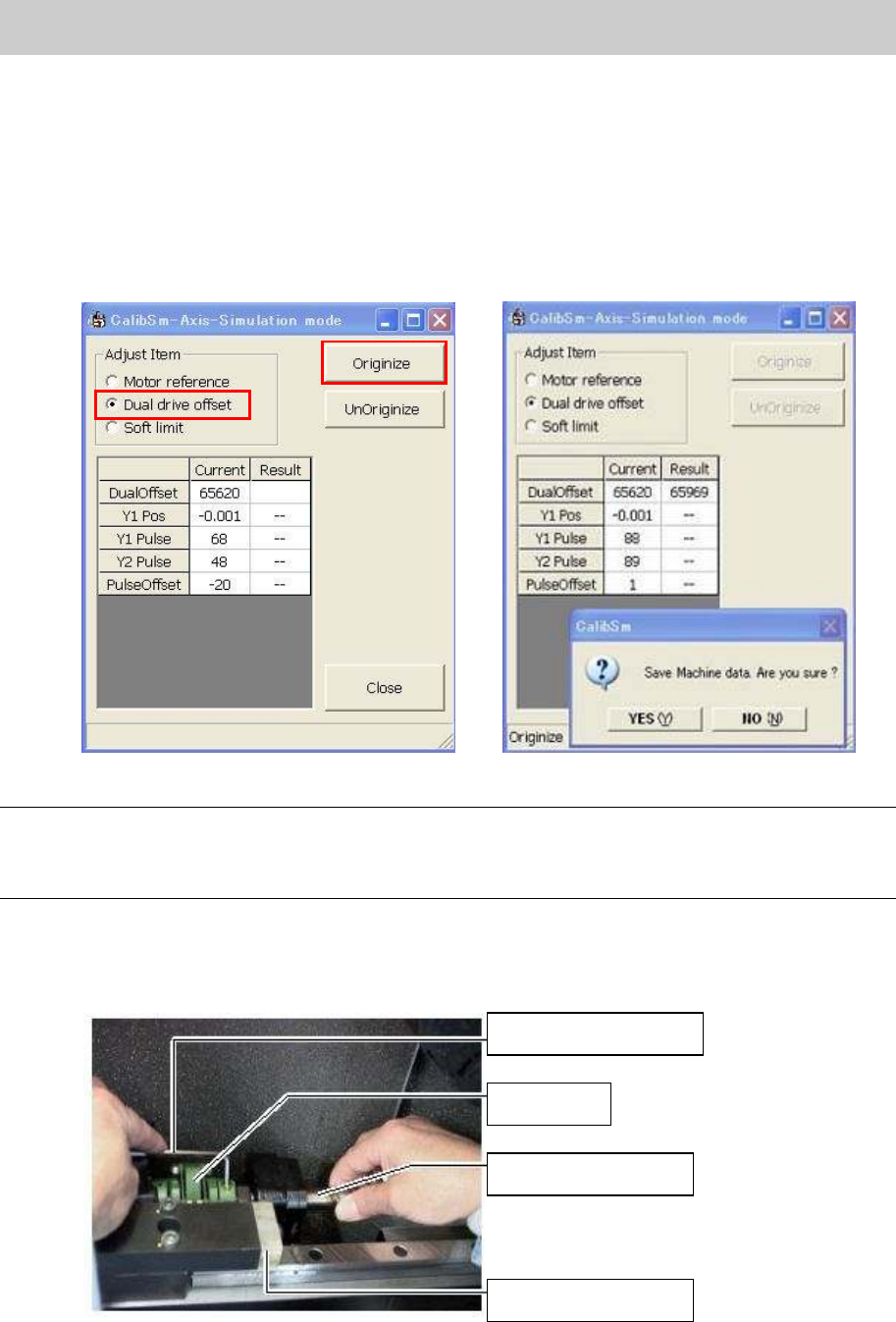
1. Select “Dual drive offset” from the “Adjust Item” and click on the [Originize] button.
2. Check the value of the Y2-axis dual offset.
The standard value of “Dual Offset”: 63700 – 64300
Please repeat the procedure 1) through 3) until the value falls within the specification.
Figure 76
Note:
If the value does not fall within the specification (63700-64300) of the Dual Offset, please click on the
“No” button without saving the data. If the data is saved accidentally, please click on the [UnOriginize]
button.
3. Adjust the Dual Offset of the Y2-axis.
Loosen the two fixing bolts on the ball screw side with a hex wrench (Size 4), and rotate the ball
screw little by little in order to adjust the position to the specified value while securing the coupling.
Figure 77
Hex wrench (Size 4)
Coupling
Y2-axis ball screw
Mechanical stopper
Service Engineer
Service Information
SI0802008E-000= YG series: Replacement procedure for ball screws of each axis
53/65
Note:
If the value is smaller than the specification, rotate the ball screw to the anticlockwise direction. If it is
larger than the specification, rotate it to the clockwise direction.
4. Check the machine reference and the value of dual offset.
Please check if the machine reference and the value of the dual offset have not changed.
(If the variation is about 1-2 %, it is acceptable.)
5. Reconfirm the reference coordinate.
Please check if the reference coordinate has not changed.
5.5. How to set the reference coordinate
5.5.1. Set the reference coordinate before replacement of the Axis
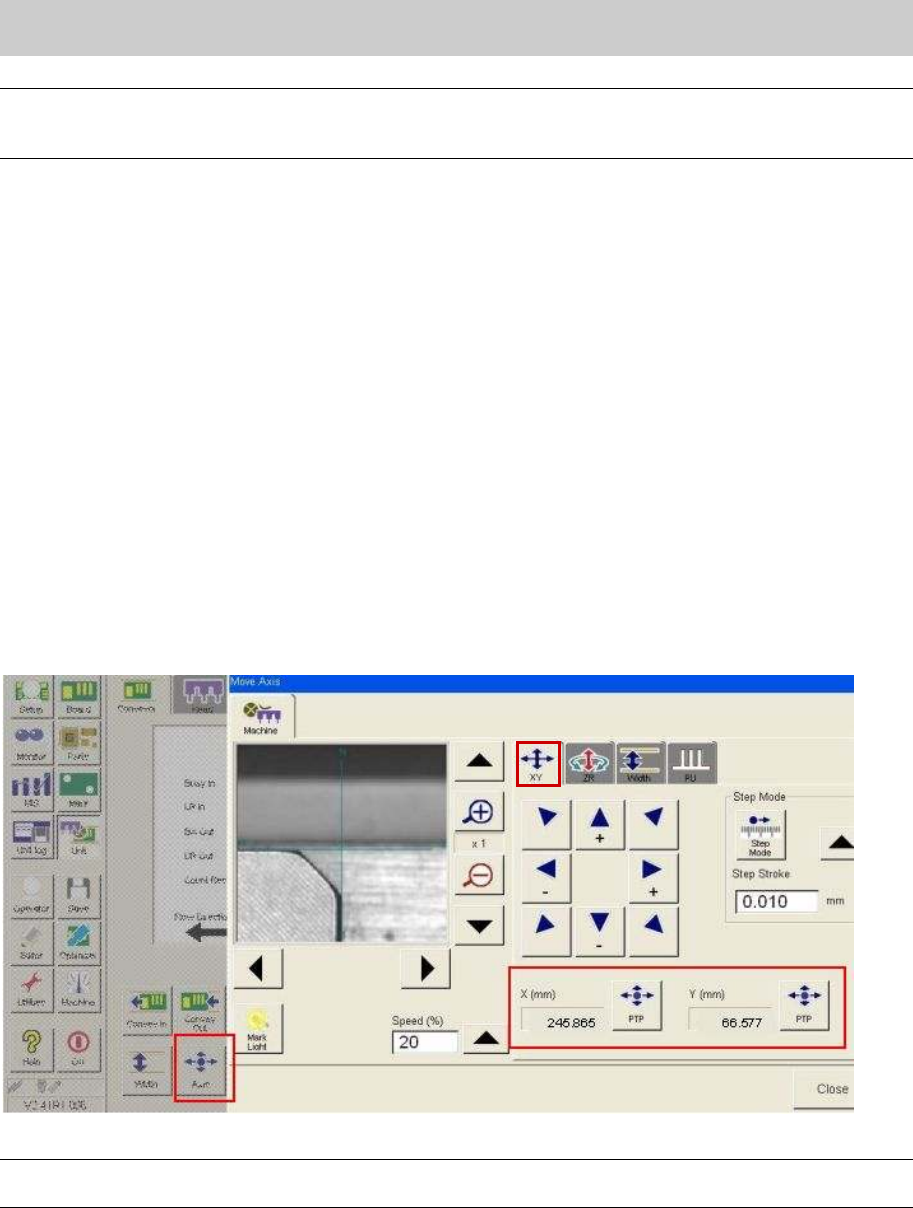
1. Click on the [Unit] button on the “Setup” screen, and then click on the [Axis] button.
2. Select the “XY” tab.
3. Record (note down) the reference coordinate.
Adjust the cursor to the corner of the board guide that is the same height as the measuring section
of the board surface height on the reference conveyor, and then record (note down) the
coordinate.
Figure 78
Note:
As the coordinate affects the mounting accuracy, please adjust the position accurately.
Service Engineer
Service Information
SI0802008E-000= YG series: Replacement procedure for ball screws of each axis
54/65
5.5.2. Adjust the axis position to the reference coordinate after replacing the ball screw
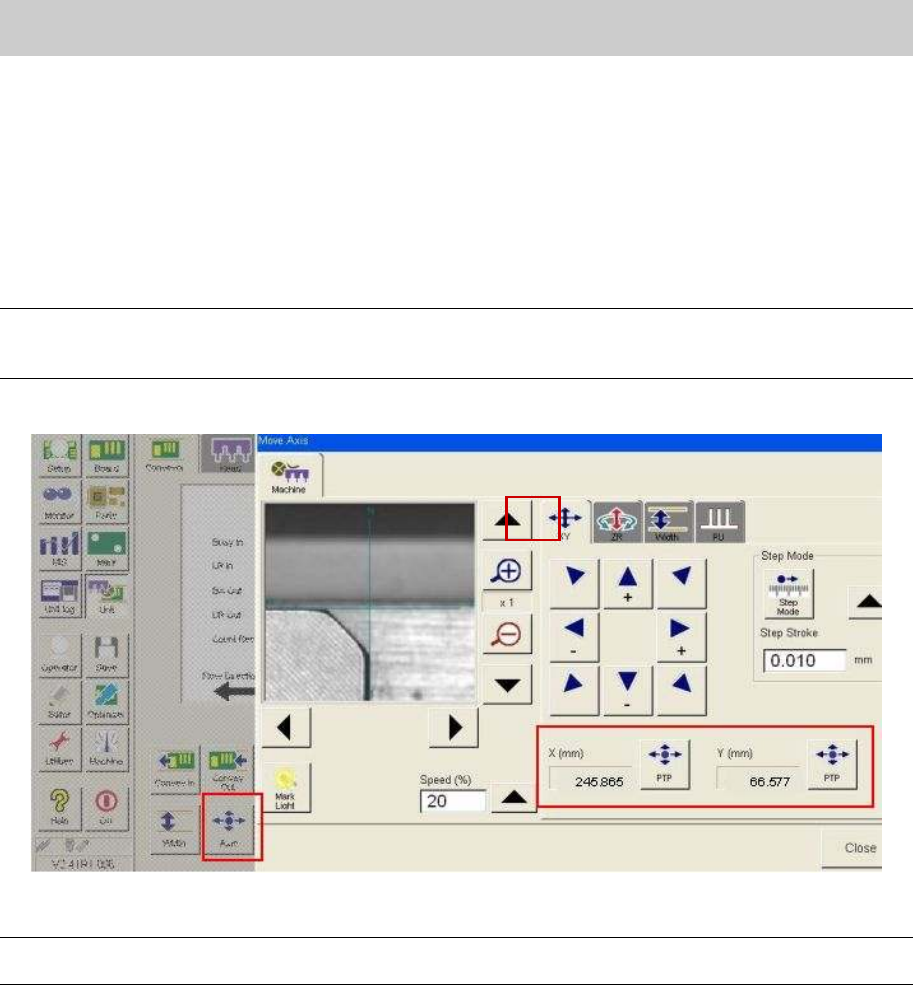
1. Click on the [Unit] button on the “Setup” screen, and then click on the [Axis] button.
2. Select the “XY” tab.
3. Input the reference coordinates before the replacement of the ball screw.
Click on the [PTP] buttons of X-axis and Y-axis and input the reference coordinates recorded in
“5.5.1. Set the reference coordinate before replacement of the Axis”, in order to move the axes.
Note:
If the position of the axes can be adjusted to the same coordinates of the X-axis and Y-axis before
replacement of the parts, it indicates that the replacement was performed successfully.
Figure 79
Caution:
As the coordinate affects the mounting accuracy, please adjust the position accurately.