00197500-01_IM_Material Manager_1.0_DE_EN.pdf - 第14页
Installing the MaterialManager 14 Installation Manual Material Manager V1.0 Initializing database ► Enter the folder in which the Ma terial Manager da tabase shall b e installed under Database folder . ► Specify the fo …
Installing the MaterialManager
Installation Manual Material Manager V1.0 13
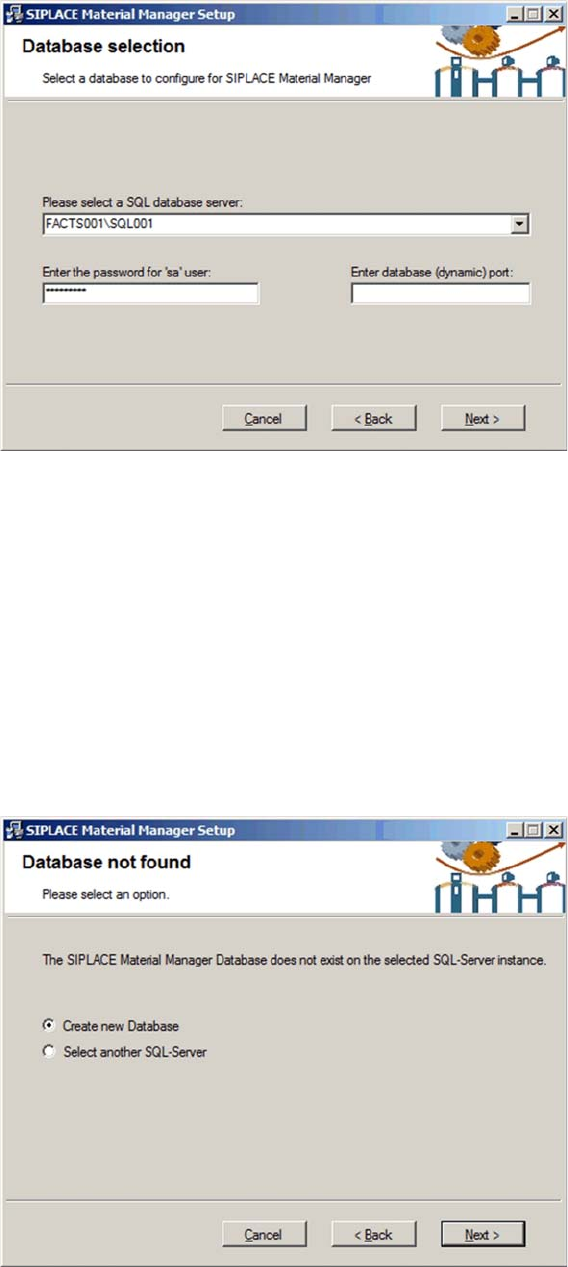
Selecting SQL server
► Select the server that you want to use as host for the Material Manager database from the drop-down
list.
► Enter the password for the "sa" user (administrator).
► Enter the port number for the database. Either you receive the port number from your system
administrator or you will find it in the Configuration Manager of the SQL server.
► Click on Next.
The installation program tries to establish a connection to the defined SQL server.
If a connection has been successfully established, the installation program checks if a Material Manager
database already exists on this SQL server. In this case, the database will be updated to the current state
(if necessary).
If no Material Manager database is available on the defined SQL server, a new one will be created.
Creating a new database
► Select the Create new Database option.
► Click on Next.
Installing the MaterialManager
14 Installation Manual Material Manager V1.0
Initializing database
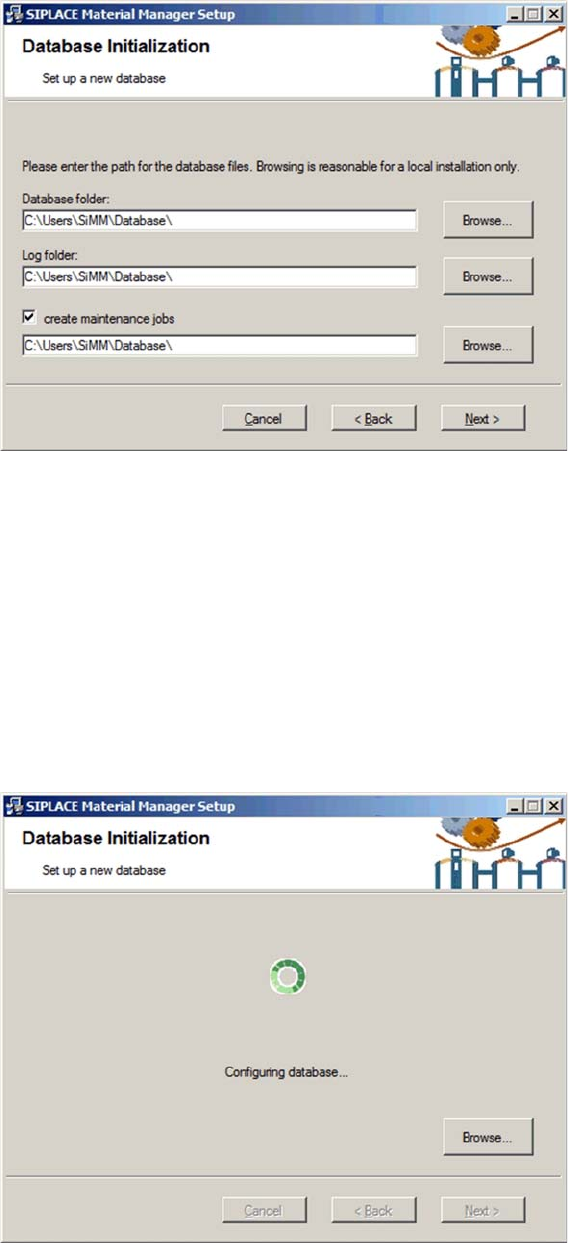
► Enter the folder in which the Material Manager database shall be installed under Database folder.
► Specify the folder in which the log files shall be stored under Log folder.
Routines are available in the Material Manager to help you maintaining the Material Manager database.
▪ CleanUp Consumed Lots
deletes the data of a used packaging unit after the set time.
▪ CleanUp Lot Log
deletes the history of a used packaging unit after the set time.
► Enable the Create maintenance jobs option if you want to use these routines and, in the entry field
below, specify the folder in which the log files created by the routines shall be stored.
► Click on Next.
Configuring database
The Material Manager database will be installed according to your specifications.
Installing the MaterialManager
Installation Manual Material Manager V1.0 15
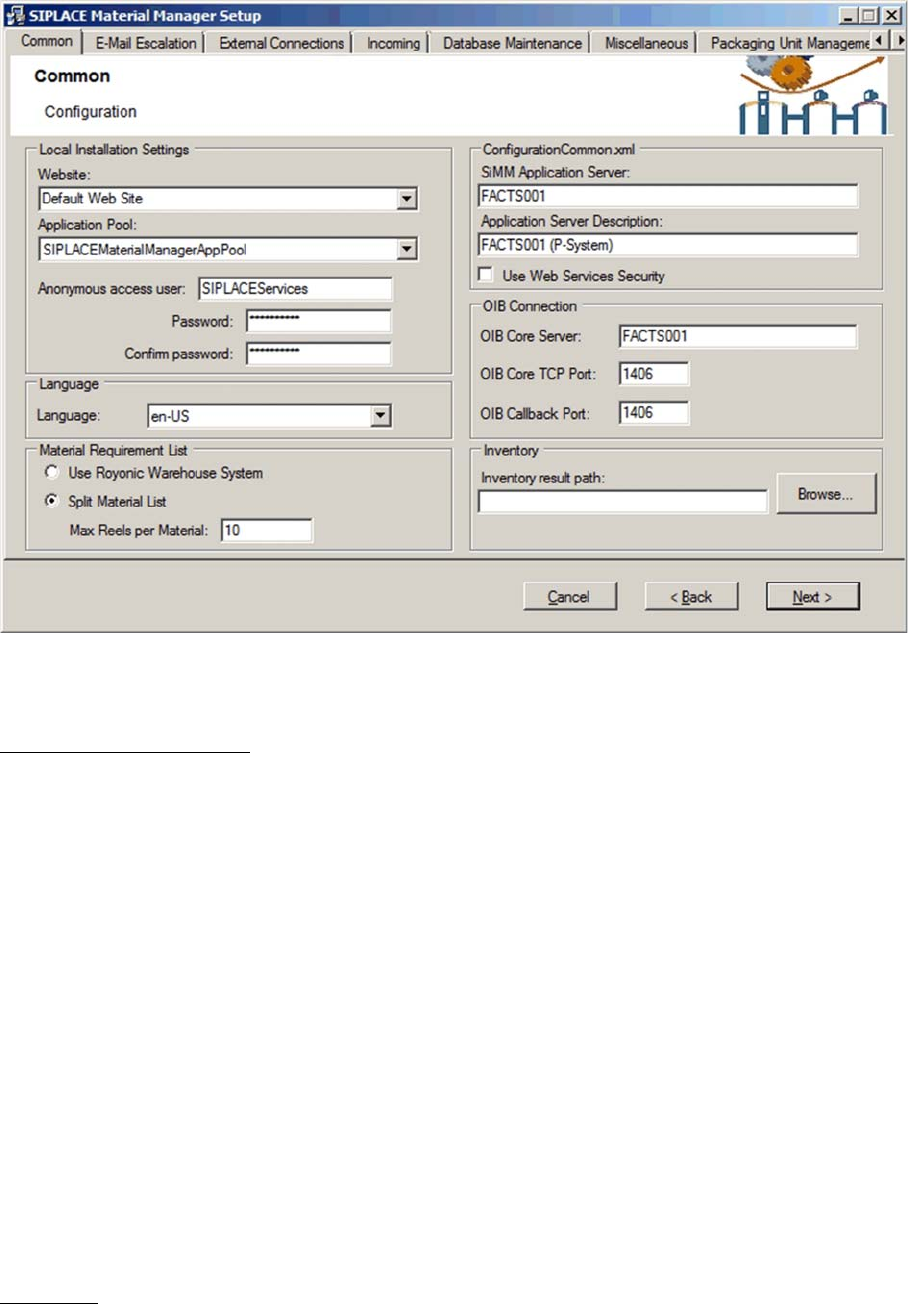
Configuring Material Manager – Common tab
In this tab you set general specifications for the Material Manager.
Local Installation Settings
Settings for the Web server
Website
Location for Web pages of the Material Manager in Internet Information Services (IIS). Material Manager
pages will be installed in this folder. "Default Web Site" is pre-set. If another location shall be used, it
must have been created and configured by the customer administrator BEFORE installing the
Material Manager.
Application Pool
Application Pool for Web pages of the Material Manager in IIS. Material Manager pages will be installed
in this folder. "SIPLACEMaterialManagerAppPool" is pre-set and will be automatically created during the
installation. If another location shall be used, it must have been created and configured by the customer
administrator BEFORE installing the Material Manager.
Anonymous access user
User that has access to the Website specified above.
It is recommended to use the pre-set user SIPLACEServices to avoid problems when accessing the
Website. In this case, use the same password that is specified on the Support Media DVD (complex or
simple)
Password / Confirm Password
Password for the user specified above
Language
Language in which the GUI and the Material Manager reports shall be displayed. This GUI language can
be changed afterwards in the Material Manager.
If necessary, the language of the reports can be changed afterwards with the ConfigurationHelper (see
chapter "6 Changing the Configuration" [ ➙ 43]).