00197500-01_IM_Material Manager_1.0_DE_EN.pdf - 第24页
Installing the MaterialManager 24 Installation Manual Material Manager V1.0 Should locked Packaging Units be included for process? Process Create Storage List If this option is enabled, locked packag ing units m ay be u…
Installing the MaterialManager
Installation Manual Material Manager V1.0 23
SIPLACE Pro Deployment Scenario
Deployment Scenario
▪ Central
This setting means that a single SIPLACE Pro system is used for all production lines.
▪ ProductionLine
This setting means that a separate SIPLACE Pro system is used for each production line.
▪ EDM
This setting is a mixture of the Central and ProductionLine options, i.e. an overall SIPLACE Pro sys
-
tem is used as master for multiple production lines for which, on the other hand, separate SIPLACE
Pro system are used as clients in addition.
▪ EDMn
This setting complies with the EDM option and applies if several scenarios of that type are used.
Material Requirement List – PDA
The operator can require a material reorder over PDA. If another colleague as the operator has to pro
-
vide the material from the storage, this colleague should be informed accordingly.
Print Material Requirement List
If this option is enabled, the corresponding material requirement list will be printed when a material re
-
order is required (ideally, on a printer close by the storage location).
Otherwise, the material requirement list will not be printed, e.g. because the operator picks up the re
-
quired material himself.
Configuring Material Manager – Packaging Unit Management
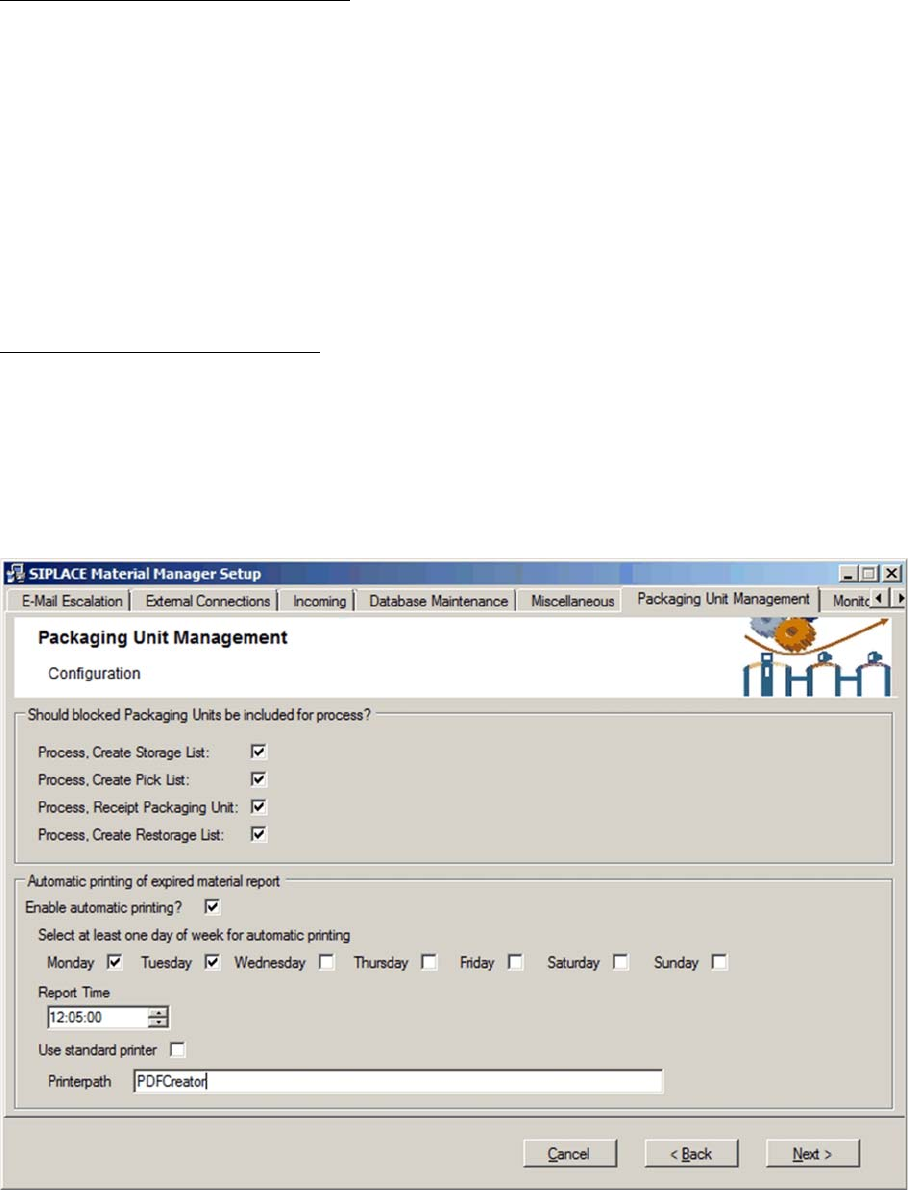
For various reasons, packaging units may be flagged as Locked.
In this tab you can unlock locked packaging units for certain processes.

Installing the MaterialManager
24 Installation Manual Material Manager V1.0
Should locked Packaging Units be included for process?
Process Create Storage List
If this option is enabled, locked packaging units may be used when storage lists are created.
Process Create Pick List
If this option is enabled, locked packaging units may be used when pick lists are created.
Process Receipt Packaging Unit
If this option is enabled, locked packaging units may be used within the material receipt process.
Process Create Restorage List
If this option is enabled, locked packaging units may be used when storage lists returned from the
production are created.
Automatic printing of expired material report
If necessary, it is possible to print a list of all expired packaging units automatically. Expired means that
the expiration date of the packaging unit has been exceeded. The entries remain in the list until the
packaging unit has been manually deleted or the expiration date of the packaging unit has been changed
accordingly.
Enable automatic printing
If this option is enabled, the list will be created and printed.
In the options that are displayed now, set time and the printer to be used.
Select at least one day of the week for automatic printing
Enable at least one day of the week on which the list shall be created and printed.
Report time
Set the time at which the list shall be printed.
Use standard printer
Enable this option if the pre-set default printer shall be used to print the list.
Printerpath
If another printer as the default printer shall be used, enter the path and network name of it here.
Installing the MaterialManager
Installation Manual Material Manager V1.0 25
Configuring Material Manager – Monitor Records tab
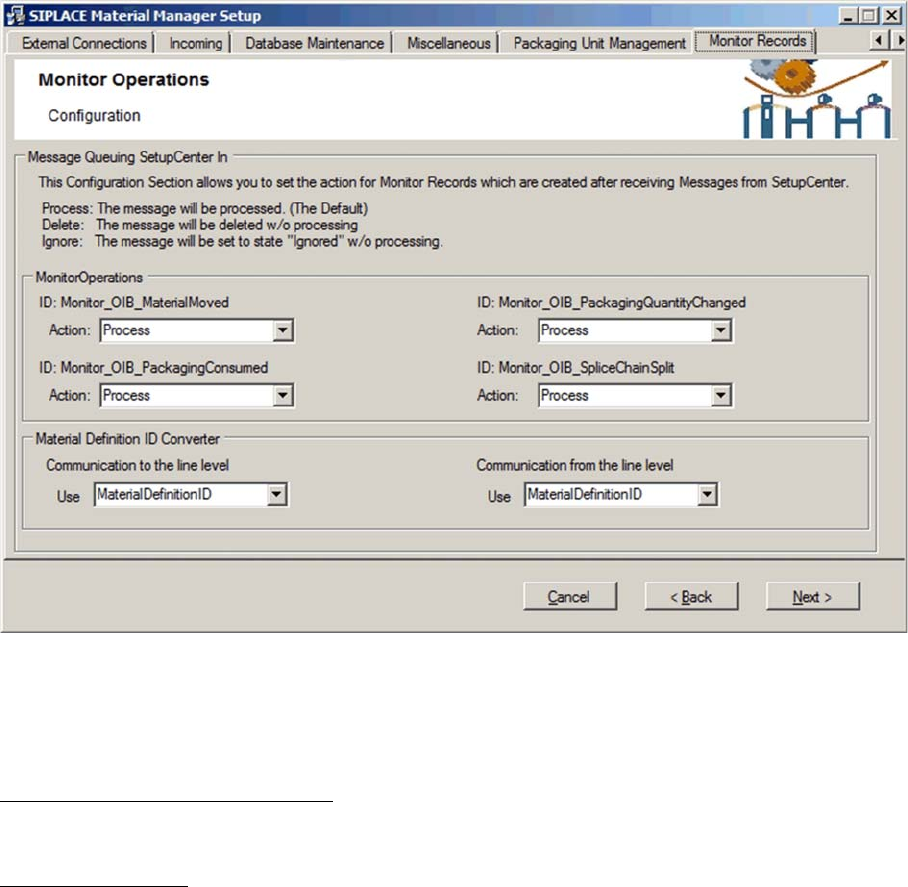
In this tab you configure the type of reaction by the Material Manager to certain Setup Center messages.
The Setup Center messages will be classified according to type, stored in the Material Manager data
-
base as monitor records and then processed according to the settings in this dialog box.
Message Queuing SetupCenter In
Display area for Setup Center messages.
Monitor Operations
In this area, the different Setup Center message types (IDs) and the specific processing behavior are
displayed. Set the appropriate processing behavior for the messages under Action.
ID: Monitor_OIB_MaterialMoved
These messages will be generated if a packaging unit is moved in Setup Center, e.g. during setup.
ID: Monitor_OIB_PackagingQuantityChanged
These messages will be generated if the quantity of components has changed within a packaging unit.
ID: Monitor_OIB_PackagingConsumed
These messages will be generated if a packaging unit is consumed in Setup Center.
ID: Monitor_OIB_SpliceChainSplit
These messages will be generated if a packaging unit chain gets splitted in Setup Center.