00197500-01_IM_Material Manager_1.0_DE_EN.pdf - 第21页
Installing the MaterialManager Installation Manual Material Manager V1.0 21 Configuring Material Manager – Database Mai ntenance tab In this tab you config ure the ha ndling of consumed packaging un its. Database Mainte…

Installing the MaterialManager
20 Installation Manual Material Manager V1.0
Label Configuration
Use standard label printer
If this option is enabled, the labels will be sent in Zebra syntax to the printer. This setting should be
selected if the GT-430GK default label printer is used.
Otherwise, the setting for other label printers will be used. In this case, a detailed agreement is required
between ASM Assembly Systems GmbH & Co. KG and the customer.
Default printerpath
Path and network name of the pre-set label printer.
Delay time between labels in ms
(for printer-specific templates only)
If the printer is not able to process the print jobs correctly one after another, you can set a delay time
(in milliseconds) between the respective print jobs.
Label format
Here you set the size of the label that will be stuck on the packaging unit.
Available sizes:
▪ Default
Default size
▪ Small
Smaller labels
▪ Big
Bigger labels
▪ Custom
As default size but may be edited in a TXT file.
The TXT file will be stored under:
*\Siplace\SIPLACE Material Manager\WebApplication\ASM\AS\SiMM\config\Labels\Lot.txt
▪ Existing
This option corresponds to the previous configuration.
Incoming Modul
All packaging unit data that has been created in Setup Center can be transferred to the Material
Manager; if master data is required, it will also be automatically created.
Use Incoming Modul
If this option is enabled, Setup Center messages for created packaging unit data will be ignored.
If this option is NOT enabled, Setup Center messages for created packaging unit data will be processed
in the Material Manager, i.e. packaging unit data and the required master data will be created.
Installing the MaterialManager
Installation Manual Material Manager V1.0 21
Configuring Material Manager – Database Maintenance tab
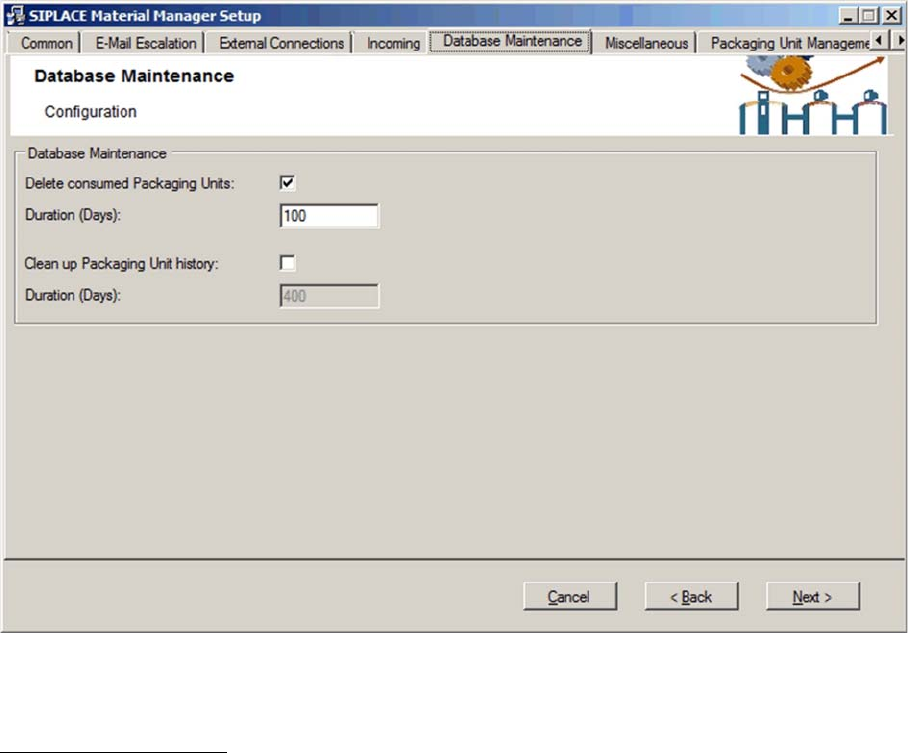
In this tab you configure the handling of consumed packaging units.
Database Maintenance
Delete consumed Packaging Units
If this option is enabled, a consumed packaging unit will be deleted in the database after the time set
under Duration.
Duration (Days)
Number of days after which a consumed packaging unit will be deleted in the database.
Clean up Packaging Unit history
If this option is enabled, the history of a consumed packaging unit will be deleted in the database after
the time set under Duration.
Duration (Days)
Number of days after which the history of a consumed packaging unit will be deleted in the database.
Installing the MaterialManager
22 Installation Manual Material Manager V1.0
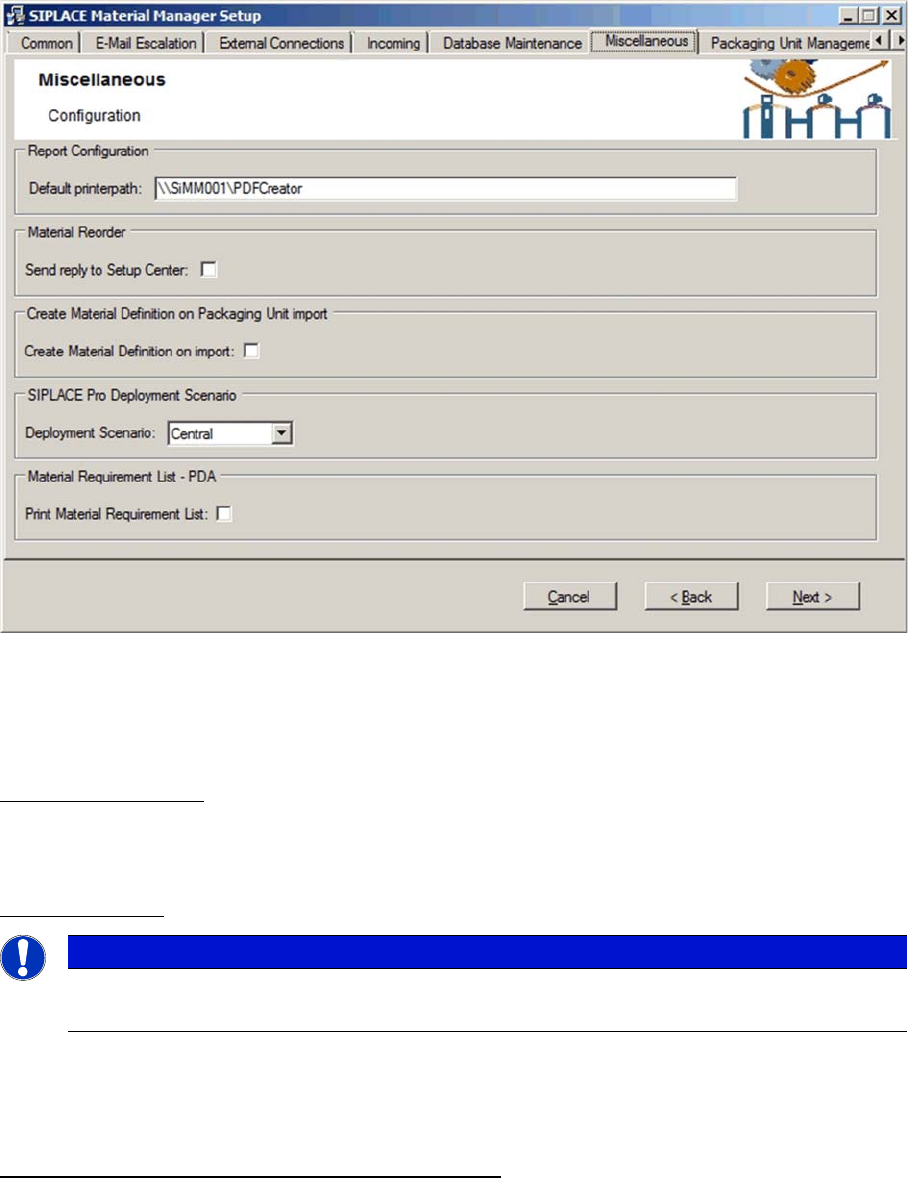
Configuring Material Manager – Miscellaneous tab
In this tab you set various parameters, such as default report printer, synchronization with SIPLACE
Setup Center, handling of unknown material definitions, SIPLACE Pro deployment scenarios and print
-
ing material requirement lists.
Report Configuration
Default printerpath
Path and network name of the pre-set report printer.
Material Reorder
Send Reply to Setup Center
If this option is enabled, the responses of the external storage system to material requirements will be
transmitted to Setup Center.
Create Material Definition on Packaging Unit import
Create Material Definition on Import
If this option is enabled, a material definition is generated for a packaging unit if it is registered in the
Material Manager via the Web service interface or via a PackagingUnitCreated message from SIPLACE
Setup Center and the provided part number is unknown to the Material Manager.
NOTICE
Required software
This function requires software that has to be created by the customer.