00197500-01_IM_Material Manager_1.0_DE_EN.pdf - 第15页
Installing the MaterialManager Installation Manual Material Manager V1.0 15 Configuring Material Manager – Common tab In this tab you set general spec ifica tions for the Material Man ager. Local Installation Settings S…
Installing the MaterialManager
14 Installation Manual Material Manager V1.0
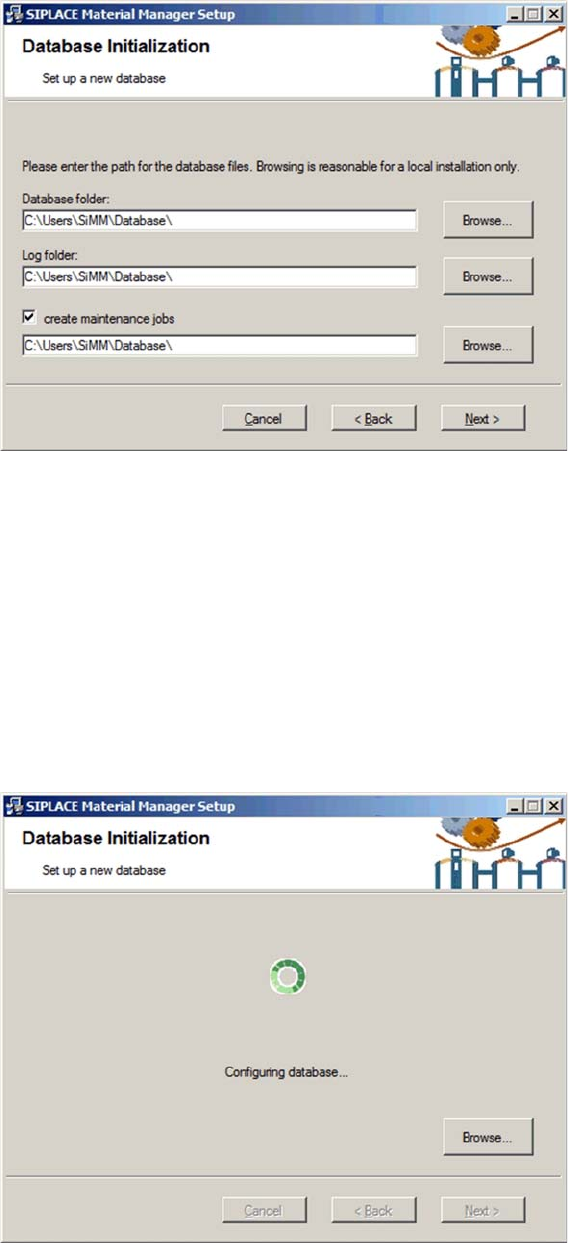
Initializing database
► Enter the folder in which the Material Manager database shall be installed under Database folder.
► Specify the folder in which the log files shall be stored under Log folder.
Routines are available in the Material Manager to help you maintaining the Material Manager database.
▪ CleanUp Consumed Lots
deletes the data of a used packaging unit after the set time.
▪ CleanUp Lot Log
deletes the history of a used packaging unit after the set time.
► Enable the Create maintenance jobs option if you want to use these routines and, in the entry field
below, specify the folder in which the log files created by the routines shall be stored.
► Click on Next.
Configuring database
The Material Manager database will be installed according to your specifications.
Installing the MaterialManager
Installation Manual Material Manager V1.0 15
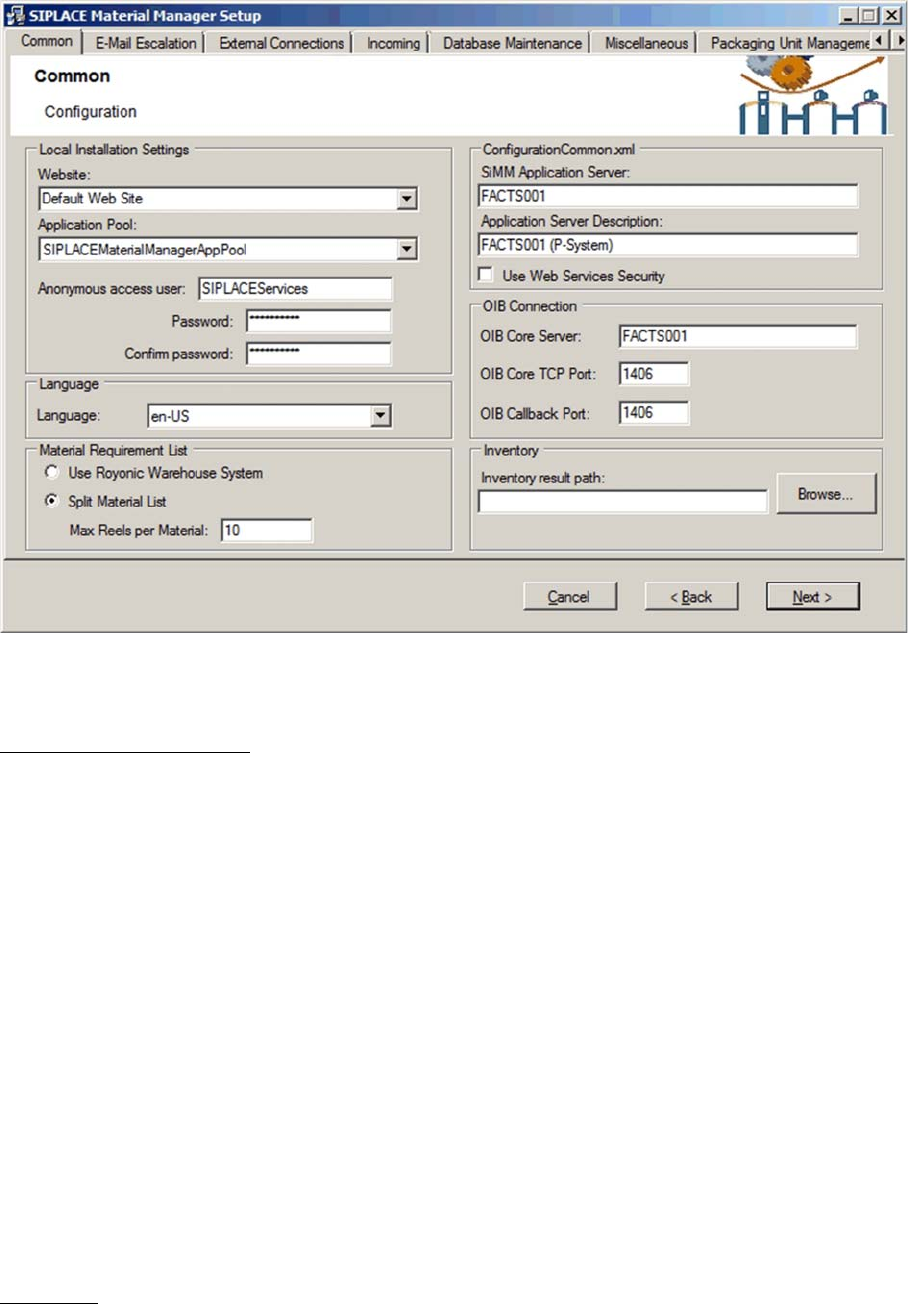
Configuring Material Manager – Common tab
In this tab you set general specifications for the Material Manager.
Local Installation Settings
Settings for the Web server
Website
Location for Web pages of the Material Manager in Internet Information Services (IIS). Material Manager
pages will be installed in this folder. "Default Web Site" is pre-set. If another location shall be used, it
must have been created and configured by the customer administrator BEFORE installing the
Material Manager.
Application Pool
Application Pool for Web pages of the Material Manager in IIS. Material Manager pages will be installed
in this folder. "SIPLACEMaterialManagerAppPool" is pre-set and will be automatically created during the
installation. If another location shall be used, it must have been created and configured by the customer
administrator BEFORE installing the Material Manager.
Anonymous access user
User that has access to the Website specified above.
It is recommended to use the pre-set user SIPLACEServices to avoid problems when accessing the
Website. In this case, use the same password that is specified on the Support Media DVD (complex or
simple)
Password / Confirm Password
Password for the user specified above
Language
Language in which the GUI and the Material Manager reports shall be displayed. This GUI language can
be changed afterwards in the Material Manager.
If necessary, the language of the reports can be changed afterwards with the ConfigurationHelper (see
chapter "6 Changing the Configuration" [ ➙ 43]).

Installing the MaterialManager
16 Installation Manual Material Manager V1.0
Material Requirement List
Material requirement list settings for the storage.
Use Royonics Warehouse System
If this option is enabled, the storage management will not be performed by the Material Manager but by
Royonics Warehouse.
Split Material List
If this option is enabled, only one packaging unit per material and lane will be picked in the first run. The
additionally required refill material will be listed on a new material requirement list.
Max Reels per Material
Defines the maximum quantity of packaging units of a material that may be picked. If the quantity is in
-
sufficient, an additional material requirement list will be created. This makes sure that no vast quantity
of material is picked.
ConfigurationCommon.xml
Settings for the Application Server
SiMM Application Server
Name of the server on which the Material Manager shall be installed.
Application Server Description
Description for the server defined above. The text will be displayed to the right at the bottom of the Web
pages.
Use Web Services Security
Enable this option if you want to operate a Web service with activated Web security.
This option is disabled by default and should only be enabled for special requirements within the project
environment.
OIB Connection
(OIB = Operations Information Broker)
Settings for the server on which the OIB core is installed.
OIB Core Server
Name of the server on which the OIB core is installed.
OIB Core TCP Port
Number of the port that shall be used for the communication with the OIB server.
OIB Callback Port
Number of the callback port that shall be used for the communication with the OIB server.
Inventory
Setting for the end-of-period inventory.
Inventory result path
Path for the inventory result file. If no path is specified, the file cannot be written. Make sure that the local
user ID "Network service" under which the Application Server runs has write access to this folder.
Browse…
Here you navigate to the folder in which you want to store the inventory result file.