00197500-01_IM_Material Manager_1.0_DE_EN.pdf - 第25页
Installing the MaterialManager Installation Manual Material Manager V1.0 25 Configuring Material Manager – Monitor Records tab In this tab you configure the ty pe of reaction by the Material Manager to certain Setup Cen…

Installing the MaterialManager
24 Installation Manual Material Manager V1.0
Should locked Packaging Units be included for process?
Process Create Storage List
If this option is enabled, locked packaging units may be used when storage lists are created.
Process Create Pick List
If this option is enabled, locked packaging units may be used when pick lists are created.
Process Receipt Packaging Unit
If this option is enabled, locked packaging units may be used within the material receipt process.
Process Create Restorage List
If this option is enabled, locked packaging units may be used when storage lists returned from the
production are created.
Automatic printing of expired material report
If necessary, it is possible to print a list of all expired packaging units automatically. Expired means that
the expiration date of the packaging unit has been exceeded. The entries remain in the list until the
packaging unit has been manually deleted or the expiration date of the packaging unit has been changed
accordingly.
Enable automatic printing
If this option is enabled, the list will be created and printed.
In the options that are displayed now, set time and the printer to be used.
Select at least one day of the week for automatic printing
Enable at least one day of the week on which the list shall be created and printed.
Report time
Set the time at which the list shall be printed.
Use standard printer
Enable this option if the pre-set default printer shall be used to print the list.
Printerpath
If another printer as the default printer shall be used, enter the path and network name of it here.
Installing the MaterialManager
Installation Manual Material Manager V1.0 25
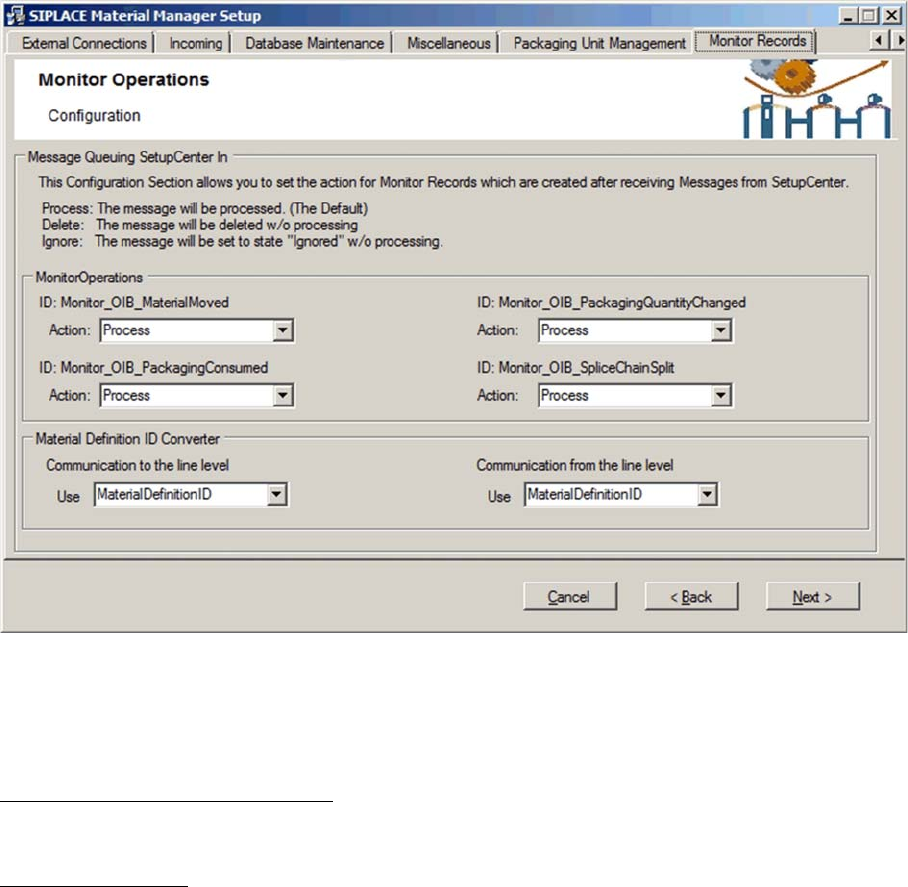
Configuring Material Manager – Monitor Records tab
In this tab you configure the type of reaction by the Material Manager to certain Setup Center messages.
The Setup Center messages will be classified according to type, stored in the Material Manager data
-
base as monitor records and then processed according to the settings in this dialog box.
Message Queuing SetupCenter In
Display area for Setup Center messages.
Monitor Operations
In this area, the different Setup Center message types (IDs) and the specific processing behavior are
displayed. Set the appropriate processing behavior for the messages under Action.
ID: Monitor_OIB_MaterialMoved
These messages will be generated if a packaging unit is moved in Setup Center, e.g. during setup.
ID: Monitor_OIB_PackagingQuantityChanged
These messages will be generated if the quantity of components has changed within a packaging unit.
ID: Monitor_OIB_PackagingConsumed
These messages will be generated if a packaging unit is consumed in Setup Center.
ID: Monitor_OIB_SpliceChainSplit
These messages will be generated if a packaging unit chain gets splitted in Setup Center.

Installing the MaterialManager
26 Installation Manual Material Manager V1.0
Action
Here you set the processing behavior for a specific message type.
▪ Process
The message will be processed in the Material Manager, gets the Processed state and remains in
the database.
If the message cannot be processed, it gets the Failed state and remains in the database.
▪ Delete
The message will NOT be processed and is deleted in the database.
▪ Ignore
The message will NOT be processed, gets the Ignored state and remains in the database.
Material Definition ID Converter
With the following settings you synchronize the usage of part numbers and article numbers for process
-
ing material data. This makes sure that the transferred data is used with the same meaning in the com
-
munication between the Material Manager and the external Setup Center and SIPLACE Pro systems.
Communication to the line level
Communication / data export from the Material Manager to Setup Center.
Under Use, set if the Material Manager shall send the part number or the article number to Setup Center
to be processed.
Communication from the line level
Communication / data import from Setup Center or SIPLACE Pro to the Material Manager.
Under Use, set if the Material Manager shall interpret the information to be processed sent by Setup
Center or SIPLACE Pro as part number or article number.
Use
▪ Material Definition ID (part number )
Internal material number for technical usage, e.g. in SIPLACE Pro and Setup Center. This number
agrees with the component number of the material as used in SIPLACE Pro.
▪ ArticleNumber (article number )
Alias material name for the commercial usage. Usually, the entry is identical to the part number but
an alias name may be defined.