Nordson_EFD_GV_Series_Operating_Manual.pdf - 第104页
GV Series Automated Dispensing Systems 104 www.nordsonefd.com info@nordsonefd.com +1-401-431-7000 Sales and service of Nordson EFD dispensing systems are available worldwide. Appendix A, Command Function Refer ence (cont…
GV Series Automated Dispensing Systems
103www.nordsonefd.com info@nordsonefd.com +1-401-431-7000 Sales and service of Nordson EFD dispensing systems are available worldwide.
Appendix A, Command Function Reference
(continued)
Dispense Dot Setup
Click Function
Sets how the system dispenses a dot of fluid.
Parameter Description
Valve On Time How long the dispenser stays open (in seconds).
Dwell Time Delay time (in seconds) that occurs at the end of dispensing to allow the pressure to equalize
before the tip moves to the next point.
Head Time Delay time (in seconds) that occurs at the beginning of dispensing.
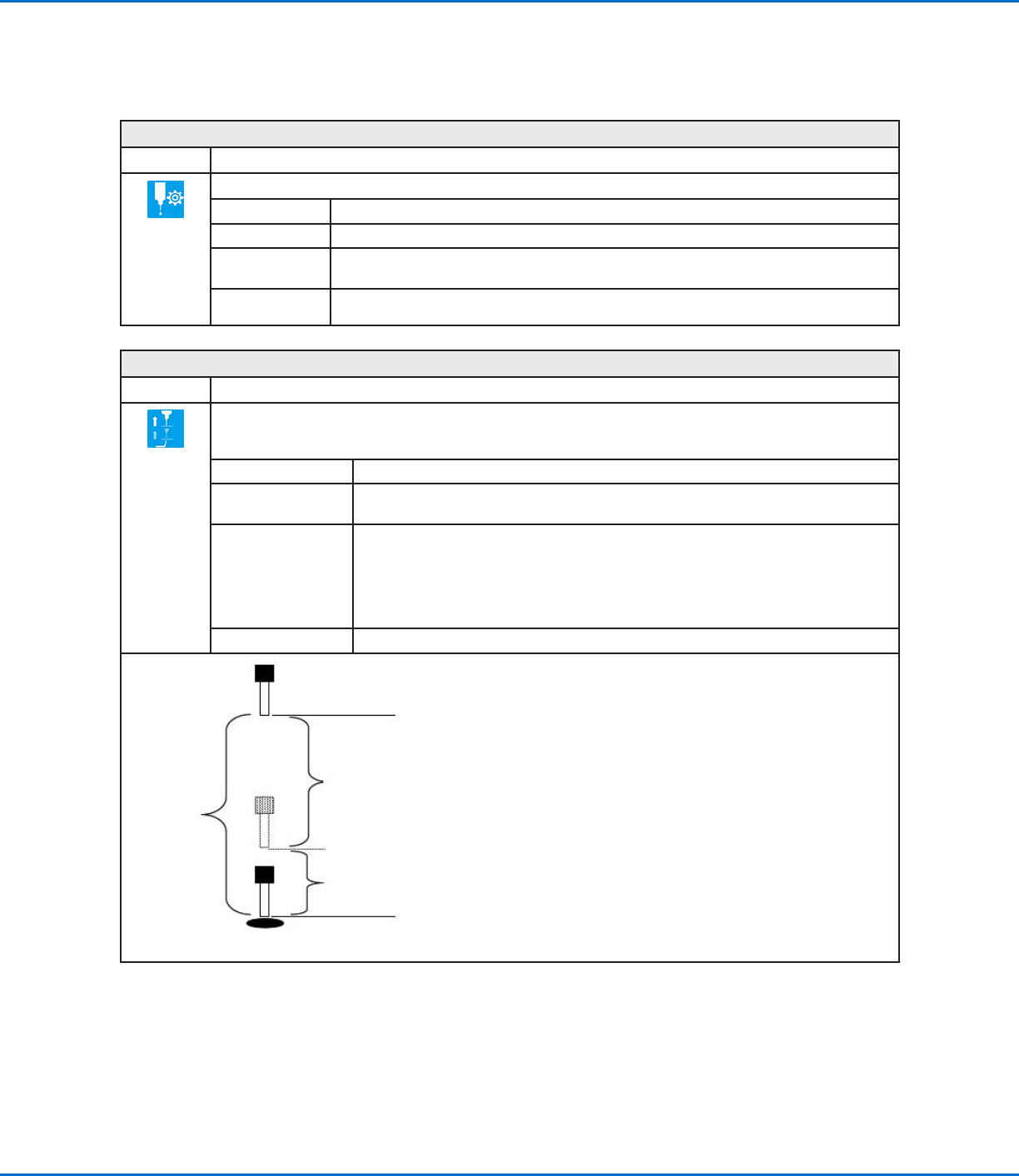
Dispense End Setup
Click Function
After dispensing a dot or line, it is often required to raise the tip a short distance at a slow speed. This allows the
fluid to cleanly break free from the tip to prevent it from being incorrectly applied. The parameters for Dispense
End Setup affect how far and how fast the tip raises after dispensing.
Parameter Description
Retract Low Speed The speed (inmm/s) at which the tip raises after dispensing.
Range: 0–150mm/s
Retract High Speed After the tip raises the amount specified by Retract Distance at the speed specified by
Retract Low Speed, the tip continues raising to the Z-clearance height at the speed
(inmm/s) specified by this setting. The purpose of specifying a Z-clearance height is to
allow the tip to raise high enough to clear any obstacles it encounters on the way to the
next point.
Range: 0–150mm/s
Retract Distance The distance (inmm) the tip raises after dispensing.
Z Clearance
Retract
High Speed to
Z Clearance
height
Retract
Distance at
Retract Low
Speed
Example illustration of Dispense End Setup
GV Series Automated Dispensing Systems
104 www.nordsonefd.com info@nordsonefd.com +1-401-431-7000 Sales and service of Nordson EFD dispensing systems are available worldwide.
Appendix A, Command Function Reference
(continued)
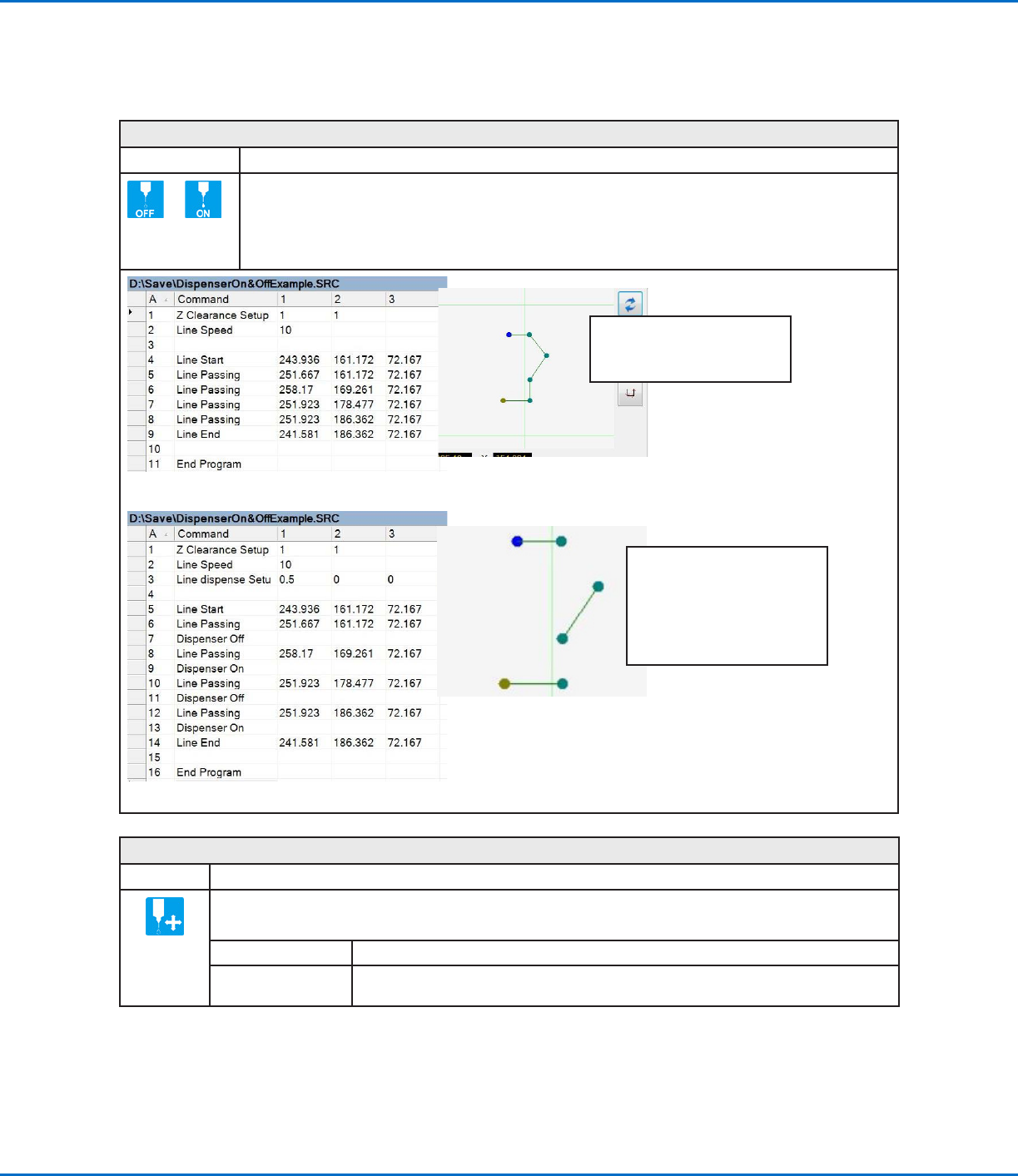
Dispenser Off / Dispenser On
Click Function
or
Turns the dispenser OFF or ON at the current address.
NOTE: This command is useful when you want to turn off (deactivate) dispensing for part of a line. To do
so, determine the beginning and end points where you want the line to be deactivated and then insert a
Dispenser Off command in between those points. When you want the line to be active, insert a Dispenser
On command between those points. An example program and the resulting pattern is shown below.
Original program and corresponding Path view
Program with Dispenser On / Dispenser Off commands and an example of the resulting dispense pattern
NOTE: The Path view in the
Secondary View screen will NOT
change when you add the Dispenser
Off / Dispenser On commands as
shown in this example; this image is
only a representation of the resulting
dispense pattern.
NOTE: This image is the actual
Path view of the example program
shown.
Dummy Point
Click Function
Registers the current XYZ location as a Dummy point. The dispensing tip passes through this point. A dummy
point is useful for avoiding obstacles on the workpiece.
Parameter Description
Speed The speed (inmm/s) at which the tip moves toward the dummy point.
Range: 0–150mm/s
GV Series Automated Dispensing Systems
105www.nordsonefd.com info@nordsonefd.com +1-401-431-7000 Sales and service of Nordson EFD dispensing systems are available worldwide.
Edge Adjust
Click Function
Double-click
address and
select from drop-
down menu
Used in tandem with Find Marks when a workpiece presents one of the following challenges:
• Very large, rounded corners
• No obvious features for creating a mark image
Refer to “How to Use Marks to Dispense onto a Plain Workpiece” on page73 for instructions on using
this command.
End Pattern
Click Function
Double-click
address and
select from
drop-down
menu
Used in tandem with Call Pattern to return the program to the address that occurs just after a Call Pattern
command.
End Program
Click Function
Registers the current address as the end of the program. End Program returns the dispensing tip to the home
position (0, 0, 0).
End Subroutine
Click Function
Double-click
address and
select from
drop-down
menu
Used in tandem with Call Subroutine to return the program to the address that occurs just after a Call Subroutine
command.
Appendix A, Command Function Reference
(continued)