Nordson_EFD_GV_Series_Operating_Manual.pdf - 第50页
GV Series Automated Dispensing Systems 50 www.nordsonefd.com info@nordsonefd.com +1-401-431-7000 Sales and service of Nordson EFD dispensing systems are available worldwide. Robot Initial Setup (Step 2 T ab): (Only GV Sy…
GV Series Automated Dispensing Systems
49www.nordsonefd.com info@nordsonefd.com +1-401-431-7000 Sales and service of Nordson EFD dispensing systems are available worldwide.
Setting Up the System Using the Robot Initial Setup Wizard
The Robot Initial Setup wizard guides you through all the steps required to properly set up the system, including the
calibration and setting of offsets.
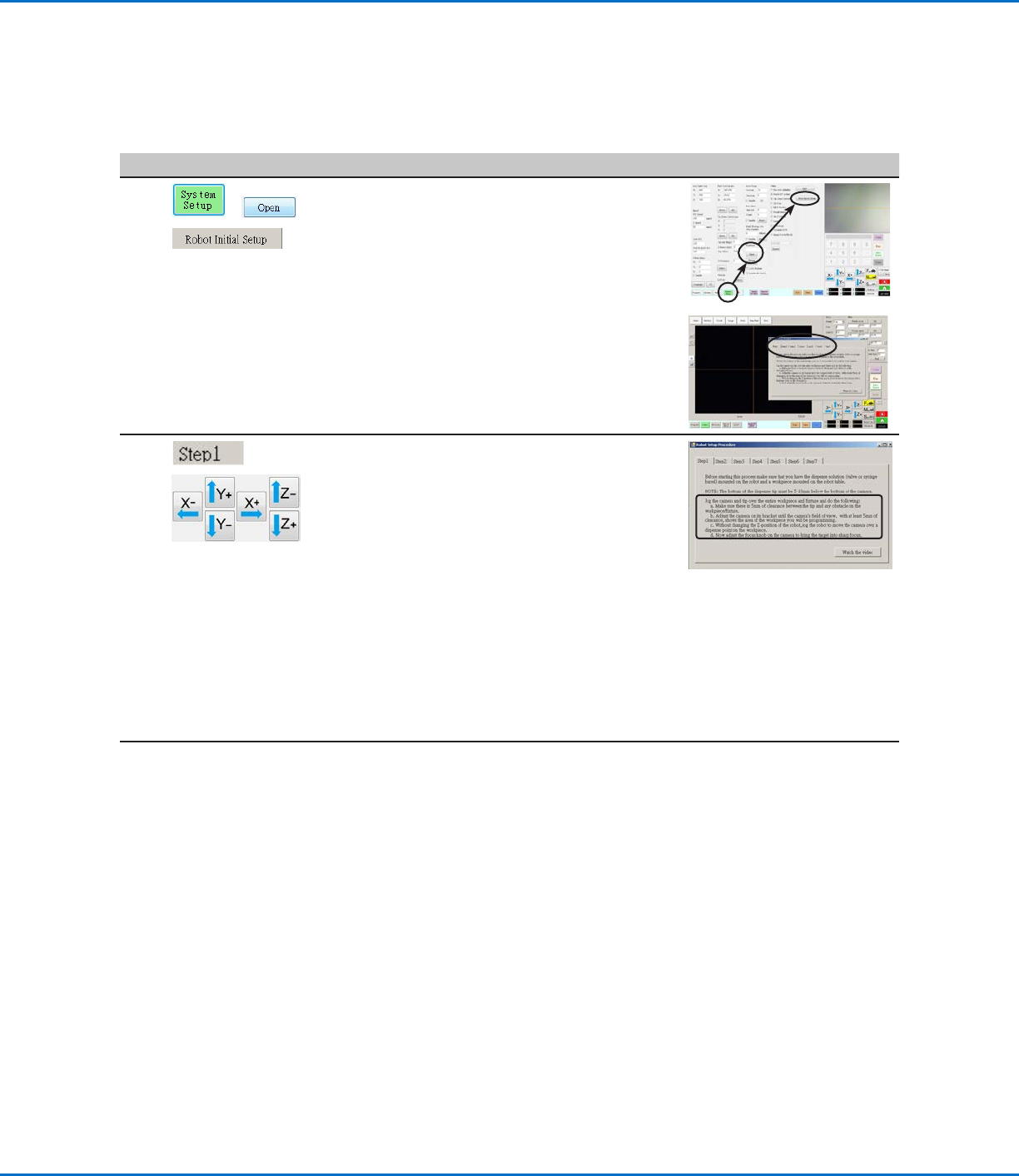
Robot Initial Setup (Step1 Tab): Opening the Robot Initial Setup Wizard and Focusing the Camera
# Click Step Reference Image
1
> >
• Click SYSTEM SETUP > OPEN > ROBOT
INITIAL SETUP.
The Robot Initial Setup wizard opens.
• Perform the actions on tabs 1–6 one at a
time. The actions are also provided in this
manual, starting with the next step, for your
reference as needed.
2
>
• Click the STEP1 tab.
• Jog the tip over the entire workpiece
to ensure that there is at least 5 mm of
clearance between the bottom of the tip to
the highest part of the workpiece.
• Adjust the camera on its bracket until
the camera’s field of view shows the
correct area of the workpiece for setup or
programming.
• Jog the tip to a good location to deposit a
test dispense dot.
• Bring the image on the screen into a sharp
focus. Refer to “Camera” on page18
as needed for instructions on focusing the
camera.
3
• Continue to “Robot Initial Setup (Step 2
Tab): (Only GV Systems With a Tip Detector)
Setting Up the Tip Detector” on page50.
GV Series Automated Dispensing Systems
50 www.nordsonefd.com info@nordsonefd.com +1-401-431-7000 Sales and service of Nordson EFD dispensing systems are available worldwide.
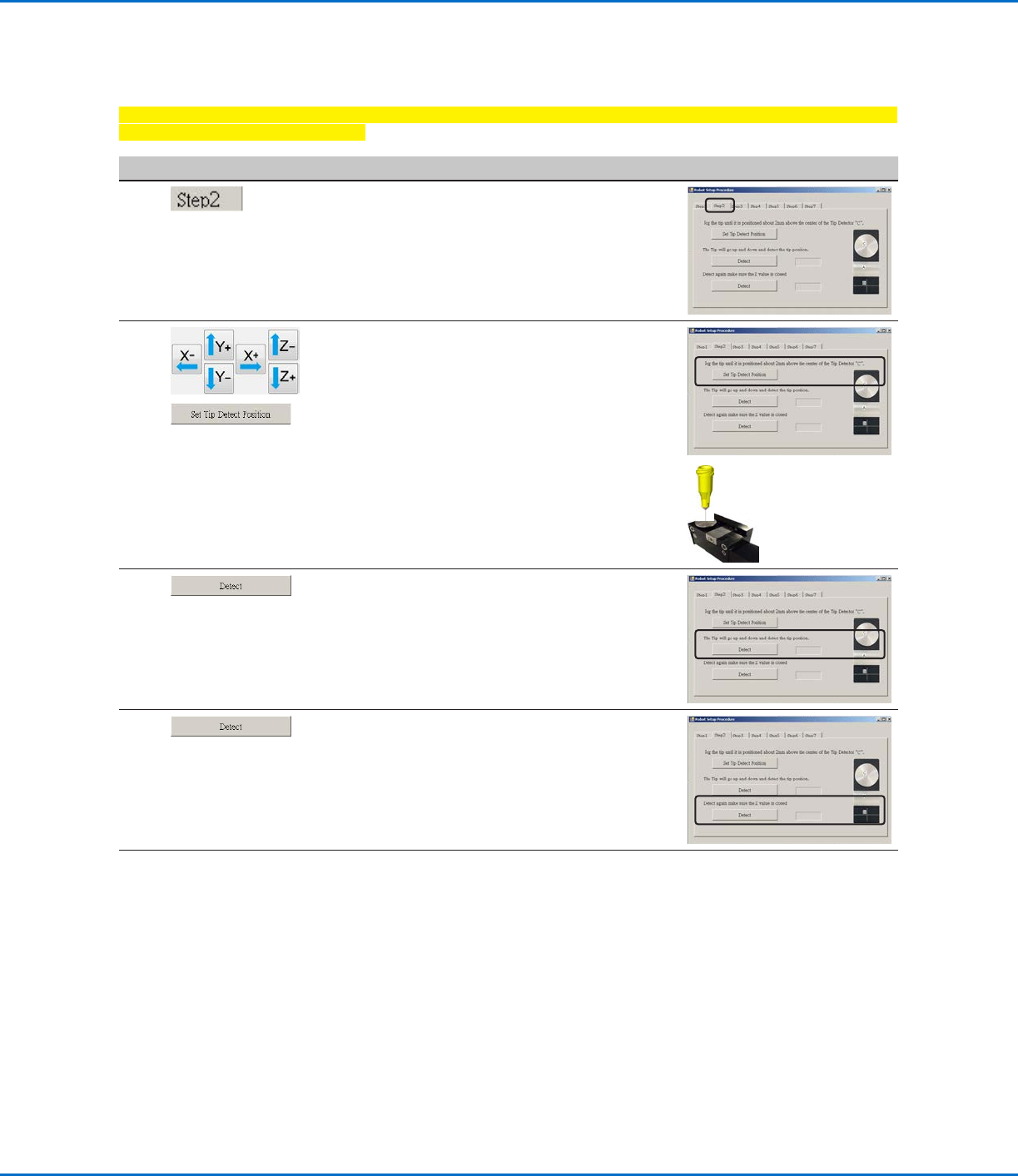
Robot Initial Setup (Step 2 Tab): (Only GV Systems With a Tip Detector) Setting Up the Tip Detector
Important: If your system does not include a tip detector, skip to “Robot Initial Setup (Step3 Tab): Setting the
Camera-to-Tip Offset” on page51.
# Click Step Reference Image
1
• Click the STEP2 tab.
2
>
• Jog the tip until it is positioned about 2 mm
above the sensor on the tip detector.
• Click SET TIP DETECT POSITION.
3
• Click DETECT.
The tip touches the sensor to detect the
tip position and the system displays the tip
offset value next to the Detect button.
4
• Click DETECT again.
The system confirms the tip offset setting.
5
• Continue to “Robot Initial Setup (Step3
Tab): Setting the Camera-to-Tip Offset” on
page51.
Setting Up the System Using the Robot Initial Setup Wizard (continued)
GV Series Automated Dispensing Systems
51www.nordsonefd.com info@nordsonefd.com +1-401-431-7000 Sales and service of Nordson EFD dispensing systems are available worldwide.
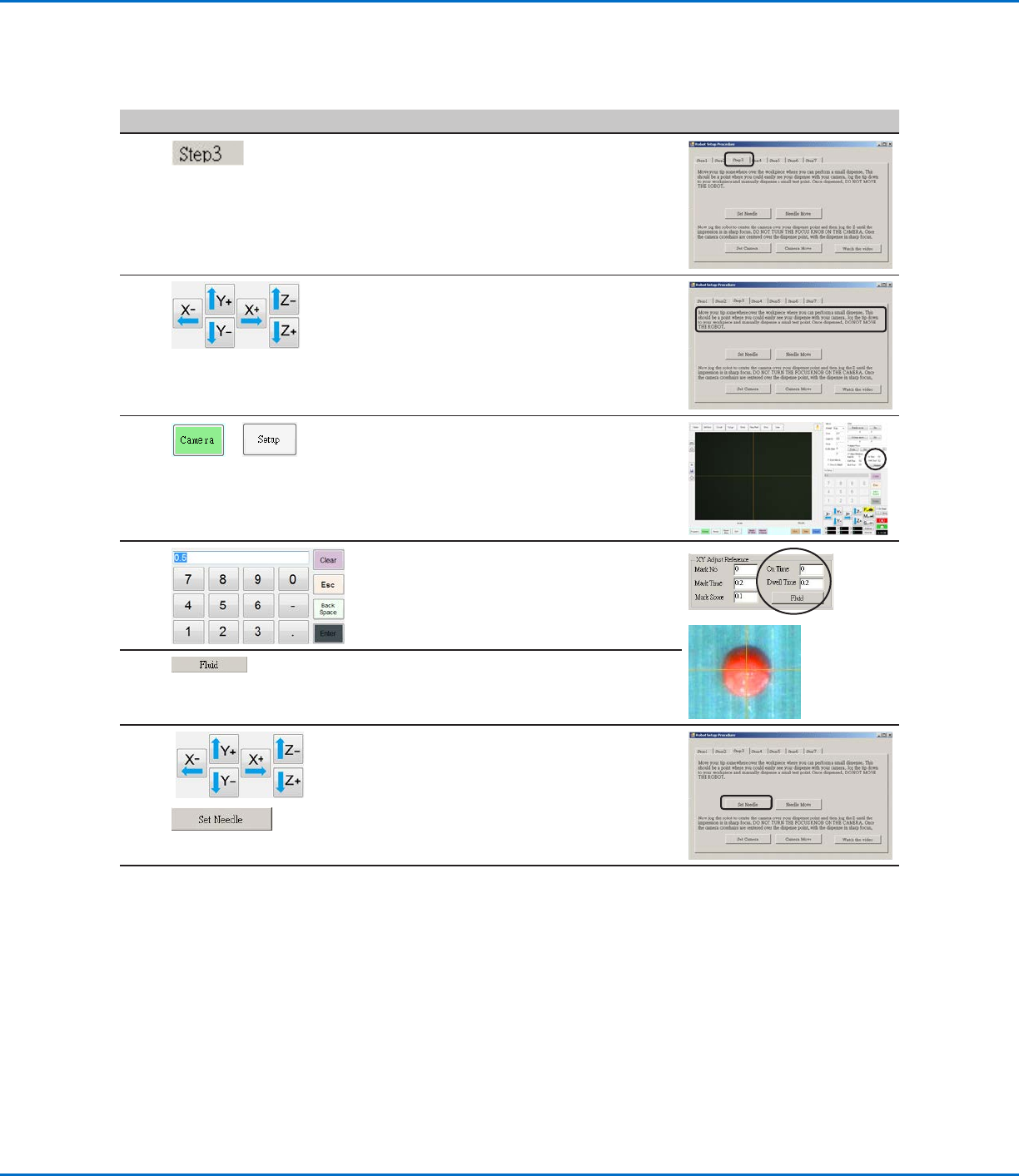
Robot Initial Setup (Step3 Tab): Setting the Camera-to-Tip Offset
# Click Step Reference Image
1
• Click the STEP3 tab.
2
• Jog the tip to a good location on the work
surface to deposit a test dot of fluid.
3
>
• Click the CAMERA tab and then click SETUP
at the top of the Camera screen.
You will use the fields under XY Adjust
Reference to deposit a test dot of fluid.
4
• Use the keypad to enter the following
recommended dispense dot parameters:
- ON TIME: 0.5
- DWELL TIME: 0.2
5
• Click FLUID to dispense a dot of fluid.
6
>
• Jog the tip until it is positioned about 2mm
above the dispense dot.
• Click SET NEEDLE.
Continued on next page
Setting Up the System Using the Robot Initial Setup Wizard (continued)