Nordson_EFD_GV_Series_Operating_Manual.pdf - 第108页
GV Series Automated Dispensing Systems 108 www.nordsonefd.com info@nordsonefd.com +1-401-431-7000 Sales and service of Nordson EFD dispensing systems are available worldwide. Fill Area: 2. Cir cle (Outer to Inner) This c…
GV Series Automated Dispensing Systems
107www.nordsonefd.com info@nordsonefd.com +1-401-431-7000 Sales and service of Nordson EFD dispensing systems are available worldwide.
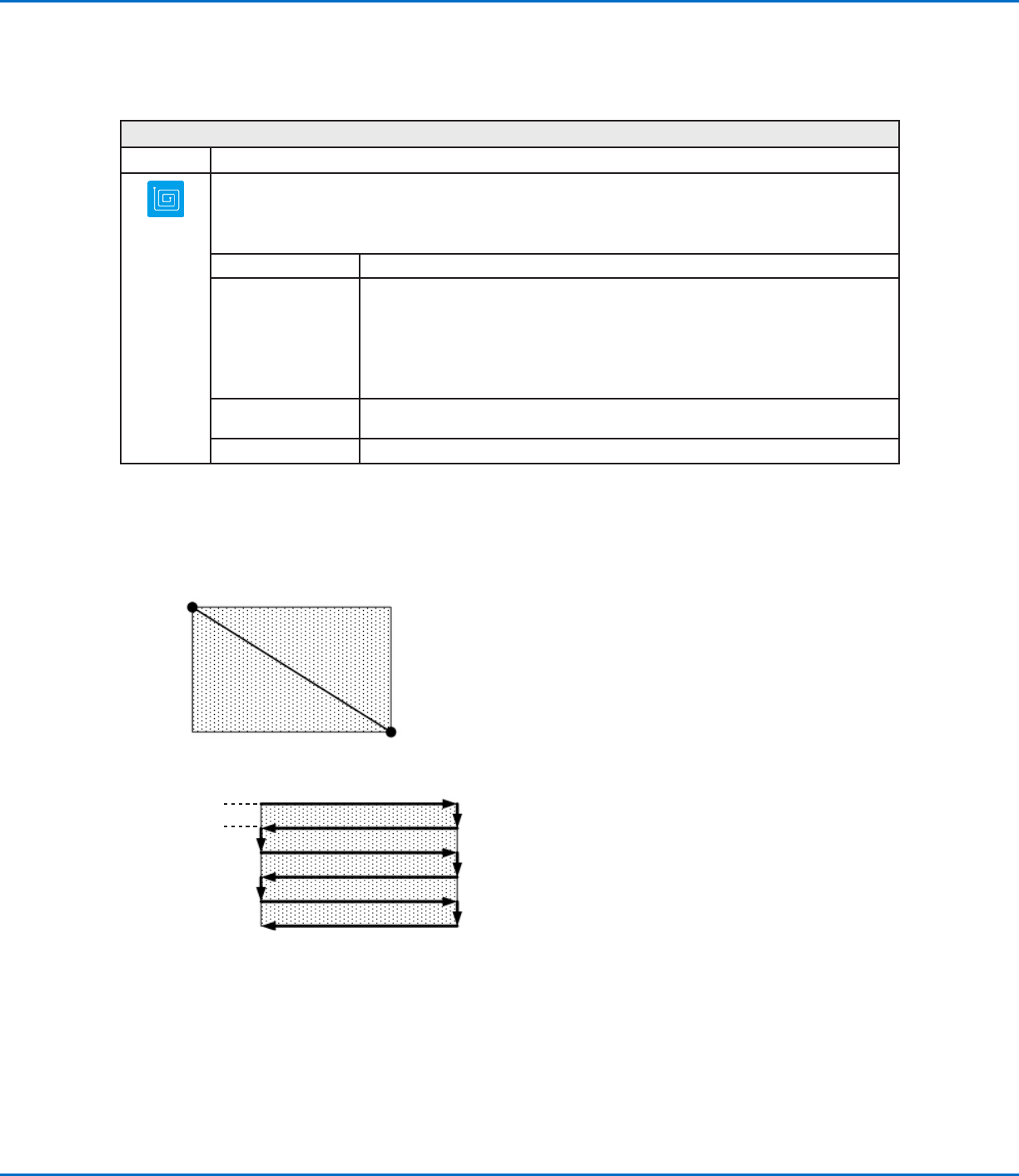
Fill Area: 1. Rectangle (S path)
This command fills the defined area by passing the tip back and forth along the X axis (in an S-shaped path) at the specified
Band distance while moving the Y axis in the specified Width distance after each pass along the X axis. After entering a Fill Area
Rectangle command, enter a Line Start point at the top left corner of the area to be filled and a Line End point at the bottom right
corner of that area.
Line Start
Line End
Fill Area
EXAMPLE: if a Width of 5 mm is entered, the tip makes the following path:
Width = 5 mm
Fill Area
Click Function
Used in tandem with Fill Start and Fill End, the Fill Area command fills a defined area in a specific way using the
specified Width and Band parameters. Refer to the explanations below this table for an example of each Fill Area
type. The correct sequence of commands for a fill area is: (1) Fill Start, (2) Fill Area, (3) Fill End.
NOTE: Line Start can be used in place of Fill Start, and Line End can be used in place of Fill End.
Parameter Description (see illustration examples)
Type (see below for
an example of each)
1. Rectangle (S path)
2. Circle (outer to inner)
3. Rectangle (outer to inner)
4. Rectangle Band
5. Circle Band
6. Rectangle (inner to outer)
7. Circle (inner to outer)
Width The distance (in mm) between the center of the bead being dispensed and the bead
that spirals next to it.
Band The width (in mm) the completed fill must be (from one end to the other).
Appendix A, Command Function Reference
(continued)
GV Series Automated Dispensing Systems
108 www.nordsonefd.com info@nordsonefd.com +1-401-431-7000 Sales and service of Nordson EFD dispensing systems are available worldwide.
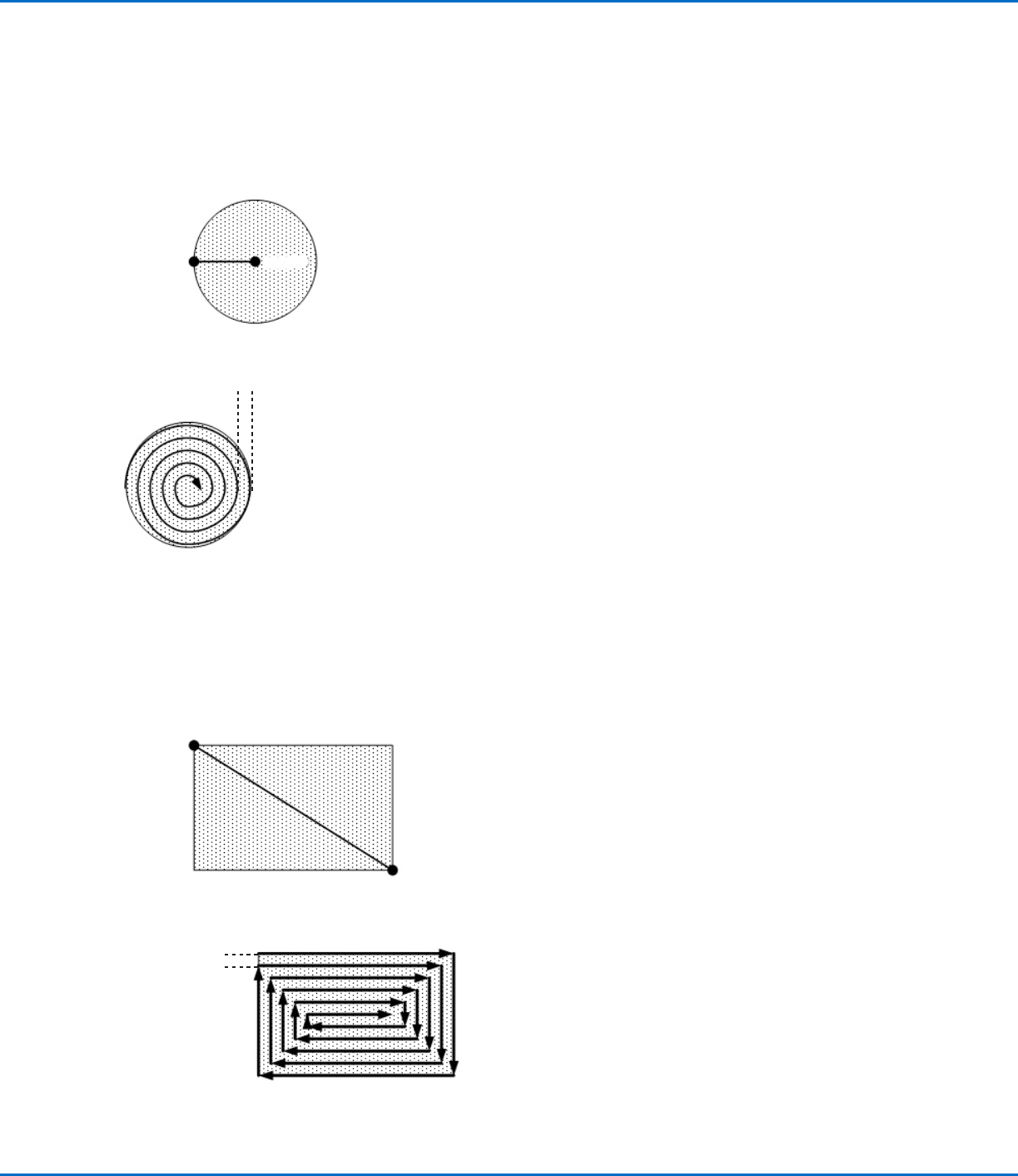
Fill Area: 2. Circle (Outer to Inner)
This command fills the defined area by moving the tip along a spiral path from the outside of the circle to the center. After entering
a Fill Area Circle command, jog the tip to a point on the outside limit of the circle to be filled and enter that location as a Line Start
point. Then jog the tip directly across to the center of the circle and enter that location as a Line End point.
Line End
Line Start
Fill Area
EXAMPLE: if a Width of 5 mm is entered, the tip makes the following path:
Width = 5 mm
Fill Area: 3. Rectangle (Outer to Inner)
This command fills the defined area by moving the tip along a square, spiral-shaped path from the outside of the rectangle to the
center. After entering a Fill Area Rectangle command, enter a Line Start point at the top left corner of the area to be filled and a
Line End point at the bottom right corner of that area.
Line Start
Line End
Fill Area
EXAMPLE: If a Width of 5 mm is entered, the tip makes the following path:
Width = 5 mm
Appendix A, Command Function Reference
(continued)
GV Series Automated Dispensing Systems
109www.nordsonefd.com info@nordsonefd.com +1-401-431-7000 Sales and service of Nordson EFD dispensing systems are available worldwide.
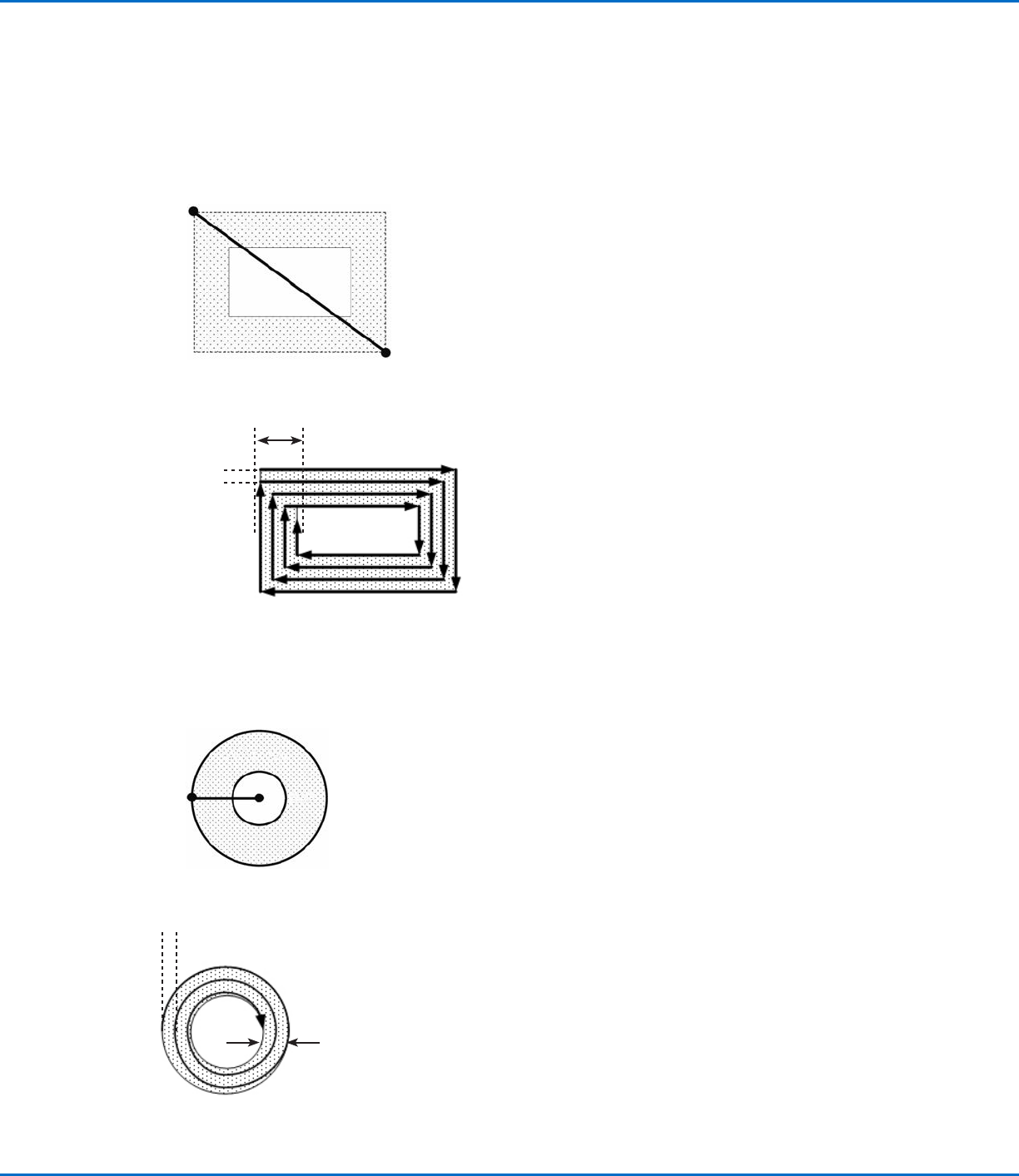
Fill Area: 4. Rectangle Band
This command fills a rectangular band area by moving the tip along a square, spiral-shaped path from the outside of the rectangle
to the center. After entering a Fill Area Rectangle Band command, enter a Line Start point at the top left corner of the area to be
filled and a Line End point at the bottom right corner of that area.
Line Start
Line End
EXAMPLE: If a Width of 5 mm and a Band of 15 mm are entered, the tip makes the following path:
Band = 15 mm
Width = 5 mm
Fill Area: 5. Circle Band
This command fills a defined circular band area by moving the tip along a spiral path from the outside of the circle to the center.
After entering a Fill Area Circle Band command, jog the tip to a point on the outside limit of the circle to be filled and enter that
location as a Line Start point. Then jog the tip directly across to the center of the circle and enter that location as a Line End point.
Line EndLine Start
Fill Area
EXAMPLE: If a Width of 5 mm and a Band of 10 mm are entered, the tip makes the following path:
Band = 10 mm
Width = 5 mm
Appendix A, Command Function Reference
(continued)