Nordson_EFD_GV_Series_Operating_Manual.pdf - 第51页
GV Series Automated Dispensing Systems 51 www.nordsonefd.com info@nordsonefd.com +1-401-431-7000 Sales and service of Nordson EFD dispensing systems are available worldwide. Robot Initial Setup (Step3 T ab): Setting the…
GV Series Automated Dispensing Systems
50 www.nordsonefd.com info@nordsonefd.com +1-401-431-7000 Sales and service of Nordson EFD dispensing systems are available worldwide.
Robot Initial Setup (Step 2 Tab): (Only GV Systems With a Tip Detector) Setting Up the Tip Detector
Important: If your system does not include a tip detector, skip to “Robot Initial Setup (Step3 Tab): Setting the
Camera-to-Tip Offset” on page51.
# Click Step Reference Image
1
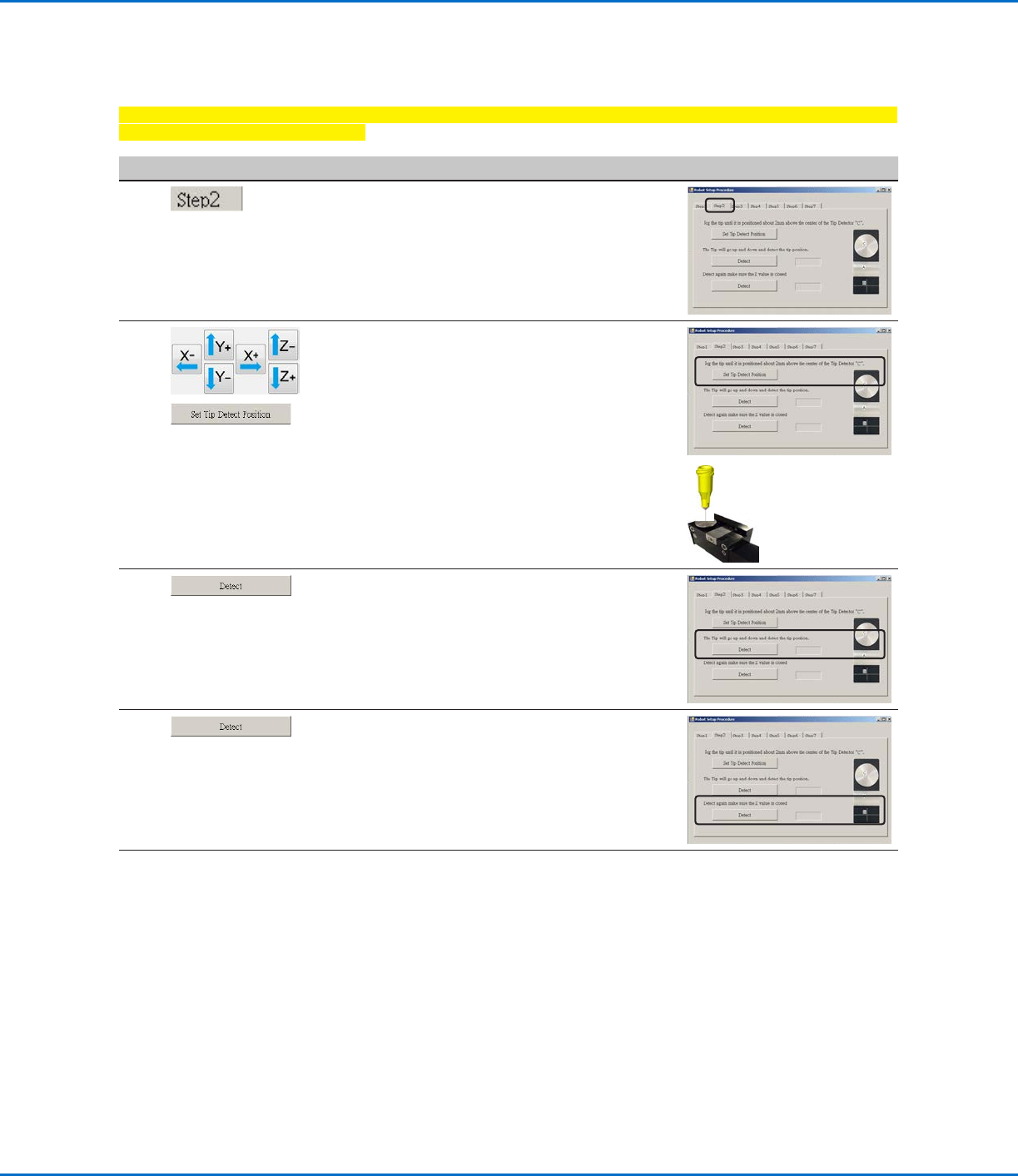
• Click the STEP2 tab.
2
>
• Jog the tip until it is positioned about 2 mm
above the sensor on the tip detector.
• Click SET TIP DETECT POSITION.
3
• Click DETECT.
The tip touches the sensor to detect the
tip position and the system displays the tip
offset value next to the Detect button.
4
• Click DETECT again.
The system confirms the tip offset setting.
5
• Continue to “Robot Initial Setup (Step3
Tab): Setting the Camera-to-Tip Offset” on
page51.
Setting Up the System Using the Robot Initial Setup Wizard (continued)
GV Series Automated Dispensing Systems
51www.nordsonefd.com info@nordsonefd.com +1-401-431-7000 Sales and service of Nordson EFD dispensing systems are available worldwide.
Robot Initial Setup (Step3 Tab): Setting the Camera-to-Tip Offset
# Click Step Reference Image
1
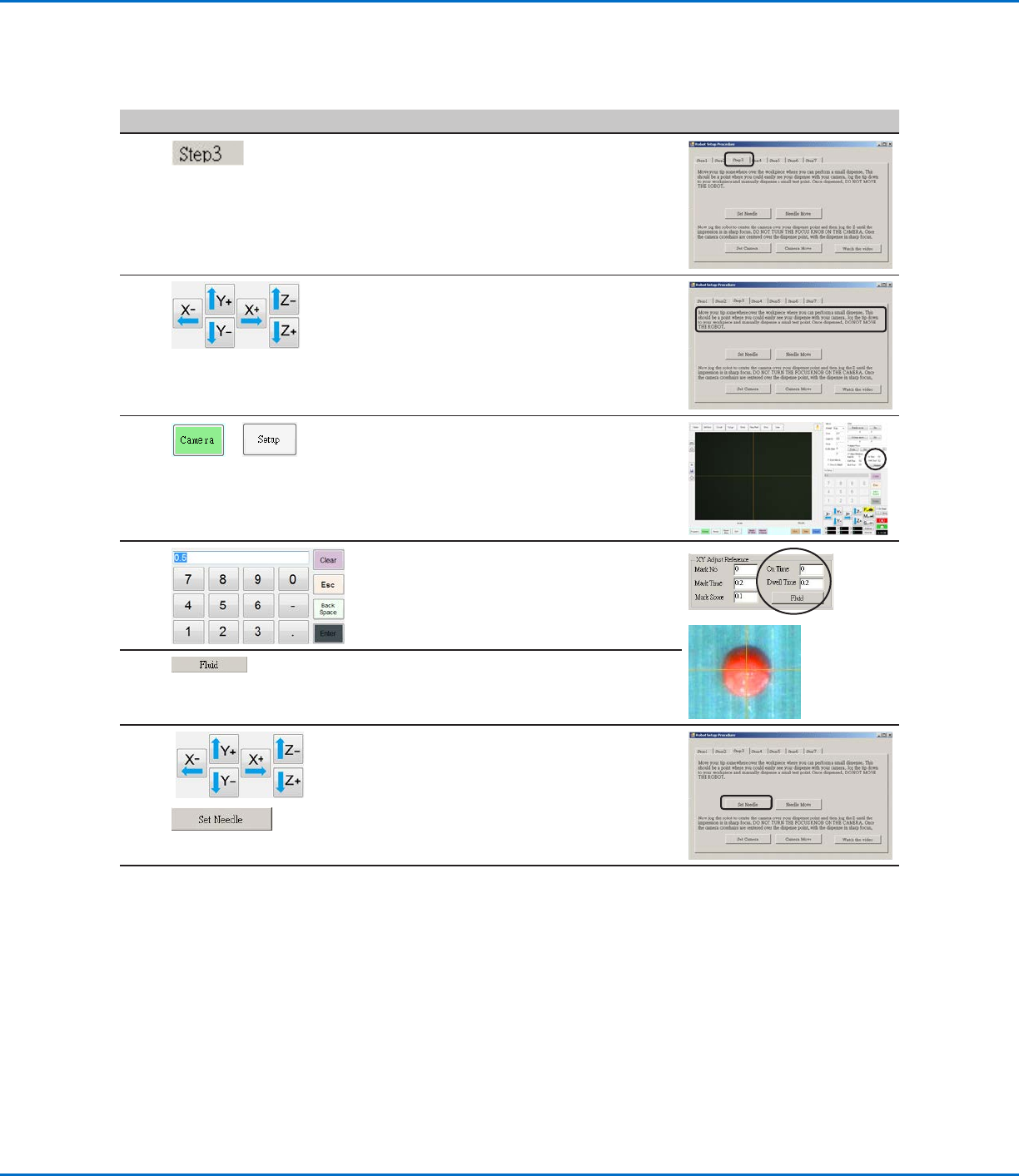
• Click the STEP3 tab.
2
• Jog the tip to a good location on the work
surface to deposit a test dot of fluid.
3
>
• Click the CAMERA tab and then click SETUP
at the top of the Camera screen.
You will use the fields under XY Adjust
Reference to deposit a test dot of fluid.
4
• Use the keypad to enter the following
recommended dispense dot parameters:
- ON TIME: 0.5
- DWELL TIME: 0.2
5
• Click FLUID to dispense a dot of fluid.
6
>
• Jog the tip until it is positioned about 2mm
above the dispense dot.
• Click SET NEEDLE.
Continued on next page
Setting Up the System Using the Robot Initial Setup Wizard (continued)
GV Series Automated Dispensing Systems
52 www.nordsonefd.com info@nordsonefd.com +1-401-431-7000 Sales and service of Nordson EFD dispensing systems are available worldwide.
Setting Up the System Using the Robot Initial Setup Wizard (continued)
Robot Initial Setup (Step3 Tab): Setting the Camera-to-Tip Offset (continued)
# Click Step Reference Image
7
>
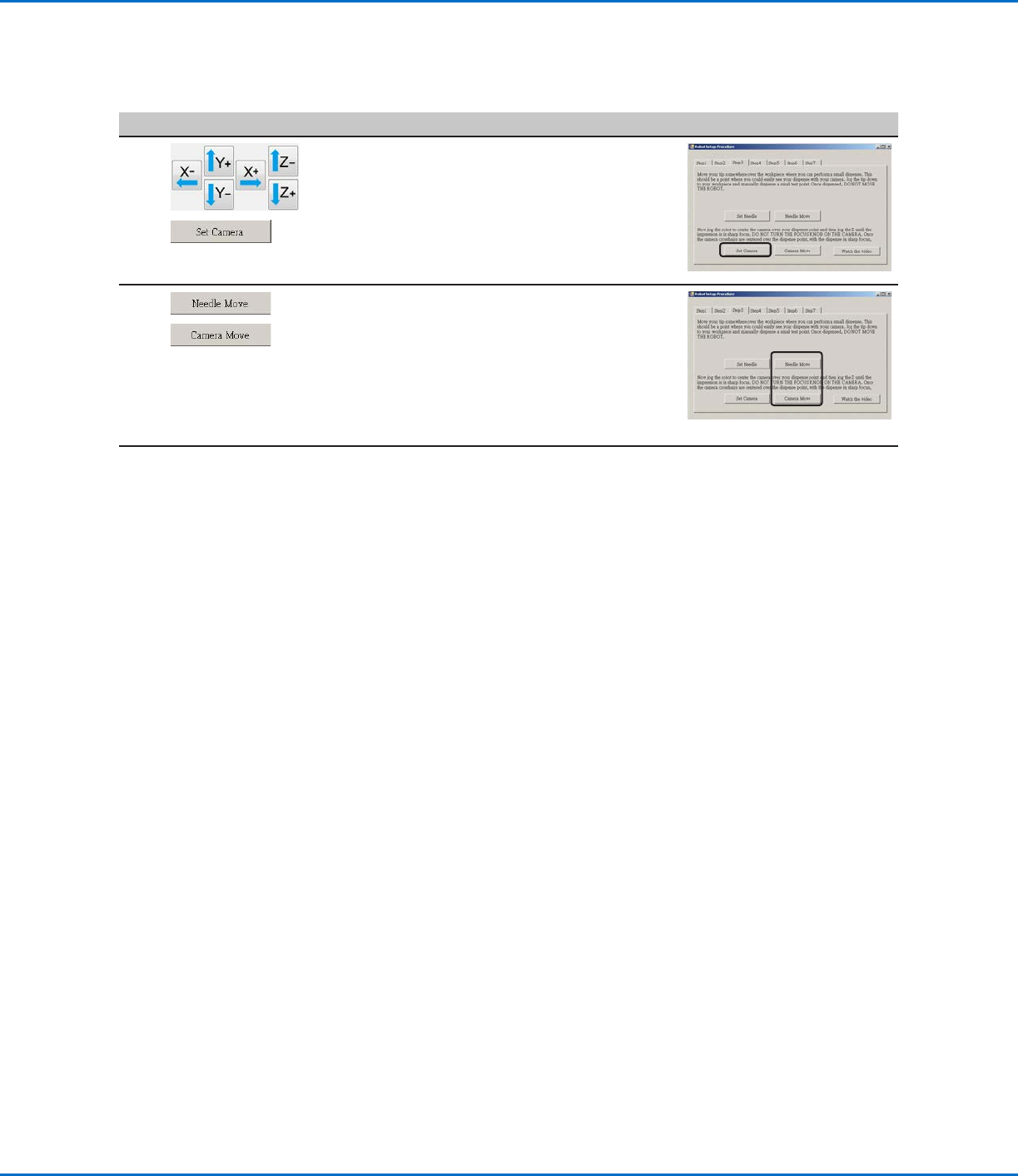
• Jog the camera until the camera crosshairs
are centered over the dispense dot.
• Focus the camera until the image of the
dispense dot is clear. Refer to “Camera” on
page18 as needed for instructions on
focusing the camera.
• Click SET CAMERA.
8
>
• Click NEEDLE MOVE to test the setup.
The system should center the tip over the
test dot dispensed in step 5.
• Click CAMERA MOVE to further test the
setup.
The camera should center its crosshairs over
the test dot dispensed in step 5.
9
• Continue to “Robot Initial Setup (Step4
Tab): Setting a Mark” on page53.