CP7 training(6.0) (1).pdf - 第101页
FK-9F98-27 CP-7 Series Traini ng Text for Service Engineers Edition 6.0 Chapter 6. Servo Pack Zero Ad justment and Gain / Motion Check [5/10] 6.4 Servo Pack Gain and Motion Check Cautions to be observed during the Gain a…

FK-9F98-27 CP-7 Series Training Text for Service Engineers
Edition 6.0 Chapter 6. Servo Pack Zero Adjustment and Gain / Motion Check [4/10]
4. Release the emergency stop button, press [Ready ON] to turn the servo power ON.
5. Press [0 Adjust Start] (fig. 5) and the M/C [Start] button will begin to blink.
When the [Start] button is pressed, servo pack zero setting will start. If the counter value in
[Actual] (fig. 5) is not stable, carry out the adjustment as follows so that the value remains
relatively constant.
Press [MODE/SET] Æ Display <Fn000> Æ Press the key 10 times to display <Fn00A> Æ
Press [DATA/SHIFT] more than 1 second. Æ < SPd> Æ Press [DATA/SHIFT] (less than 1
second) Æ Display <Speed Command Offset>
Press the keys, in order to stabilize the servo counter value. [see “Actual” on the
screen] Æ when the counter value stabilizes, press [DATA/SHIFT] (for less than 1 second.)
Æ to display < SPd> Æ Press [DATA/SHIFT] for more than 1 second. (Data will be
recorded). Æ Return to <Fn00A>. Æ Press the emergency button to turn the servo OFF. Æ
Press the [MODE/SET] button 3 times to display < bb>.
Manual zero setting is now complete.
6. Carry out adjustment for each axis in the same manner.
[Note]: Always push the emergency button when stopping zero adjustment.
Fuji Machine Mfg. Co., Ltd. (Okazaki)
SMT Equipment Quality Assurance Dept.
CS Section
6-4

FK-9F98-27 CP-7 Series Training Text for Service Engineers
Edition 6.0 Chapter 6. Servo Pack Zero Adjustment and Gain / Motion Check [5/10]
6.4 Servo Pack Gain and Motion Check
Cautions to be observed during the Gain and Motion Check
1. Check that each axis fits into the time and overshoot amount.
2. The parameter for each axis, the value to enter into [Start] [End], the traverse time, and the
overshoot amount is listed in the gain test adjustment table.
3. Basically, parameters (Pn100, 101, 401) are fixed. If the motion value is not in range, check again
after idling. If problems persist contact Fuji for further instructions.
Check that the conditions are met for each axis as described below
[C-axis]
1. The I/O is set as described on page 6-2.
2. In [Start], enter the counter value when the cam is at 0 degrees (present position). In [End],
enter “Start value + 12000”. The counter value for the current position shows next to Actual
on the left side of the display.
[X, Y-axes]
1. The main table is moved to the unloading position.
2. The cam angle is 0 degrees
3. The Z-axis is lowered, and the main lifter is clamped.
4. Check both parameters listed on the Gain Test table for the X, & Y-axes.
[Z-axis]
1. The main lifter is clamped.
[PQ, FQ, RQ, NC-axes]
1. Use the Parts Rejection command and make sure the shafts are all facing the correct direction.
After checking the [Rot100] parameter at a cam angle of 180 degrees, check the [Rev]
parameter at cam angle 0 degrees. When adjusting [Rot100], make sure that the clutch is
properly engaged with the shaft.
[D1, D2-axes]
1. Make sure both Device pallets are retracted
2. The D-axis pallet is lowered
3. The cam angle is at 0 degrees
4. The D-axis stoppers are both retracted.
5. Check both parameters listed on the Gain Test table for the D-axes.
[NZ-axis]
1. Check at a cam angle of 0 degrees.
Fuji Machine Mfg. Co., Ltd. (Okazaki)
SMT Equipment Quality Assurance Dept.
CS Section
6-5
FK-9F98-27 CP-7 Series Training Text for Service Engineers
Edition 6.0 Chapter 6. Servo Pack Zero Adjustment and Gain / Motion Check [6/10]
6.5 Servo Pack Gain and Motion Check Procedure
[
Note]: Select only one axis at a time from the “Select Tuning Axis” field.
1) When an axis is selected (Fig.4), each parameter for the axis will be displayed on the “Select
Parameter List”. The parameter from the “Select Parameter List” can be changed by pressing
the [UP] and [DOWN] keys in the “Parameter Manager”.
First, press the intended parameter and then press [Decision] from the “Parameter Manager”.
The parameter selected in the “Decision parameter” will be displayed.
When [Tuning] is pressed, axis operation can be carried out by the parameter displayed as the
“Decision Parameter”.
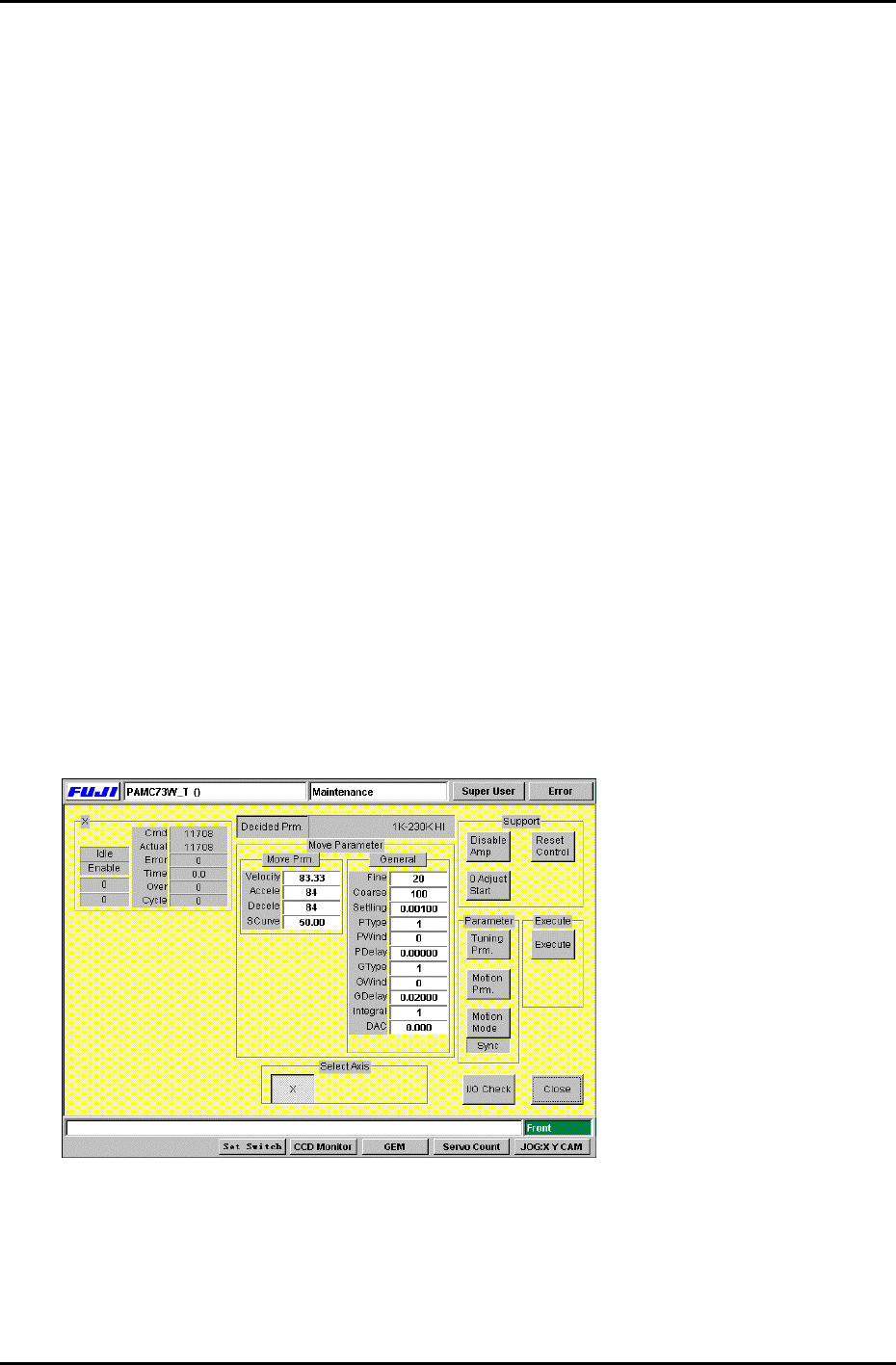
2) Each time the [Tuning Prm.] from “Parameter” is selected, the display switches between
Fig.5 and fig.6. Each time [Motion Prm.] is pressed, the display changes between Fig.7 and
Fig.8. Each time [Motion Mode] is pressed, the display under the button changes between
“Sync”, “Interp”, “Unsync”, “Timer” one by one. The set value is always set to “Sync”,
[Caution]: Do not change the [Move Parameter] and [Gain Parameter] in Fig.5 and Fig.6.
3) After [Motion1 Prm.] is pressed in Fig.7, values can be entered into [Start], [End]. Enter the
values for [Start] and [End] according to the gain test adjustment table.
Carry out the same procedure for Fig.8 [Motion2 Prm.]. Press and enter the values for
[Cycle], and [Timer]. Enter 1 for [Cycle mode] and 500 for [Interval timer].
The machine [Start] button will blink after [Execute] is pressed. After [Start] is pressed, the
axis will begin to move. Press [Cycle stop] to stop movement.
During movement, the amount of traverse time (ms) and overshoot (pulse) are displayed in
“Time” and “Over”. Check that the values fit within the values shown in the gain test
adjustment table.
Figure 6
Fuji Machine Mfg. Co., Ltd. (Okazaki)
SMT Equipment Quality Assurance Dept.
CS Section
6-6