CP7 training(6.0) (1).pdf - 第110页
FK-9F98-27 CP-7 Series Traini ng Text for Service Engineers Edition 6.0 Chapter 7. Cam era Adjustment [4 / 16] 7.4 T emporary Gain Adjustment 1. T emporarily adjust the camera gain (using the manual gain adjustment trimm…
FK-9F98-27 CP-7 Series Training Text for Service Engineers
Edition 6.0 Chapter 7. Camera Adjustment [3/16]
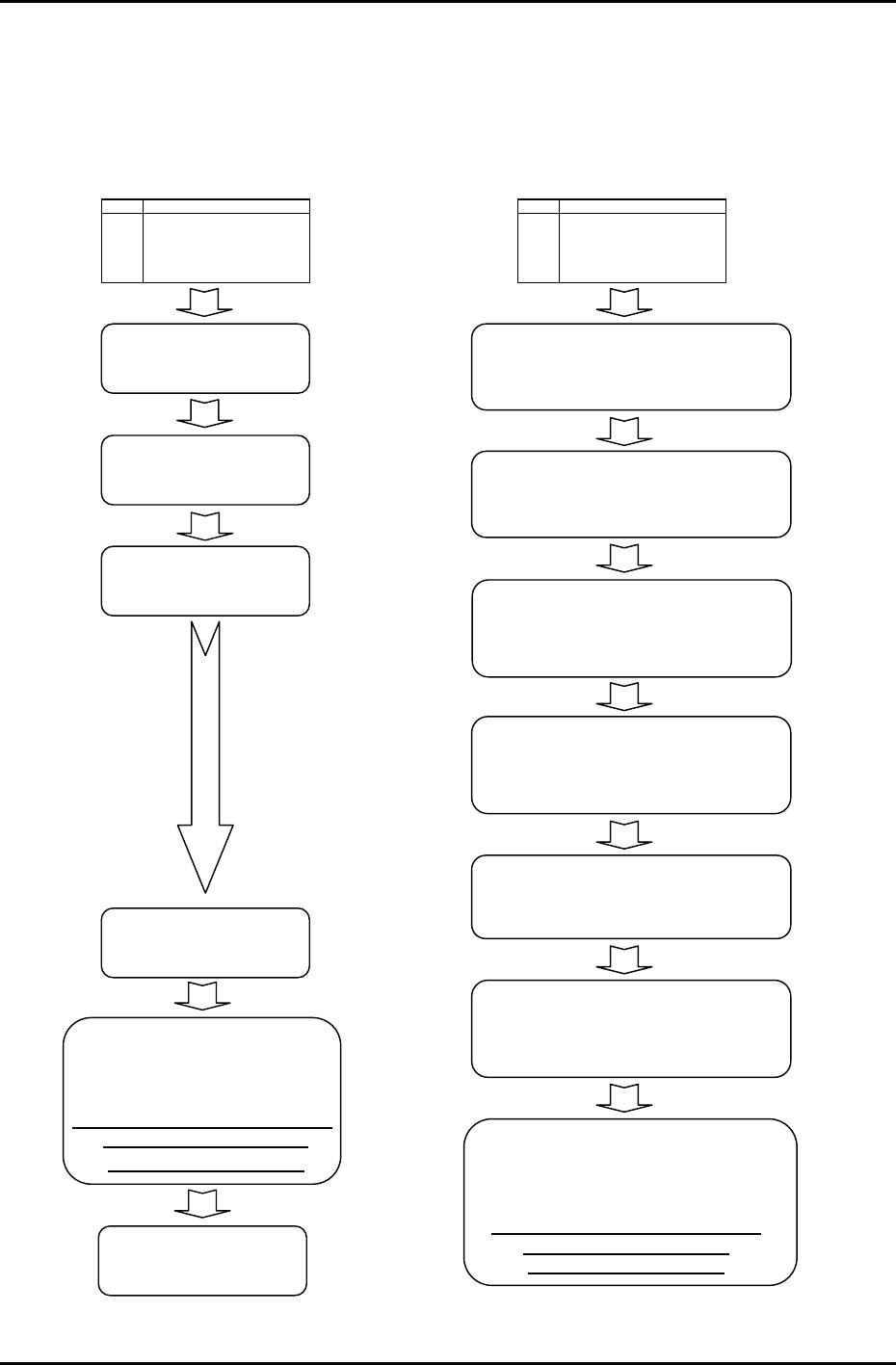
7.3 Camera Set-up Procedure
Firmware version V1.18 features a new brightness adjustment function. Use of this function requires a
change in the camera adjustment procedure in order to perform resolution measurements at the
appropriate brightness. Refer to the following diagram for the correct order of adjustment.
V1.17 and prior
V1.18 and later
START
(Mount Camera)
Camera gain adjustment
(Temporary adjustment)
Camera centering
Camera focusing
Camera resolution
measurement
Nozzle check, camera rotation
center &nozzle diameter
measurement
Attach a 0.7 to 2.5 mm nozzle in
all holders and ensure to
perform a nozzle check.
Camera gain
ad
j
ustment
START
(Mount Camera)
Camera gain adjustment
(Temp rarily
in
orary adjustment) Tempo
c
r
e
ase
ga
in if im
age
too
da
rk.
Nozzle check, camera rotation
center &nozzle diameter
measurement
Attach a 1.3 to 2.5 mm nozzles in
all holders and ensure to
p
erform a nozzle check.
Camera focusing
The height of the cameras should
be set to the approximate center of
the in-focus range.
Camera gain adjustment
Ensure to use the V1.18 camera
adjustment method with a 1.3 mm
nozzle in holder 1.
Nozzle brightness check (A1)
Ensure to adjust the brightness level
(A1) prior to the resolution adjustment.
Camera centering
Camera resolution measurement
Fuji Machine Mfg. Co., Ltd. (Okazaki)
SMT Equipment Quality Assurance Dept.
CS Section
7-3
FK-9F98-27 CP-7 Series Training Text for Service Engineers
Edition 6.0 Chapter 7. Camera Adjustment [4/16]
7.4 Temporary Gain Adjustment
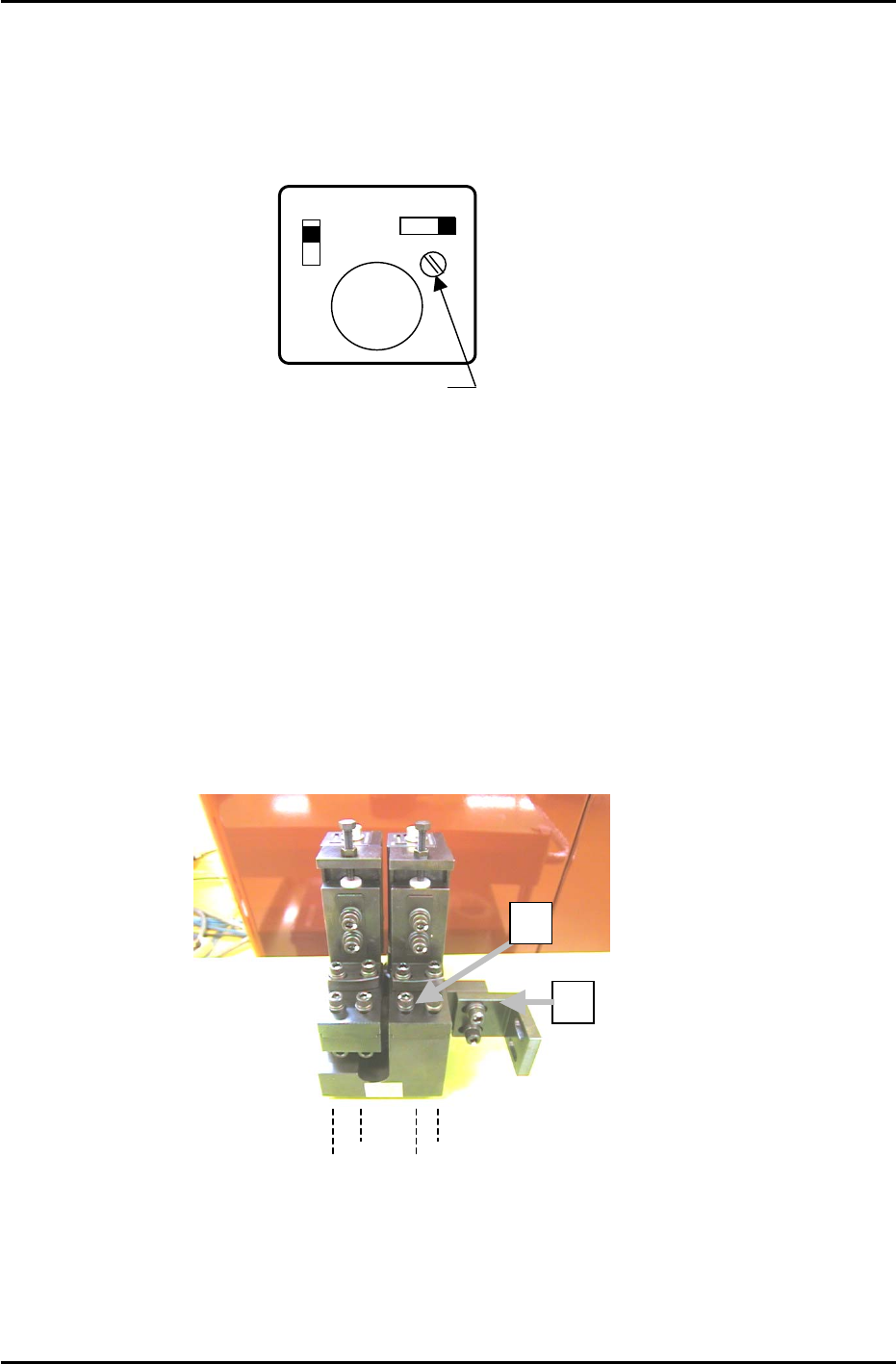
1. Temporarily adjust the camera gain (using the manual gain adjustment trimmer on top of the camera
body) if the nozzle image appears too dark on the monitor.
Top View
of camera
A
F M
SIGNAL
1N
1 l
Manual Gain Adj. Trimmer
GAIN
Figure 4A
7.5 Camera Centering
1. Move a straight 0.7mm nozzle to the 5
th
station and set at 200 degrees.
2. View the raw image of the nozzle as follows:
[Press the CCD Monitor tab at the bottom of the screen] → [Select the Wide or Narrow camera]
3. The CCD monitor will appear on the screen. Press [SCALE] to display the crosshairs.
4. Remove the mounting bracket (item 2 in figure 5) securing the camera assembly to the right hand
inner side of the cam box. It will not be possible to perform camera adjustments without removing
this bracket.
Figure 5
2
1
Wide Camera Y-axis
positioning bolts
5. To align the Wide Camera nozzle image to the crosshairs in the Y-direction, loosen the four bolts on
the underside of the camera assembly and adjust the position of the assembly accordingly (see
figure 6). Once the adjustment is complete tighten the bolts with the required amount of torque
(13N.m).
Fuji Machine Mfg. Co., Ltd. (Okazaki)
SMT Equipment Quality Assurance Dept.
CS Section
7-4
FK-9F98-27 CP-7 Series Training Text for Service Engineers
Edition 6.0 Chapter 7. Camera Adjustment [5/16]
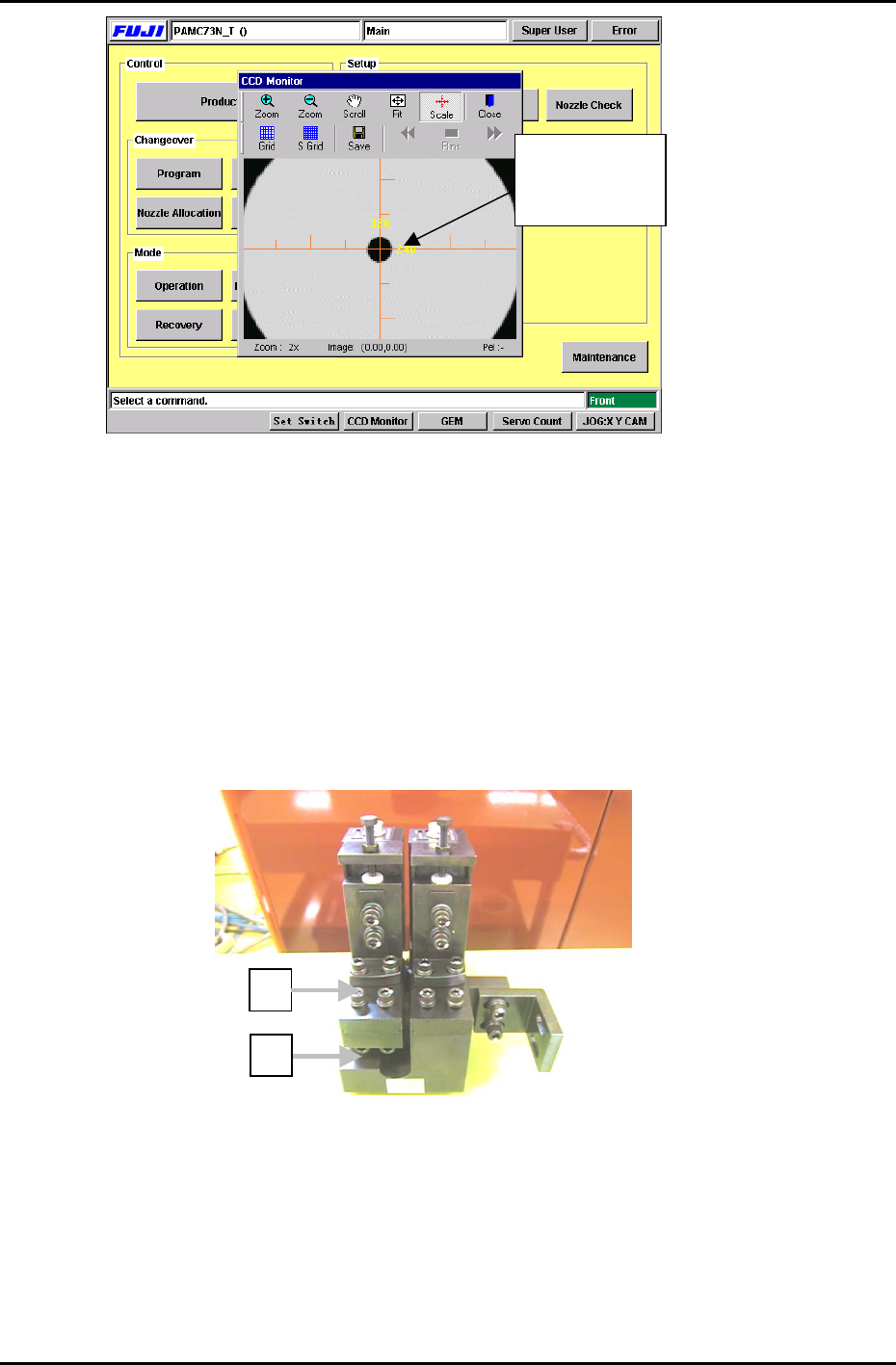
The nozzle
should be aligned
with the cross
Figure 6
6. To align the Wide Camera nozzle image to the crosshairs in the X-direction, loosen the X-axis
positioning bolts (Item 1 in figure 5) and adjust the position of the camera accordingly. Once the
adjustment is complete tighten the bolts with the required amount of torque (8N.m).
7. As the narrow camera bracket is attached to the wide camera bracket, it is necessary to adjust the
wide camera bracket first when adjusting both cameras. Performing narrow camera adjustments first
will necessitate the adjustment being performed twice.
8. To adjust the narrow camera in the Y-direction, loosen the Y-axis positioning bolts (Item 1 in figure 7)
and adjust the camera position accordingly. Once the adjustment is complete, tighten the bolts with
the required amount of torque (13N.m).
2
Figure 7
1
9. To adjust the narrow camera in the X-direction, loosen the X-axis positioning bolts (Item 2 in figure 7)
and adjust the camera position accordingly. Once the adjustment is complete tighten the bolts with
the required amount of torque (8N.m).
Fuji Machine Mfg. Co., Ltd. (Okazaki)
SMT Equipment Quality Assurance Dept.
CS Section
7-5