CP7 training(6.0) (1).pdf - 第70页
FK-9F98-27 CP-7 Series T raini ng T ext for Service Engineers Edition 6.0 Chapter 4. S tation Adjustment [21/28] 4. Set the cam at 0 degrees. R un the cutter for N times by I/O (Y03E n T APE CUT), and perform the sensor …
FK-9F98-27 CP-7 Series Training Text for Service Engineers
Edition 6.0 Chapter 4. Station Adjustment [20/28]
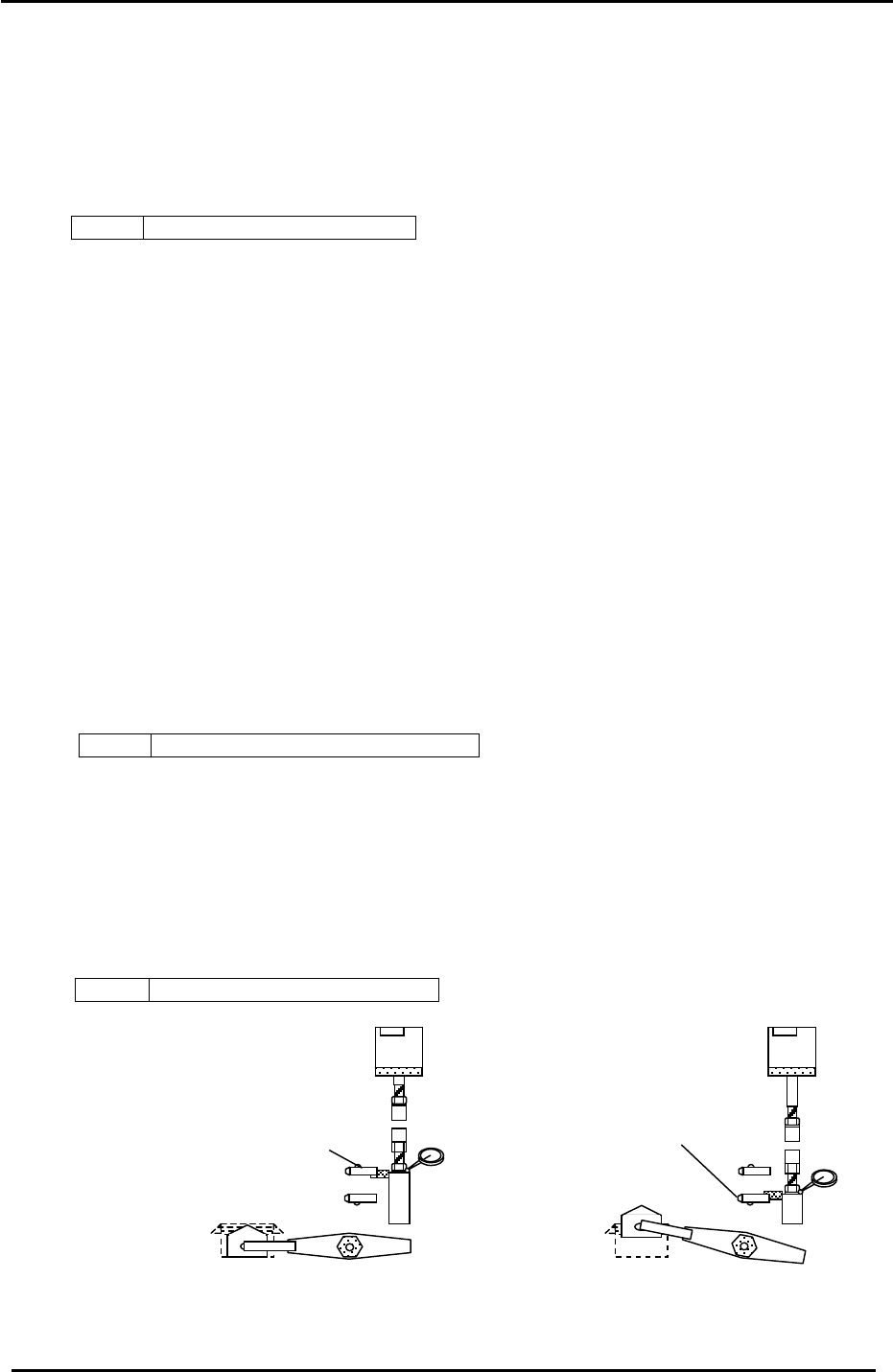
4.16.2 Forward End Sensor Adjustment
1. Move the feeding lever to the forward limit (the cam angle should be around 200 degrees)
and rotate the cam angle so that the flag ascends 0.5mm from the forward end sensor. Use a
dial gauge to check. Adjust the sensor bracket so that the sensor turns OFF at this position.
2. Check sensor reaction by I/O.
<I/O Æ Standard Æ IN>
X03B FEEDING FORWARD LIMIT
4.16.3 Speed Controller Adjustment
1. Fully open the speed controllers for the upper lower ends of the feed cylinder.
4.17 Station 1 N times Cutter Adjustment
1. At 0 degrees, turn the tape feeder solenoid valve OFF. (Y032) Set the dial gauge at the cam
angle where the flag starts descending from the upward position.
2. Rotate the cam axis and check the position where the flag descends 0.5mm from the upper
limit using a dial gauge. Adjust the sensor bracket so that the sensor turns OFF at this
position.
* The flag descends when the movable cutter raises. When the upper end sensor turns ON,
the movable cutter descends. Check the I/O as follows:
<I/O Æ Standard Æ IN>
X04E TAPE CUTTER LOWER LIMIT
3. Analogous to the above, when the movable cutter is at the upper limit (cam angle 190
degrees), rotate the cam axis and check the position where the flag ascends 0.5mm from the
lower limit by a dial gauge. Adjust the sensor bracket so that the sensor turns OFF at this
position.
*When the flag descends the lower sensor turns ON and the movable cutter raises. Check
the I/O as follows:
<I/O Æ Standard Æ IN>
X04D TAPE CUTTER UPPER LIMIT
Movable cutter upward sensor
X04D TAPE CUTTER UPPER-LIMIT
Movable cutter downward sensor
(X04E TAPE CUTTER LOWER-LIMIT)
<Moveable cutter lowered position>
<Moveable cutter raised
p
osition>
Figure 31
Fuji Machine Mfg. Co., Ltd. (Okazaki)
SMT Equipment Quality Assurance Dept.
CS Section
4-20
FK-9F98-27 CP-7 Series Training Text for Service Engineers
Edition 6.0 Chapter 4. Station Adjustment [21/28]
4. Set the cam at 0 degrees. Run the cutter for N times by I/O (Y03E n TAPE CUT), and perform
the sensor input and operation check.
*Speed controller volume: Both up & down flow controls are set to fully open.
Note: Carry out the solenoid valve operation for the N times cutter at 0 degrees.
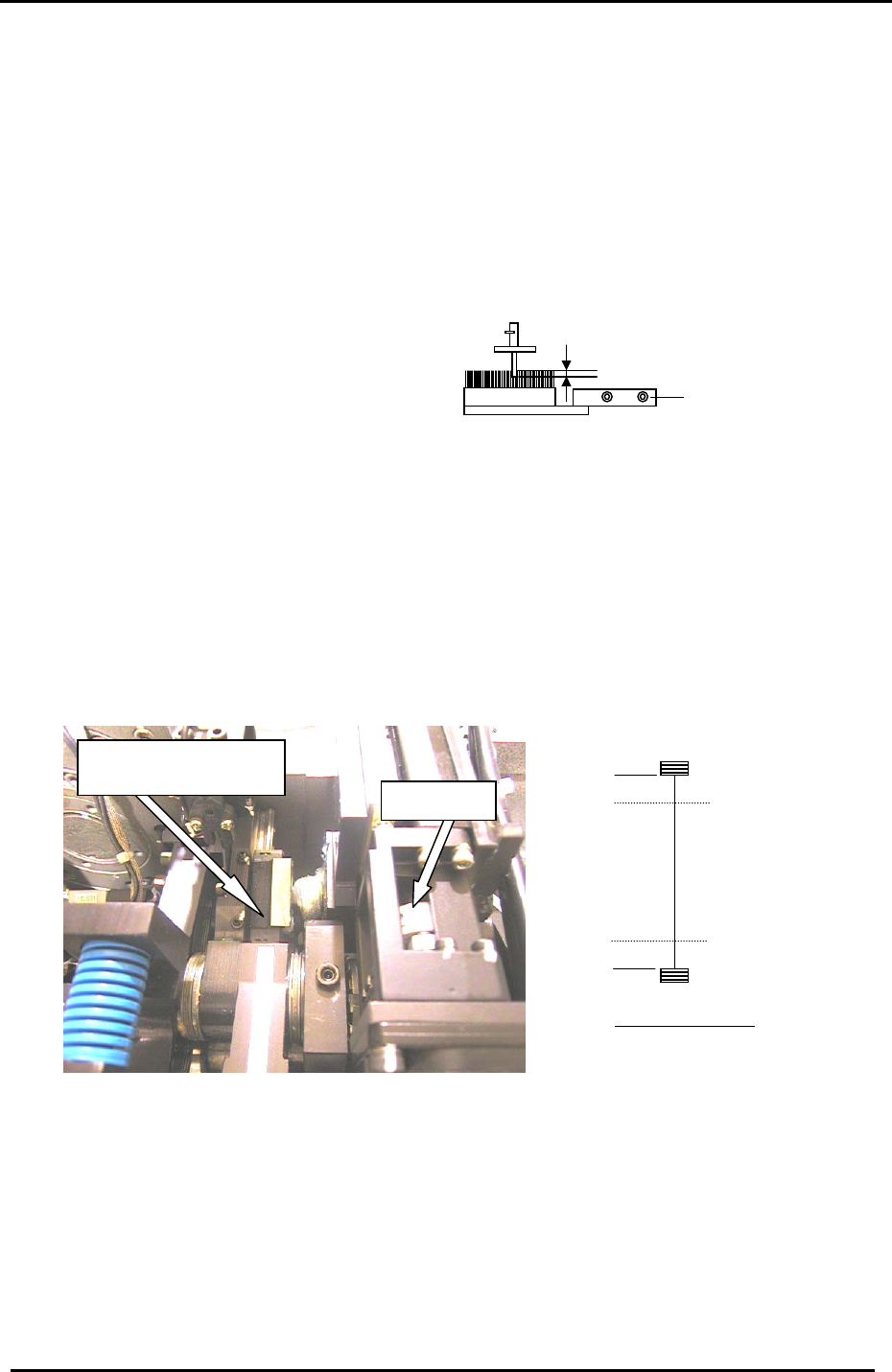
4.18 Station 13 Brush Height Adjustment for Parts Rejection
1. Set a nozzle in the holder and move it to station 13. Adjust the brush height so that the tip of the
nozzle jig enters the top surface of the brush by 0.5 to 1.0mm.
Installation bolts
0.5 to 1mm into the brush
4.19 Nozzle Holder Installation
1. Install the nozzle filters on all the shafts.
Fi
g
ure 32
2. Check the motion of the shafts and then install the holders on all the nozzle shafts.
3. Check the alignment of holder and jig by following the procedure outlined in step 4.1 at the
beginning of this chapter.
4.20 ST1 NZ Adjustment & Calibration Data Measurement
1. Loosen the coupling for the NZ-axis motor and move the guide to the minus mechanical
stopper. (figure 33)
Guide against the minus
mechanical stopper
NZ Coupling
Minus stopper
Plus stopper
Min Limit Pos.
100 Pulses
100 Pulses
Max Limit Pos.
Rear of Machine
Figure 33
2. Set the counter value to zero and tighten the coupling. (Torque setting: 0.8Nm)
3. Set the NZ Calibration Data as follows:
(Maximum Limit = 100 pulses from the + stopper)
Press: [Maintenance] → [Calibration] → [Travel Limits] →[Maximum Limit NZ]
(Minimum Limit = 100 pulses from the – stopper)
Press: [Maintenance] → [Calibration] → [Travel Limits] →[Minimum Limit NZ]
Fuji Machine Mfg. Co., Ltd. (Okazaki)
SMT Equipment Quality Assurance Dept.
CS Section
4-21
FK-9F98-27 CP-7 Series Training Text for Service Engineers
Edition 6.0 Chapter 4. Station Adjustment [22/28]
Quality Assurance Dept.
CS Section
4-22
NZ-axis servo counter chart
0.002mm / Pulse
Standard
(Reference)
+ Mechanical stopper 12770 ± 1000
Max Limit Pos NZ 12670 ± 500
Pickup Pos NZ 4000 ± 1000
Min Limit Pos NZ 100 ± 50
– Mechanical stopper 0 ± 50
4.21 ST1 NZ Pick-Up Position Adjustment
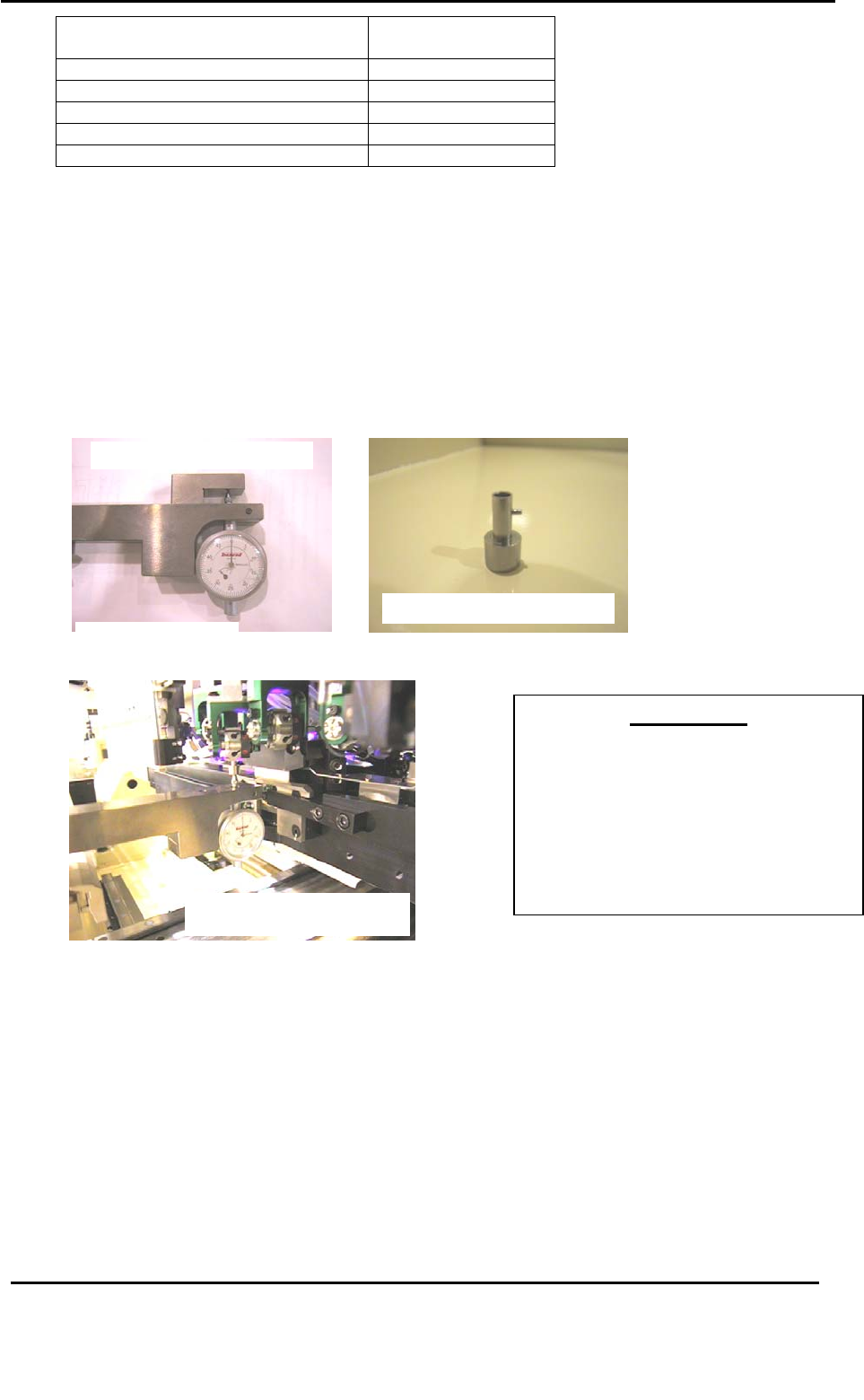
1. Set the cam to 0 degrees and turn ON the ST1 nozzle UP/DOWN solenoid valve. (Y031)
2. Place the 1
st
nozzle height calibration jig on the D-axis pallet and install the
nozzle jig at nozzle holder No.1. Set the cam angle at 170 degrees and move the
NZ-axis manually so the nozzle jig descends until the pick up height is 0.65mm (at this
condition the dial gauge should read 0).
1
s
t
nozzle hei
g
ht calibration
j
i
g
JIG No. ADCPJ8261
Nozzle Jig. Jig No. DCPJ0620
Figure 34
1
s
t
nozzle height calibration jig
Jig No. ADCPJ8261
IMPORTANT!!
The pick-up height calibration is critically
important to ensuring stable pick-up. If
not adjusted correctly, damage to
components may occur (due to shock
from nozzle) or pick-up rates will not be
at optimum levels. Be sure to use care
when making adjustments in this area.
Figure 35
3. Calibrate the NZ-axis servo counter value for all shafts (A through P) and record the value.
4. Calculate the average value for all shafts and set as the : PICK UP POS NZ.
Press: [Maintenance] → [Calibration] → [Pick Up Reference] → [NZ Original Pos.] → [Set]
*Measurements should be carried out at device locations (2 & 29, CP-732/733E), (2 &
39, CP- 742/743ME), (2 & 69, CP-742/743E) on both pallets.
Target Value: 0.65 ± 0.05mm
Fuji Machine Mfg. Co., Ltd. (Okazaki)
SMT Equipment