CP7 training(6.0) (1).pdf - 第91页
FK-9F98-27 CP-7 Series T raining T ext for Service Engineers Edition 6.0 Chapter 5. Loader and Con veyor Adjustment [23/28] <<OUT Conv e yor>> Refer to the Fig. 45 for PCB stopper and sensor po sitioning. Sen…
FK-9F98-27 CP-7 Series Training Text for Service Engineers
Edition 6.0 Chapter 5. Loader and Conveyor Adjustment [22/28]
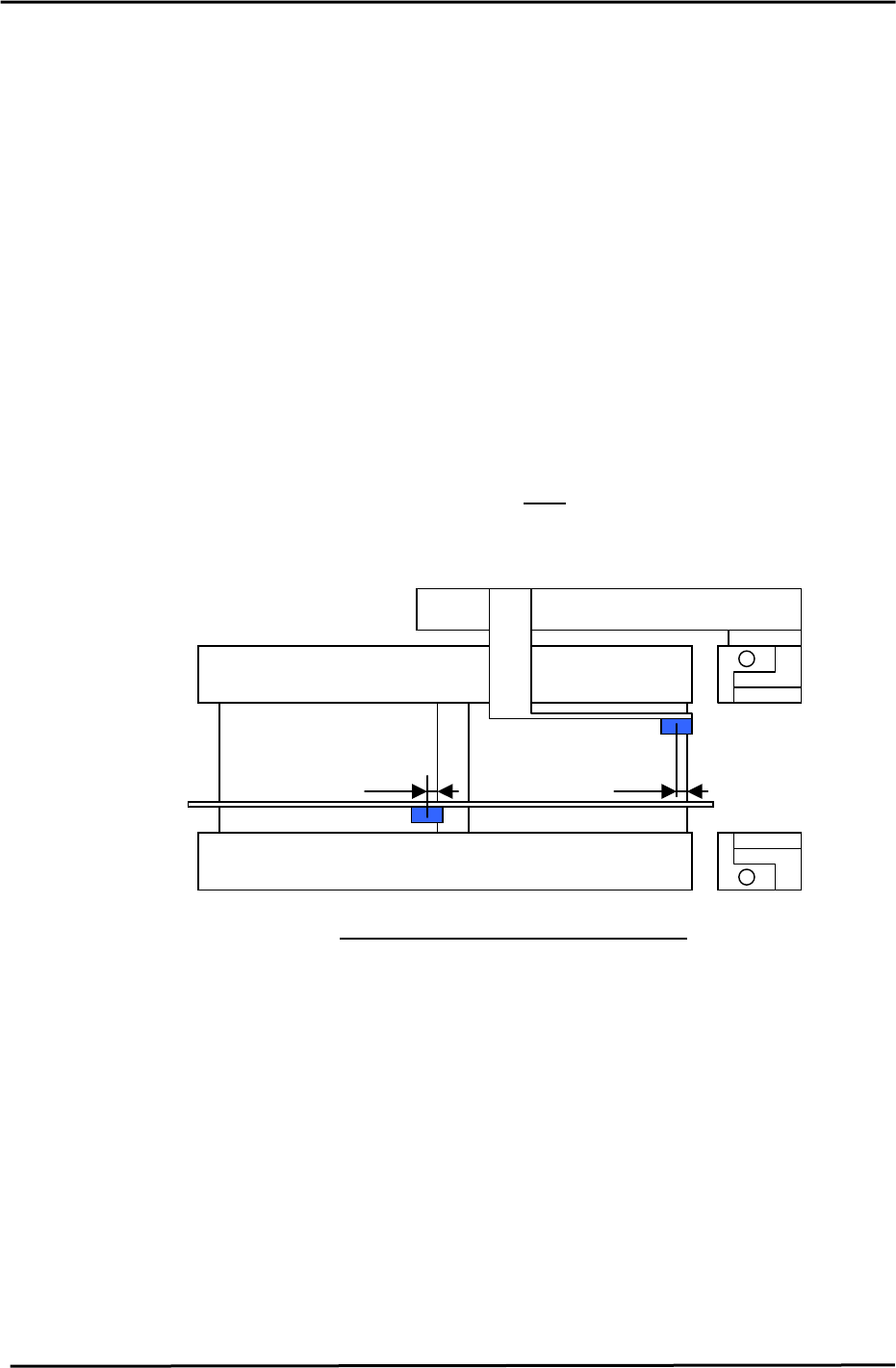
<<OUT Carrier Sensor Adjustment>>
Adjust the sensors for the OUT carrier as follows:
1. Load 2 PCBs on the IN carrier. Advance the carrier to the forward end position. (Continued from
the IN carrier adjustment.). Move the XY table to the IN loading position. (Do NOT raise the Z-
axis.)
2. Turn ON I/O, “Y044” (Main clamp open). Raise Z to the IN loading position.
3. Turn ON “Y043” (Main clamp close) and “Y073”,(IN carrier open). Lower the Z-axis to the “Z0”
position to load 2 PCBs onto the XY table. Then, move the main table to the unloading position.
4. Turn ON “Y082” (Out carrier close), “Y084” (Out carrier advance), and “Y083”(Out carrier open)
and raise the Z-axis raise to the ZL out position.
5. Turn ON “Y082”(Out carrier close) and “Y082” (Main clamp open). Lower Z to set to the same
condition as when the 2 PCBs were loaded on the IN carrier.
6. Adjust the sensor position so that “X0CC” (Out carrier 1 detection check), and “X0CD” (Out
carrier 2 detection check) are set 5mm from the leading edge of each Pcb. Set the sensor switch
to “L_ON”. And make sure that the volume is at
MAX position.
(1
st
PCB)
5mm
(2
nd
PCB)
5mm
OUT Carrier
Sensor Positioning for the Out Carrier
Figure 44
Fuji Machine Mfg. Co., Ltd. (Okazaki)
SMT Equipment Quality Assurance Dept.
CS Section
5-22
FK-9F98-27 CP-7 Series Training Text for Service Engineers
Edition 6.0 Chapter 5. Loader and Conveyor Adjustment [23/28]
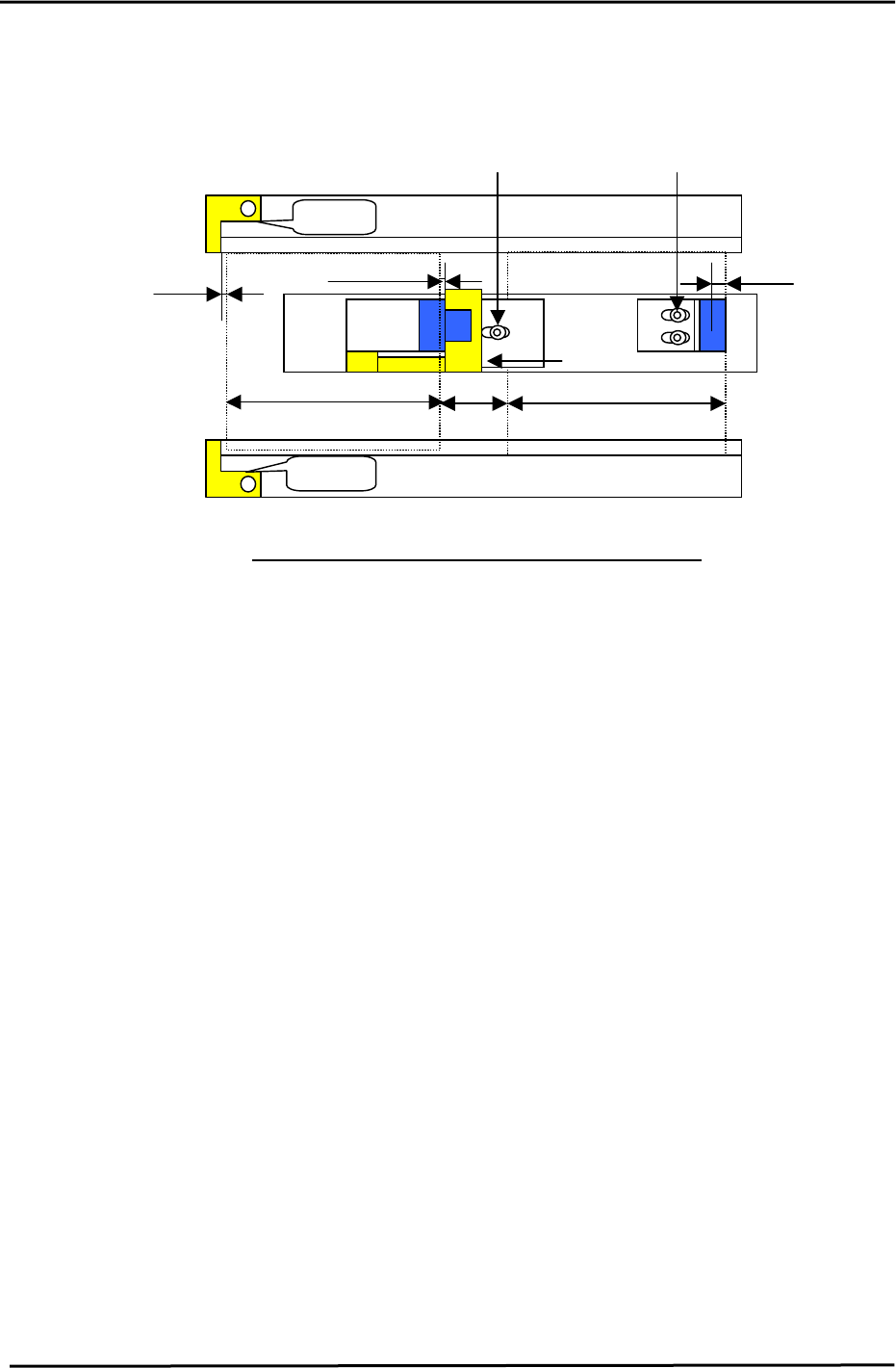
<<OUT Conveyor>>
Refer to the Fig. 45 for PCB stopper and sensor positioning.
Sensor positioning bolt for the 1
st
PCB
Sensor positioning bolt for the 2nd PCB
1
st
PCB
Reverse flow
stopper
No Gap
Reverse flow
stopper
170mm (220mm)
5mm
15mm
2
n
d
PCB
stopper
No Gap
0.2 to 0.3mm
170mm (220mm)
3mm
Figure 45
Stopper and Sensor Positioning for the Out conveyor
1. Remove the stoppers on the out conveyor. Load 2 PCBs on the OUT carrier. (Continued from
the OUT carrier adjustment.) Turn ON “Y085” (Out carrier retract), “Y086” (Out lifter up),
“Y083”, (Out carrier open), “Y087” (Out lifter down), “Y082”(Out carrier close), and “Y084”,
(Out carrier advance), to load the PCB on the OUT conveyor.
2. Loosen the sensor positioning bolt for the 1
st
PCB and set the sensor beam 5mm from the
leading edge of the first PCB.
3. Check that the PCB stopper is positioned 3mm from the trailing edge of the second PCB.
4. Set the switch for the OUT PCB clearance check sensor to “D_ON”, and both the arrival and
speed reduction sensors to “L_ON”.
Fuji Machine Mfg. Co., Ltd. (Okazaki)
SMT Equipment Quality Assurance Dept.
CS Section
5-23
FK-9F98-27 CP-7 Series Training Text for Service Engineers
Edition 6.0 Chapter 5. Loader and Conveyor Adjustment [24/28]
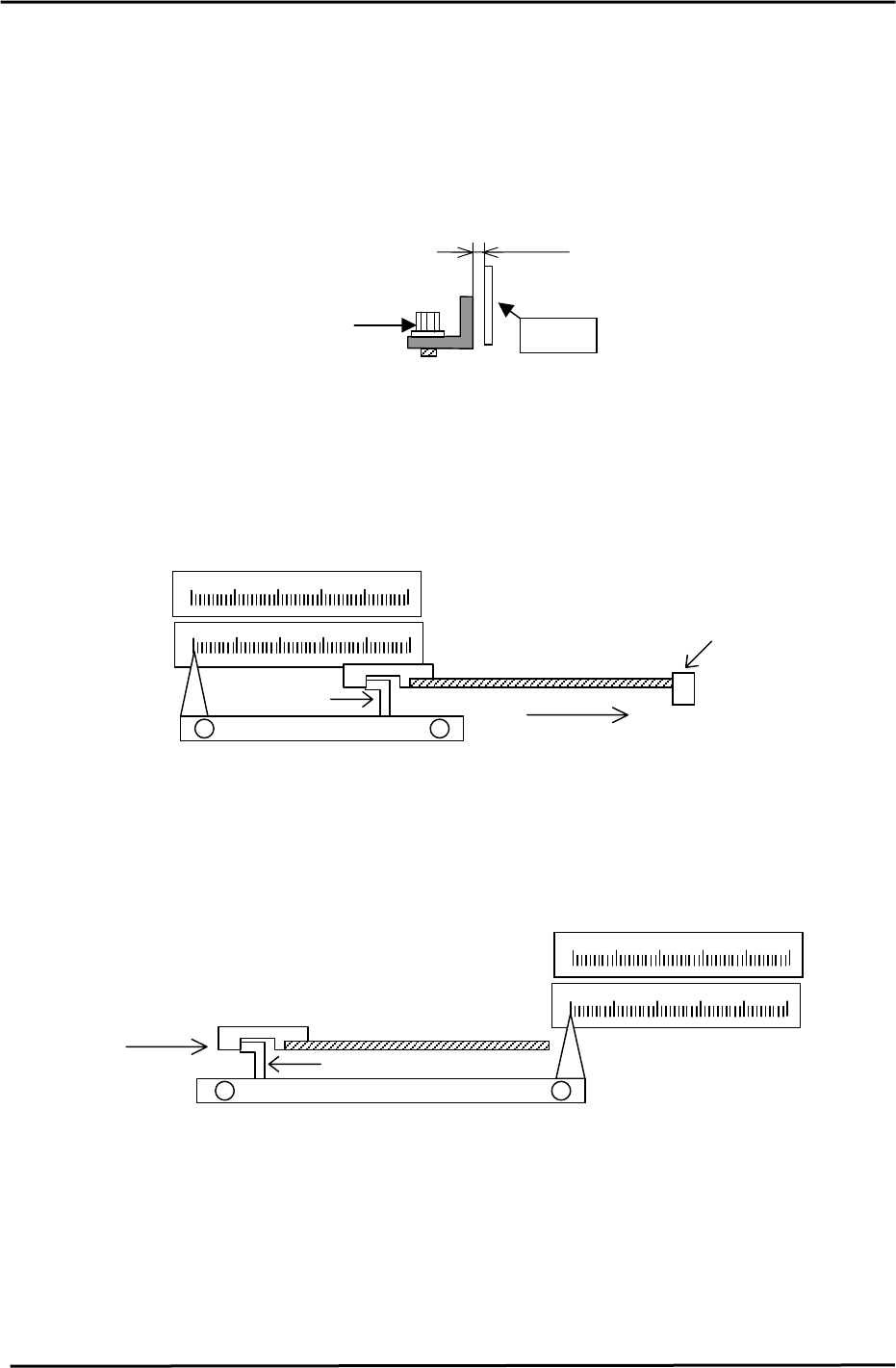
5.24 Positioning-Scale Adjustment for the IN and OUT Middle Stoppers
1. Set the clearance between the scale and arrow to 0.5mm for both the IN and OUT conveyors.
Confirm that the stopper can move between 50mm and 170mm.
(220mm for CP-742/743(M)E)
(Make sure that scale does not interfere with the arrow at that time.)
0.5mm
Scale
A
djustment Bolt
Figure 46
2. Using the appropriate board length against the first stopper, contact the middle stopper with
the 15mm spacing jig. The scale should indicate “170” at this point.
(220mm for CP-742/743(M)E)
If out of alignment, loosen the two screws on the scale and slide the scale into position.
(Alternatively, set a gap of 15mm between the two boards using a vernier.)
170
Middle stopper
Jig
PCB
First stopper
(CP-742/743(M)E)
220
Board flow
(CP-732/733E)
Figure 47
3. To position the middle stopper, place a 170mm (220mm) board on the OUT conveyor. Insert
the 15mm positioning jig to make contact with the middle stopper. The scale should indicate
“170” at this point. (220mm for CP-742/743(M)E) If out of alignment, loosen the two screws on
the scale and slide the scale into position.
220
(CP-742/743(M)E)
Board flow
170
Middle stopper
PCB
Jig
(CP-732/733E)
Figure 48
Fuji Machine Mfg. Co., Ltd. (Okazaki)
SMT Equipment Quality Assurance Dept.
CS Section
5-24