3OM-1343-008_w.pdf - 第107页
3-22 AKFEDT -ID (A02_04) Fiducial mark When "1 Point", "2 Point", or "3 Point" is selected for the global PEC recognition mode, the coordinates and mark code of each fi ducial mark must be en…
3-21
AKFEDT-ID
local
Select one of the following options to determine whether or not the
fidu
cial mark on each component placement point should be recognized.
Disable :
The local recognition function is not used.
Enable :
The local recognition function is used.
Note
(a) When "Enable" is set in the text box, the deviation of each component
placement point can be corrected.
(b) A component placement point and each recognition mode can be
specified in "(D02_09)
V" of the placement data (P-data) and the
coordinates and mark code of a fiducial mark can be designated in
(D02_12), (D02_13), and (D02_14) of the placement data (P-data).
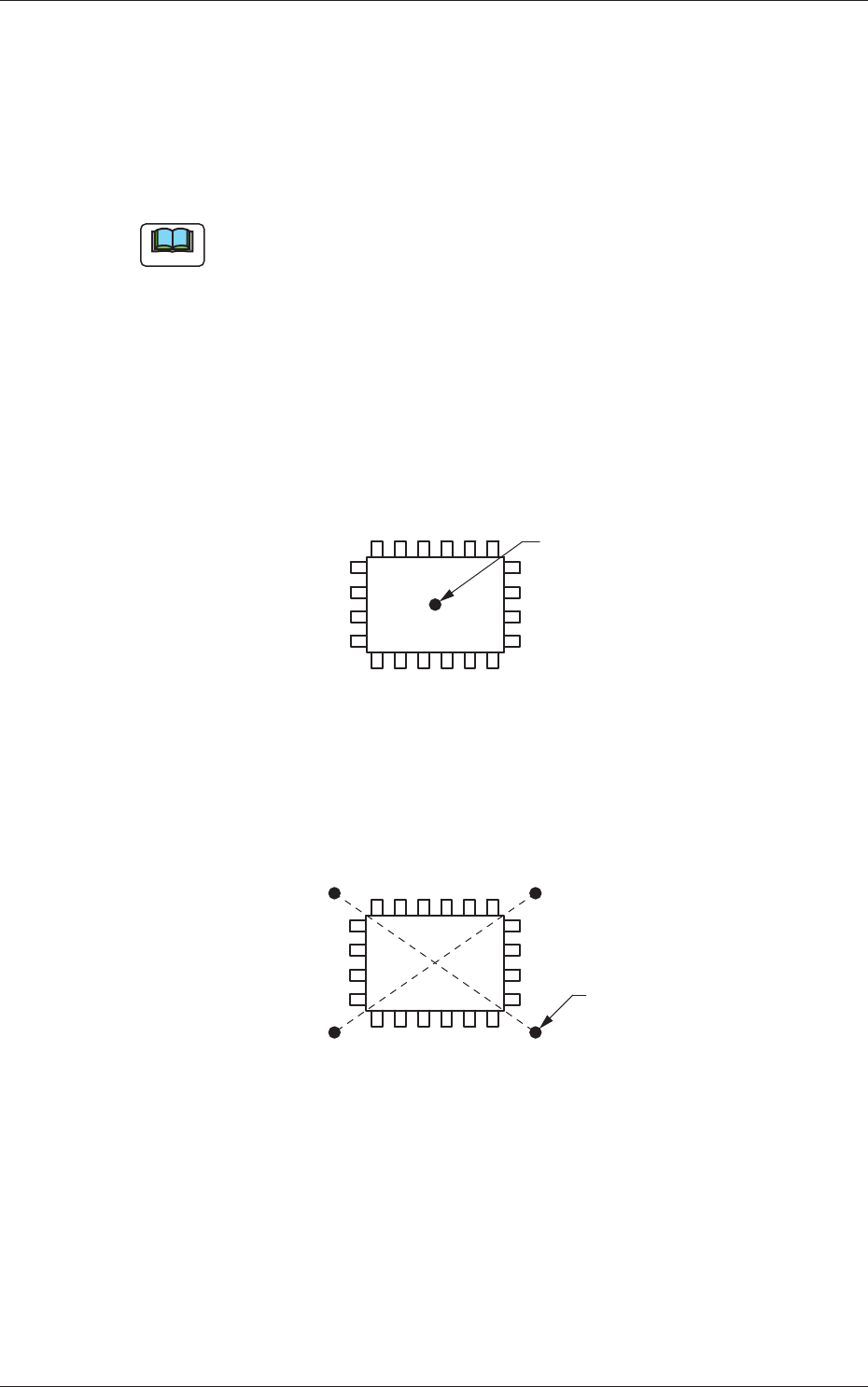
1-Point Recognition :
Put a fiducial mark on the center of component
placement point or a desired point around the
center.
Fiducial Mark
Fig. 3C21
2-Point Recognition :
Put two points (fiducial marks) symmetrically
on both sides of the center of the placement
position. (A-A', B-B')
B'
A'
A
B
Fiducial Marks
Fig. 3C22
0611-003
1.2 Operation Data

3-22
AKFEDT-ID
(A02_04)
Fiducial mark
When "1 Point", "2 Point", or "3 Point" is selected for the global PEC
recognition mode, the coordinates and mark code of each fi ducial mark
must be entered in the corresponding text boxes.
Zones 1, 2, 3, 4, and 5
#1 X [mm] (Horizontal) and Y [mm] (Vertical)
Set the coordinates of the fi rst fi ducial mark in the text boxes.
#1 Mark Code
Set the mark code of the fi rst fi ducial mark in this text box.
#2 X [mm] (Horizontal) and Y [mm] (Vertical)
Set the coordinates of the second fi ducial mark in the text boxes.
#2 Mark Code
Set the mark code of the second fi ducial mark in the text box.
#3 X [mm] (Horizontal) and Y [mm] (Vertical)
Set the coordinates of the third fi ducial mark in the text boxes.
#3 Mark Code
Set the mark code of the third fi ducial mark in the text box.
Reference
Refer to "(A03) PEC Recognition Mark Data" for the mark codes.
0601-002
1.2 Operation Data

3-23
AKFEDT-ID
(A02_05)
Beam
It can be determined which beam should be used for the global and
image PEC recognition operations.
Stage 1
Beam 1 :
Select this when only Beam 1 should be used
for PEC recognition operations.
Beam 2 :
Select this when only Beam 2 should be used
for PEC recognition operations.
Automatic (1 or 2) :
The machine determines which beam (Beam
1 or 2) is more suitable for PEC recognition
operations and selects the better one.
Both Beam :
Select this when both beams (Beams 1
and 2) should be used for PEC recognition
operations.
Stage 2
Beam 3 :
Select this when only Beam 3 should be used
for PEC recognition operations.
Beam 4 :
Select this when only Beam 4 should be used
for PEC recognition operations.
Automatic (3 or 4) :
The machine determines which beam (Beam
3 or 4) is more suitable for PEC recognition
operations and selects the better one.
Both Beam :
Select this when both beams (Beams 3
and 4) should be used for PEC recognition
operations.
Reference
As for the local PEC recognition, the PEC recognition operations are
performed with the beam by which components are placed regardless of
this designation of the PEC recognition beams.
0601-002
1.2 Operation Data