3OM-1343-008_w.pdf - 第219页
5-34 AKFEDT -ID (12) Shrtg. of Comp. Each text box shows the total number of the detected component shortage errors for each individual feeders. (13) Component ID Each text box shows the component IDs for each individual…

5-33
AKFEDT-ID
(1) Feeder No. (Actual Fdr No.)
Shown are the feeder Nos.
(2) Total Components
Each text box shows the total number of picked components (number of
pickup actions) for each individual feeders.
(3) A: Comp. Missing
Each text box shows the total number of missing components detected
by the linear measure detection sensor for each individual feeders.
(4) B: Comp. Missing
Each text box shows the total number of missing components detected
through recognition operation for each individual feeders.
(5) C: Comp. Vertical
Each text box shows the total number of vertical component errors
detected by the linear measure detection sensor for each individual
feeders.
(6) D: Comp. Recog.
Each text box shows the total number of errors detected through
recognition operation for each individual feeders.
(7) E: Comp. Thick
Each text box shows the total number of errors in component thickness
detected by the linear measure detection sensor for each individual
feeders.
(8) F: Pick-up Diff
Each text box shows the total number of pickup difference errors
detected in the recognition process for each individual feeders.
(9) G: Comp. Posture
Each text box shows the total number of reversed component and
polarity judgment errors detected in the recognition process for each
individual feeders.
(10) Total Errors
Each text box shows the total number of errors detected in (3) through
(9).
(11) Rate of Error (%)
Each text box shows the percentage of the total number of errors per the
number of picked components.
0607-003
3.3 Handling Errors Per Feeder

5-34
AKFEDT-ID
(12) Shrtg. of Comp.
Each text box shows the total number of the detected component
shortage errors for each individual feeders.
(13) Component ID
Each text box shows the component IDs for each individual feeders.
(14) Type
Each text box shows the component type.
(15) Width (mm)
Each text box shows the component width.
Note
When one of the above buttons is pressed, the feeder No. with the biggest
parameter under the selected button is displayed in the fi rst line and feeder
Nos. having the subsequent (second, third, fourth, ...) biggest parameters
follow.
That is, parameters are re-arranged in order of error counts, making it easy
to analyze and improve production rate.
When the [Feeder No.] button is pressed, the feeder Nos. are re-arranged
in their initial order (order of slot Nos.).
0607-003
3.3 Handling Errors Per Feeder
5-35
AKFEDT-ID
4. Bypass & Rate Data
The corresponding window enables the operator to check the pickup rate and
nozzle bypass condition (managed for each individual feeders or nozzles)
based on each pickup rate and nozzle bypassing specifi ed in the auto
operation setup data.
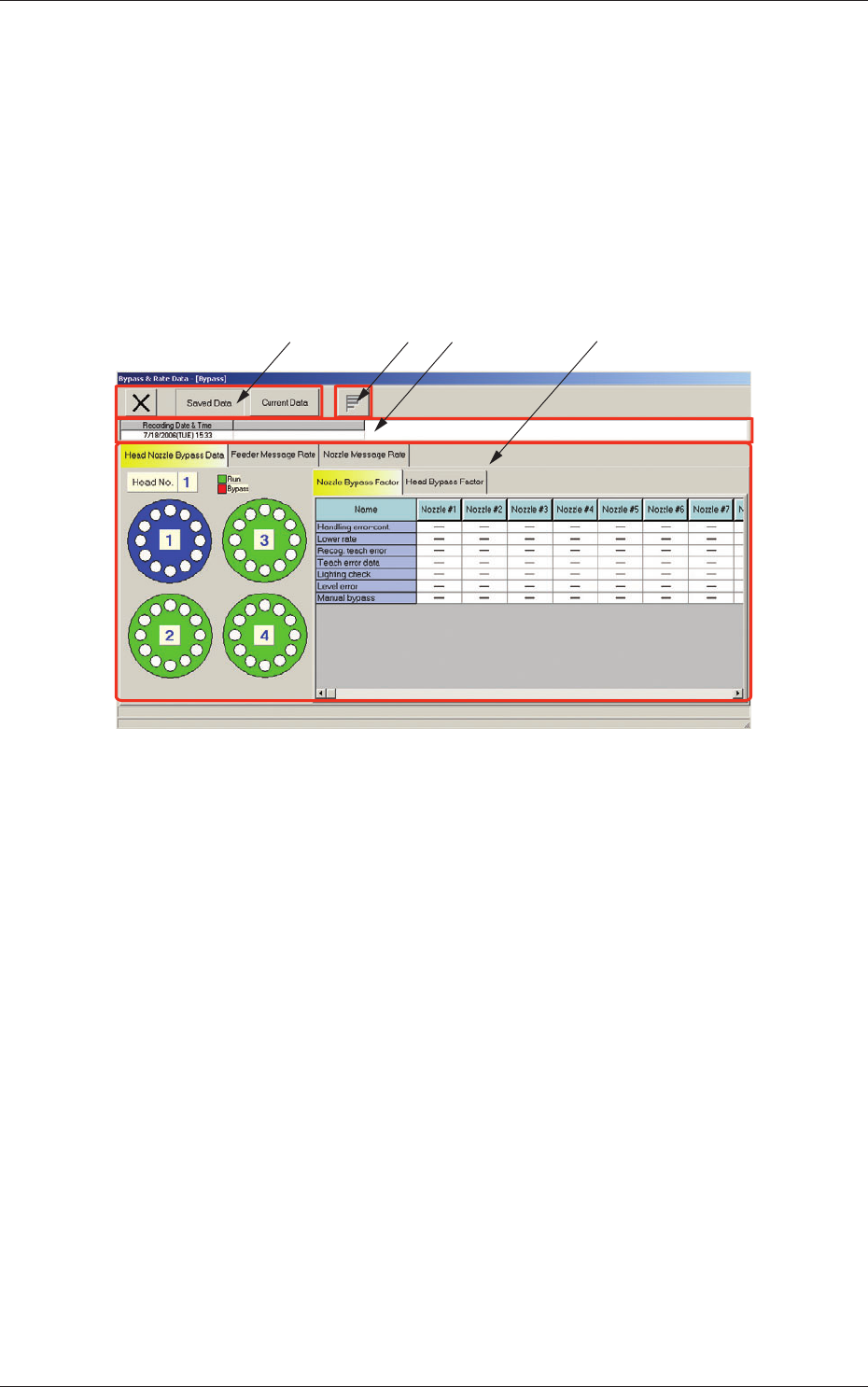
When the [Bypass & Rate Dt] button is pressed in the "Bypass & Rate Dt"
window, the "Bypass & Rate Data - [Bypass]" window appears.
[1] [2][4] [3]
Fig. 3E16 "Bypass & Rate Data - [Bypass]" Window
[1] Toolbar
The following buttons are provided.
[Saved Data] Button
When pressed, this button displays the data saved as bypass & rate data.
[Current Data] Button
When pressed, this button displays the current bypass & rate data.
[2] Recording Date & Time
Displayed are the recording date & time and the machine name related
to the bypass & rate data.
0607-003
4. Bypass & Rate Data