3OM-1343-008_w.pdf - 第207页
5-22 AKFEDT -ID (2) Component chuck [((*total comp.-(*A+*B+*C+*G))/*T otal comp.) × 100] (%) The value (%) is determined by the following formula. # of Picks - (Counts in "A" + Counts in "B" + Counts …
5-21
AKFEDT-ID
2.4 Handling/Placement Data
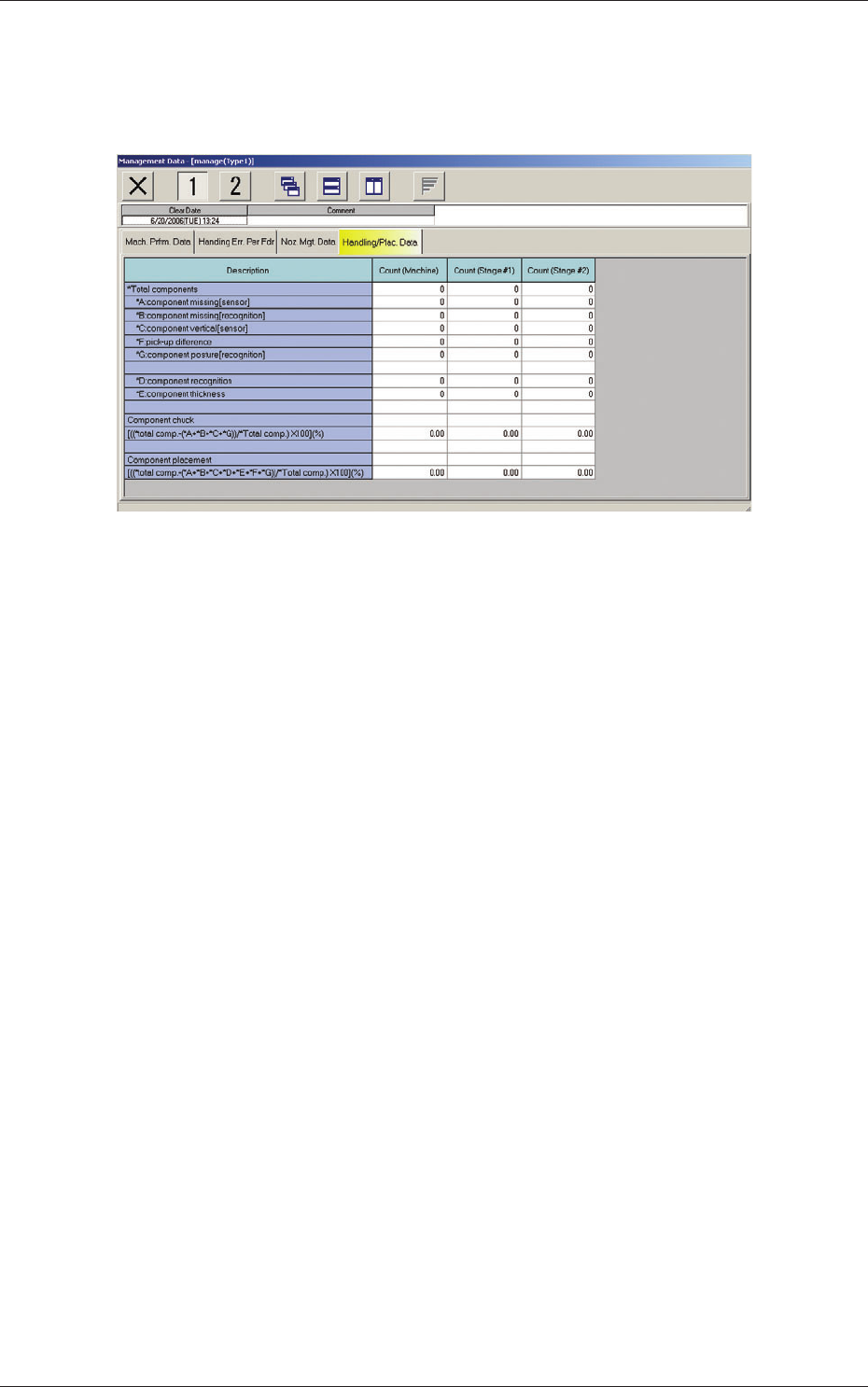
When the "Handling/Plac. Data" tab is pressed in the "Management Data"
window, the following tab sheet appears inside the window.
Fig. 3E11 "Handling/Plac. Data" Tab Sheet
(1) *Total components
Shown is the number of component picks.
*A component missing [sensor]
Shown is the number of component missing errors detected by the
component linear measure detection sensor.
(Case: "NG" (No Good) in Component Recognition and Linear
Measure Detection Sensor)
*B component missing [recognition]
Shown is the number of component missing errors detected through
component recognition operation.
*C component vertical [sensor]
Shown is the number of components judged "NG" (No Good) by
the linear measure detection sensor although they are judged "OK"
through component recognition process.
*F pick-up difference
Shown is the number of components judged "NG" (No Good)
through recognition process.
*G component posture [recognition]
Shown is the number of reversed component and polarity judgment
errors detected in the recognition process.
*D component recognition
Shown is the number of components judged "NG" (No Good)
through recognition process.
*E component thickness
Shown is the number of errors in component thickness detected by
the linear measure detection sensor.
0607-003
2.4 Handling/Placement Data
5-22
AKFEDT-ID
(2) Component chuck
[((*total comp.-(*A+*B+*C+*G))/*Total comp.)
×
100] (%)
The value (%) is determined by the following formula.
# of Picks - (Counts in "A" + Counts in "B" + Counts in "C"+ Counts in "G")
×
100
# of Picks
(3) Component placement
[((*total comp.-(*A+*B+*C+*D+*E+*F+*G))/*Total comp.)
×
100] (%)
The value (%) is determined by the following formula.
# of Picks - (Counts in "A" + Counts in "B" + Counts in "C"
+ Counts in "D"+ Counts in "E"+ Counts in "F"+ Counts in "G")
×
100
# of Picks
Note
About Data Counting (Counting of "*A: component missing [sensor]"
and "*B: component missing [recognition]")
The machine stops in an error condition according to the number of times
(the number of continuous component missing errors to be counted to stop
the machine in an error condition) set in the "1" text box of "Error process"
in the "Control Data" tab sheet of a "Component Library" window. In this
case, the number of missing component errors is not added to the number
of picks and the number of chuck errors.
0607-003
2.4 Handling/Placement Data
5-23
AKFEDT-ID
0607-003
3. Pattern Program Management Data
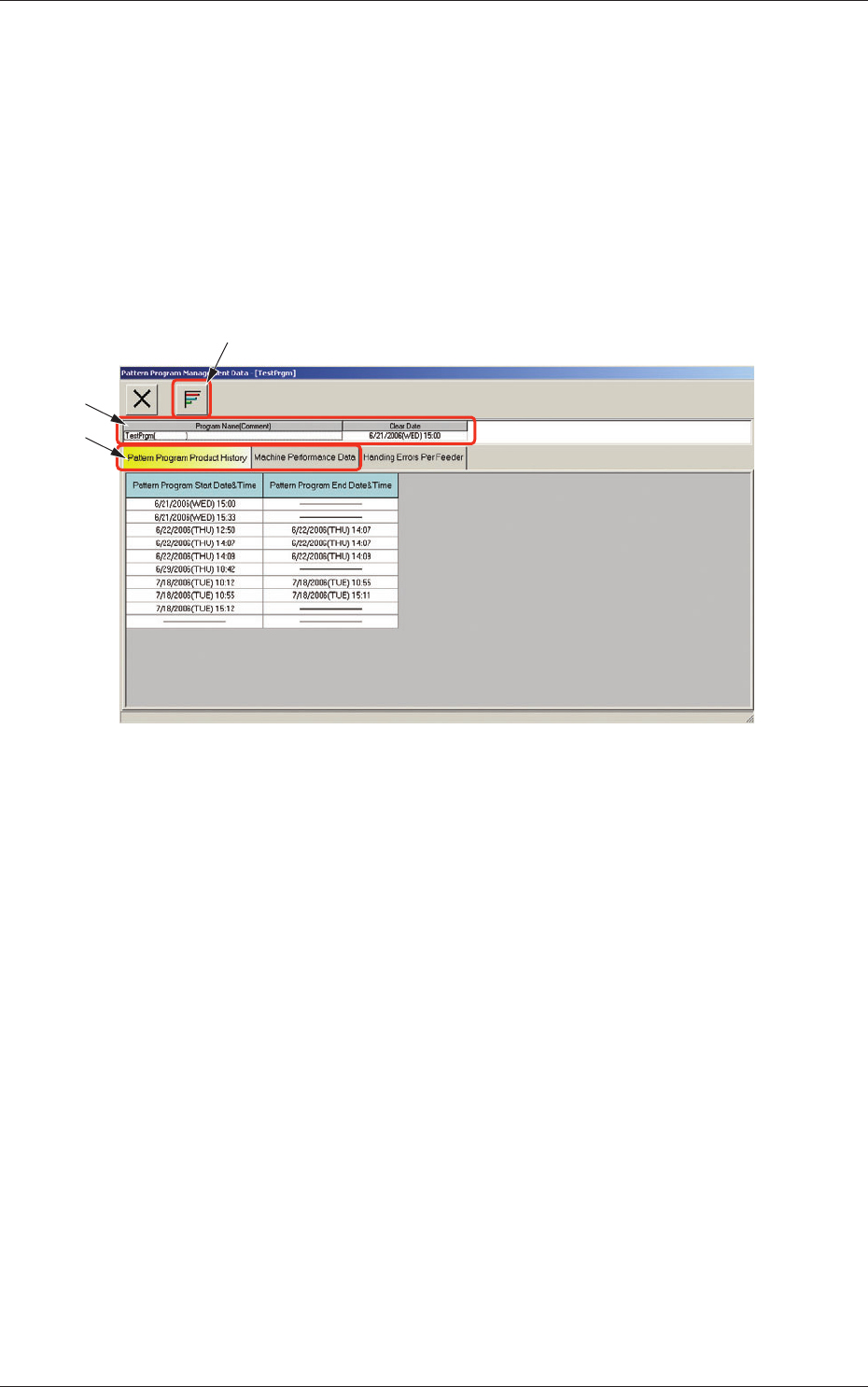
The corresponding "Pattern Program Management Data" window enables the
operator to view the pattern program management data of the selected model
for each individual pattern programs.
When the [Open] button is pressed after the desired model is selected in
the "Patt Prgm Mng Dt" window, the "Pattern Program Management Data"
window appears.
[2]
[1]
[3]
Fig. 3E12 "Pattern Program Management Data" Window
[1] [Graph Display] Button
When selected, this button graphically displays the status of each item.
[2] Program Name
Displayed are the pattern program name (comment) and the clear date.
3. Pattern Program Management Data